Add graph to widget for quick look at connection status and also for aesthetic.
Examples:
GlassWire
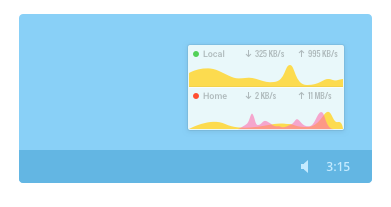
NetWorx
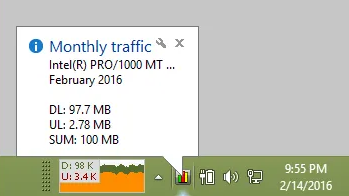
You can look into this old C# project which includes mini graph
UpDown Meter
Also, please remove "-S" from "D-S" & "U-S". These were not present in taskbar version of the widget, but later added in mini widget. And they are unnecessary and annoying. If you like, You can use - up and down arrow instead of "D-S" and "U-S" which will more visually pleasing.

Add graph to widget for quick look at connection status and also for aesthetic.
Examples:
GlassWire


NetWorx
You can look into this old C# project which includes mini graph
UpDown Meter
Also, please remove "-S" from "D-S" & "U-S". These were not present in taskbar version of the widget, but later added in mini widget. And they are unnecessary and annoying. If you like, You can use - up and down arrow instead of "D-S" and "U-S" which will more visually pleasing.