Describe the bug
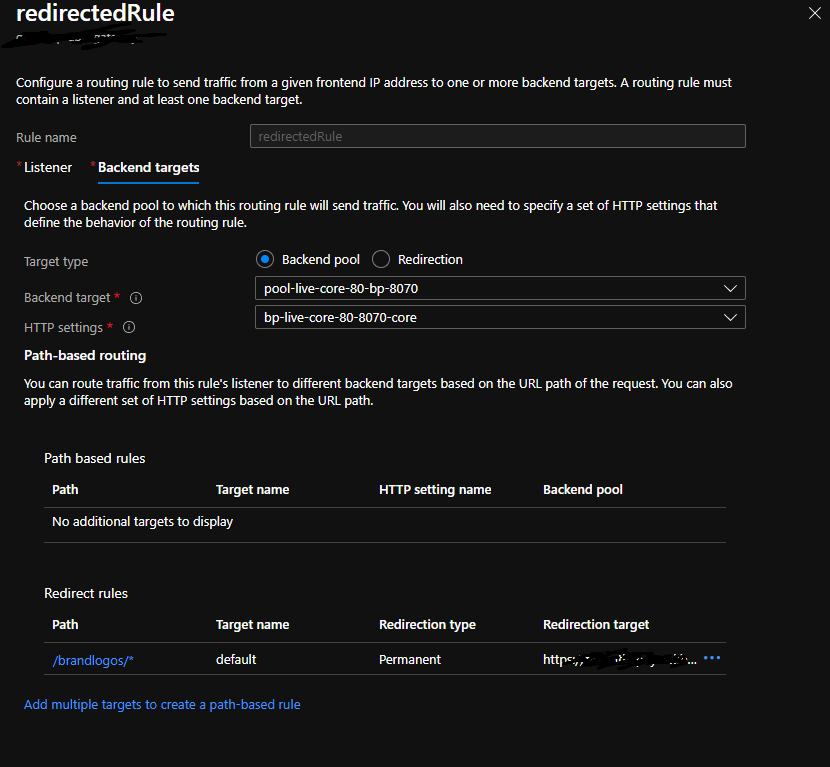
Unable to create path-based routing rule (backend targets) of target type "Backend pool" and using it with redirect rules.
This scenario is achievable only via Portal and cannot be automated in any way. (not even from AGIC level).
To Reproduce
- Create redirect config:
az network application-gateway redirect-config create -g <resource-group-name> \
    --gateway-name <gw-name> -n <config-name> --type Permanent \
    --include-path true --include-query-string true --target-url https://google.com
- Create URL path map
az network application-gateway url-path-map create \
  --gateway-name <gw-name> \
  --name <path-map-name> \
  --paths /test-path/* \
  --resource-group <resource-group-name> \
  --redirect-config <config-name-from-step-1>
- Create a routing rule
az network application-gateway rule create \
  --gateway-name <gw-name> \
  --name <rr-name> \
  --resource-group <resource-group-name> \
  --http-listener <listeneder-name> \
  --rule-type PathBasedRouting \
  --url-path-map <path-map-name-from-step-2> \
  --address-pool <backend-pool-name> \
  --http-settings <http-settings-name>
Those steps end with following error:
(ApplicationGatewayRedirectConfigurationPathRuleCannotReference) Path Rule /subscriptions/<id>/resourceGroups/<rg-name>/providers/Microsoft.Network/applicationGateways/<gw-name>/urlPathMaps/<path-map>/pathRules/<rule-name> cannot reference a BackendHttpSettings when Redirect Setting is specified.
Expected behavior
The user should be able to achieve the following configuration as on screenshot through az cli.
Environment summary
CLI version - 2.29.1 / Windows 10 / Git Bash
Additional context
I tried also using https://docs.microsoft.com/en-us/cli/azure/network/application-gateway/url-path-map/rule?view=azure-cli-latest but unfortunately, this approach did not work also.


Describe the bug
Unable to create path-based routing rule (backend targets) of target type "Backend pool" and using it with redirect rules.
This scenario is achievable only via Portal and cannot be automated in any way. (not even from AGIC level).
To Reproduce
Those steps end with following error:
Expected behavior
The user should be able to achieve the following configuration as on screenshot through az cli.
Environment summary
CLI version - 2.29.1 / Windows 10 / Git Bash
Additional context
I tried also using https://docs.microsoft.com/en-us/cli/azure/network/application-gateway/url-path-map/rule?view=azure-cli-latest but unfortunately, this approach did not work also.