Describe the bug
I hope this is the right place to post this issue.
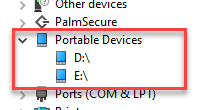
Azure cli is extremely slow on Windows 10 (more than 30 secs just to display az --version) when a USB-C dock with card readers is plugged in and displays them as drive letters (portable devices) and there are no devices plugged in.
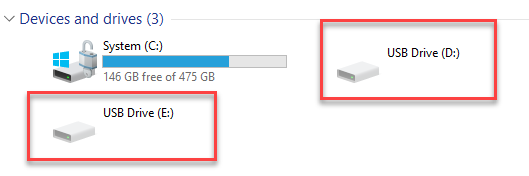
Devices and Printers
Device Manager
❯ Measure-Command {az --version}


Days              : 0
Hours             : 0
Minutes           : 0
Seconds           : 38
Milliseconds      : 502
Ticks             : 385028983
TotalDays         : 0.000445635396990741
TotalHours        : 0.0106952495277778
TotalMinutes      : 0.641714971666667
TotalSeconds      : 38.5028983
TotalMilliseconds : 38502.8983
Note how something is trying to access the 'D:' drive:
cli.__main__: Command ran in 24.627 seconds
❯ az --version --debug --verbose
cli.knack.cli: Command arguments: ['--version', '--debug', '--verbose']
cli.knack.cli: __init__ debug log:
Enable color in terminal.
cli.knack.cli: Event: Cli.PreExecute []
urllib3.connectionpool: Starting new HTTPS connection (1): azure.microsoft.com:443
urllib3.connectionpool: https://azure.microsoft.com:443 "HEAD / HTTP/1.1" 301 0
cli.azure.cli.core.util: Connectivity check: 0.935667600002489 sec
urllib3.connectionpool: Starting new HTTPS connection (1): raw.githubusercontent.com:443
urllib3.connectionpool: https://raw.githubusercontent.com:443 "GET /Azure/azure-cli/main/src/azure-cli-core/setup.py HTTP/1.1" 200 1246
urllib3.connectionpool: Starting new HTTPS connection (1): raw.githubusercontent.com:443
urllib3.connectionpool: https://raw.githubusercontent.com:443 "GET /Azure/azure-cli/main/src/azure-cli-telemetry/setup.py HTTP/1.1" 200 679
azure-cli                         2.42.0

core                              2.42.0
telemetry                          1.0.8

Extensions:
azure-devops                      0.25.0

Dependencies:
msal                              1.20.0
azure-mgmt-resource             21.1.0b1

Python location 'C:\Program Files (x86)\Microsoft SDKs\Azure\CLI2\python.exe'
Extensions directory 'C:\Users\******\.azure\cliextensions'

Python (Windows) 3.10.8 (tags/v3.10.8:aaaf517, Oct 11 2022, 16:37:59) [MSC v.1933 32 bit (Intel)]

Legal docs and information: aka.ms/AzureCliLegal


Your CLI is up-to-date.
cli.knack.cli: Event: Cli.PostExecute [<function AzCliLogging.deinit_cmd_metadata_logging at 0x04963EC8>]
cli.__main__: Command ran in 24.627 seconds (init: 23.025, invoke: 1.603)
cli.azure.cli.core.decorators: Suppress exception:
Traceback (most recent call last):
  File "D:\a\_work\1\s\build_scripts\windows\artifacts\cli\Lib\site-packages\azure/cli/__main__.py", line 61, in <module>
  File "D:\a\_work\1\s\build_scripts\windows\artifacts\cli\Lib\site-packages\azure/cli/__main__.py", line 54, in <module>
SystemExit: 0

During handling of the above exception, another exception occurred:

Traceback (most recent call last):
  File "D:\a\_work\1\s\build_scripts\windows\artifacts\cli\Lib\site-packages\azure/cli/core/decorators.py", line 79, in _wrapped_func
  File "D:\a\_work\1\s\build_scripts\windows\artifacts\cli\Lib\site-packages\azure/cli/core/telemetry.py", line 314, in set_custom_properties
  File "D:\a\_work\1\s\build_scripts\windows\artifacts\cli\Lib\site-packages\azure/cli/core/telemetry.py", line 175, in <lambda>
KeyError: 'x-ms-client-request-id'

telemetry.main: Begin splitting cli events and extra events, total events: 1
telemetry.client: Accumulated 0 events. Flush the clients.
telemetry.main: Finish splitting cli events and extra events, cli events: 1
telemetry.save: Save telemetry record of length 3038 in cache
telemetry.check: Returns Positive.
telemetry.main: Begin creating telemetry upload process.
telemetry.process: Creating upload process: "C:\Program Files (x86)\Microsoft SDKs\Azure\CLI2\python.exe C:\Program Files (x86)\Microsoft SDKs\Azure\CLI2\Lib\site-packages\azure\cli\telemetry\__init__.pyc C:\Users\******\.azure"
telemetry.process: Return from creating process
telemetry.main: Finish creating telemetry upload process.
If I remove the dock, disable the devices, or insert an SD card (on drive D:), everything goes back to normal.
❯ measure-Command {az version}


Days              : 0
Hours             : 0
Minutes           : 0
Seconds           : 0
Milliseconds      : 814
Ticks             : 8146486
TotalDays         : 9.42880324074074E-06
TotalHours        : 0.000226291277777778
TotalMinutes      : 0.0135774766666667
TotalSeconds      : 0.8146486
TotalMilliseconds : 814.6486
cli.__main__: Command ran in 1.672 seconds
❯ az --version --debug
cli.knack.cli: Command arguments: ['--version', '--debug']
cli.knack.cli: __init__ debug log:
Enable color in terminal.
cli.knack.cli: Event: Cli.PreExecute []
urllib3.connectionpool: Starting new HTTPS connection (1): azure.microsoft.com:443
urllib3.connectionpool: https://azure.microsoft.com:443 "HEAD / HTTP/1.1" 301 0
cli.azure.cli.core.util: Connectivity check: 0.7303947000036715 sec
urllib3.connectionpool: Starting new HTTPS connection (1): raw.githubusercontent.com:443
urllib3.connectionpool: https://raw.githubusercontent.com:443 "GET /Azure/azure-cli/main/src/azure-cli-core/setup.py HTTP/1.1" 200 1246
urllib3.connectionpool: Starting new HTTPS connection (1): raw.githubusercontent.com:443
urllib3.connectionpool: https://raw.githubusercontent.com:443 "GET /Azure/azure-cli/main/src/azure-cli-telemetry/setup.py HTTP/1.1" 200 679
azure-cli                         2.42.0

core                              2.42.0
telemetry                          1.0.8

Extensions:
azure-devops                      0.25.0

Dependencies:
msal                              1.20.0
azure-mgmt-resource             21.1.0b1

Python location 'C:\Program Files (x86)\Microsoft SDKs\Azure\CLI2\python.exe'
Extensions directory 'C:\Users\*****\.azure\cliextensions'

Python (Windows) 3.10.8 (tags/v3.10.8:aaaf517, Oct 11 2022, 16:37:59) [MSC v.1933 32 bit (Intel)]

Legal docs and information: aka.ms/AzureCliLegal


Your CLI is up-to-date.
cli.knack.cli: Event: Cli.PostExecute [<function AzCliLogging.deinit_cmd_metadata_logging at 0x04C03EC8>]
cli.__main__: Command ran in 1.672 seconds (init: 0.484, invoke: 1.188)
cli.azure.cli.core.decorators: Suppress exception:
Traceback (most recent call last):
  File "D:\a\_work\1\s\build_scripts\windows\artifacts\cli\Lib\site-packages\azure/cli/__main__.py", line 61, in <module>
  File "D:\a\_work\1\s\build_scripts\windows\artifacts\cli\Lib\site-packages\azure/cli/__main__.py", line 54, in <module>
SystemExit: 0

During handling of the above exception, another exception occurred:

Traceback (most recent call last):
  File "D:\a\_work\1\s\build_scripts\windows\artifacts\cli\Lib\site-packages\azure/cli/core/decorators.py", line 79, in _wrapped_func
  File "D:\a\_work\1\s\build_scripts\windows\artifacts\cli\Lib\site-packages\azure/cli/core/telemetry.py", line 314, in set_custom_properties
  File "D:\a\_work\1\s\build_scripts\windows\artifacts\cli\Lib\site-packages\azure/cli/core/telemetry.py", line 175, in <lambda>
KeyError: 'x-ms-client-request-id'

telemetry.main: Begin splitting cli events and extra events, total events: 1
telemetry.client: Accumulated 0 events. Flush the clients.
telemetry.main: Finish splitting cli events and extra events, cli events: 1
telemetry.save: Save telemetry record of length 3037 in cache
telemetry.check: Negative: The C:\Users\*****\.azure\telemetry.txt was modified at 2022-11-30 20:21:40.700441, which in less than 600.000000 s
Command Name
Any az cli command
Errors:
cli.azure.cli.core.decorators: Suppress exception:
Traceback (most recent call last):
  File "D:\a\_work\1\s\build_scripts\windows\artifacts\cli\Lib\site-packages\azure/cli/__main__.py", line 61, in <module>
  File "D:\a\_work\1\s\build_scripts\windows\artifacts\cli\Lib\site-packages\azure/cli/__main__.py", line 54, in <module>
SystemExit: 0

During handling of the above exception, another exception occurred:

Traceback (most recent call last):
  File "D:\a\_work\1\s\build_scripts\windows\artifacts\cli\Lib\site-packages\azure/cli/core/decorators.py", line 79, in _wrapped_func
  File "D:\a\_work\1\s\build_scripts\windows\artifacts\cli\Lib\site-packages\azure/cli/core/telemetry.py", line 314, in set_custom_properties
  File "D:\a\_work\1\s\build_scripts\windows\artifacts\cli\Lib\site-packages\azure/cli/core/telemetry.py", line 175, in <lambda>
KeyError: 'x-ms-client-request-id'
To Reproduce:
I think someone would need a USB-C hub that assigns drive letters to empty card readers.
Expected Behavior
I would expect not to have this behaviour, with or without the hub.
Environment Summary
Windows-10-10.0.19042-SP0
Python 3.10.8
Installer: MSI

azure-cli 2.42.0

Extensions:
azure-devops 0.25.0

Dependencies:
msal 1.20.0
azure-mgmt-resource 21.1.0b1
Additional Context


Describe the bug
I hope this is the right place to post this issue.
Azure cli is extremely slow on Windows 10 (more than 30 secs just to display
az --version) when a USB-C dock with card readers is plugged in and displays them as drive letters (portable devices) and there are no devices plugged in.Devices and Printers

Device Manager

Note how something is trying to access the 'D:' drive:
cli.__main__: Command ran in 24.627 secondsIf I remove the dock, disable the devices, or insert an SD card (on drive D:), everything goes back to normal.
cli.__main__: Command ran in 1.672 secondsCommand Name
Any
az clicommandErrors:
To Reproduce:
I think someone would need a USB-C hub that assigns drive letters to empty card readers.
Expected Behavior
I would expect not to have this behaviour, with or without the hub.
Environment Summary
Additional Context