ISSUE TYPE
COMPONENT NAME
CLOUDSTACK VERSION
CONFIGURATION
not relevant I think
OS / ENVIRONMENT
not relevant I think
SUMMARY
I run
cloudstack-setup-databases cloud:@localhost --deploy-as=root: -e <encryption_type> -m <management_server_key> -k <database_key> -i <management_server_ip>
with e.g. the following (see database key)
cloudstack-setup-databases cloud:@localhost --deploy-as=root: -e <encryption_type> -m <management_server_key> -k "Some&Crazy&Password" -i <management_server_ip>
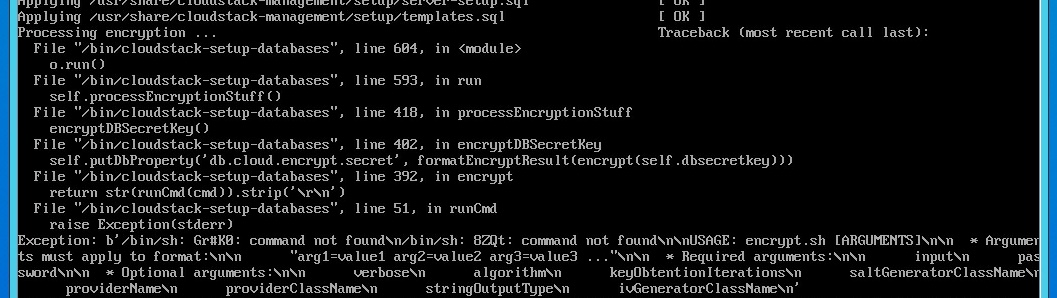
it splits the key and try to run it as commands (see screenshot)
STEPS TO REPRODUCE
- Follow install instructions on https://docs.cloudstack.apache.org/en/4.15.0.0/installguide/management-server/index.html
- in step where you have to run cloudstack-setup-databases, do something like the following:
cloudstack-setup-databases cloud:"password"@localhost --deploy-as=root:"password" -m "password" -k "Some&Crazy&Password"
EXPECTED RESULTS
Script should setup the given key.
ACTUAL RESULTS
Error message when processing encryption.


ISSUE TYPE
COMPONENT NAME
CLOUDSTACK VERSION
CONFIGURATION
not relevant I think
OS / ENVIRONMENT
not relevant I think
SUMMARY
I run

cloudstack-setup-databases cloud:@localhost --deploy-as=root: -e <encryption_type> -m <management_server_key> -k <database_key> -i <management_server_ip>
with e.g. the following (see database key)
cloudstack-setup-databases cloud:@localhost --deploy-as=root: -e <encryption_type> -m <management_server_key> -k "Some&Crazy&Password" -i <management_server_ip>
it splits the key and try to run it as commands (see screenshot)
STEPS TO REPRODUCE
EXPECTED RESULTS
ACTUAL RESULTS
Error message when processing encryption.