deviantMenu creates a dynamic menu from a ul list and has a similar effect as the deviantart old menu
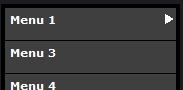
- Simply create the menu structure with ul li elements
- To have the menu automaticly navigate to an item just add to it 'selected' class
- Include mootols-core file and deviantMenu.js and deviantMenu.css file
- window.addEvent('domready', function(){ var devmenu = new deviantMenu('deviantMenu-main-conatiner'); });
- itemContainer, items container class, default: 'deviantMenu-menu-item'
- position, depends on width style for the menu
- direction, right or left
- duration, scroll duration
- updateHeight, change height automatically, default: true
- usebreadcrumbs, add breadcrumbs links, when set to false, it will be replaced with back button, default: true
- carouselScroller, scroll menu with fixed height using the mouse, default: false
- scrollerArea, Scroller area, default: 60
- scrollerVelocity, Scroller speed, default: 0.3