

Apps managed by darts-hub:
- darts-caller
- darts-extern
- darts-wled
- darts-pixelit
- darts-gif
- darts-voice
- cam-loader
- custom-urls
- custom-apps
Disclaimer: Some apps could not be visible in your setup. The reason for that is that some apps are not available for your os.
Darts-hub supports all major platforms:
| OS | X64 | X86 | ARM | ARM64 |
|---|---|---|---|---|
| Windows | ✔️ | ✔️ | ✔️ | ✔️ |
| Linux | ✔️ | ✔️ | ✔️ | |
| macOS | ✔️ | ✔️ |
Darts-hub is built with Avalonia. check it out: https://docs.avaloniaui.net/
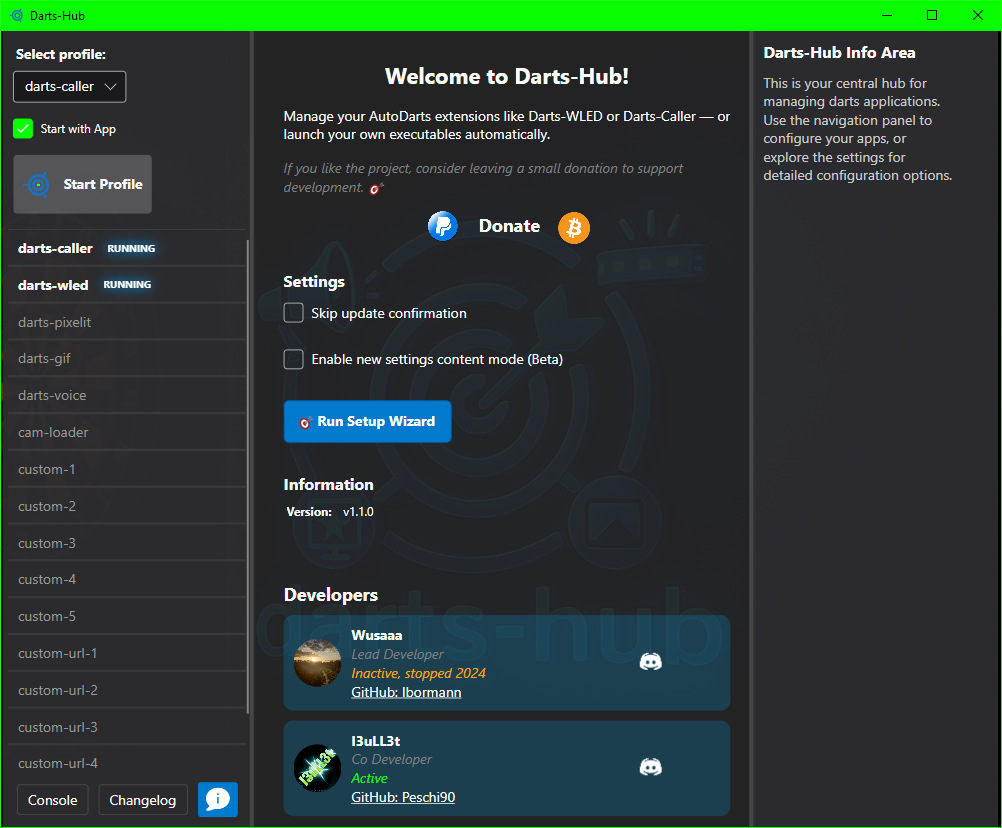
You can install darts-hub on a Linux system by using this single command.
It will automatically download the latest version and configures it for autostart.
You might have to install curl on your machine beforehand.
You can do so with sudo apt install curl.
bash <(curl -sL get-add.arnes-design.de)Alternatively you can install darts-hub step by step.
-
Create a new folder called "darts-hub" in your home directory.
-
Download the appropiate zip-file. You can find it in the release section.
-
Extract the zip-file to the new folder "darts-hub".
-
Linux and MacOS: Execute the following commands in a terminal
chmod +x ~/darts-hub/darts-hub -
MacOS: disable os-app-verification:
sudo spctl --master-disable
Unfortunately I couldn't find a proper way without doing this.
-
Start the application by double-click darts-hub
You can remove darts-hub by passing --uninstall flag as follows.
bash <(curl -sL get-add.arnes-design.de) --uninstallAlternatively you can uninstall darts-hub step by step.
-
Remove the folder called "darts-hub" in your home directory.
-
MacOS: enable os-app-verification:
sudo spctl --master-enable
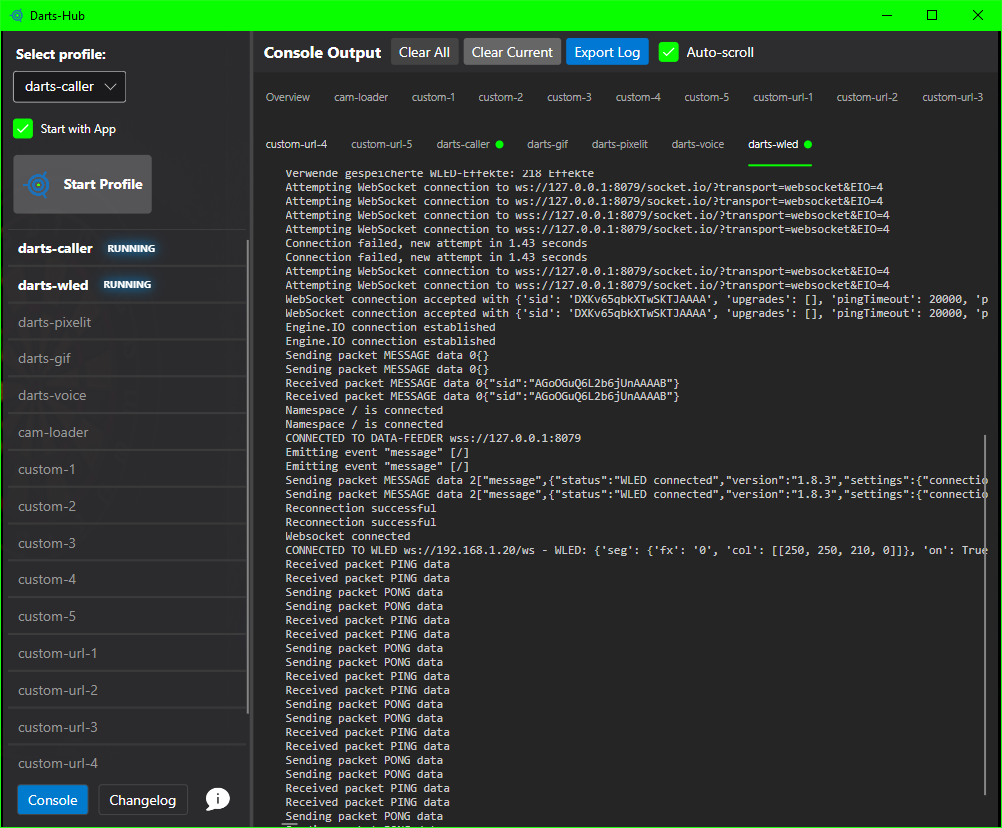
Profiles representing different play-scenarios, whether you only want to use darts-caller or playing extern by using darts-extern. Every app in a profile can be marked for start by checking it. Apps that are mandantory for particular profile can't be unchecked. To start a selected profile click the button next to profile selection. On profile-start the application will check every included app for existence, installs it or updates it if it isn't up-to-date. If an app needs configuration, darts-hub will display a configuration window to organize that. Configuration is explained in the next section. To close a running app use the ecks-symbol. To see an apps output click the monitor-symbol that should appear after a short time since app-start. It shows full details of app events in realtime. You can also rename every app: use a right click for that; you can always return to the default name by entering an empty value.
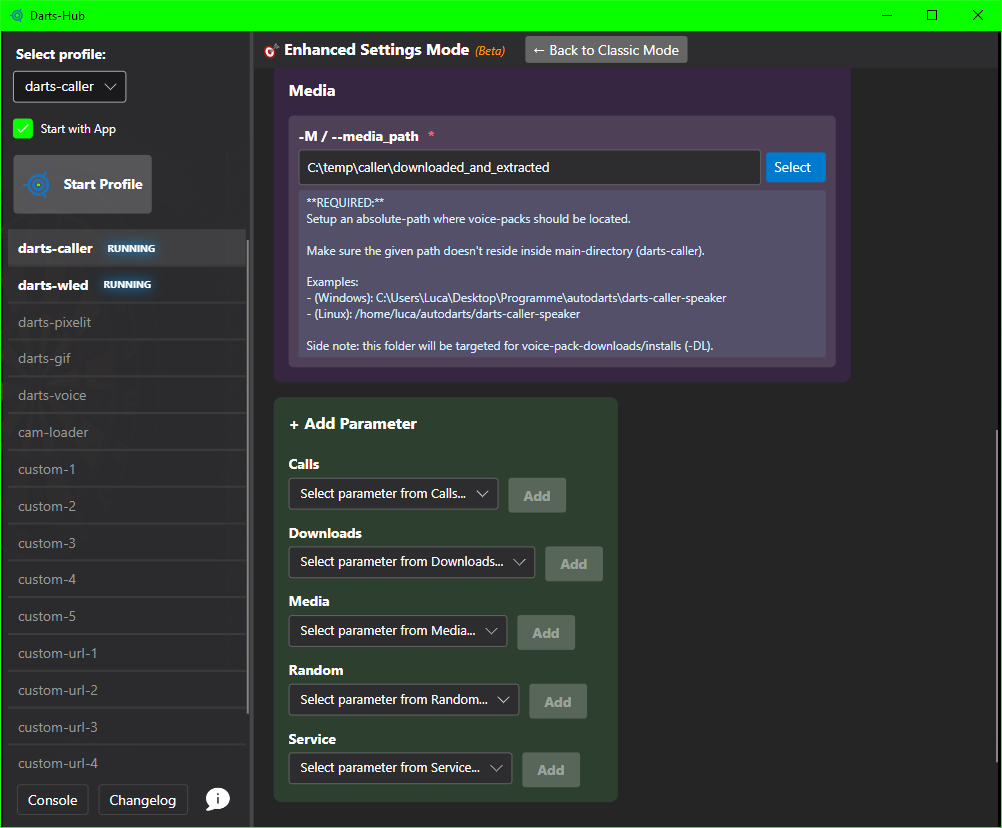
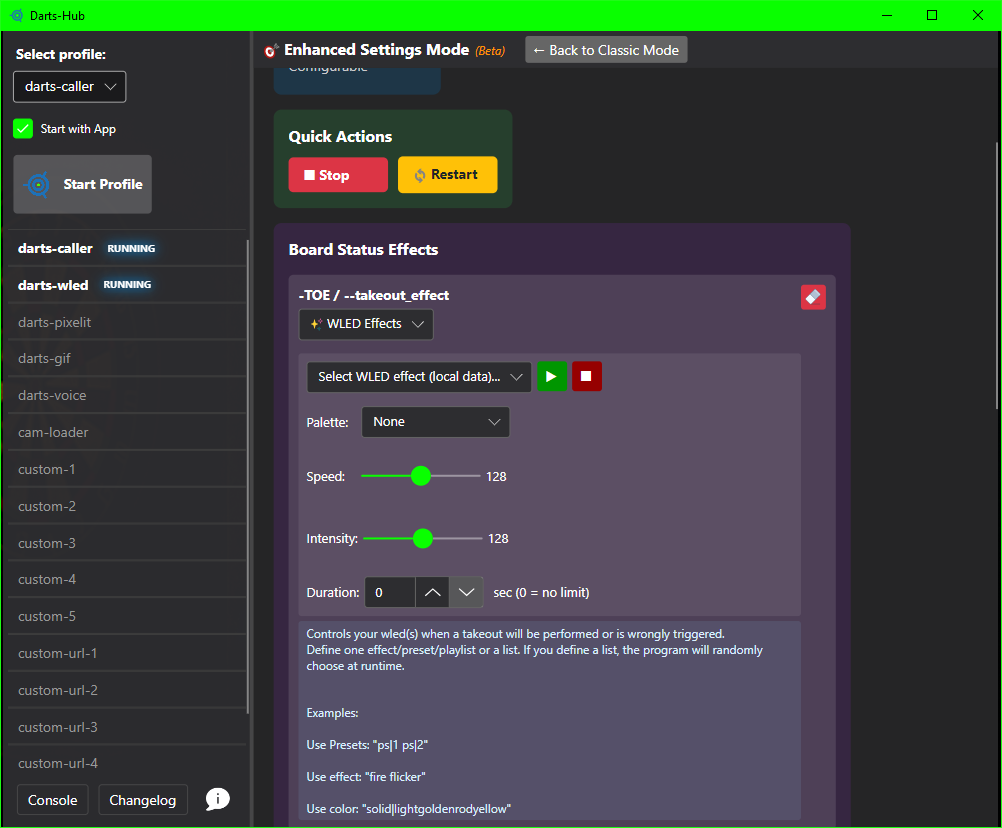
Some Apps have mandatory configuration fields to work properly. You can also spot a mandatory field by asterik character (*) at the end of the particular field-name. To reset a field-value click on the rubber-symbol or the X behind an Argument to delete it. After Changing a configuration field, you have to restart the extension to apply changes.
Side note: a grayed out configuration field means, that it uses the default value of the app itself. The displayed value doesn't match the app`s default value necessarily. If you would like to know which default value will be used, have a look at specific app README.
Newer versions of darts-caller use a device-link login to connect to Autodarts — your Autodarts e-mail and password are no longer needed in darts-hub, so the corresponding fields are hidden in the settings, in the setup wizard and in the Robbel3D one-click setup.
When darts-hub detects that the caller is waiting for approval, a dedicated dialog opens automatically:
- Open the link in your browser. darts-caller usually opens the browser by itself. If it doesn't, click "Open browser" in the dialog or use "Copy direct link" and paste it.
- Or enter the code manually. Open
https://auth.autodarts.io/linkon any device, log in to your Autodarts account and type the 8-character code shown in the dialog (use "Copy code" if you prefer). - No browser on the PC running the caller? The dialog also shows a
https://<pc-ip>:<port>URL (default port8079, or your configured-HPvalue). Open that URL on your phone or another device in the same network and approve the connection from there. - Once the caller reports "Connected to Autodarts", the dialog shows a green confirmation and closes itself after 5 seconds.
You only need to do this on first login or whenever the caller's stored token expires.
Imagine you could start your individual favorite apps. That is what custom-apps are made for. As an example: You could start OBS, to stream an autodarts game.. or trigger a Home-Assistant-hook to turn on your Autodarts-Build.. or just some lights.
If you would like to stay on specific app-version, create an empty file called "my_version.txt" in particular app dir. That file will stop future app-updates, until you remove the file.
Disclaimer: If you're using a specific version of an app with configuration, like the darts-caller and the current darts-hub version doesn't fit to app`s configuration, there's a chance the app might not start properly.
Darts-hub includes a version rollback feature that lets you revert to a previous release if a new update causes problems. You can access it through the sidebar menu in the application settings area.
- Open the Version Rollback page from the sidebar menu.
- The view displays your current version and a dropdown with up to 4 previous versions available for rollback.
- Select the desired version from the dropdown and click "Rollback to selected version".
- A confirmation dialog will appear — once confirmed, darts-hub downloads the selected version, replaces all program files, and restarts automatically.
⚠️ Note: Rolling back replaces the program files only. Your settings, profiles, and configurations are preserved.
If you rolled back because a specific version was defective, you can suppress the update notification for that version:
- On the Version Rollback page, check the "Skip update notification" checkbox.
- Updates up to the skipped version will be suppressed. The notification reappears automatically when a newer version is released.
- This setting is also cleared automatically after any successful update.
This is useful to avoid being prompted repeatedly to update to a version you know has issues.
If you have Beta Tester mode enabled (in the application settings), beta versions will also appear in the rollback dropdown.
Darts-hub supports an optional expert license system that unlocks premium features for certain extensions. You can manage your license through the License page in the sidebar menu.
- Open the License page from the sidebar menu.
- Click "Request License" — this opens the experience check in your browser.
- Complete the short darts experience check and a license key will be sent to your email.
- Enter your license key (format:
DARTS-XXXX-XXXX-XXXX-XXXX) into the input field. - Click "Validate & Save" to activate the license.
- The status indicator shows the current state:
- 🟢 Valid — License is active and features are unlocked
- 🟡 Expired — License has expired
- 🟡 Pending — License is pending activation
- 🔴 Invalid / Blocked / Revoked — License cannot be used
- 🟠 Connection Error — Could not reach the license server (will retry automatically)
When a valid license is active, the Licensed Features section shows which features are unlocked. License-gated settings in extension configurations are displayed as locked with a hint when no valid license is present — clicking the hint lets you jump directly to the License page.
Click "Remove License" on the License page to clear the stored license key and reset the status.
Each license is bound to a hardware ID derived from your machine. If you move to a new computer, you may need to request a new license or contact support.
darts-hub receives announcements, warnings and polls from the license server and shows them directly in the app.
- Bell icon in the status bar with an unread badge; click it to open the notification panel (semi-transparent, scrollable, modern dark UI).
- Toast pop-up in the top-right corner whenever a new notification arrives – auto-closes after 10 seconds with a progress bar (hover to pause, click ✕ to dismiss, click the body to open the panel).
- Critical and Warning notifications additionally open a large modal alert window and play an OS warning sound (Windows / macOS / Linux).
- Polls are interactive: single- or multi-select; after voting, results are shown as percentage bars.
- Markdown and HTML bodies are both supported (headings, lists, code blocks, links). No scripts are ever executed.
- Offline cache keeps your notifications across restarts (
notifications.jsonnext toconfig.json). - Background polling honours the server-provided interval (default 60 s) and uses exponential back-off when the server is unreachable; cached items remain visible.
Works without a license key too – in anonymous mode you only receive broadcast notifications (audience
all). With a valid license key you also get license- and feature-targeted messages.
When something goes wrong, darts-hub can build a single ZIP file with everything the maintainers need to investigate the issue. The bundle contains daily log files, a sanitized copy of the configuration and a system / security report.
| Item | Notes |
|---|---|
logs/darts-caller/<DD>_darts-caller.log |
Always included (most issues are caller-related). |
logs/<extension>/<DD>_<extension>.log |
One file per selected extension for the chosen day. |
logs/<DD>_darts-hub.log |
The darts-hub application log itself. |
config.json |
Your darts-hub settings file. |
apps-downloadable.json |
Sanitized copy — your Autodarts e-mail (U) and password (P) are removed. The board id (B) is kept because it is part of the file name and helps with correlation. |
logging-config.json |
Optional, included if present. |
system_info.txt |
OS, framework, hardware, license status (never the key itself), Windows Defender exclusions, registered AV / firewall products (Defender, Avast, AVG, Bitdefender, ESET, Kaspersky, Norton, McAfee, Sophos, Webroot, Trend Micro, …), Linux ufw/firewalld/clamav/SELinux/AppArmor, macOS ALF / Gatekeeper / SIP, elevation status (admin/root), exclusion cross-check for the darts-hub directory and every selected extension, and a list of the bundled items + collection notes. |
The ZIP is written to a debug/ folder inside the darts-hub directory and named:
DH_debug_collection_<yyyyMMdd_HHmmss>_<board-id>.zip
- Open the sidebar menu and click Debug Collection.
- Tick every extension you had problems with (the darts-caller log is included automatically).
- Pick the day the issue happened (daily logs only exist for the current month).
- Describe the problem in your own words — mention approximate times so we can find the right log entries.
- Click Create Debug ZIP. After the success animation you can:
- Click Open Folder to reveal the ZIP in your file manager.
- Click Copy Path to copy the file path to the clipboard.
- Use the Discord buttons to open the official Darts-Hub Discord (#bug-report) or send a direct message to I3uLL3t.
If darts-hub crashes before the window appears, you can still build the bundle headless:
darts-hub --debug-collect --description "Crashes on launch after 1.5.0.6 update"| Option | Default | Description |
|---|---|---|
-d, --description "<text>" |
autogenerated note | Free-form problem description (recommended). |
--date <YYYY-MM-DD> |
today | Day the issue occurred. |
--apps <list> |
all apps in the active profile | Comma-separated extension names to include (e.g. darts-caller,darts-wled). |
--profile <name> |
profile tagged for start | Profile to use as source. |
--no-license |
off | Skip the license info section in system_info.txt. |
-h, --help |
— | Show full usage. |
Examples:
darts-hub --debug-collect
darts-hub --debug-collect --description "Caller stops after leg 3" --date 2025-06-12
darts-hub --debug-collect --apps darts-caller,darts-wled --description "WLED freezes on game win"
The CLI mode prints the resulting file path and a short list of any collection notes. Send the ZIP to I3uLL3t on Discord (DM) or post it in the Darts-Hub Discord under #bug-report: https://discord.gg/aRhqH5WauV.
- The Autodarts e-mail and password are stripped from the bundled
apps-downloadable.json. - Your license key is never part of the package. Only the license status, expiration date, feature count and the first 8 characters of the hardware-ID hash are included.
- Third-party AV exclusion lists (Avast, ESET, Norton, …) are not exposed through any public API and are therefore not included automatically.
| Command | Short | Description |
|---|---|---|
--help |
-h |
Shows help information |
--version |
-v |
Shows version information (from Updater.cs) |
--info |
Shows detailed application information | |
--system-info |
--sysinfo |
Shows system and environment information |
| Command | Alias | Description |
|---|---|---|
--list-profiles |
--profiles |
Lists all available dart profiles |
| Command | Description |
|---|---|
--backup [name] |
Creates full backup (configuration, profiles, logs) |
--backup-config [name] |
Creates configuration-only backup |
--backup-list |
Lists all available backups |
--backup-restore <file> |
Restores backup from file |
--backup-cleanup [count] |
Deletes old backups (keeps the last N) |
| Command | Description |
|---|---|
--debug-collect [opts] |
Builds a debug ZIP without launching the GUI (see DEBUG COLLECTION for options) |
| Command | Description |
|---|---|
--test-updater |
Starts interactive updater test menu |
--test-full |
Runs complete updater test suite |
--test-version |
Tests version checking |
--test-retry |
Tests retry mechanism |
--test-logging |
Tests logging system |
| Command | Short | Description |
|---|---|---|
--verbose |
-vv |
Enables verbose logging (starts GUI) |
--beta |
Enables beta tester mode (starts GUI) |
For more information, run darts-hub --help or darts-hub -h in your terminal Or have a look at the command-line-interface.md file.
Darts-hub now includes a powerful configuration export/import system that allows you to:
- Backup your settings: Create full or partial backups of your extension configurations
- Share configurations: Export settings to share with friends or the community
- Move to new devices: Easily transfer your complete setup to a new computer
- Test different setups: Create multiple configuration exports for different scenarios
- Protect your credentials 🆕: Automatic prompt to exclude sensitive Autodarts credentials when exporting
When exporting configurations containing darts-caller, the system automatically prompts:
⚠ WARNING: Your configuration includes 'darts-caller'
   This extension contains sensitive Autodarts credentials

Do you want to EXCLUDE these credentials from export? (y/N):
- Answer 'y' to safely share exports with others (excludes Email, Password, Board ID)
- Answer 'n' for personal backups (includes everything)
For Windows users, we provide an easy-to-use interactive tool:
config-manager.bat - Double-click to open an interactive menu for:
- Creating exports (Full / Extensions / Parameters)
- Importing configurations (Merge / Replace modes)
- Viewing available exports
- Checking export information before importing
- Built-in help and safety features
📖 Config Manager Documentation
For Linux and macOS users:
config-manager.sh - Run the shell script for the same interactive experience:
chmod +x config-manager.sh  # First time only
./config-manager.sh
Features:
- Complete feature parity with Windows version
- Color-coded interface for better visibility
- Automatic permission handling
- All 15 menu options available
- Backup & Restore, Testing, System Info
For advanced users and automation:
# Windows
.\darts-hub.exe --export my-backup
.\darts-hub.exe --export-ext darts-caller darts-wled
.\darts-hub.exe --import my-backup.json

# Linux/macOS
./darts-hub --export my-backup
./darts-hub --export-ext darts-caller darts-wled
./darts-hub --import my-backup.json

# List available exports
darts-hub --list-exports
For detailed documentation, see:
If you're running darts-hub on windows the affected app is probably classified as a virus. The easiest way to verify this is to close darts-hub. After that, add the main folder (darts-hub) as an exception for screening. Restart darts-hub and try to start the app. Microsoft Defender is pretty sensitive for software which is not officially signed and uses websocket connections.
- Icon by Ognjen Vukomanov on freeicons.io
- Icon by Muhammad Haq on freeicons.io
- Icon by Mubdee Ashrafi on freeicons.io
- Icon by Flatart on freeicons.io