This file describes the development workflow for the Mushroom Observer project. We use a distributed workflow, known as "Integration-Manager" or "forking" workflow. See [Workflow][] below.
This file assumes that you followed the directions in [README.md][] through [Create a user in the new instance of MO][] including setting up the MO development environment by running mo-dev /vagrant.
- Sign up for the [MO project issue tracker][].
- Sign up for [Github][].
- We recommend setting up SSH access to [Github][]. See [Generating SSH Keys][]
- On [Github][], fork (create your own copy of) the [Official MO Repo][].
- In a new Terminal window on your local machine, switch to the mushroom-observer directory
cd developer-startup/mushroom-observer - Add your personal [Github][] repository as a remote repository
git remote add personal git@github.com:<YourGitUserName>/mushroom-observer.git
Synchronize your local machine, the VM, and your personal [Github][] to the [Official MO Repo][]. Use a [Git GUI][] or on your local machine:
git checkout master
git fetch origin
git merge origin/master
git push personal master
```
### Create a personal, feature branch ###
- Create a new feature branch for your changes, and switch to that branch. Use a [Git GUI][] or on your local machine: <br>
`git checkout -b <mybranch-name>`<br>
for example, `git checkout -b myfixes`
- If you are working on an issue listed in the [MO project issue tracker][], update the issue there.
### Edit code ###
Your local machine's developer-startup directory has a 'mushroom-observer' sub-directory. This is a 'shared folder' which mirrors /vagrant/mushroom-observer on the VM. You can change code on one machine and it will appear on the other.
### Commit your changes to your personal machine ###
Work on your branch, e.g. _myfixes_. Make commits using a [Git GUI][] or Git terminal commands on your local machine.
When you are done with all your changes and are ready to contribute them to the Project, make sure they are all committed locally. Use a [Git GUI][] or on your local machine: <br>
`git commit -a -m "insert commit message"` <br>
### Contribute your changes to the MO Project ###
#### Re-sync with the [Official MO Repo][] ###
Make sure that your local commits are compatible with any changes to the [Official MO Repo][] since you last synced:
- Replay your local fixes on top of the [Official MO Repo][]. Use a [Git GUI][] or on your local machine: <br>
`git checkout myfixes` <br>
`git pull --rebase origin master` <br>
- **Fix any conflicts.**
#### Push your changes to your personal [Github][] repository ####
Use a [Git GUI][] or on your local machine <br>
`git checkout myfixes` <br>
`git push personal myfixes` <br>
#### Create a Pull Request ####
- Go to your personal [Github][] repository and click on "Pull Request".
- Switch to your feature branch
- Choose your feature branch in your personal [Github][] repo as the source branch
- Choose origin repo "master" as the destination branch.
- For more information see [Using pull requests][].
## Other ##
### Follow MO development ###
Consider subscribing/joining to follow the project more closely
- Join the [MO Developers Google Group][] for discussion of development and operations of MO.
- Watch the [Official MO Repo][]. This will notify you about code updates and Pull Requests, so that you can comment on them and test them. For information on testing others' pull requests, see [Pull Requests by Others][]
- Watch the [MO developer-startup repo][]
- Bookmark the [MO persistent Goggle+ Hangout][] and use it to connect with other developers.
- - -
# Notes #
## Workflow ##
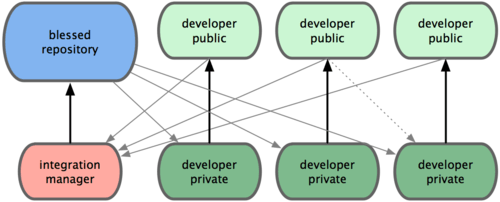
We use "integration-manager" or "forking" workflow.<br>
- Each developer:
- Clones the official MO repository to the developer's local machine;
- On the developer's local machine, creates a personal feature branch for the developer's changes;
- Pushes the personal branch from the local machine to the developer's personal, publicly readable copy (fork) on [Github][];
- Creates a pull request in [Github][].<br>
- A manager then
- merges the developer's changes to the manager's local machine;
- if the developer's changes are acceptable, pushes them to the official MO repository.
For more information, see [Integration-Manager Workflow][] and [Forking Workflow][]; _cf._ [What's the Workflow][].
## Git GUIs ##
Some developers primarily (or exclusively) use a Git GUI -- as opposed to typing Git commands at the terminal. Two free GUIs that have been found useful on the Mac are: [GitHub GUI][] and [SourceTree][].
## Pull Requests by Others ##
One way to get a copy and test other developers' Pull Requests is by following the instructions in [Get the Changes][] and [Experiment with the Changes][] (both in the admin-workflow.md file in this repository.)
- - -
[comment]: # (The following are link reference definitions)
[Create a user in the new instance of MO]: /README.md#create-a-user-in-the-new-instance-of-mo)
[Experiment with the Changes]: /admin-workflow.md#experiment-with-the-changes
[Forking Workflow]: https://www.atlassian.com/git/workflows#!workflow-forking
[Generating SSH Keys]: https://help.github.com/articles/generating-ssh-keys
[Get the Changes]: /admin-workflow.md#get-the-changes
[Git GUI]: /developer-workflow.md#git-guis/
[Github]: https://github.com/
[GitHub GUI]: https://central.github.com/mac/latest
[Initial Database]: /developer-workflow.md#intial-databse/
[Installing Ruby]: /developer-workflow.md#installing-ruby/
[Integration-Manager Workflow]: http://git-scm.com/book/en/Distributed-Git-Distributed-Workflows#Integration-Manager-Workflow
[MO Developers Google Group]: https://groups.google.com/forum/?fromgroups=#!forum/mo-developers
[MO developer-startup repo]: https://github.com/MushroomObserver/developer-startup
[MO persistent Goggle+ Hangout]: https://plus.google.com/hangouts/_/calendar/bXVzaHJvb20ucG9ldEBnbWFpbC5jb20.bs6hddfvfrkh7hh5345okcs9hs?authuser=0
[MO project issue tracker]: https://www.pivotaltracker.com/n/projects/224629
[Official MO Repo]: https://github.com/MushroomObserver/mushroom-observer
[Pivotal Tracker]: https://www.pivotaltracker.com/
[Pull Requests by Others]: /developer-workflow.md#pull-requests-by-others
[PuTTY]: http://www.chiark.greenend.org.uk/~sgtatham/putty/
[README.md]: /README.md
[SourceTree]: http://www.sourcetreeapp.com
[Using pull requests]: https://help.github.com/articles/using-pull-requests
[What's the Workflow]: http://stackoverflow.com/questions/20956154/whats-the-workflow-to-contribute-to-an-open-source-project-using-git-pull-reque
[Workflow]: /developer-workflow.md#workflow/