qiankun 介绍
qiankun 是基于 single-spa 做了二次封装的微前端框架,解决了 single-spa 的一些弊端和不足。那我们在要了解 qiankun 的原理之前,最好对 single-spa 有一个全面的认识
为什么要在 single-spa 基础上封装
single-spa 作为一个基础的微前端框架,它主要提供了以下两个能力
- 加载子应用的入口,注意这里是入口,加载子应用的方法还是需要二次开发的
- 维护子应用和路由的状态,包括子应用的初始化、挂载和卸载,同时也监听了路由的变化来切换子应用
那我们通常接入 single-spa 会做以下几个步骤
- 路由区分,因为我们需要区分不同的子应用,一般是通过添加路由前缀实现的
- 入口改造,因为我们要提供给 single-spa 的子应用加载方法,所以通常需要将多入口改造成单入口(mpa to spa)
- 打包环境修改,因为我们需要同时将所有子应用打包进 single-spa 里面,这样才能找到加载子应用的方法
到这里如果对构建有经验的读者就意识到了,single-spa 这种加载的方法我们称之为 JS-Entry。由于 JS 执行还不支持远端调用,所以我们修改打包构建。那么这对于一个已经在线上正常跑的业务代码几乎是无法接受的,
其次,即使是能够接受把所有的代码打包到一起,由于所有代码都需要在运行前加载,这对于页面的体验尤其是性能优化很难做,比如 js 的按需加载,懒加载,css 的独立打包等常规方案就不可做。
最后,如果从 CI-CD 的角度看,我们每次修改一个子应用的代码,就需要把所有的代码都打包一遍上线。目前需要用到微前端的场景,大部分都已经是古早的业务,也基本上都是所谓的“巨石应用”。这样的构建流程对于团队合作来说也是危机重重,一不小心就会踩了大坑。
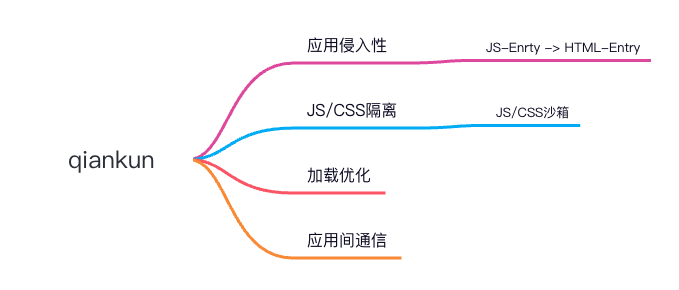
以上的这一些问题我们可以归纳为,single-spa 对于应用的侵入性太强,导致无法很好的集成之前的业务代码。
qiankun 改进了什么
刚刚除了提到 single-spa 的侵入问题以外,qiankun 框架还封装了以下能力,这一些能力也是 single-spa 没有提供给我们的:
- 样式和 js 的隔离问题:如何确保 js 和 css 之间互相不产生影响,又或者子应用 A 修改了全局变量,怎么保证子应用 B 拿到的全局变量还是之前的环境。
- 资源预加载:如何保证在子应用 A 切换子应用 B 的时候体验良好。
- 应用间通信:主子应用之间是怎么相互同步通用的状态的。
qiankun 方案初探
如果说样式和 js 的隔离问题,我们还能想到一些通用的手段,比如采用类似 namespace 的 css 隔离方案,采用全局对象备份的 js 方案等。但是侵入性问题和加载问题,对于 single-spa 来说就很难解决了。这个时候 qiankun 提出了使用 HTML-entry 代替 JS-Entry 进行二次封装,解决了这些问题,总结下来如图所示
原理解读
基于版本2.x
首先我们默认大家对 qiankun 的文档有初步的了解了,以下正式开始
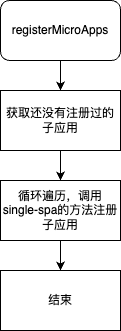
基于路由的配置,qiankun 暴露出了 2 个方法提供给我们使用registerMicroApps和start, 那我们先从此入口处开始。
registerMicroApps
/**
 * 注册子应用,基于路由配置
 * @param apps = [
 *  {
 *    name: 'react16',
 *    entry: '//localhost:7100',
 *    container: '#subapp-viewport',
 *    loader,
 *    activeRule: '/react16'
 *  },
 *  ...
 * ]
 * @param lifeCycles = { ...各个生命周期方法对象 }
 */
export function registerMicroApps<T extends ObjectType>(
  apps: Array<RegistrableApp<T>>,
  lifeCycles?: FrameworkLifeCycles<T>,
) {
  /**  对应获取还没有注册的子应用开始 */

  // Each app only needs to be registered once
  // 防止微应用重复注册,得到所有没有被注册的微应用列表
  const unregisteredApps = apps.filter((app) => !microApps.some((registeredApp) => registeredApp.name === app.name));
  // 所有的微应用 = 已注册 + 未注册的(将要被注册的)
  microApps = [...microApps, ...unregisteredApps];

  /**  对应获取还没有注册的子应用结束 */

  /**  循环遍历,调用registerApplication注册子应用 */

  // 注册每一个微应用
  unregisteredApps.forEach((app) => {
    // 注册时提供的子应用基本信息
    const { name, activeRule, loader = noop, props, ...appConfig } = app;
    // 调用 single-spa 的 registerApplication 方法注册微应用
    registerApplication({
      // 微应用名称
      name,
      // 微应用的加载方法,Promise<生命周期方法组成的对象>
      app: async () => {
        // 加载微应用时主应用显示 loading 状态
        loader(true);
        // 这里使用了经典的promise交换控制权的手法
        // 是等到调用start之后才开始执行下面的流程
        await frameworkStartedDefer.promise;
        // 负责加载子应用,然后一大堆处理,返回 bootstrap、mount、unmount、update 这个几个生命周期
        const { mount, ...otherMicroAppConfigs } = (
          await loadApp({ name, props, ...appConfig }, frameworkConfiguration, lifeCycles) // 配置信息,start 方法执行时设置的配置对象,注册微应用时提供的全局生命周期对象
        )();

        return {
          mount: [async () => loader(true), ...toArray(mount), async () => loader(false)],
          ...otherMicroAppConfigs,
        };
      },
      // 微应用的激活条件
      activeWhen: activeRule,
      // 传递给微应用的 props
      customProps: props,
    });
  });
}
那么frameworkStartedDefer是怎么操作的
export class Deferred<T> {
  promise: Promise<T>;

  resolve!: (value: T | PromiseLike<T>) => void;

  reject!: (reason?: any) => void;

  constructor() {
    this.promise = new Promise((resolve, reject) => {
      this.resolve = resolve;
      this.reject = reject;
    });
  }
}
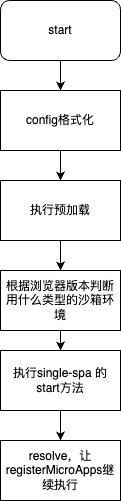
实际上是利用了async和await的异步控制流,返回了一个promise,只有当resolve的时候才会继续向下执行代码。
start
/**
 * 启动 qiankun
 * @param opts start 方法的配置对象
 */
export function start(opts: FrameworkConfiguration = {}) {
  // qiankun 框架默认开启预加载、单例模式、样式沙箱
  frameworkConfiguration = { prefetch: true, singular: true, sandbox: true, ...opts };
  const {
    prefetch,
    sandbox,
    singular,
    urlRerouteOnly = defaultUrlRerouteOnly,
    ...importEntryOpts
  } = frameworkConfiguration;
  // 预加载
  if (prefetch) {
    // 执行预加载策略,参数分别为子应用列表、预加载策略、{ fetch、getPublicPath、getTemplate }
    doPrefetchStrategy(microApps, prefetch, importEntryOpts);
  }
  // 沙箱检测降级
  frameworkConfiguration = autoDowngradeForLowVersionBrowser(frameworkConfiguration);
  // 执行 single-spa 的 start 方法,启动 single-spa
  startSingleSpa({ urlRerouteOnly });
  started = true;

  frameworkStartedDefer.resolve();
}
可以看到代码入口的部分就已经结束了,总结一下就是内部通过promise控制实现了流程的打断和暂停,直到调用start的时候代码才会继续往下走。底层都是继续调用了single-spa的相关代码。
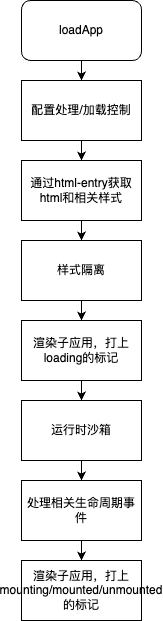
根据上面未完成的流程,接下来就是最关键的loadApp方法。整个qiankun的精髓也在这个部分
loadApp
/**
 * 核心方法,完成以下几件事
 * 1. 通过HTML-entry的方式远程加载微应用
 * 2. 样式隔离,使用css scoped或者shadow-dom
 * 3. 渲染子应用
 * 4. 运行时沙箱,js沙箱、全局沙箱
 * 5. 生命周期方法
 * 6. 注册相关通信方法
 * @param app
 * @param configuration
 * @param lifeCycles
 * @returns
 */
export async function loadApp<T extends ObjectType>(
  app: LoadableApp<T>,
  configuration: FrameworkConfiguration = {},
  lifeCycles?: FrameworkLifeCycles<T>,
): Promise<ParcelConfigObjectGetter> {
  const { entry, name: appName } = app;
  // 获取app实例
  const appInstanceId = genAppInstanceIdByName(appName);
  // 生成时间戳
  const markName = `[qiankun] App ${appInstanceId} Loading`;
  if (process.env.NODE_ENV === 'development') {
    performanceMark(markName);
  }

  // 配置信息
  const {
    singular = false,
    sandbox = true,
    excludeAssetFilter,
    globalContext = window,
    ...importEntryOpts
  } = configuration;

  // 调用import-html-entry, 获取子应用的入口html和脚本执行器
  /**
   * template时link替换为style后的模版
   * execScripts是在指定的js上下文环境中执行代码
   * assetPublicPath静态资源地址
   */
  // get the entry html content and script executor
  const { template, execScripts, assetPublicPath } = await importEntry(entry, importEntryOpts);

  // as single-spa load and bootstrap new app parallel with other apps unmounting
  // (see https://github.com/CanopyTax/single-spa/blob/master/src/navigation/reroute.js#L74)
  // we need wait to load the app until all apps are finishing unmount in singular mode
  // 这里是single-spa的限制,加载、初始化、卸载不能同时执行,所以使用了一个promise控制调用流
  if (await validateSingularMode(singular, app)) {
    await (prevAppUnmountedDeferred && prevAppUnmountedDeferred.promise);
  }

  /** 样式隔离开始 */
  // 用一个容器元素包裹子应用的html入口
  // appContent = `<div id="__qiankun_microapp_wrapper_for_${appInstanceId}__" data-name="${appName}">${template}</div>`
  const appContent = getDefaultTplWrapper(appInstanceId)(template);
  // 是否严格样式隔离
  const strictStyleIsolation = typeof sandbox === 'object' && !!sandbox.strictStyleIsolation;

  if (process.env.NODE_ENV === 'development' && strictStyleIsolation) {
    console.warn(
      "[qiankun] strictStyleIsolation configuration will be removed in 3.0, pls don't depend on it or use experimentalStyleIsolation instead!",
    );
  }
  //scope css
  const scopedCSS = isEnableScopedCSS(sandbox);
  // 将appContent由字符串模版转换成html的dom,如果需要严格样式隔离,这里使用了shadow-dom
  let initialAppWrapperElement: HTMLElement | null = createElement(
    appContent,
    strictStyleIsolation,
    scopedCSS,
    appInstanceId,
  );

   /** 子应用渲染开始 */
  const initialContainer = 'container' in app ? app.container : undefined;
  const legacyRender = 'render' in app ? app.render : undefined;

  const render = getRender(appInstanceId, appContent, legacyRender);

  // 第一次加载设置应用可见区域 dom 结构
  // 确保每次应用加载前容器 dom 结构已经设置完毕
  // 渲染子应用到容器节点,并且展示loading状态
  render({ element: initialAppWrapperElement, loading: true, container: initialContainer }, 'loading');

  // 得到一个 getter 函数
  // 通过该函数可以获取 <div id="__qiankun_microapp_wrapper_for_${appInstanceId}__" data-name="${appName}">${template}</div>
  const initialAppWrapperGetter = getAppWrapperGetter(
    appInstanceId,
    !!legacyRender,
    strictStyleIsolation,
    scopedCSS,
    () => initialAppWrapperElement,
  );

  /** 运行时沙箱开始 */
  let global = globalContext;
  // 挂载的异步控制流程
  let mountSandbox = () => Promise.resolve();
  let unmountSandbox = () => Promise.resolve();
  const useLooseSandbox = typeof sandbox === 'object' && !!sandbox.loose;
  let sandboxContainer;
  if (sandbox) {
    /**
     * 运行时沙箱,由JS的沙箱和css的沙箱两部分
     * 在正常情况下,返回了window的proxy对象
     * unmount方法卸载子应用,并且恢复到之前的环境
     * mount方法挂载子应用,并且增强相关函数,接下来会讲解
     */
    sandboxContainer = createSandboxContainer(
      appInstanceId,
      // FIXME should use a strict sandbox logic while remount, see https://github.com/umijs/qiankun/issues/518
      initialAppWrapperGetter,
      scopedCSS,
      useLooseSandbox,
      excludeAssetFilter,
      global,
    );
    // 用沙箱的代理对象作为接下来使用的全局对象
    global = sandboxContainer.instance.proxy as typeof window;
    mountSandbox = sandboxContainer.mount;
    unmountSandbox = sandboxContainer.unmount;
  }

  // 将传的生命周期函数合并,一些addon看起来是打了一些标记
  const {
    beforeUnmount = [],
    afterUnmount = [],
    afterMount = [],
    beforeMount = [],
    beforeLoad = [],
  } = mergeWith({}, getAddOns(global, assetPublicPath), lifeCycles, (v1, v2) => concat(v1 ?? [], v2 ?? []));

  // 按照顺序执行beforeLoad生命周期
  await execHooksChain(toArray(beforeLoad), app, global);

  // get the lifecycle hooks from module exports
  // 获取微任务暴露出来的生命周期函数
  const scriptExports: any = await execScripts(global, sandbox && !useLooseSandbox);
  const { bootstrap, mount, unmount, update } = getLifecyclesFromExports(
    scriptExports,
    appName,
    global,
    sandboxContainer?.instance?.latestSetProp,
  );

  // 注册通信方法,通过props会传递给子应用
  const { onGlobalStateChange, setGlobalState, offGlobalStateChange }: Record<string, CallableFunction> =
    getMicroAppStateActions(appInstanceId);

  // FIXME temporary way
  const syncAppWrapperElement2Sandbox = (element: HTMLElement | null) => (initialAppWrapperElement = element);

  const parcelConfigGetter: ParcelConfigObjectGetter = (remountContainer = initialContainer) => {
    let appWrapperElement: HTMLElement | null;
    let appWrapperGetter: ReturnType<typeof getAppWrapperGetter>;

    const parcelConfig: ParcelConfigObject = {
      name: appInstanceId,
      bootstrap,
      // 挂载阶段的生命周期
      mount: [
        async () => {
          if (process.env.NODE_ENV === 'development') {
            const marks = performanceGetEntriesByName(markName, 'mark');
            // mark length is zero means the app is remounting
            if (marks && !marks.length) {
              performanceMark(markName);
            }
          }
        },
        // 如果是单例模式的沙箱,则需要等微应用卸载完成之后才能执行挂载任务
        async () => {
          if ((await validateSingularMode(singular, app)) && prevAppUnmountedDeferred) {
            return prevAppUnmountedDeferred.promise;
          }

          return undefined;
        },
        // initial wrapper element before app mount/remount

        async () => {
          appWrapperElement = initialAppWrapperElement;
          // 重新初始化模版
          appWrapperGetter = getAppWrapperGetter(
            appInstanceId,
            !!legacyRender,
            strictStyleIsolation,
            scopedCSS,
            () => appWrapperElement,
          );
        },
        // 添加 mount hook, 确保每次应用加载前容器 dom 结构已经设置完毕
        async () => {
          const useNewContainer = remountContainer !== initialContainer;
          // 这种情况是主应用的容器换掉了,所以需要执行一系列的方法rebuild
          if (useNewContainer || !appWrapperElement) {
            // element will be destroyed after unmounted, we need to recreate it if it not exist
            // or we try to remount into a new container
            appWrapperElement = createElement(appContent, strictStyleIsolation, scopedCSS, appInstanceId);
            syncAppWrapperElement2Sandbox(appWrapperElement);
          }
          // 渲染微应用到容器节点,展示mounted状态
          render({ element: appWrapperElement, loading: true, container: remountContainer }, 'mounting');
        },
        // 运行时沙箱导出的mount
        mountSandbox,
        // exec the chain after rendering to keep the behavior with beforeLoad
        // 执行beforeMount
        async () => execHooksChain(toArray(beforeMount), app, global),
        // 向子应用的mount生命周期函数传递参数
        async (props) => mount({ ...props, container: appWrapperGetter(), setGlobalState, onGlobalStateChange }),
        // finish loading after app mounted
        async () => render({ element: appWrapperElement, loading: false, container: remountContainer }, 'mounted'),
        async () => execHooksChain(toArray(afterMount), app, global),
        // initialize the unmount defer after app mounted and resolve the defer after it unmounted
        // 子应用挂载完成之后初始化这个promise,并且在微应用卸载以后resolve这个promise
        async () => {
          if (await validateSingularMode(singular, app)) {
            prevAppUnmountedDeferred = new Deferred<void>();
          }
        },
        async () => {
          if (process.env.NODE_ENV === 'development') {
            const measureName = `[qiankun] App ${appInstanceId} Loading Consuming`;
            performanceMeasure(measureName, markName);
          }
        },
      ],
      // 卸载微应用
      unmount: [
        async () => execHooksChain(toArray(beforeUnmount), app, global),
        // 执行微应用的生命周期函数
        async (props) => unmount({ ...props, container: appWrapperGetter() }),
        // 沙箱导出的unmount方法
        unmountSandbox,
        async () => execHooksChain(toArray(afterUnmount), app, global),
        async () => {
          render({ element: null, loading: false, container: remountContainer }, 'unmounted');
          offGlobalStateChange(appInstanceId);
          // for gc
          appWrapperElement = null;
          syncAppWrapperElement2Sandbox(appWrapperElement);
        },
        // 子应用卸载的时候会resolve这个promise,确保框架能进行后续的工作
        async () => {
          if ((await validateSingularMode(singular, app)) && prevAppUnmountedDeferred) {
            prevAppUnmountedDeferred.resolve();
          }
        },
      ],
    };

    // 子应用有可能定义了update方法,覆盖
    if (typeof update === 'function') {
      parcelConfig.update = update;
    }

    return parcelConfig;
  };

  return parcelConfigGetter;
}
这个就是loadApp的整体流程,那我们在其中跳过了很多方法,接下来就着重看样式隔离和JS运行时隔离的相关代码
样式隔离
qiankun里面的样式通过两种方法去实现的,第一种是shadow-dom,第二种是css scope,两种方法是不可以共存的
使用shadow-dom 或者css scope的方法都在createElement函数中
function createElement(
  appContent: string,
  strictStyleIsolation: boolean,
  scopedCSS: boolean,
  appInstanceId: string,
): HTMLElement {
  // 创建一个div元素
  const containerElement = document.createElement('div');
  // 将字符串模版设置为div的子元素
  containerElement.innerHTML = appContent;
  // appContent always wrapped with a singular div
  // 然后这样就能将string变成dom了
  const appElement = containerElement.firstChild as HTMLElement;
  // 如果是严格模式的话,则将appContent的子元素用shadowdom包裹
  if (strictStyleIsolation) {
    if (!supportShadowDOM) {
      console.warn(
        '[qiankun]: As current browser not support shadow dom, your strictStyleIsolation configuration will be ignored!',
      );
    } else {
      const { innerHTML } = appElement;
      appElement.innerHTML = '';
      let shadow: ShadowRoot;

      if (appElement.attachShadow) {
        shadow = appElement.attachShadow({ mode: 'open' });
      } else {
        // createShadowRoot was proposed in initial spec, which has then been deprecated
        shadow = (appElement as any).createShadowRoot();
      }
      shadow.innerHTML = innerHTML;
    }
  }

  // css scope
  if (scopedCSS) {
    const attr = appElement.getAttribute(css.QiankunCSSRewriteAttr);
    if (!attr) {
      appElement.setAttribute(css.QiankunCSSRewriteAttr, appInstanceId);
    }

    const styleNodes = appElement.querySelectorAll('style') || [];
    forEach(styleNodes, (stylesheetElement: HTMLStyleElement) => {
      // 这里是处理css scope的地方
      css.process(appElement!, stylesheetElement, appInstanceId);
    });
  }

  return appElement;
}
shadow-dom很好理解,但是css scope是怎么实现的呢,按照如下例子
// 假设应用名是 react18
.app-main {
    font-size: 16px;
}

div[data-qiankun-react18] .app-main {
    font-size: 14px;
}
具体流程这里不展开看源码了,简单说,就是通过css的属性:sheet。去重写原来的样式逻辑。而大多数情况目前使用下来我们都是不开启样式隔离这个功能的。
运行时隔离
接下来就是js的环境隔离,我们之前也在这里踩了不少坑
qiankun提供了两种不同的js沙箱隔离方案
- 一种是单例模式,直接代理了原生的window对象,记录元素的增删改查,从而恢复或取消window的状态
- 另一种是多例模式,代理了一个全新的对象,这个对象是复制了window对象一部分不可配置属性,所有的更改都是基于这个对象,从而保证实例之间互不影响,这个是通过proxy代理window对象从而实现的。
那在样式这里也有运行时的隔离,原理是劫持script,link,style三个标签的相关动作,比如创建/插入。在卸载的时候找到对应的标签删除。
当然样式沙箱还额外做了2件事情
- 在卸载前为动态样式添加缓存。
- 将proxy对象传递给execScripts函数,设置为子应用的全局上下文。
入口位置 - createSandboxContainer
生成应用运行时沙箱
沙箱分两个类型:
- app 环境沙箱
app 环境沙箱是指应用初始化过之后,应用会在什么样的上下文环境运行。每个应用的环境沙箱只会初始化一次,因为子应用只会触发一次 bootstrap 。
子应用在切换时,实际上切换的是 app 环境沙箱。
- render 沙箱
子应用在 app mount 开始前生成好的的沙箱。每次子应用切换过后,render 沙箱都会重现初始化。
这么设计的目的是为了保证每个子应用切换回来之后,还能运行在应用 bootstrap 之后的环境下。
/**
 * @param appName
 * @param elementGetter
 * @param scopedCSS
 * @param useLooseSandbox
 * @param excludeAssetFilter
 * @param globalContext
 */
export function createSandboxContainer(
  appName: string,
  elementGetter: () => HTMLElement | ShadowRoot,
  scopedCSS: boolean,
  useLooseSandbox?: boolean,
  excludeAssetFilter?: (url: string) => boolean,
  globalContext?: typeof window,
) {
  let sandbox: SandBox;
  // 判断是否支持proxy方法,这里我们只看proxybox就可以了
  if (window.Proxy) {
    // js沙箱
    sandbox = useLooseSandbox ? new LegacySandbox(appName, globalContext) : new ProxySandbox(appName, globalContext);
  } else {
    sandbox = new SnapshotSandbox(appName);
  }

  // 样式沙箱
  // some side effect could be be invoked while bootstrapping, such as dynamic stylesheet injection with style-loader, especially during the development phase
  const bootstrappingFreers = patchAtBootstrapping(appName, elementGetter, sandbox, scopedCSS, excludeAssetFilter);
  // mounting freers are one-off and should be re-init at every mounting time
  // 一次性的,应当在每次挂载的时候重新初始化
  let mountingFreers: Freer[] = [];

  let sideEffectsRebuilders: Rebuilder[] = [];

  return {
    instance: sandbox,

    /**
     * 沙箱被 mount
     * 可能是从 bootstrap 状态进入的 mount
     * 也可能是从 unmount 之后再次唤醒进入 mount
     */
    async mount() {
      /* ------------------------------------------ 因为有上下文依赖(window),以下代码执行顺序不能变 ------------------------------------------ */

      /* ------------------------------------------ 1. 启动/恢复 沙箱------------------------------------------ */
      sandbox.active();

      const sideEffectsRebuildersAtBootstrapping = sideEffectsRebuilders.slice(0, bootstrappingFreers.length);
      const sideEffectsRebuildersAtMounting = sideEffectsRebuilders.slice(bootstrappingFreers.length);

      // must rebuild the side effects which added at bootstrapping firstly to recovery to nature state
      if (sideEffectsRebuildersAtBootstrapping.length) {
        // 子应用再次挂载时重建刚刚缓存的动态样式
        sideEffectsRebuildersAtBootstrapping.forEach((rebuild) => rebuild());
      }

      /* ------------------------------------------ 2. 开启全局变量补丁 ------------------------------------------*/
      // render 沙箱启动时开始劫持各类全局监听,尽量不要在应用初始化阶段有 事件监听/定时器 等副作用
      mountingFreers = patchAtMounting(appName, elementGetter, sandbox, scopedCSS, excludeAssetFilter);

      /* ------------------------------------------ 3. 重置一些初始化时的副作用 ------------------------------------------*/
      // 存在 rebuilder 则表明有些副作用需要重建
      if (sideEffectsRebuildersAtMounting.length) {
        sideEffectsRebuildersAtMounting.forEach((rebuild) => rebuild());
      }

      // clean up rebuilders
      // 卸载的时候clear掉
      sideEffectsRebuilders = [];
    },

    /**
     * 恢复 global 状态,使其能回到应用加载之前的状态
     */
    async unmount() {
      // record the rebuilders of window side effects (event listeners or timers)
      // note that the frees of mounting phase are one-off as it will be re-init at next mounting
      sideEffectsRebuilders = [...bootstrappingFreers, ...mountingFreers].map((free) => free());
      // 撤销之前打的一系列补丁
      sandbox.inactive();
    },
  };
}
接下来就是两个沙箱了
ProxySandbox
大部分情况用的都是proxy沙箱,为多实例模式
// 记录被激活的沙箱的数量
let activeSandboxCount = 0;

/**
 * 基于 Proxy 实现的沙箱
 */
export default class ProxySandbox implements SandBox {
  /** window 值变更记录 */
  private updatedValueSet = new Set<PropertyKey>();

  name: string;

  type: SandBoxType;

  proxy: WindowProxy;

  globalContext: typeof window;

  sandboxRunning = true;

  latestSetProp: PropertyKey | null = null;

  private registerRunningApp(name: string, proxy: Window) {
    if (this.sandboxRunning) {
      const currentRunningApp = getCurrentRunningApp();
      if (!currentRunningApp || currentRunningApp.name !== name) {
        setCurrentRunningApp({ name, window: proxy });
      }
      // FIXME if you have any other good ideas
      // remove the mark in next tick, thus we can identify whether it in micro app or not
      // this approach is just a workaround, it could not cover all complex cases, such as the micro app runs in the same task context with master in some case
      nextTask(() => {
        setCurrentRunningApp(null);
      });
    }
  }

  active() {
    // 被激活的沙箱数 + 1
    if (!this.sandboxRunning) activeSandboxCount++;
    this.sandboxRunning = true;
  }

  inactive() {
    // 沙箱失活
    if (process.env.NODE_ENV === 'development') {
      console.info(`[qiankun:sandbox] ${this.name} modified global properties restore...`, [
        ...this.updatedValueSet.keys(),
      ]);
    }
    // 被激活的沙箱数 - 1
    if (--activeSandboxCount === 0) {
      variableWhiteList.forEach((p) => {
        if (this.proxy.hasOwnProperty(p)) {
          // @ts-ignore
          delete this.globalContext[p];
        }
      });
    }

    this.sandboxRunning = false;
  }

  constructor(name: string, globalContext = window) {
    this.name = name;
    this.globalContext = globalContext;
    this.type = SandBoxType.Proxy;
    const { updatedValueSet } = this;
    // 全局对象上所有不可配置的属性都在fakewindow中,其中能够通过getter获得的同时存在在propertiesWithGetter中,且值为true
    const { fakeWindow, propertiesWithGetter } = createFakeWindow(globalContext);

    const descriptorTargetMap = new Map<PropertyKey, SymbolTarget>();
    // 判断全局对象上有没有这个属性
    const hasOwnProperty = (key: PropertyKey) => fakeWindow.hasOwnProperty(key) || globalContext.hasOwnProperty(key);
    // proxy代理
    const proxy = new Proxy(fakeWindow, {
      set: (target: FakeWindow, p: PropertyKey, value: any): boolean => {
        // 如果沙箱在运行,则更新属性值并且记录被更改的属性
        if (this.sandboxRunning) {
          this.registerRunningApp(name, proxy);
          // We must kept its description while the property existed in globalContext before
          if (!target.hasOwnProperty(p) && globalContext.hasOwnProperty(p)) {
            const descriptor = Object.getOwnPropertyDescriptor(globalContext, p);
            const { writable, configurable, enumerable } = descriptor!;
            if (writable) {
              // 设置属性值
              Object.defineProperty(target, p, {
                configurable,
                enumerable,
                writable,
                value,
              });
            }
          } else {
            // @ts-ignore
            target[p] = value;
          }

          if (variableWhiteList.indexOf(p) !== -1) {
            // @ts-ignore
            globalContext[p] = value;
          }
          // 记下被更改的属性
          updatedValueSet.add(p);
          // 最后一次设置的属性
          this.latestSetProp = p;

          return true;
        }

        if (process.env.NODE_ENV === 'development') {
          console.warn(`[qiankun] Set window.${p.toString()} while sandbox destroyed or inactive in ${name}!`);
        }

        // 在 strict-mode 下,Proxy 的 handler.set 返回 false 会抛出 TypeError,在沙箱卸载的情况下应该忽略错误
        return true;
      },
      // 获取执行属性的值
      get: (target: FakeWindow, p: PropertyKey): any => {
        this.registerRunningApp(name, proxy);

        if (p === Symbol.unscopables) return unscopables;
        // avoid who using window.window or window.self to escape the sandbox environment to touch the really window
        // see https://github.com/eligrey/FileSaver.js/blob/master/src/FileSaver.js#L13
        if (p === 'window' || p === 'self') {
          return proxy;
        }

        // hijack globalWindow accessing with globalThis keyword
        if (p === 'globalThis') {
          return proxy;
        }

        if (
          p === 'top' ||
          p === 'parent' ||
          (process.env.NODE_ENV === 'test' && (p === 'mockTop' || p === 'mockSafariTop'))
        ) {
          // if your master app in an iframe context, allow these props escape the sandbox
          if (globalContext === globalContext.parent) {
            return proxy;
          }
          return (globalContext as any)[p];
        }

        // proxy.hasOwnProperty would invoke getter firstly, then its value represented as globalContext.hasOwnProperty
        if (p === 'hasOwnProperty') {
          return hasOwnProperty;
        }

        if (p === 'document') {
          return document;
        }

        if (p === 'eval') {
          return eval;
        }
        // 以上都是一些特殊属性的处理
        // 获取特定属性,如果属性具有getter,说明是原生对象那几个属性,否则是fakewindow上面的属性(原生的或者用户自己设置的)
        const value = propertiesWithGetter.has(p)
          ? (globalContext as any)[p]
          : p in target
          ? (target as any)[p]
          : (globalContext as any)[p];
        /* Some dom api must be bound to native window, otherwise it would cause exception like 'TypeError: Failed to execute 'fetch' on 'Window': Illegal invocation'
           See this code:
             const proxy = new Proxy(window, {});
             const proxyFetch = fetch.bind(proxy);
             proxyFetch('https://qiankun.com');
        */
       // 针对fetch的处理
        const boundTarget = useNativeWindowForBindingsProps.get(p) ? nativeGlobal : globalContext;
        return getTargetValue(boundTarget, value);
      },

      // trap in operator
      // see https://github.com/styled-components/styled-components/blob/master/packages/styled-components/src/constants.js#L12
      // 判断是否存在指定的属性
      has(target: FakeWindow, p: string | number | symbol): boolean {
        return p in unscopables || p in target || p in globalContext;
      },

        // ....省略一部分代码,有兴趣可以自己去看
    });

    // 我们找到的window.proxy就是在这里挂载的
    this.proxy = proxy;

    activeSandboxCount++;
  }
}
可以看到我们是在fakeWindow上面进行操作修改,接下来我们看下fakeWindow的代码
/**
 * 拷贝全局对象上所有不可配置属性到fakewindow对象,并且将这些属性的描述符改为可配置的然后冻结
 * @param globalContext
 * @returns
 */
function createFakeWindow(globalContext: Window) {
  // map always has the fastest performance in has check scenario
  // see https://jsperf.com/array-indexof-vs-set-has/23

  // 记录 window 对象上的 getter 属性,
  // 原生的有:window、document、location、top,比如:Object.getOwnPropertyDescriptor(window, 'window') => {set: undefined, enumerable: true, configurable: false, get: ƒ}
  // propertiesWithGetter = {"window" => true, "document" => true, "location" => true, "top" => true, "__VUE_DEVTOOLS_GLOBAL_HOOK__" => true}
  const propertiesWithGetter = new Map<PropertyKey, boolean>();
  // 存储window对象中不可配置的属性和值
  const fakeWindow = {} as FakeWindow;

  /*
   copy the non-configurable property of global to fakeWindow
   see https://developer.mozilla.org/en-US/docs/Web/JavaScript/Reference/Global_Objects/Proxy/handler/getOwnPropertyDescriptor
   > A property cannot be reported as non-configurable, if it does not exists as an own property of the target object or if it exists as a configurable own property of the target object.
   */
  Object.getOwnPropertyNames(globalContext)
  // 遍历出不可配置的
    .filter((p) => {
      const descriptor = Object.getOwnPropertyDescriptor(globalContext, p);
      return !descriptor?.configurable;
    })
    .forEach((p) => {
      // 得到属性描述符
      const descriptor = Object.getOwnPropertyDescriptor(globalContext, p);
      if (descriptor) {
        // 获取get属性
        const hasGetter = Object.prototype.hasOwnProperty.call(descriptor, 'get');

        /*
         make top/self/window property configurable and writable, otherwise it will cause TypeError while get trap return.
         see https://developer.mozilla.org/en-US/docs/Web/JavaScript/Reference/Global_Objects/Proxy/handler/get
         > The value reported for a property must be the same as the value of the corresponding target object property if the target object property is a non-writable, non-configurable data property.
         */
        if (
          p === 'top' ||
          p === 'parent' ||
          p === 'self' ||
          p === 'window' ||
          (process.env.NODE_ENV === 'test' && (p === 'mockTop' || p === 'mockSafariTop'))
        ) {
          // 不可配置改为可配置
          descriptor.configurable = true;
          /*
           The descriptor of window.window/window.top/window.self in Safari/FF are accessor descriptors, we need to avoid adding a data descriptor while it was
           Example:
            Safari/FF: Object.getOwnPropertyDescriptor(window, 'top') -> {get: function, set: undefined, enumerable: true, configurable: false}
            Chrome: Object.getOwnPropertyDescriptor(window, 'top') -> {value: Window, writable: false, enumerable: true, configurable: false}
           */
          if (!hasGetter) {
            // 如果这几个属性没有getter,说明有writeable属性,设置为可写
            descriptor.writable = true;
          }
        }
        // 如果存在getter,则以改属性为key,value为true写入propertiesWithGetter
        if (hasGetter) propertiesWithGetter.set(p, true);

        // freeze the descriptor to avoid being modified by zone.js
        // see https://github.com/angular/zone.js/blob/a5fe09b0fac27ac5df1fa746042f96f05ccb6a00/lib/browser/define-property.ts#L71
        // 设置到fake window,并且不可更改
        rawObjectDefineProperty(fakeWindow, p, Object.freeze(descriptor));
      }
    });

  return {
    fakeWindow,
    propertiesWithGetter,
  };
}
以上就是js沙箱的内容,接下来我们看下样式沙箱
patchAtBooststrapping
/**
 * 初始化阶段,给createElement、appendChild、insertBefore打一个patch
 * @param appName
 * @param elementGetter
 * @param sandbox
 * @param scopedCSS
 * @param excludeAssetFilter
 * @returns
 */
export function patchAtBootstrapping(
  appName: string,
  elementGetter: () => HTMLElement | ShadowRoot,
  sandbox: SandBox,
  scopedCSS: boolean,
  excludeAssetFilter?: CallableFunction,
): Freer[] {
  const patchersInSandbox = {
    [SandBoxType.LegacyProxy]: [
      () => patchLooseSandbox(appName, elementGetter, sandbox.proxy, false, scopedCSS, excludeAssetFilter),
    ],
    [SandBoxType.Proxy]: [
      () => patchStrictSandbox(appName, elementGetter, sandbox.proxy, false, scopedCSS, excludeAssetFilter),
    ],
    [SandBoxType.Snapshot]: [
      () => patchLooseSandbox(appName, elementGetter, sandbox.proxy, false, scopedCSS, excludeAssetFilter),
    ],
  };
  // 返回一个数组,数组元素是patch的执行结果, 即free函数
  return patchersInSandbox[sandbox.type]?.map((patch) => patch());
}
那之后的操作我们给一个例子, 整体上就是劫持所有动态添加的操作,包括link,style,script等方法
export function patchStrictSandbox(
  appName: string,
  appWrapperGetter: () => HTMLElement | ShadowRoot,
  proxy: Window,
  mounting = true,
  scopedCSS = false,
  excludeAssetFilter?: CallableFunction,
): Freer {
  let containerConfig = proxyAttachContainerConfigMap.get(proxy);
  if (!containerConfig) {
    containerConfig = {
      appName,
      proxy,
      appWrapperGetter,
      dynamicStyleSheetElements: [],
      strictGlobal: true,
      excludeAssetFilter,
      scopedCSS,
    };
    proxyAttachContainerConfigMap.set(proxy, containerConfig);
  }
  // all dynamic style sheets are stored in proxy container
  // 获取所有动态添加的样式
  const { dynamicStyleSheetElements } = containerConfig;
  // 劫持createElement方法
  const unpatchDocumentCreate = patchDocumentCreateElement();
  // 劫持appendChild,insertBefore,removeChildren
  const unpatchDynamicAppendPrototypeFunctions = patchHTMLDynamicAppendPrototypeFunctions(
    (element) => elementAttachContainerConfigMap.has(element),
    (element) => elementAttachContainerConfigMap.get(element)!,
  );
  // 记录初始化的次数
  if (!mounting) bootstrappingPatchCount++;
  if (mounting) mountingPatchCount++;
  // 初始化完成之后返回free函数,负责清除patch、缓存动态添加的样式、返回rebuild函数
  return function free() {
    // bootstrap patch just called once but its freer will be called multiple times
    if (!mounting && bootstrappingPatchCount !== 0) bootstrappingPatchCount--;
    if (mounting) mountingPatchCount--;

    const allMicroAppUnmounted = mountingPatchCount === 0 && bootstrappingPatchCount === 0;
    // release the overwritten prototype after all the micro apps unmounted
    if (allMicroAppUnmounted) {
      unpatchDynamicAppendPrototypeFunctions();
      unpatchDocumentCreate();
    }

    recordStyledComponentsCSSRules(dynamicStyleSheetElements);

    // As now the sub app content all wrapped with a special id container,
    // the dynamic style sheet would be removed automatically while unmoutting
    // 子应用重新挂载的时候调用
    return function rebuild() {
      // 遍历缓存的样式表
      rebuildCSSRules(dynamicStyleSheetElements, (stylesheetElement) => {
        const appWrapper = appWrapperGetter();
        // 添加结点到样式表
        if (!appWrapper.contains(stylesheetElement)) {
          const mountDom =
            stylesheetElement[styleElementTargetSymbol] === 'head' ? getAppWrapperHeadElement(appWrapper) : appWrapper;
          rawHeadAppendChild.call(mountDom, stylesheetElement);
          return true;
        }

        return false;
      });
    };
  };
}
那么问题出在哪里呢?我们看下script是怎么被劫持挂载的
function getOverwrittenAppendChildOrInsertBefore(opts: {
  rawDOMAppendOrInsertBefore: <T extends Node>(newChild: T, refChild?: Node | null) => T;
  isInvokedByMicroApp: (element: HTMLElement) => boolean;
  containerConfigGetter: (element: HTMLElement) => ContainerConfig;
  target: DynamicDomMutationTarget;
}) {
  return function appendChildOrInsertBefore<T extends Node>(
    this: HTMLHeadElement | HTMLBodyElement,
    newChild: T,
    refChild: Node | null = null,
  ) {
    // 这个是要插入的元素
    let element = newChild as any;
    const { rawDOMAppendOrInsertBefore, isInvokedByMicroApp, containerConfigGetter, target = 'body' } = opts;
    if (!isHijackingTag(element.tagName) || !isInvokedByMicroApp(element)) {
      return rawDOMAppendOrInsertBefore.call(this, element, refChild) as T;
    }

    if (element.tagName) {
      const containerConfig = containerConfigGetter(element);
      const {
        appName,
        appWrapperGetter,
        proxy,
        strictGlobal,
        dynamicStyleSheetElements,
        scopedCSS,
        excludeAssetFilter,
      } = containerConfig;

      switch (element.tagName) {
        case LINK_TAG_NAME:
        case STYLE_TAG_NAME: {
          let stylesheetElement: HTMLLinkElement | HTMLStyleElement = newChild as any;
          const { href } = stylesheetElement as HTMLLinkElement;
          if (excludeAssetFilter && href && excludeAssetFilter(href)) {
            return rawDOMAppendOrInsertBefore.call(this, element, refChild) as T;
          }

          Object.defineProperty(stylesheetElement, styleElementTargetSymbol, {
            value: target,
            writable: true,
            configurable: true,
          });

          const appWrapper = appWrapperGetter();

          if (scopedCSS) {
            // exclude link elements like <link rel="icon" href="favicon.ico">
            const linkElementUsingStylesheet =
              element.tagName?.toUpperCase() === LINK_TAG_NAME &&
              (element as HTMLLinkElement).rel === 'stylesheet' &&
              (element as HTMLLinkElement).href;
            if (linkElementUsingStylesheet) {
              const fetch =
                typeof frameworkConfiguration.fetch === 'function'
                  ? frameworkConfiguration.fetch
                  : frameworkConfiguration.fetch?.fn;
              stylesheetElement = convertLinkAsStyle(
                element,
                (styleElement) => css.process(appWrapper, styleElement, appName),
                fetch,
              );
              dynamicLinkAttachedInlineStyleMap.set(element, stylesheetElement);
            } else {
              css.process(appWrapper, stylesheetElement, appName);
            }
          }

          const mountDOM = target === 'head' ? getAppWrapperHeadElement(appWrapper) : appWrapper;

          dynamicStyleSheetElements.push(stylesheetElement);
          const referenceNode = mountDOM.contains(refChild) ? refChild : null;
          return rawDOMAppendOrInsertBefore.call(mountDOM, stylesheetElement, referenceNode);
        }
        // 这里就是问题关键点了,script标签插入
        case SCRIPT_TAG_NAME: {
          const { src, text } = element as HTMLScriptElement;
          // some script like jsonp maybe not support cors which should't use execScripts
          // 核心逻辑就在这里,如果我们配置了除外,就直接使用的是原生的insertBefore方法
          if ((excludeAssetFilter && src && excludeAssetFilter(src)) || !isExecutableScriptType(element)) {
            return rawDOMAppendOrInsertBefore.call(this, element, refChild) as T;
          }

          const mountDOM = appWrapperGetter();
          const { fetch } = frameworkConfiguration;
          const referenceNode = mountDOM.contains(refChild) ? refChild : null;
          // 这里去执行脚本并且挂载,注意这里是在proxy环境下执行,但是如果这个脚本里面通过jsonp的方式再请求代码,这个代码是运行在原始的window环境下的,插入到了主应用了
          // 所以只能通过appendchild的方式挂载,不然就要配置除外
          if (src) {
            execScripts(null, [src], proxy, {
              fetch,
              strictGlobal,
              beforeExec: () => {
                const isCurrentScriptConfigurable = () => {
                  const descriptor = Object.getOwnPropertyDescriptor(document, 'currentScript');
                  return !descriptor || descriptor.configurable;
                };
                if (isCurrentScriptConfigurable()) {
                  Object.defineProperty(document, 'currentScript', {
                    get(): any {
                      return element;
                    },
                    configurable: true,
                  });
                }
              },
              success: () => {
                manualInvokeElementOnLoad(element);
                element = null;
              },
              error: () => {
                manualInvokeElementOnError(element);
                element = null;
              },
            });

            const dynamicScriptCommentElement = document.createComment(`dynamic script ${src} replaced by qiankun`);
            dynamicScriptAttachedCommentMap.set(element, dynamicScriptCommentElement);
            return rawDOMAppendOrInsertBefore.call(mountDOM, dynamicScriptCommentElement, referenceNode);
          }

          // inline script never trigger the onload and onerror event
          execScripts(null, [`<script>${text}</script>`], proxy, { strictGlobal });
          const dynamicInlineScriptCommentElement = document.createComment('dynamic inline script replaced by qiankun');
          dynamicScriptAttachedCommentMap.set(element, dynamicInlineScriptCommentElement);
          return rawDOMAppendOrInsertBefore.call(mountDOM, dynamicInlineScriptCommentElement, referenceNode);
        }

        default:
          break;
      }
    }

    return rawDOMAppendOrInsertBefore.call(this, element, refChild);
  };
}
以上就是qiankun的原理分享。

qiankun 介绍
qiankun 是基于 single-spa 做了二次封装的微前端框架,解决了 single-spa 的一些弊端和不足。那我们在要了解 qiankun 的原理之前,最好对 single-spa 有一个全面的认识
为什么要在 single-spa 基础上封装
single-spa 作为一个基础的微前端框架,它主要提供了以下两个能力
那我们通常接入 single-spa 会做以下几个步骤
到这里如果对构建有经验的读者就意识到了,single-spa 这种加载的方法我们称之为 JS-Entry。由于 JS 执行还不支持远端调用,所以我们修改打包构建。那么这对于一个已经在线上正常跑的业务代码几乎是无法接受的,
其次,即使是能够接受把所有的代码打包到一起,由于所有代码都需要在运行前加载,这对于页面的体验尤其是性能优化很难做,比如 js 的按需加载,懒加载,css 的独立打包等常规方案就不可做。
最后,如果从 CI-CD 的角度看,我们每次修改一个子应用的代码,就需要把所有的代码都打包一遍上线。目前需要用到微前端的场景,大部分都已经是古早的业务,也基本上都是所谓的“巨石应用”。这样的构建流程对于团队合作来说也是危机重重,一不小心就会踩了大坑。
以上的这一些问题我们可以归纳为,single-spa 对于应用的侵入性太强,导致无法很好的集成之前的业务代码。
qiankun 改进了什么
刚刚除了提到 single-spa 的侵入问题以外,qiankun 框架还封装了以下能力,这一些能力也是 single-spa 没有提供给我们的:
qiankun 方案初探
如果说样式和 js 的隔离问题,我们还能想到一些通用的手段,比如采用类似 namespace 的 css 隔离方案,采用全局对象备份的 js 方案等。但是侵入性问题和加载问题,对于 single-spa 来说就很难解决了。这个时候 qiankun 提出了使用 HTML-entry 代替 JS-Entry 进行二次封装,解决了这些问题,总结下来如图所示
原理解读
基于版本2.x
首先我们默认大家对 qiankun 的文档有初步的了解了,以下正式开始
基于路由的配置,qiankun 暴露出了 2 个方法提供给我们使用registerMicroApps和start, 那我们先从此入口处开始。
registerMicroApps
那么frameworkStartedDefer是怎么操作的
实际上是利用了async和await的异步控制流,返回了一个promise,只有当resolve的时候才会继续向下执行代码。
start
可以看到代码入口的部分就已经结束了,总结一下就是内部通过promise控制实现了流程的打断和暂停,直到调用start的时候代码才会继续往下走。底层都是继续调用了single-spa的相关代码。
根据上面未完成的流程,接下来就是最关键的loadApp方法。整个qiankun的精髓也在这个部分
loadApp
这个就是loadApp的整体流程,那我们在其中跳过了很多方法,接下来就着重看样式隔离和JS运行时隔离的相关代码
样式隔离
qiankun里面的样式通过两种方法去实现的,第一种是shadow-dom,第二种是css scope,两种方法是不可以共存的
使用shadow-dom 或者css scope的方法都在createElement函数中
shadow-dom很好理解,但是css scope是怎么实现的呢,按照如下例子
具体流程这里不展开看源码了,简单说,就是通过css的属性:sheet。去重写原来的样式逻辑。而大多数情况目前使用下来我们都是不开启样式隔离这个功能的。
运行时隔离
接下来就是js的环境隔离,我们之前也在这里踩了不少坑
qiankun提供了两种不同的js沙箱隔离方案
那在样式这里也有运行时的隔离,原理是劫持script,link,style三个标签的相关动作,比如创建/插入。在卸载的时候找到对应的标签删除。
当然样式沙箱还额外做了2件事情
入口位置 - createSandboxContainer
生成应用运行时沙箱
沙箱分两个类型:
app 环境沙箱是指应用初始化过之后,应用会在什么样的上下文环境运行。每个应用的环境沙箱只会初始化一次,因为子应用只会触发一次 bootstrap 。
子应用在切换时,实际上切换的是 app 环境沙箱。
子应用在 app mount 开始前生成好的的沙箱。每次子应用切换过后,render 沙箱都会重现初始化。
这么设计的目的是为了保证每个子应用切换回来之后,还能运行在应用 bootstrap 之后的环境下。
接下来就是两个沙箱了
ProxySandbox
大部分情况用的都是proxy沙箱,为多实例模式
可以看到我们是在fakeWindow上面进行操作修改,接下来我们看下fakeWindow的代码
以上就是js沙箱的内容,接下来我们看下样式沙箱
patchAtBooststrapping
那之后的操作我们给一个例子, 整体上就是劫持所有动态添加的操作,包括link,style,script等方法
那么问题出在哪里呢?我们看下script是怎么被劫持挂载的
以上就是qiankun的原理分享。