ecchat is a decentralized messaging application with integrated support for cross-chain transactions.
This Quick Start Guide helps you get started with ecchat version 1.4, the MVP beta release.
Please note that ecchat is only supported with WSL 2 on Windows 10 or later.
< this section to be written later in July 2021 >
Please note that ecchat is only supported with Cygwin on Windows 7 or later.
0 - Install Cygwin. Save and run the following using defaults settings:
https://cygwin.com/setup-x86_64.exe
Add the wget package during the installation. In the Select Packages page, set View to Full and set Search to wget. In the New column for the package wget, change the setting from Skip to the most recent version number.
Repeat the above procedure to also add the python38 and python38-zmq packages.
The latest Cygwin package versions, at the time of writing, used to test this installation procedure are:
| Package | Version |
|---|---|
| python38 | 3.8.10-1 |
| python38-zmq | 19.0.2-1 |
| wget | 1.21.1-1 |
You may wish to add other packages to improve your command line enjoyment, such as bash-completion, curl and git, although these are not required for ecchat.
1 - Ensure that eccoin.conf contains the following settings using your preferred text file editor:
C:\Users\user> notepad "%APPDATA%\eccoin\eccoin.conf"

rpcuser=any_user_name
rpcpassword=any_password
rpcport=19119
rpcconnect=127.0.0.1
rpcallowip=127.0.0.1
server=1
daemon=1
beta=1
messaging=1
2 - Start eccoind using the START WALLET button in Lynx.
If eccoind crashes on startup with the following in debug.log:
************************
EXCEPTION: St13runtime_error
CDB: Error 22, can't open database
eccoin in AppInit()
this means that you have an incompatible routing.dat file from a previous version of eccoind. To fix this, delete the file which will be recreated in a compatible format when eccoind next starts:
C:\Users\user> del "%APPDATA%\eccoin\routing.dat"
3 - Ensure eccoind is running and responding to RPC commands by entering the getinfo command into the Lynx debug console.
4 - Ensure eccoind is a compatible version by checking that version returned by the previous command is 30301 or higher.
5 - Run Cygwin64 Terminal which you should find in a Windows start folder named Cygwin.
5 - Create a directory for ecchat.
$ mkdir ecchat
$ cd ecchat
6 - Download the ecchat executable:
$ wget https://github.com/project-ecc/ecchat/releases/download/1.4/ecchat-1.4-win-x86_64.tar.gz
7 - Extract the ecchat executable:
$ tar xvf ecchat-1.4-win-x86_64.tar.gz
8 - Check that ecchat's md5 and sha256 file checksums are correct:
$ md5sum ecchat
1a9fae1c88a285cff6e8196afb350128  *ecchat.exe
$ sha256sum ecchat
cba834b3b5672159ed786ea525b880102d0b547cf24753c1279d932641ef9405  *ecchat.exe
If either of these checksums do not match up, your copy of ecchat may have been tampered with and you should NOT run it.
9 - Create a copy of the eccoin daemon config file for Cygwin:
$ mkdir ~/.eccoin
$ cp /cygdrive/c/Users/<username>/AppData/Roaming/eccoin/eccoin.conf ~/.eccoin
replacing <username> with your Windows user name. Note that if your user name includes a space character, you will need to enclose it in single quotes, for example:
$ cp /cygdrive/c/Users/'Fred Bloggs'/AppData/Roaming/eccoin/eccoin.conf ~/.eccoin
This is necessary because ecchat running under Cygwin is unable to determine the Windows account hosting the Cygwin runtime environment.
10 - Run ecchat with the --help option to familiarise yourself with the available command line options:
$ ./ecchat --help
11 - Run ecchat with your first conversation with the ececho service:
$ ./ecchat -n my_name -o ececho -t ececho
replacing my_name with your short nickname.
You should see something resembling the following:

The status bar shows your available node connections with symbol, block height and connection count for each. Initially this will show ecc only.
12 - Enter a short message - ececho will repeat it with a > prefix.
13 - Test sending ecc to ececho with the following command:
/send 1
14 - View the ececho wallet balance, which will only update after the next block is minted:
#BALANCE
15 - View how many unique nodes have communicated with ececho:
#USAGE
16 - Text with a / prefix is a command to ecchat:
/help - lists all / commands
/keys - info on recall, replace, erase, scroll and exit
17 - While you are chatting with ececho, take a note of your routing tag which you'll need to give to someone else wishing to chat with you via ecchat:
/tag
depending on your terminal emulation app, you should be able to copy this to the clipboard. With Putty on Windows this is done with SHIFT and a left click mouse drag.
Alternatively you can take a screen shot of your routing tag as a QR code:
/qr
18 - To exit ecchat, you may enter either of these commands:
/exit
/quit
or hit ESCAPE.
19 - To have a conversation with another ecchat user, first you need to exchange routing tags using another messenger or email. Then start ecchat:
$ ./ecchat.exe -n my_name -o other_name -t routing_tag_of_other_party
replacing my_name with your short nickname, other_name with your preferred short nick name of the other party and routing_tag_or_other_party with their routing tag.
20 - The first time ecchat is run it creates a file ecchat.conf. You may use this file to add RPC connections to additional crypto nodes running either locally or on remote servers. A comment header explains the format. ecchat 1.4 supports most Bitcoin and Monero derived nodes. For a full list of those known to work please refer to compatibility.md
Please note that in the following, commands with paths are examples that may not be suitable for the specifics of your system and should be adapted appropriately. I have assumed that eccoin is installed in ~/eccoin with configuration in ~/.eccoin but that may not be the case on your system.
0 - Ensure you install ecchat on a host with Python 3.8 run-time libraries. The app uses 3.8 specific features and therefore cannot run under prior Python versions. The easiest way to achieve this is to ensure you are running on a recent Linux distro such as Ubuntu 20.04 which has Python 3.8 by default.
1 - Ensure that eccoin.conf contains the following settings using your preferred text file editor:
$ vi ~/.eccoin/eccoin.conf

rpcuser=any_user_name
rpcpassword=any_password
rpcport=19119
rpcconnect=127.0.0.1
rpcallowip=127.0.0.1
server=1
daemon=1
beta=1
messaging=1
2 - Start eccoind in your preferred manner - command line or Lynx - to make the conf file changes current:
$ ~/eccoin/eccoind
If eccoind crashes on startup with the following in debug.log:
************************
EXCEPTION: St13runtime_error
CDB: Error 22, can't open database
eccoin in AppInit()
this means that you have an incompatible routing.dat file from a previous version of eccoind. To fix this, delete the file which will be recreated in a compatible format when eccoind next starts:
$ rm ~/.eccoin/routing.dat
3 - Ensure eccoind is running and responding to RPC commands:
$ ~/eccoin/eccoind getinfo
4 - Ensure eccoind is a compatible version by checking that version returned by the previous command is 30000 or higher.
5 - Create a directory for ecchat:
$ mkdir ~/ecchat
$ cd ~/ecchat
6 - Download the ecchat executable:
$ wget https://github.com/project-ecc/ecchat/releases/download/1.4/ecchat-1.4-linux-x86_64.tar.gz
7 - Extract the ecchat executable:
$ tar xvf ecchat-1.4-linux-x86_64.tar.gz
8 - Check that ecchat's md5 and sha256 file checksums are correct:
$ md5sum ecchat
7cde0b9183238d5130d2762d002107ab  ecchat
$ sha256sum ecchat
8f05037ac7d53487b1547ddeab4c0875493a2afa61a3a559cec27a69fd376c97  ecchat
If either of these checksums do not match up, your copy of ecchat may have been tampered with and you should NOT run it.
9 - Run ecchat with the --help option to familiarise yourself with the available command line options:
$ ./ecchat --help
10 - Run ecchat with your first conversation with the ececho service:
$ ./ecchat -n my_name -o ececho -t ececho
replacing my_name with your short nickname.
You should see something resembling the following:
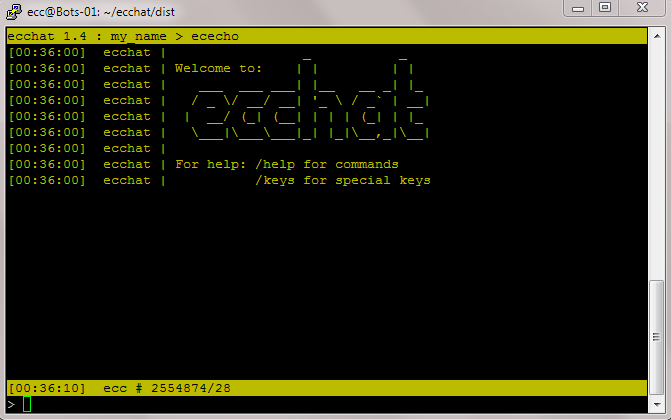
The status bar shows your available node connections with symbol, block height and connection count for each. Initially this will show ecc only.
11 - Enter a short message - ececho will repeat it with a > prefix.
12 - Test sending ecc to ececho with the following command:
/send 1
13 - View the ececho wallet balance, which will only update after the next block is minted:
#BALANCE
14 - View how many unique nodes have communicated with ececho:
#USAGE
15 - Text with a / prefix is a command to ecchat:
/help - lists all / commands
/keys - info on recall, replace, erase, scroll and exit
16 - While you are chatting with ececho, take a note of your routing tag which you'll need to give to someone else wishing to chat with you via ecchat:
/tag
depending on your terminal emulation app, you should be able to copy this to the clipboard. With Cygwin64 Terminal this is done with SHIFT and a left click mouse drag.
Alternatively you can take a screen shot of your routing tag as a QR code:
/qr
17 - To exit ecchat, you may enter either of these commands:
/exit
/quit
or hit ESCAPE.
18 - To have a conversation with another ecchat user, first you need to exchange routing tags using another messenger or email. Then start ecchat:
$ ./ecchat -n my_name -o other_name -t routing_tag_of_other_party
replacing my_name with your short nickname, other_name with your preferred short nick name of the other party and routing_tag_or_other_party with their routing tag.
19 - The first time ecchat is run it creates a file ecchat.conf. You may use this file to add RPC connections to additional crypto nodes running either locally or on remote servers. A comment header explains the format. ecchat 1.4 supports most Bitcoin and Monero derived nodes. For a full list of those known to work please refer to compatibility.md