- 1. Overview
- 1.1 Software Requirements
- 1.2 Issues
- 1.2.1 Memory Requirements
- 1.2.2 SQL Server Connection Error
- 1.2.3 JSZip 3.0 Error
- 1.2.4 BULK INSERT Permission
- 1.2.5 MSSQL Timeout: Request failed to complete in XXX000ms
- 1.2.6 JavaScript heap out of memory
- 1.2.7 No top level shapefile with only one area
- 1.2.8 pgTileMaker or mssqlTileMaker JavaScript heap out of memory
- 1.2.9 Hierarchy Issues
- 1.2.10 SQL Server disk space and memory Issues
- 2. Running the Tile Maker
- 3. TileMaker Source Code
- 4. TileMaker TODO
This document details the loading of the administrative geography data and the geo-coding requirements of the RIF.
The RIF web front end uses leaflet, which requires map tiles; these are squares that follow certain Google Maps conventions:
- Tiles are 256x256 pixels;
- At the outer most zoom level, 0, the entire world can be rendered in a single map tile;
- Each zoom level doubles in both dimensions, so a single tile is replaced by 4 tiles when zooming in. This means that about 22 zoom levels are sufficient for most practical purposes; the RIF uses 0-11;
- The Web Mercator (WGS84, as used by GPS) projection is used, with latitude limits of around 85 degrees. Care needs to be taken during simplification with Northern latitudes in the USA because of the distortions in the Mercator projection (e.g. the size of Greenland); with each pixel being much shorter in length than in latitudes near to the equator.
Leaflet uses de facto OpenStreetMap standard, known as Slippy Map Tilenames or XYZ, follows these and adds more:
- An X and Y numbering scheme; with Z for the zoomlevels;
- PNG images for tiles. In the RIF Leaflet also uses topoJSON tles for the administrative geography.
Background map images are served direct from the source through a REST API, with a URL like http://.../Z/X/Y.png where Z is the zoom level, and X and Y identify the tile.
For example a zoomlevel 8 tile, X=123, Y=82; covering the Irish Sea, Liverpool and the Lancashire and Cumbrian coasts:
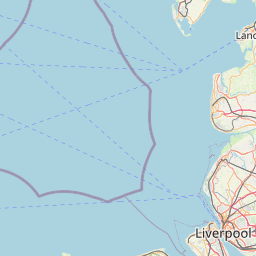
The RIF does NOT cache background maps so on a private air-gapped network you will not get background maps.
The administrative geography uses GeoJSON Layers server by the rifServices REST api. For performance reasons the RIF uses a modified Leaflet.GeoJSONGridLayer originally created by Eric Brelsford. The modification is to use TopoJSON grids to reduce the REST GET JSON size and then internally converts to TopoJSON to GeoJSON for the Leaflet gridlayer. Some experiments have been carried out with local caching and there is a tile viewer program to test this.
The caching code is in the main RIF application but is disabled due to issues with browser support.
The job of the Tile Maker is to process a hierarchy of administrative shapefiles to:
- Generate the TopoJSON tiles required by the RIF and store them in the database;
- Generate the required data tables, scripts and setup data for a RIF administrative geography;
- Provide installer scripts for both Postgres and SQL Server.
Performance:
- SAHSULAND takes about 15 minutes to processing in total.
- USA to county level with only 9 zoomlevels:
- Shapefile conversion and simplification: 115s.
- Database load/clean etc: 1 hour 27 minutes
- Tile manufacture: 5290 tiles in 2 hours 48 minutes About 5 hours in total.
The principal limitation is memory:
- UK Census output area 2011 is 1GB in size and has 227,759 records and 203,930,998 points!
- This requires a machine with 32 or 63G memory.
- A pre-simplification program will be created to reduce the resolution suitably.
- Node.js 8;
- Python 2.7;
- GNU Make (part of Mingw MSYS on Windows) [Optional];
- Postgres 9.3 onwards and/or SQL Server 2012 onwards;
The software has not been tested on Linux or MacOS but should work.
A minimum of 16GB of RAM is required; if you are processing high resolution geographies (e.g. US census block groups or UK census output areas) you will require 32 to 64GB of RAM.
The memory requirement comes from the need to read an entire shapefile, convert each area to GeoJson, and finally progressively simplify the GeoJSON to be suitable for each zoomlevel.
By default the TileMaker runs in only 4GB memory which is not enough for large shapefiles.
In particular see 2.3.3 Handling Large Shapefiles to either reduce the memory requirement or increase the available memory.
Symptom; SQL Severer connect error Error: None of the binaries loaded successfully. Is your node version either >= 0.12.7 or >= 4.2.x or >= 5.1.1 or >= 6.1.0
-
SQL server connect error caused by a version mismatch between the Node.js packages mssql and msnodesqlv8;
C:\Users\phamb\OneDrive\SEER Data\Tile maker USA>node C:\Users\%USERNAME%\Documents\GitHub\rapidInquiryFacility\rifNodeServices\mssqlTileMaker.js -U peter --password XXXXXXXXXXX Created info log file: mssqlTileMaker.log About to connected to SQL server using: { "driver": "msnodesqlv8", "server": "localhost", "options": { "trustedConnection": false, "useUTC": true, "appName": "mssqlTileMaker.js" }, "user": "peter", "password": "XXXXXXXXXXXXXXXXX" } error [mssqlTileMaker:212:mssql_db_connect()] Could not connect to SQL server client using: { "driver": "msnodesqlv8", "server": "localhost", "options": { "trustedConnection": false, "useUTC": true, "appName": "mssqlTileMaker.js" }, "user": "peter", "password": "retep", "port": 1433, "stream": false, "parseJSON": false } Error: None of the binaries loaded successfully. Is your node version either >= 0.12.7 or >= 4.2.x or >= 5.1.1 or >= 6.1.0 -
Check you have Visual Studio 2015/2017 installed; launch it and logon to the Microsoft DEveloper network so the developer license is active;
-
Remove mssql and msnodesqlv8 from package.json;
-
re-run:
npm install msnodesqlv8 --save:C:\Users\phamb\Documents\GitHub\rapidInquiryFacility\rifNodeServices>npm install msnodesqlv8 --save npm WARN optional SKIPPING OPTIONAL DEPENDENCY: fsevents@1.2.4 (node_modules\fsevents): npm WARN notsup SKIPPING OPTIONAL DEPENDENCY: Unsupported platform for fsevents@1.2.4: wanted {"os":"darwin","arch":"any"} (current: {"os":"win32","arch":"x64"}) + msnodesqlv8@0.1.46 updated 1 package in 10.388s -
re-run:
npm install mssql --save:C:\Users\phamb\Documents\GitHub\rapidInquiryFacility\rifNodeServices>npm install mssql --save npm WARN optional SKIPPING OPTIONAL DEPENDENCY: fsevents@1.2.4 (node_modules\fsevents): npm WARN notsup SKIPPING OPTIONAL DEPENDENCY: Unsupported platform for fsevents@1.2.4: wanted {"os":"darwin","arch":"any"} (current: {"os":"win32","arch":"x64"}) + mssql@4.1.0 added 12 packages in 11.196s
The error log forever.err contains:
Error(Error): The constructor with parameters has been removed in JSZip 3.0, please check the upgrade guide.
Stack >>>
Error: The constructor with parameters has been removed in JSZip 3.0, please check the upgrade guide.
    at Object.JSZip (C:\Users\Peter\Documents\GitHub\rapidInquiryFacility\rifNodeServices\node_modules\JSZip\lib\index.js:14:15)
    at zipProcessingSeriesAddStatus1 (C:\Users\Peter\Documents\GitHub\rapidInquiryFacility\rifNodeServices\lib\nodeGeoSpatialServices.js:765:17)
    at addStatusWriteDiagnosticFileRename (C:\Users\Peter\Documents\GitHub\rapidInquiryFacility\rifNodeServices\lib\nodeGeoSpatialServicesCommon.js:923:10)
    at FSReqWrap.oncomplete (fs.js:123:15)<<<

* LOG END ***********************************************************************

C:\Users\Peter\Documents\GitHub\rapidInquiryFacility\rifNodeServices\lib\nodeGeoSpatialServicesCommon.js:932
									throw e;
									^

Error: The constructor with parameters has been removed in JSZip 3.0, please check the upgrade guide.
    at Object.JSZip (C:\Users\Peter\Documents\GitHub\rapidInquiryFacility\rifNodeServices\node_modules\JSZip\lib\index.js:14:15)
    at zipProcessingSeriesAddStatus1 (C:\Users\Peter\Documents\GitHub\rapidInquiryFacility\rifNodeServices\lib\nodeGeoSpatialServices.js:765:17)
    at addStatusWriteDiagnosticFileRename (C:\Users\Peter\Documents\GitHub\rapidInquiryFacility\rifNodeServices\lib\nodeGeoSpatialServicesCommon.js:923:10)
    at FSReqWrap.oncomplete (fs.js:123:15)
Ypou must install a version 2.6.N JSZip: npm install JSZip@2.6.1
If you get:
C:\Users\Peter\Documents\GitHub\rapidInquiryFacility\rifNodeServices>npm install JSZip@2.6.1
RIF40-geospatial@0.0.1 C:\Users\Peter\Documents\GitHub\rapidInquiryFacility\rifNodeServices
`-- jszip@2.6.1  invalid
Chnage the *package.json line from the version 3 JSZip to the 2.6.N version:
"jszip": "^2.6.1",
The code does need to be updated to version 3.
A correct install looks like:
C:\Users\Peter\Documents\GitHub\rapidInquiryFacility\rifNodeServices>npm install JSZip@2.6.1
RIF40-geospatial@0.0.1 C:\Users\Peter\Documents\GitHub\rapidInquiryFacility\rifNodeServices
`-- jszip@2.6.1

npm WARN optional SKIPPING OPTIONAL DEPENDENCY: fsevents@^1.0.0 (node_modules\chokidar\node_modules\fsevents):
npm WARN notsup SKIPPING OPTIONAL DEPENDENCY: Unsupported platform for fsevents@1.2.4: wanted {"os":"darwin","arch":"any"} (current:
 {"os":"win32","arch":"x64"})
SQL Server needs access permission granted to the directories used to BULK INSERT files, the files are not copied from the client to the
server as in the Postgres psql ```\copy` command and the Oracle sqlldr command.
SQL Server needs access to the directories containing the data loaded by the scripts. The simplest way is to allow read/execute access to the local users group (e.g. PH-LAPTOP\Users or USERS depending on your Windows version).
DO NOT TRY TO RUN BULK INSERT FROM NETWORK DRIVES or CLOUD DRIVES (e.g. Google Drive). Use a local directory which SQL Server has access to; e.g. somewhere on the C: drive. Note that SQL Server BULK LOAD behaves deterrently if you logon using Windows authentication (where it will use your credentials to access the files) to using a username and password (where it will use the Server's credentials to access the file).
-- SQL statement 23: Load table from CSV file >>>
BULK INSERT cb_2014_us_county_500k
FROM 'C:\Users\Peter\OneDrive\SEER Data\Tile maker USA/cb_2014_us_county_500k.csv'	-- Note use of pwd; set via -v pwd="%cd%" in the sqlcmd command line
WITH
(
	FORMATFILE = 'C:\Users\Peter\OneDrive\SEER Data\Tile maker USA/mssql_cb_2014_us_county_500k.fmt',		-- Use a format file
	TABLOCK					-- Table lock
);

Msg 4861, Level 16, State 1, Server PH-LAPTOP\SQLEXPRESS, Line 3
Cannot bulk load because the file "C:\Users\Peter\OneDrive\SEER Data\Tile maker USA/cb_2014_us_county_500k.csv" could not be opened. Operating system error code 5(Access is denied.).
Timeout in Node mssql package. Edit mssqlTileMaker.js and set the the requestTomeout in the MSSQL connection config:
	var config = {
		driver: 'msnodesqlv8',
		server: p_hostname,
		requestTimeout: 300000, // 5 mins. Default 15s per SQL statement
		options: {
			trustedConnection: false,
			useUTC: true,
			appName: 'mssqlTileMaker.js',
			encrypt: true
		}
	};
error [events:96:dbErrorHandler()] dbErrorHandler() Error: dbErrorHandler(no callback): Timeout: Request failed to complete in 90000ms
Stack:
RequestError: Timeout: Request failed to complete in 90000ms
at Request.tds.Request.err [as userCallback] (c:\Users\Peter\Documents\GitHub\rapidInquiryFacility\rifNodeServices\node_modules\mssql\lib\tedious.js:578:19)
at Request._this.callback (c:\Users\Peter\Documents\GitHub\rapidInquiryFacility\rifNodeServices\node_modules\tedious\lib\request.js:60:27)
at Connection.message (c:\Users\Peter\Documents\GitHub\rapidInquiryFacility\rifNodeServices\node_modules\tedious\lib\connection.js:1936:24)
at Connection.dispatchEvent (c:\Users\Peter\Documents\GitHub\rapidInquiryFacility\rifNodeServices\node_modules\tedious\lib\connection.js:992:38)
at MessageIO.<anonymous> (c:\Users\Peter\Documents\GitHub\rapidInquiryFacility\rifNodeServices\node_modules\tedious\lib\connection.js:886:18)
at emitNone (events.js:86:13)
at MessageIO.emit (events.js:185:7)
at ReadablePacketStream.<anonymous> (c:\Users\Peter\Documents\GitHub\rapidInquiryFacility\rifNodeServices\node_modules\tedious\lib\message-io.js:102:16)
at emitOne (events.js:96:13)
at ReadablePacketStream.emit (events.js:188:7)
The TileMaker server log forever.log contains:
FATAL ERROR: CALL_AND_RETRY_LAST Allocation failed - JavaScript heap out of memory
 1: node_module_register
 2: v8::internal::FatalProcessOutOfMemory
 3: v8::internal::FatalProcessOutOfMemory
 4: v8::internal::Factory::NewRawTwoByteString
 5: v8::internal::Smi::SmiPrint
 6: v8::internal::StackGuard::HandleInterrupts
 7: v8::String::WriteUtf8
 8: v8_inspector::V8InspectorClient::currentTimeMS
 9: node::Buffer::New
10: node::Buffer::New
11: v8::internal::wasm::SignatureMap::Find
12: v8::internal::Builtins::CallableFor
13: v8::internal::Builtins::CallableFor
14: v8::internal::Builtins::CallableFor
15: 00000291C30043C1
By default the TileMaker runs in only 4GB memory which is not enough for large shapefiles. See 2.3.3 Handling Large Shapefiles to either reduce the memory requirement or increase the available memory.
The top level shapefile must have only one area:
Check that minimum resolution shapefile has only 1 area

geolevel 1/5 shapefile: CNTRY2011.shp has >1 (3) area)

Stack:

setupLayers@http://127.0.0.1:3000/nodeGeoSpatialFrontEnd.js:1169:5
displayResponse@http://127.0.0.1:3000/nodeGeoSpatialFrontEnd.js:1304:26
getShpConvertTopoJSON@http://127.0.0.1:3000/nodeGeoSpatialFrontEnd.js:1511:4
fire@http://127.0.0.1:3000/jquery-2.2.3.js:3187:11
fireWith@http://127.0.0.1:3000/jquery-2.2.3.js:3317:7
done@http://127.0.0.1:3000/jquery-2.2.3.js:8785:5
callback/<@http://127.0.0.1:3000/jquery-2.2.3.js:9151:9
Symptom:
node C:\Users\%USERNAME%\Documents\GitHub\rapidInquiryFacility\rifNodeServices\pgTileMaker.js --database sahsuland_dev -V
Created info log file: pgTileMaker.log
XML Directory C:/Users/phamb/AppData/Local/Temp/shpConvert/c01a6d67-dd9d-4380-9446-21470eafdcfd is readable
Parsed XML config file: C:/Users/phamb/AppData/Local/Temp/shpConvert/c01a6d67-dd9d-4380-9446-21470eafdcfd/geoDataLoader.xml
Connected to Postgres using: postgres://peter@localhost:5432/sahsuland_dev?application_name=pgTileMaker; log level: info
Set Postgres search path to: "$user",rif40, public, topology, gis, pop, rif_data, data_load, rif40_sql_pkg, rif_studies, rif40_partitions
SET client_encoding='UTF-8'
Creating hierarchy CSV file: C:/Users/phamb/AppData/Local/Temp/shpConvert/c01a6d67-dd9d-4380-9446-21470eafdcfd/data/pg_hierarchy_ews2011.csv for EWS2011: England, Wales and Scotland 2011 census Administatrive geography
Creating lookup CSV file: C:/Users/phamb/AppData/Local/Temp/shpConvert/c01a6d67-dd9d-4380-9446-21470eafdcfd/data/pg_lookup_scntry2011.csv for EWS2011: England, Wales and Scotland 2011 census Administatrive geography
Creating lookup CSV file: C:/Users/phamb/AppData/Local/Temp/shpConvert/c01a6d67-dd9d-4380-9446-21470eafdcfd/data/pg_lookup_cntry2011.csv for EWS2011: England, Wales and Scotland 2011 census Administatrive geography
Creating lookup CSV file: C:/Users/phamb/AppData/Local/Temp/shpConvert/c01a6d67-dd9d-4380-9446-21470eafdcfd/data/pg_lookup_gor2011.csv for EWS2011: England, Wales and Scotland 2011 census Administatrive geography
Creating lookup CSV file: C:/Users/phamb/AppData/Local/Temp/shpConvert/c01a6d67-dd9d-4380-9446-21470eafdcfd/data/pg_lookup_ladua2011.csv for EWS2011: England, Wales and Scotland 2011 census Administatrive geography
Creating lookup CSV file: C:/Users/phamb/AppData/Local/Temp/shpConvert/c01a6d67-dd9d-4380-9446-21470eafdcfd/data/pg_lookup_msoa2011.csv for EWS2011: England, Wales and Scotland 2011 census Administatrive geography
Creating lookup CSV file: C:/Users/phamb/AppData/Local/Temp/shpConvert/c01a6d67-dd9d-4380-9446-21470eafdcfd/data/pg_lookup_lsoa2011.csv for EWS2011: England, Wales and Scotland 2011 census Administatrive geography
Creating lookup CSV file: C:/Users/phamb/AppData/Local/Temp/shpConvert/c01a6d67-dd9d-4380-9446-21470eafdcfd/data/pg_lookup_coa2011.csv for EWS2011: England, Wales and Scotland 2011 census Administatrive geography
Creating adjacency CSV file: C:/Users/phamb/AppData/Local/Temp/shpConvert/c01a6d67-dd9d-4380-9446-21470eafdcfd/data/pg_adjacency_ews2011.csv for EWS2011: England, Wales and Scotland 2011 census Administatrive geography
Creating geometry CSV file: C:/Users/phamb/AppData/Local/Temp/shpConvert/c01a6d67-dd9d-4380-9446-21470eafdcfd/data/pg_geometry_ews2011.csv for EWS2011: England, Wales and Scotland 2011 census Administatrive geography

<--- Last few GCs --->

[17648:00000123C835AD90]    79285 ms: Mark-sweep 1565.0 (1629.7) -> 1565.0 (1630.7) MB, 114.9 / 0.0 ms  allocation failure GC in old space requested
[17648:00000123C835AD90]    79397 ms: Mark-sweep 1565.0 (1630.7) -> 1564.9 (1598.2) MB, 112.0 / 0.0 ms  last resort GC in old space requested
[17648:00000123C835AD90]    79511 ms: Mark-sweep 1564.9 (1598.2) -> 1564.9 (1598.2) MB, 113.1 / 0.0 ms  last resort GC in old space requested


<--- JS stacktrace --->

==== JS stack trace =========================================

Security context: 000001BA0F8A57C1 <JSObject>
    1: /* anonymous */ [C:\Users\phamb\Documents\GitHub\rapidInquiryFacility\rifNodeServices\node_modules\pg\lib\client.js:~107] [pc=000003501E21C756](this=00000373014B8E71 <Connection map = 0000031F751CEF99>,msg=00000237B13DF6D1 <DataRowMessage map = 00000189A6D84E59>)
    2: emitOne(aka emitOne) [events.js:~114] [pc=000003501E21541C](this=000000AC5A9022D1 <undefined>,handler=00000373014B8DE1...

FATAL ERROR: CALL_AND_RETRY_LAST Allocation failed - JavaScript heap out of memory
 1: node_module_register
 2: v8::internal::FatalProcessOutOfMemory
 3: v8::internal::FatalProcessOutOfMemory
 4: v8::internal::Factory::NewUninitializedFixedArray
 5: v8::internal::WasmDebugInfo::SetupForTesting
 6: v8::internal::interpreter::BytecodeArrayRandomIterator::UpdateOffsetFromIndex
 7: 000003501E0843C1
Solution: add --max-old-space-size=<max node memory in MB> flag, e.g.
node --max-old-space-size=4096 C:\Users\%USERNAME%\Documents\GitHub\rapidInquiryFacility\rifNodeServices\pgTileMaker.js --database sahsuland_dev -V
E.g. Postgres processing failed after 2:26 (hours) at statement 421/601 hierarchy checks (check_intersections.sql):
psql:pg_EWS2011.sql:6524: WARNING:  Geography: EWS2011 geolevel 7: [coa2011] spurious additional codes: 2
...
psql:pg_EWS2011.sql:6524: INFO:  Geography: EWS2011 geolevel 1: [scntry2011] no multiple hierarchy codes
psql:pg_EWS2011.sql:6524: INFO:  Geography: EWS2011 geolevel 2: [cntry2011] no multiple hierarchy codes
psql:pg_EWS2011.sql:6524: INFO:  Geography: EWS2011 geolevel 3: [gor2011] no multiple hierarchy codes
psql:pg_EWS2011.sql:6524: INFO:  Geography: EWS2011 geolevel 4: [ladua2011] no multiple hierarchy codes
psql:pg_EWS2011.sql:6524: INFO:  Geography: EWS2011 geolevel 5: [msoa2011] no multiple hierarchy codes
psql:pg_EWS2011.sql:6524: INFO:  Geography: EWS2011 geolevel 6: [lsoa2011] no multiple hierarchy codes
psql:pg_EWS2011.sql:6524: ERROR:  Geography: EWS2011 codes check 0 missing, 1 spurious additional, 0 hierarchy fails
CONTEXT:  PL/pgSQL function inline_code_block line 41 at RAISE
Time: 1714.103 ms
The transaction BEGIN/END statements had already been removed from pg_EWS2011.sql so that the previous objects up to and including the hierarchy table were committed.
Hierarchy insert took 83 minutes. Two rows are missing from the hierarchy are:
sahsuland_dev=> SELECT coa2011 FROM lookup_coa2011
sahsuland_dev->                 EXCEPT
sahsuland_dev->                 SELECT coa2011 FROM hierarchy_ews2011;
  coa2011
-----------
 W00010143
 W00010161
(2 rows)
These are in Cardiff and are small:
SELECT coa2011, lsoa11_1, lad11nm, msoa11nm, area_km2, geographic_centroid_wkt, ST_ASText(ST_Transform(geographic_centroid, 27700)) AS osgb
FROM coa2011
WHERE coa2011 IN ('W00010143', 'W00010161');
  coa2011  | lsoa11_1  | lad11nm |  msoa11nm   |    area_km2     |            geographic_centroid_wkt            |                   osgb
-----------+-----------+---------+-------------+-----------------+-----------------------------------------------+------------------------------------------
 W00010161 | W01001945 | Cardiff | Cardiff 048 | 0.0147534816105 | POINT (-3.1781555521064697 51.45499419539898) | POINT(318235.967585802 173549.01243282)
 W00010143 | W01001945 | Cardiff | Cardiff 048 |  0.009281476807 | POINT (-3.1768272276630127 51.45381197706475) | POINT(318326.146578801 173416.053359773)
(2 rows)
That COA2011 only is affected means that the upper intersections are fine.
The hierarchy check failure may have been caused by oversimplification of higher layers (SCNTRY, CNTRY) leading to the exclusion to the two census output areas.:
- CNTRY2011 in purple;
- GOR2011 (not oversimplified) in green;
- COA2001 in hashing;
 To be in the hierarchy the intersection code insert_hierarchy.sql selects the intersection with the largest intersection by area for each (higher resolution). This
eliminates duplicates and picks the most likely intersection on the basis of area. There are two possible reasons for this failure:
To be in the hierarchy the intersection code insert_hierarchy.sql selects the intersection with the largest intersection by area for each (higher resolution). This
eliminates duplicates and picks the most likely intersection on the basis of area. There are two possible reasons for this failure:
- An intersection was not found. Visually this appears to be the case;
- The area is zero. This seems unlikely and would need to be tested in SQL.
The following SQL was derived from code generated by insert_hierarchy.sql:
WITH x12 AS ( /* Subqueries x12 ... x67: intersection aggregate geometries starting from the lowest resolution.
	       Created using N-1 geoevels cross joins rather than 1 to minimise cross join size and hence improve performance.
	       Calculate the area of the higher resolution geolevel and the area of the intersected area */
SELECT a1.areaid AS scntry2011, a2.areaid AS cntry2011,
       ST_Area(a2.geom_9) AS a2_area,
       ST_Area(ST_Intersection(a1.geom_9, a2.geom_9)) AS a12_area
  FROM scntry2011 a1 CROSS JOIN cntry2011 a2
 WHERE ST_Intersects(a1.geom_9, a2.geom_9)
), x23 AS ( /* Subqueries x23 ... x67: intersection aggregate geometries starting from the lowest resolution.
	       Created using N-1 geoevels cross joins rather than 1 to minimise cross join size and hence improve performance.
	       Calculate the area of the higher resolution geolevel and the area of the intersected area */
SELECT a2.areaid AS cntry2011, a3.areaid AS gor2011,
       ST_Area(a3.geom_9) AS a3_area,
       ST_Area(ST_Intersection(a2.geom_9, a3.geom_9)) AS a23_area
  FROM cntry2011 a2 CROSS JOIN gor2011 a3
 WHERE ST_Intersects(a2.geom_9, a3.geom_9)
), x34 AS ( /* Subqueries x34 ... x67: intersection aggregate geometries starting from the lowest resolution.
	       Created using N-1 geoevels cross joins rather than 1 to minimise cross join size and hence improve performance.
	       Calculate the area of the higher resolution geolevel and the area of the intersected area */
SELECT a3.areaid AS gor2011, a4.areaid AS ladua2011,
       ST_Area(a4.geom_9) AS a4_area,
       ST_Area(ST_Intersection(a3.geom_9, a4.geom_9)) AS a34_area
  FROM gor2011 a3 CROSS JOIN ladua2011 a4
 WHERE ST_Intersects(a3.geom_9, a4.geom_9)
), x45 AS ( /* Subqueries x45 ... x67: intersection aggregate geometries starting from the lowest resolution.
	       Created using N-1 geoevels cross joins rather than 1 to minimise cross join size and hence improve performance.
	       Calculate the area of the higher resolution geolevel and the area of the intersected area */
SELECT a4.areaid AS ladua2011, a5.areaid AS msoa2011,
       ST_Area(a5.geom_9) AS a5_area,
       ST_Area(ST_Intersection(a4.geom_9, a5.geom_9)) AS a45_area
  FROM ladua2011 a4 CROSS JOIN msoa2011 a5
 WHERE ST_Intersects(a4.geom_9, a5.geom_9)
), x56 AS ( /* Subqueries x56 ... x67: intersection aggregate geometries starting from the lowest resolution.
	       Created using N-1 geoevels cross joins rather than 1 to minimise cross join size and hence improve performance.
	       Calculate the area of the higher resolution geolevel and the area of the intersected area */
SELECT a5.areaid AS msoa2011, a6.areaid AS lsoa2011,
       ST_Area(a6.geom_9) AS a6_area,
       ST_Area(ST_Intersection(a5.geom_9, a6.geom_9)) AS a56_area
  FROM msoa2011 a5 CROSS JOIN lsoa2011 a6
 WHERE ST_Intersects(a5.geom_9, a6.geom_9)
), x67 AS ( /* Subqueries x67 ... x67: intersection aggregate geometries starting from the lowest resolution.
	       Created using N-1 geoevels cross joins rather than 1 to minimise cross join size and hence improve performance.
	       Calculate the area of the higher resolution geolevel and the area of the intersected area */
SELECT a6.areaid AS lsoa2011, a7.areaid AS coa2011,
       ST_Area(a7.geom_9) AS a7_area,
       ST_Area(ST_Intersection(a6.geom_9, a7.geom_9)) AS a67_area
  FROM lsoa2011 a6 CROSS JOIN coa2011 a7
 WHERE ST_Intersects(a6.geom_9, a7.geom_9)
   AND a7.coa2011 IN ('W00010143','W00010161')
)
SELECT x12.scntry2011,
       x12.cntry2011,
       x23.gor2011,
       x34.ladua2011,
       x45.msoa2011,
       x56.lsoa2011,
       x67.coa2011,
       CASE WHEN x12.a2_area > 0 THEN x12.a12_area/x12.a2_area ELSE NULL END test12,
       MAX(x12.a12_area/x12.a2_area) OVER (PARTITION BY x12.cntry2011) AS max12,
       CASE WHEN x23.a3_area > 0 THEN x23.a23_area/x23.a3_area ELSE NULL END test23,
       MAX(x23.a23_area/x23.a3_area) OVER (PARTITION BY x23.gor2011) AS max23,
       CASE WHEN x34.a4_area > 0 THEN x34.a34_area/x34.a4_area ELSE NULL END test34,
       MAX(x34.a34_area/x34.a4_area) OVER (PARTITION BY x34.ladua2011) AS max34,
       CASE WHEN x45.a5_area > 0 THEN x45.a45_area/x45.a5_area ELSE NULL END test45,
       MAX(x45.a45_area/x45.a5_area) OVER (PARTITION BY x45.msoa2011) AS max45,
       CASE WHEN x56.a6_area > 0 THEN x56.a56_area/x56.a6_area ELSE NULL END test56,
       MAX(x56.a56_area/x56.a6_area) OVER (PARTITION BY x56.lsoa2011) AS max56,
       CASE WHEN x67.a7_area > 0 THEN x67.a67_area/x67.a7_area ELSE NULL END test67,
       MAX(x67.a67_area/x67.a7_area) OVER (PARTITION BY x67.coa2011) AS max67
  FROM x12, x23, x34, x45, x56, x67
 WHERE x12.cntry2011 = x23.cntry2011
   AND x23.gor2011 = x34.gor2011
   AND x34.ladua2011 = x45.ladua2011
   AND x45.msoa2011 = x56.msoa2011
   AND x56.lsoa2011 = x67.lsoa2011
 ORDER BY 1, 2, 3, 4, 5, 6, 7;
This, unsurprisingly, returned no rows, suggesting the problem is with the intersection and not the area:
  scntry2011 | cntry2011 | gor2011 | ladua2011 | msoa2011 | lsoa2011 | coa2011 | test12 | max12 | test23 | max23 | test34 | max34 | test45 | max45 | test56 | max56 | test67 | max67
 ------------+-----------+---------+-----------+----------+----------+---------+--------+-------+--------+-------+--------+-------+--------+-------+--------+-------+--------+-------
 (0 rows)
This in turn implies the problem may be with the COA2011, LSOA2011 intersection, common table expression: x67; as shown by the below map. The records will be manually inserted to fix the problem.

The following Postgres SQL was added to pg_EWS2011.sql immediately after the hierarchy insert.
WITH a AS (
	SELECT DISTINCT scntry2011,cntry2011, gor2011, ladua2011, msoa2011, lsoa2011
	  FROM hierarchy_ews2011
	 WHERE lsoa2011 = 'W01001945' /* Where it should be */
), b AS (
	SELECT coa2011, lsoa11_1
      FROM coa2011
     WHERE coa2011 IN ('W00010143', 'W00010161')
)
INSERT INTO hierarchy_ews2011 (scntry2011, cntry2011, gor2011, ladua2011, msoa2011, lsoa2011, coa2011)
SELECT a.*, b.coa2011
  FROM a, b
 WHERE a.lsoa2011 = b.lsoa11_1
   AND b.coa2011 NOT IN (SELECT coa2011 FROM hierarchy_ews2011);
The SQL Server SQL code will be the same.
This can also be added to geoDataLoader.xml just below the top level <geoDataLoader>:
  <hierarchy_post_processing_sql>
    <![CDATA[
WITH a AS (
	SELECT DISTINCT scntry2011,cntry2011, gor2011, ladua2011, msoa2011, lsoa2011
	  FROM hierarchy_ews2011
	 WHERE lsoa2011 = 'W01001945' /* Where it should be */
), b AS (
	SELECT coa2011, lsoa11_1
      FROM coa2011
     WHERE coa2011 IN ('W00010143', 'W00010161') /* Missing */
)
INSERT INTO hierarchy_ews2011 (scntry2011, cntry2011, gor2011, ladua2011, msoa2011, lsoa2011, coa2011)
SELECT a.*, b.coa2011
  FROM a, b
 WHERE a.lsoa2011 = b.lsoa11_1
   AND b.coa2011 NOT IN (SELECT coa2011 FROM hierarchy_ews2011)
   ]]>
  </hierarchy_post_processing_sql>
This SQL will then be inserted just after insert_hierarchy.sql and before the checks. The SQL should be in a CDATA block and should NOT have a terminating comma.
Large database post processing can easily fill up the database and exhaust the memory. SQL Server does not release memory willingly and database compaction (shrinking) has to be done manually.
- If the database runs out of space; shrink it: https://docs.microsoft.com/en-us/sql/relational-databases/databases/shrink-a-database?view=sql-server-2017
The app domain with specified version id (2) was unloaded due to memory pressure and could not be found- Stop and start SQL Server to release memory
It is advised to do this before any big run.
Install the required Node.js modules. Change directory into the rapidInquiryFacility\rifNodeServices:
cd C:\Users\phamb\Documents\GitHub\rapidInquiryFacility\rifNodeServices
make
If you do not have make, type:
mkdir node_modules/pg-native
npm install --save pg-native
npm install JSZip@2.6.0
npm install --save request JSZip turf geojson2svg clone object-sizeof form-data magic-globals helmet pg pg-native mssql msnodesqlv8 srs xml2js async reproject mapshaper forever shapefile node-uuid chroma-js jszip express morgan topojson request-debug cjson wellknown svg2png svg2png-many connect-busboy winston
To update the modules type npm update --save.
The tile Maker is a web application, so you need to start the server. The Makefile has a number of targets to help with this:
- all: Build modules, run the complete database test harness
- modules: Build required Node.js modules using npm install --save to update dependencies in package.json
- clean: clean Node modules; avoid Windows path length stupidities with rimraf
- install: No install target (dummy)
- server-start: start server
- server-restart: restart server
- server-restart-debug: restart server with debugging
- server-status: status of running server
- server-stop: stop server
- server-log: display server logs
- test\make_bighelloworld.js: create >2G data\bighelloworld.js
- update: Update required Node.js modules using npm install --save to update dependencies in package.json
- test: Run the test harness
- help: Display makefile help, rifNode.js help
Again, these commands can be run by hand;
- Start:
rm -f forever.err forever.log node node_modules\forever\bin\forever start -c "node --max-old-space-size=4096 --expose-gc" -verbose -l forever.log -e forever.err -o forever.log --append ./expressServer.js - Stop:
node node_modules\forever\bin\forever stop -verbose -l forever.log -e forever.err -o forever.log --append ./expressServer.js - Restart:
rm -f forever.err forever.log
node node_modules\forever\bin\forever stop -verbose -l forever.log -e forever.err -o forever.log --append ./expressServer.js
node node_modules\forever\bin\forever start -c "node --max-old-space-size=4096 --expose-gc" -verbose -l forever.log -e forever.err -o forever.log --append ./expressServer.js
Stop example:
C:\Users\phamb\Documents\GitHub\rapidInquiryFacility\rifNodeServices>make server-start
Debug level set to default: 1
node_modules\\forever\\bin\\forever start -c "node --max-old-space-size=4096 --expose-gc" -verbose -l forever.log -e forever.err -o forever.log --append ./expressServer.js
warn:    --minUptime not set. Defaulting to: 1000ms
warn:    --spinSleepTime not set. Your script will exit if it does not stay up for at least 1000ms
info:    Forever processing file: ./expressServer.js
Stop example:
C:\Users\phamb\Documents\GitHub\rapidInquiryFacility\rifNodeServices>  node node_modules\forever\bin\forever stop -verbose -l forever.log -e forever.err -o forever.log --append ./expressServer.js
info:    Forever stopped process:
    uid  command                                    script                                                                                forever pid   id logfile                             uptime
[0] b_rz node --max-old-space-size=4096 --expose-gc C:\Users\phamb\Documents\GitHub\rapidInquiryFacility\rifNodeServices\expressServer.js 37284   33616    C:\Users\phamb\.forever\forever.log 0:0:9:31.853
Finally, start the tile maker application in a browser http://127.0.0.1:3000/tile-maker.html

The following browsers have been tested:
- Chrome;
- Mozilla Firefox [recommended as it handles large memory requirements well];
- Internet Explorer 11 [not recommended as it is very bad at handling large memory requirements];
- Microsoft Edge
GUI phase:
- The tile maker web application is used to upload and convert shapefiles and simplifies the GeoJSON geometry. The web application generates scripts and the tile maker configuration file: geoDataLoader.xml;
- The user then downloads the processed data from server;
GUI phase then proceeds to script phase:
- Run a SQL script. This loads the processed CSV data into the database (both Postgres and SQL Server are supported). The data is then cleaned and processed by the script into geospatial data tables, data for tiles and the hierarchy and lookup tables needed by the RIF;
- A tile manufacture node script is then run. This makes the topoJSON tiles; dumps geospatial table data to CSV files for the load scripts.
- The RIF production load SQL script can now be run. This script loads and configure the geospatial data into your RIF database;
- You can view the tiles using the tile viewer application.
The first load/clean/setup SQL script and the tile maker will be integrated into the web services at a later date. All the processing will then be in the front end and this leaves the user only needing to install the processed data into the database.
Processing concepts:
- Geography: The name of an administrative geography; e.g. USA_2014, EW_2001 (the 2011 census for England and Wales);
- Geolevel: The name of a level in the hierarchy of shapefiles that make up the geography;
- Area ID: A code given to an area ID by the administrative authority (e.g. ONS for the 2011 Census);
- Area Name: A name corresponding to an area ID.
The tile maker web application is used to:
-
Upload a set of shapefiles (see next section for format), this optionally contains the tile maker configuration file: geoDataLoader.xml. The field names must be in upper case. For first run through setup:
- Enter a geography name and description;
- For each administrative geography starting from the highest resolution:
- Enter a description;
- Select an Area_ID from the list of features in the shapefile. This will be the name of column used throughout the administrative geography and must be distinct;
- Enter a description for the Area_id;
- Select an Area_Name from the list of features in the shapefile;
- Enter a description for the Area_Name;
- When setup the user presses the Upload file(s) button. You then get a lot of processing messages.
The descriptions may be pre-entered for you if you have an ESRI extended attributes file (.shp.ea.iso.xml)

So as a worked example for the United States to county level:
- Geography name: USA_2014;
- Description: US 2014 Census geography to county level;
- Shapefile: cb_2014_us_nation_5m.shp:
- Description: The nation at a scale of 1:5,000,000;
- Area_ID: GEOID - Nation identifier;
- Area_Name: NAME - Nation name;
- Shapefile: cb_2014_us_state_500k.shp:
- Description: The State at a scale of 1:500,000;
- Area_ID: STATENS - Current state Geographic Names Information System (GNIS) code;
- Area_Name: NAME - Current State name;
- Shapefile: cb_2014_us_county_500k.shp:
- Description: The County at a scale of 1:500,000;
- Area_ID: COUNTYNS - Current county Geographic Names Information System (GNIS) code;
- Area_Name: NAME - Current county name;

Note that you can also change:
- The quantization. To be able to simplify the geoJSON the data must be quantized. The default is 1:1,000,000. This means that the smallest value is 1 millionth of the largest value. You will need to increase this quantization to 1:10,000,000 or 1:100,000,000 if you use more than 11 zoom levels or you cover are very large area. Quantization is applied on a per shapefile basis so there is no potential for slivers between areas. However, if the shapefiles are not on the same scale (as in the US data) then you will see differences between the national data at 1:5,000,000 and the state and county data at 1:500,000;
- The simplification factor. The tile maker uses Visvalingam algorithm Line generalisation by repeated elimination of the smallest area; Visvalingam, Maheswari; Whyatt, J. D. (James Duncan)Cartography -- Data processing; Computer science; July 1992 This is superior to the Ramer–Douglas–Peucker algorithm generally leaving no "cocked hat" artefacts. The effect of this parameter can be seen at Mike Bostock's Line Simplification Example Set a low value (e.g. 0.3) will result in modern art (i.e. triangles). Generally it needs to be increased slightly from the default (0.75) for large areas and high resolutions to improve quality. This is especially true if you have high latitudes in your map and the mercator distortions are greater;
- Maximum zoomlevel. The default is 11; reducing to 9 will reduce the processing time by a factor of 16. Every increase quadruples processing time. !1 gives good quality even with fine census tracts/output areas.
- Enables more diagnostics in the log
The web application then:
- Converts the shapefiles to first GeoJSON the TopoJSON format in the WGS84 projection;
- Simplifies the GeoJSON geometry using the Visvalingam algorithm;
- Generates SQL scripts and the tile maker configuration file: geoDataLoader.xml;
Informative message appear at the bottom of the screen:

Tile maker processing messages are also found in the forever.err log, e.g:
Processed zip file 1: SAHSULAND.zip; size: 6.73MB; added: 33 file(s)SAHSU_GRD_Level4: simplified topojson for zoomlevel: 7Created database load scripts: pg_SAHSULAND.sql and mssql_SAHSULAND.sql
Finally a map is displayed of the adminstrative geography:

-
The user then downloads the processed data from server using the two download buttons in the shapefile selector tab. The *Download configuration" button returns an XML file e.g. shpConvertGetConfig_66d8a532-bb2c-4304-8e2b-ffde330b88fa.xml; this is the geoDataLoader.xml for the run.
The Download processed files button is currently not worked ans the underlying ZIP file is NOT implemented and it will produce an error:
* LOG START *********************************************************************

Fri Jun 01 2018 17:25:23 GMT+0100 (GMT Daylight Time)
[httpErrorResponse:143; function: httpErrorResponseAddStatusCallback();
Url: /shpConvertGetResults.zip?uuidV1=1dca95fe-7f68-4edc-9bc6-56dc76130920; ip: ::ffff:127.0.0.1]
httpErrorResponse sent; size: 532 bytes:
Output: {"error":"ENOENT: no such file or directory, stat 'C:\\Users\\Peter\\AppData\\Local\\Temp\\shpConvert\\1dca95fe-7f68-4edc-9bc6-56dc76130920\\geoDataLoader.zip'","no_files":0,"field_errors":0,"file_errors":0,"file_list":[],"message":"shpConvertGetResults(): \nresults ZIP file: C:/Users/Peter/AppData/Local/Temp/shpConvert/1dca95fe-7f68-4edc-9bc6-56dc76130920/geoDataLoader.zip does not exist","diagnostic":"\n\nIn: shpConvertGetResults()","fields":{"uuidV1":"1dca95fe-7f68-4edc-9bc6-56dc76130920","xmlFileName":"geoDataLoader.zip"}}

No errors

* LOG END ***********************************************************************
The files cab be found in your TMP directory, in Windows: C:\Users<Windows user>\AppData\Local\Temp\shpConvert<unique file name>
e.g.
C:\Users\Peter\AppData\Local\Temp\shpConvert\66d8a532-bb2c-4304-8e2b-ffde330b88faThe structure of archive is:
-
Data directory contains the Postgres and SQL Server scripts and data. These are named:
- pg_/mssql_<Geography>.sql - load for tile processing;
- rif_pg_/mssql_<Geography>.sql - production load script;
- <Geolevel>.csv - geospatial data;
- mssql_sahsu_<Geolevel>.fmt - SQL Server bulk load format;
E.g.
mssql_SAHSULAND.sql;mssql_sahsu_grd_level1.fmt;mssql_sahsu_grd_level2.fmt;mssql_sahsu_grd_level3.fmt;mssql_sahsu_grd_level4.fmt;pg_SAHSULAND.sql;rif_mssql_SAHSULAND.sql;rif_pg_SAHSULAND.sql;SAHSU_GRD_Level1.csv;SAHSU_GRD_Level2.csv;SAHSU_GRD_Level3.csv;SAHSU_GRD_Level4.csv;
-
<Shapefile directory>: contains the shapefile data. One per geolevel;
-
<Geography> directory: contains the input data. E.g SASULAND.zip;
-
diagnostics.log: the log trace;
-
geoDataLoader.xml: configuration file;
-
response.json.N: internal JSON status at stages 1 to 3 of the processing;
-
status.json: processing statii in JSON format.
-


The best approach is to have each administrative geography in your hierarchy as single ZIP file containing a set of shapefiles. The tile maker requires two or more shapefiles with:
- A shapefile (.shp). This contains the geometric data in a proprietary ESRI format;
- dBASE III/IV file (.dbf). The contains the attributes records for each area in a dBASE table;
- An ESRI projection file (.prj). You must have a projection file, use: http://spatialreference.org/ to search for it.
Using OSGB as the search term returns the UK national grid http://spatialreference.org/ref/epsg/4277/. You
can then download the relevant .prj file. This actually only contains the ESRI WKT (wellknown text):
GEOGCS["OSGB 1936",DATUM["D_OSGB_1936",SPHEROID["Airy_1830",6377563.396,299.3249646]],PRIMEM["Greenwich",0],UNIT["Degree",0.017453292519943295]]
There is a one-to-one relationship between geometry and attributes, which is based on record number. Attribute records in the dBASE file must be in the same order as records in the main file.
Optional files:
- Tile maker configuration file: geoDataLoader.xml. This contains the setup for your hierarchy and can be downloaded after your run;
- ESRI extended attributes XML file for a shapefile (.shp.ea.iso.xml). The contains principally the names of the attributes and their description.
Other files not required by the tile Maker:
- .shx — The index file that stores the index of the feature geometry; only required by ARCGIS;
- .sbn and .sbx — The files that store the spatial index of the features;
- .fbn and .fbx — The files that store the spatial index of the features for shapefiles that are read-only;
- .ain and .aih — The files that store the attribute index of the active fields in a table or a theme's attribute table;
- .atx — An .atx file is created for each shapefile or dBASE attribute index created in ArcCatalog. ArcView GIS 3.x attribute indexes for shapefiles and dBASE files are not used by ArcGIS. A new attribute indexing model has been developed for shapefiles and dBASE files;
- .ixs — Geocoding index for read/write shapefiles;
- .mxs — Geocoding index for read/write shapefiles (ODB format);
- .cpg — An optional file that can be used to specify the codepage for identifying the character-set to be used.
The usual layout for the tilemaker ZIP file is:
- geoDataLoader.xml [not needed first time around; generated by the tile maker web application]
- Directory containing the shapefiles. These may be contained in sub-directories:

- The shapefiles themselves:

- The shapefiles themselves:


This allows the tile maker runs to be re-produced exactly.
Make sure you:
- Follow the ESRI naming convention exactly;
- Do NOT use the same file name in multiple sub-directories or you will get:
Unable to process list of filess Duplicate file: sahsu_grd_level1.dbf; shape file: sahsu_grd_level1.shp already processed - Have a top level shapefile with only one area;
- Do not add extra files other than those specified here. For example a Windows batch script used to pre process the shapefiles will cause an error;
- Follow the Shapefile Naming Requirements.
The AreaID field will be the name of column used throughout the administrative geography and must be:
- Distinct between shapefiles. DO NOT call them all area_id or geo_code;
- In upper case. Using lower case names will result in a crash!
- Do not add files not defined here to the ZIP file. This will cause:
FAIL Shapefile[7/7/tileMaker]:
tileMaker.bat is missing a shapefile/DBF file/Projection file
See the 2.4.3 Renaming fields in a shapefile example below.
The file name of the ZIP file is the code for the geography. This can be changed in the front end.
Large shapefiles are those bigger than 500MB in size or with more than 100,000 records. The England, Wales and Scotland 2011 census has census output area as it highest resolution with 227,759 feature and is 1.04GB in size. Pre-processing to reduce the shapefile size by 80% reduces this to 240MB with acceptable loss in quality. The maximum zoomlevel can easily be set to 9, this removes two simplification passes with no reduction in overall quality. This will also speed up the SQL post processing by a factor of 16.
In the England, Wales and Scotland 2011 census there a four further levels with increasing administrative boundary size to (Government office) region; and a sixth highest level of country.
A key factor is visualizing a suitable amount of initial simplification using the mapshaper GUI, see: pre processing shapefiles:
-
England Wales and Scotland at Census Output area, unsimplified. The orange lines and points are polygon errors (line intersections):

-
Simplified by 50%:

-
Simplified by 80%:

-
Simplified by 90%:

-
Simplified by 99.999%:


These leads to the following conclusions:
- 99.999% simplification is far too much as the shapes are starting to break down;
- 50% simplification is still very high quality with little visible loss of information at the scales the RIF maps at;
- 80% simplification is acceptable, there is some visible loss of information in urban areas, suitable for most RIF users;
- 90% simplification is borderline, there is visible loss of information in urban areas. Suitable for regional or state boundaries provided they are not too small;
- 98% simplification is poor at high scale. Suitable for boundary maps, e.g. UK and UK constituent countries;
After shapefile reduction by 80% the total size of all the files in the administrative geography is 480MB. This is a simplification factor of 0.8. Fine tuning lead to 98% simplification for boundary maps, e.g. UK and UK constituent countries.
Take care to ensure the the input shapefile is valid (i.e. use the -clean flag in mapshaper); and keep the boundary maps simple. If they are mapped at high scale
they tend to contain many small islands which can become invalid during simplification. These take a long time to fix; for the UK no pre-simplification took two hours to
fix, 98% simplification took 7 seconds!
The Node.js server program needs to be able to read each shapefile in turn and then store the GeoJSON in memory. This leads to a memory requirement of 40x the total size of the shapefiles with a maximum zoomlevel of 9.
The server is pre-configured with 4GB of memory in the Makefile. To change the memory in use alter NODE_MAX_MEMORY= to the new value in MB: NODE_MAX_MEMORY?=24576. The
? is important, it allows the value to be set without altering the Makefile. There are four ways to achieve this:
- Altering the Makefile:
NODE_MAX_MEMORY?=24576
FOREVER_OPTIONS=--max-old-space-size=$(NODE_MAX_MEMORY) --expose-gc- Set NODE_MAX_MEMORY in the environment;
- Use
make server-start NODE_MAX_MEMORY=24576to set on the command line. This will work for the other stop/restart make targets; - Manual start - change
--max-old-space-size=4096to--max-old-space-size=24576:
rm -f forever.err forever.log
node node_modules\forever\bin\forever start -c "node --max-old-space-size=24576 --expose-gc" -verbose -l forever.log -e forever.err -o forever.log --append ./expressServer.js
Huge shapefiles need to be pre processed using mapshaper down to a more reasonable size. mapshaper has browser and command line based versions and handles large files well. Do NOT use the web based version http://mapshaper.org/ as it is limited to 100MB.
Install mapshaper globally using npm install -g mapshaper:
C:\Users\phamb\Documents\GitHub\rapidInquiryFacility>npm install -g mapshaper
C:\Users\phamb\AppData\Roaming\npm\mapshaper -> C:\Users\phamb\AppData\Roaming\npm\node_modules\mapshaper\bin\mapshaper
C:\Users\phamb\AppData\Roaming\npm\mapshaper-xl -> C:\Users\phamb\AppData\Roaming\npm\node_modules\mapshaper\bin\mapshaper-xl
C:\Users\phamb\AppData\Roaming\npm\mapshaper-gui -> C:\Users\phamb\AppData\Roaming\npm\node_modules\mapshaper\bin\mapshaper-gui
+ mapshaper@0.4.80
added 17 packages in 2.913s
On Windows there are two commands available:
- Command line:
C:\Users\%USERNAME%\AppData\Roaming\npm\mapshaper-gui.cmd - Browser GUI:
C:\Users\%USERNAME%\AppData\Roaming\npm\mapshaper.cmd
mapshaper is a complex tool with many options mapshaper WIKI. In addition to simplification:
- Convert between file formats;
- Clip a layer of polygons, lines or points using polygons in a second layer;
- Erase parts of a polygon, line or point layer using a second polygon layer;
- Aggregate polygons by dissolving edges;
- Join an external data table to a feature layer;
- Edit the attribute table;
- Create population weighted centroids.
Other tools available are:
- QGIS. QGIS can load and simplify shapefiles;
- ArcGIS. The most complete all round solution; but requires expensive licensing.
The following mapshaper options were used:
<shapefile>or-i <shapefile>: Input shapefile name;snap: Input shapefile option - snap together vertices within a small distance threshold. This option is intended to fix minor coordinate misalignments in adjacent polygons. The snapping distance is 0.0025 of the average segment length;
-simplify <simplify percent> stats: Simplify retaining %lt;simplify percent> of the data. 20% to 50% gives good results; less than 5% will probably result in triangles. This is very dependent on the resolution of the shapefile. Mapshaper supports Douglas-Peucker simplification and two kinds of Visvalingam simplification. Douglas-Peucker (a.k.a. Ramer-Douglas-Peucker) produces simplified lines that remain within a specified distance of the original line. It is effective for thinning dense vertices but tends to form spikes at high simplification. Visvalingam simplification iteratively removes the least important point from a polyline. The importance of points is measured using a metric based on the geometry of the triangle formed by each non-endpoint vertex and the two neighboring vertices. The visvalingam option uses the "effective area" metric — points forming smaller-area triangles are removed first. Mapshaper's default simplification method uses Visvalingam simplification but weights the effective area of each point so that smaller-angle vertices are preferentially removed, resulting in a smoother appearance. Display summary statistics relating to the geometry of simplified paths;-o <output shapefile or output directory>: Output shapefile or output directory;format=shapefile|geojson|topojson|json|dbf|csv|tsv|svg: Output option - format as a shapefile|geojson|topojson|json|dbf|csv|tsv|svg;name=<new name>: Rename the layer (or layers) modified by a command;
-each <expression>: Apply a JavaScript <expression> to each feature in a layer. Data properties are available as local variables. Additional feature-level properties are available as read-only properties of the this object. E.g.'geo_code=country_co,geo_label=country_na': replace the data in geo_code with country_co and geo_label with country_na. Note there must be no spaces due to a bug as of 5/6/2018 (now fixed in development) so the delete example will not work;-dissolve <fields>: Aggregate groups of features using a data field, or aggregate all features if no field is given. For polygon layers, -dissolve merges adjacent polygons by erasing shared boundaries. For point layers, -dissolve replaces a group of points with their centroid. For polyline layers, -dissolve tries to merge contiguous polylines into as few polylines as possible. <fields> Name of a data field or fields to dissolve on. Accepts a comma-separated list of field names;-rename-fields <fields>: Rename data fields. To rename a field from A to B, use the assignment operator: B=A. <fields> or fields= List of fields to rename as a comma-separated list;-verbose: Print verbose messages, including the time taken by each processing step;-info:Print information about a dataset. Useful for seeing the fields in a layer's attribute data table. Also useful for summarizing the result of a series of commands;-clean: Repair overlaps and fill small gaps between adjacent polygons. Only gaps that are completely enclosed can be filled. Areas that are contained by more than one polygon (overlaps) are assigned to the polygon with the largest area. Similarly, gaps are assigned to the largest-area polygon. This rule may give undesired results and will likely change in the future.
Examples:
- To display information about a shapefile;
- Simplifying a shapefile. To simplify a dataset by 50% in size, repair overlaps and fill small gaps between adjacent polygons and produce a new shapefile in the tilemaker directory;
- Renaming fields in a shapefile;
- Simplifying multiple shapefiles. To simplify a geography 25%, repair overlaps and fill small gaps between adjacent polygons and produce a new renamed shapefile in the tilemaker directory;
- Dissolving a shapefile. To dissolve a geography - UK regions (GOR2011) to UK Countries.
To display information about a shapefile: C:\Users\%USERNAME%\AppData\Roaming\npm\mapshaper.cmd COA\coa11_clip.shp -info
C:\Users\phamb\Documents\Local Data Loading\RIF2011>C:\Users\phamb\AppData\Roaming\npm\mapshaper.cmd COA\coa11_clip.shp -info
[info]
Layer 1 *
Layer name: coa11_clip
Records: 227,759
Geometry
  Type: polygon
  Bounds: 5513 5337.9 655604.7 1220301.5
  Proj.4: +proj=tmerc +x_0=400000 +y_0=-100000 +lon_0=-2 +k_0=0.9996012717 +lat_0=49 +datum=OSGB36
Attribute data
  Field     First value
  Area      49974.435826
  Area_km2      0.049974435826
  COA11     'E00062113'
  LAD11     'E06000005'
  LAD11NM   'Darlington'
  LSOA11_1  'E01012316'
  LSOA11NM  'Darlington 010B'
  MSOA11    'E02002568'
  MSOA11NM  'Darlington 010'
To simplify a shapefile by 50% in size, repair overlaps and fill small gaps between adjacent polygons and produce a new shapefile in the EWS2011 directory:
C:\Users\%USERNAME%\AppData\Roaming\npm\mapshaper.cmd -i COA\*.shp snap -simplify 0.5 stats -clean -o EWS2011/ format=shapefile -verbose
C:\Users\phamb\Documents\Local Data Loading\RIF2011>C:\Users\%USERNAME%\AppData\Roaming\npm\mapshaper.cmd -i COA\*.shp snap -simplify 0.5 stats -clean -o EWS2011/ format=shapefile -verbose
[i] Importing: COA\coa11_clip.shp
[i] Snapped 54928 points
[i] - 31757ms
[simplify] Repaired 38 intersections; 212 intersections could not be repaired
[simplify] Simplification statistics
   Method: Weighted Visvalingam (planar) (weighting=0.7)
   Removed vertices: 17,787,587
      49.3% of 36,051,631 unique coordinate locations
      50.0% of 35,575,670 filterable coordinate locations
   Simplification threshold: 0.4924
   Collapsed rings: 20
   Displacement statistics
      Mean displacement: 0.0096
      Max displacement: 20.0861
      Quartiles: 0.00, 0.00, 0.00
   Vertex angle statistics
      Mean angle: 155.10 degrees
      Quartiles: 148.00, 166.51, 173.76
[simplify] - 32224ms
[clean] Find mosaic rings 1130ms
[clean] Detect holes (holes: 3496, enclosures: 4630) 1637ms
[clean] Build mosaic 2770ms
[clean] Dissolve tiles 2413ms
[clean] Retained 227,759 of 227,759 features
[clean] - 27774ms
[o] Wrote EWS2011\coa11_clip.shp
[o] Wrote EWS2011\coa11_clip.shx
[o] Wrote EWS2011\coa11_clip.dbf
[o] Wrote EWS2011\coa11_clip.prj
[o] - 15673ms
To simplify a shapefile by 50% in size, repair overlaps and fill small gaps between adjacent polygons and produce a new shapefile in the EWS2011 directory:
C:\Users\%USERNAME%\AppData\Roaming\npm\mapshaper.cmd -i COA\*.shp snap -rename-fields COA2011=COA11 -o EWS2011/ format=shapefile -verbose
C:\Users\phamb\Documents\Local Data Loading\RIF2011>C:\Users\%USERNAME%\AppData\Roaming\npm\mapshaper.cmd -i  COA\*.shp snap -rename-fields COA2011=COA11 -o EWS2011/ format=shapefile -verbose
[i] Importing: COA\coa11_clip.shp
[i] Snapped 54928 points
[i] - 30723ms
[rename-fields] - 1034ms
[o] Wrote EWS2011\coa11_clip.shp
[o] Wrote EWS2011\coa11_clip.shx
[o] Wrote EWS2011\coa11_clip.dbf
[o] Wrote EWS2011\coa11_clip.prj
[o] - 25844ms
To simplify a geography 25%, repair overlaps and fill small gaps between adjacent polygons and produce a new renamed shapefile in the EWS2011 directory. Note the grouping and repetition of the commands; this is essentially five commands concatenated together:
C:\Users\%USERNAME%\AppData\Roaming\npm\mapshaper.cmd ^
-i COA\*.shp name=COA2011 snap -simplify 0.5 stats -clean -rename-fields COA2011=COA11 -o EWS2011/ format=shapefile ^
-i LSOA\*.shp name=LSOA2011 snap -simplify 0.5 stats -clean -rename-fields LSOA2011=LSOA11 -o EWS2011/ format=shapefile ^
-i MSOA\*.shp name=MSOA2011 snap -simplify 0.5 stats -clean -rename-fields MSOA2011=MSOA11 -o EWS2011/ format=shapefile ^
-i District\*.shp name=LADUA2011 snap -simplify 0.5 stats -clean -rename-fields LADUA2011=LADUA11 -o EWS2011/ format=shapefile ^
-i Region\*.shp name=GOR2011 snap -simplify 0.5 stats -clean -rename-fields GOR2011=geo_code,GOR_NAME=geo_label -o EWS2011/ format=shapefile ^
-verbose
C:\Users\phamb\Documents\Local Data Loading\RIF2011>C:\Users\%USERNAME%\AppData\Roaming\npm\mapshaper.cmd ^
More? -i COA\*.shp name=COA2011 snap -simplify 0.5 stats -clean -rename-fields COA2011=COA11 -o EWS2011/ format=shapefile ^
More? -i LSOA\*.shp name=LSOA2011 snap -simplify 0.5 stats -clean -rename-fields LSOA2011=LSOA11 -o EWS2011/ format=shapefile ^
More? -i MSOA\*.shp name=MSOA2011 snap -simplify 0.5 stats -clean -rename-fields MSOA2011=MSOA11 -o EWS2011/ format=shapefile ^
More? -i District\*.shp name=LADUA2011 snap -simplify 0.5 stats -clean -rename-fields LADUA2011=LADUA11 -o EWS2011/ format=shapefile ^
More? -i Region\*.shp name=GOR2011 snap -simplify 0.5 stats -clean -rename-fields GOR2011=geo_code,GOR_NAME=geo_label -o EWS2011/ format=shapefile ^
More? -verbose
[i] Importing: COA\coa11_clip.shp
[i] Snapped 54928 points
[i] - 38393ms
[simplify] Repaired 1,073 intersections; 69 intersections could not be repaired
[simplify] Simplification statistics
   Method: Weighted Visvalingam (planar) (weighting=0.7)
   Removed vertices: 28,460,780
      78.9% of 36,051,631 unique coordinate locations
      80.0% of 35,575,670 filterable coordinate locations
   Simplification threshold: 5.9781
   Collapsed rings: 1,766
   Displacement statistics
      Mean displacement: 1.2519
      Max displacement: 585.3023
      Quartiles: 0.00, 0.74, 1.55
   Vertex angle statistics
      Mean angle: 141.88 degrees
      Quartiles: 120.36, 151.68, 168.06
[simplify] - 24211ms
[clean] Find mosaic rings 981ms
[clean] Detect holes (holes: 1848, enclosures: 4536) 988ms
[clean] Build mosaic 1973ms
[clean] Dissolve tiles 2180ms
[clean] Retained 227,750 of 227,759 features
[clean] - 18007ms
[rename-fields] - 126ms
[o] Wrote EWS2011\COA2011.shp
[o] Wrote EWS2011\COA2011.shx
[o] Wrote EWS2011\COA2011.dbf
[o] Wrote EWS2011\COA2011.prj
[o] - 8712ms
[i] Importing: LSOA\LSOA11_clip.shp
[i] Snapped 28149 points
[i] - 17988ms
[simplify] Repaired 302 intersections; 1 intersection could not be repaired
[simplify] Simplification statistics
   Method: Weighted Visvalingam (planar) (weighting=0.7)
   Removed vertices: 13,987,029
      79.6% of 17,573,633 unique coordinate locations
      80.0% of 17,484,011 filterable coordinate locations
   Simplification threshold: 6.1054
   Collapsed rings: 208
   Displacement statistics
      Mean displacement: 1.1515
      Max displacement: 301.2329
      Quartiles: 0.00, 0.68, 1.44
   Vertex angle statistics
      Mean angle: 144.18 degrees
      Quartiles: 123.53, 155.47, 170.13
[simplify] - 11329ms
[clean] Find mosaic rings 233ms
[clean] Detect holes (holes: 182, enclosures: 671) 135ms
[clean] Build mosaic 372ms
[clean] Dissolve tiles 424ms
[clean] Retained 41,729 of 41,729 features
[clean] - 5215ms
[rename-fields] - 14ms
[o] Wrote EWS2011\LSOA2011.shp
[o] Wrote EWS2011\LSOA2011.shx
[o] Wrote EWS2011\LSOA2011.dbf
[o] Wrote EWS2011\LSOA2011.prj
[o] - 2295ms
[i] Importing: MSOA\MSOA11_clip.shp
[i] Snapped 20697 points
[i] - 10260ms
[simplify] Repaired 94 intersections
[simplify] Simplification statistics
   Method: Weighted Visvalingam (planar) (weighting=0.7)
   Removed vertices: 8,065,203
      79.8% of 10,105,922 unique coordinate locations
      80.0% of 10,078,914 filterable coordinate locations
   Simplification threshold: 6.7475
   Collapsed rings: 2,181
   Displacement statistics
      Mean displacement: 1.5862
      Max displacement: 1118.9583
      Quartiles: 0.24, 0.95, 1.83
   Vertex angle statistics
      Mean angle: 146.13 degrees
      Quartiles: 129.24, 156.78, 170.10
[simplify] - 8674ms
[clean] Find mosaic rings 83ms
[clean] Detect holes (holes: 1159, enclosures: 1118) 191ms
[clean] Build mosaic 282ms
[clean] Dissolve tiles 224ms
[clean] Retained 8,480 of 8,480 features
[clean] - 2453ms
[rename-fields] - 4ms
[o] Wrote EWS2011\MSOA2011.shp
[o] Wrote EWS2011\MSOA2011.shx
[o] Wrote EWS2011\MSOA2011.dbf
[o] Wrote EWS2011\MSOA2011.prj
[o] - 1452ms
[i] Importing: District\District11_SAHSU_clip.shp
[i] Snapped 27497 points
[i] - 2201ms
[simplify] Repaired 25 intersections
[simplify] Simplification statistics
   Method: Weighted Visvalingam (planar) (weighting=0.7)
   Removed vertices: 1,942,659
      79.8% of 2,434,247 unique coordinate locations
      80.0% of 2,427,993 filterable coordinate locations
   Simplification threshold: 10.9538
   Collapsed rings: 301
   Displacement statistics
      Mean displacement: 3.3641
      Max displacement: 559.1203
      Quartiles: 0.88, 1.87, 3.62
   Vertex angle statistics
      Mean angle: 146.46 degrees
      Quartiles: 131.53, 155.64, 168.71
[simplify] - 2630ms
[clean] Find mosaic rings 20ms
[clean] Detect holes (holes: 1, enclosures: 573) 77ms
[clean] Build mosaic 99ms
[clean] Dissolve tiles 44ms
[clean] Retained 380 of 380 features
[clean] - 576ms
[rename-fields] - 0ms
[o] Wrote EWS2011\LADUA2011.shp
[o] Wrote EWS2011\LADUA2011.shx
[o] Wrote EWS2011\LADUA2011.dbf
[o] Wrote EWS2011\LADUA2011.prj
[o] - 161ms
[i] Importing: Region\region11_clip.shp
[i] Snapped 42648 points
[i] - 2353ms
[simplify] Repaired 59 intersections
[simplify] Simplification statistics
   Method: Weighted Visvalingam (planar) (weighting=0.7)
   Removed vertices: 2,778,357
      79.5% of 3,496,142 unique coordinate locations
      80.0% of 3,469,941 filterable coordinate locations
   Simplification threshold: 9.3525
   Collapsed rings: 2,477
   Displacement statistics
      Mean displacement: 4.5091
      Max displacement: 1249.3872
      Quartiles: 1.35, 2.42, 4.41
   Vertex angle statistics
      Mean angle: 141.25 degrees
      Quartiles: 125.17, 148.90, 163.65
[simplify] - 4042ms
[clean] Find mosaic rings 41ms
[clean] Detect holes (holes: 852, enclosures: 4224) 622ms
[clean] Build mosaic 667ms
[clean] Dissolve tiles 341ms
[clean] Retained 11 of 11 features
[clean] - 1755ms
[rename-fields] - 0ms
[o] Wrote EWS2011\GOR2011.shp
[o] Wrote EWS2011\GOR2011.shx
[o] Wrote EWS2011\GOR2011.dbf
[o] Wrote EWS2011\GOR2011.prj
[o] - 608ms
To dissolve a geography - UK regions (GOR2011) to UK Countries.
Step 1: Edit the DBF file using QGIS to add country_co and country_na as follows. This provides the correct code to dissolve onto. This possibly could be done programatically using mapshaper.
To dump DBF to CSV: C:\Users\%USERNAME%\AppData\Roaming\npm\mapshaper.cmd -i Region\*.shp -o Region\region11_clip.csv format=csv -verbose:
Old DBF file data:
| GOR2011 | GOR_NAME | EER11CDO |
|---|---|---|
| E12000006 | East of England | |
| E12000003 | Yorkshire and The Humber | |
| E12000008 | South East | |
| E12000004 | East Midlands | |
| E12000007 | London | |
| E12000009 | South West | |
| E12000005 | West Midlands | |
| E12000002 | North West | |
| E12000001 | North East | |
| W08000001 | Wales | 10 |
| S15000001 | Scotland | 11 |
New DBF file data:
| GOR2011 | GOR_NAME | EER11CDO | country_co | country_na |
|---|---|---|---|---|
| E12000006 | East of England | E92000001 | England | |
| E12000003 | Yorkshire and The Humber | E92000001 | England | |
| E12000008 | South East | E92000001 | England | |
| E12000004 | East Midlands | E92000001 | England | |
| E12000007 | London | E92000001 | England | |
| E12000009 | South West | E92000001 | England | |
| E12000005 | West Midlands | E92000001 | England | |
| E12000002 | North West | E92000001 | England | |
| E12000001 | North East | E92000001 | England | |
| W08000001 | Wales | 10 | W92000004 | Wales |
| S15000001 | Scotland | 11 | S92000003 | Scotland |

Step 2: Create Cntry\cntry11_clip.shp renaming country_co to geo_code and country_na to geo_label, simplifying as usual:
C:\Users\%USERNAME%\AppData\Roaming\npm\mapshaper.cmd ^
-i Region\*.shp name=CNTRY2011 snap ^
-simplify 0.2 -clean ^
-each 'CNTRY2011=country_co,CNTRYNAME=country_na' ^
-o Cntry\cntry11_clip.shp format=shapefile ^
-verbose
C:\Users\phamb\Documents\Local Data Loading\RIF2011>C:\Users\%USERNAME%\AppData\Roaming\npm\mapshaper.cmd ^
More? -i Region\*.shp name=CNTRY2011 snap ^
More? -simplify 0.2 -clean ^
More? -each 'CNTRY2011=country_co,CNTRYNAME=country_na' ^
More? -o Cntry\cntry11_clip.shp format=shapefile ^
More? -verbose
[i] Importing: Region\region11_clip.shp
[i] Snapped 42648 points
[i] - 1578ms
[simplify] Repaired 59 intersections
[simplify] - 2715ms
[clean] Find mosaic rings 94ms
[clean] Detect holes (holes: 852, enclosures: 4224) 785ms
[clean] Build mosaic 882ms
[clean] Dissolve tiles 340ms
[clean] Retained 11 of 11 features
[clean] - 2082ms
[each] - 2ms
[o] Wrote Cntry\cntry11_clip.shp
[o] Wrote Cntry\cntry11_clip.shx
[o] Wrote Cntry\cntry11_clip.dbf
[o] Wrote Cntry\cntry11_clip.prj
[o] - 281ms
Step 3: View new data. To dump DBF to CSV: C:\Users\%USERNAME%\AppData\Roaming\npm\mapshaper.cmd -i Cntry\cntry11_clip.shp -o Cntry\cntry11_clip.csv format=csv -verbose:
| cntry2011 | geo_label | EER11CDO | country_co | country_na |
|---|---|---|---|---|
| E92000001 | England | E92000001 | England | |
| E92000001 | England | E92000001 | England | |
| E92000001 | England | E92000001 | England | |
| E92000001 | England | E92000001 | England | |
| E92000001 | England | E92000001 | England | |
| E92000001 | England | E92000001 | England | |
| E92000001 | England | E92000001 | England | |
| E92000001 | England | E92000001 | England | |
| E92000001 | England | E92000001 | England | |
| W92000004 | Wales | 10 | W92000004 | Wales |
| S92000003 | Scotland | 11 | S92000003 | Scotland |
Step 4: Using Cntry\cntry11_clip.shp dissolve on cntry2011, geo_label to create CNTRY2011.shp in the EWS2011 directory. Simplify an additional 90% as never used at high resolution:
C:\Users\%USERNAME%\AppData\Roaming\npm\mapshaper.cmd ^
-i Cntry\*.shp name=CNTRY2011 snap ^
-dissolve CNTRY2011,CNTRYNAME ^
-simplify 0.9 stats -clean ^
-o EWS2011/ format=shapefile ^
-verbose
C:\Users\phamb\Documents\Local Data Loading\RIF2011>C:\Users\%USERNAME%\AppData\Roaming\npm\mapshaper.cmd ^
More? -i Cntry\*.shp name=CNTRY2011 snap ^
More? -dissolve CNTRY2011,CNTRYNAME ^
More? -simplify 0.1 stats -clean ^
More? -o EWS2011/ format=shapefile ^
More? -verbose
[i] Importing: Cntry\cntry11_clip.shp
[i] Snapped 551 points
[i] - 471ms
[dissolve] Dissolved 11 features into 3 features
[dissolve] - 21ms
[simplify] Repaired 48 intersections
[simplify] Simplification statistics
   Method: Weighted Visvalingam (planar) (weighting=0.7)
   Removed vertices: 71,347
      9.9% of 717,244 unique coordinate locations
      10.0% of 712,127 filterable coordinate locations
   Simplification threshold: 10.2021
   Collapsed rings: 182
   Displacement statistics
      Mean displacement: 7.3286
      Max displacement: 420.0315
      Quartiles: 3.02, 4.59, 7.23
   Vertex angle statistics
      Mean angle: 141.14 degrees
      Quartiles: 125.06, 148.73, 163.48
[simplify] - 840ms
[clean] Find mosaic rings 31ms
[clean] Detect holes (holes: 774, enclosures: 4120) 830ms
[clean] Build mosaic 863ms
[clean] Dissolve tiles 83ms
[clean] Retained 3 of 3 features
[clean] - 1566ms
[o] Wrote EWS2011\CNTRY2011.shp
[o] Wrote EWS2011\CNTRY2011.shx
[o] Wrote EWS2011\CNTRY2011.dbf
[o] Wrote EWS2011\CNTRY2011.prj
[o] - 250ms
Step 5: View new data. To dump DBF to CSV: C:\Users\%USERNAME%\AppData\Roaming\npm\mapshaper.cmd -i EWS2011\CNTRY2011.shp -o EWS2011\CNTRY2011.csv format=csv -verbose:
| geo_code | geo_label |
|---|---|
| E92000001 | England |
| W92000004 | Wales |
| S92000003 | Scotland |

Step 6. Using Cntry\cntry11_clip.shp dissolve completely to create SCTRY2011.shp in the EWS2011 directory. Simplify an additional 90% as never used at high resolution:
C:\Users\%USERNAME%\AppData\Roaming\npm\mapshaper.cmd ^
-i Cntry\*.shp name=SCNTRY2011 snap ^
-dissolve -each 'SCTRY2011=\"UK\",SCTRYNAME=\"United_Kingdom\"' ^
-simplify 0.1 stats -clean ^
 -o EWS2011/ format=shapefile ^
-verbose
C:\Users\phamb\Documents\Local Data Loading\RIF2011>C:\Users\%USERNAME%\AppData\Roaming\npm\mapshaper.cmd ^
More? -i Cntry\*.shp name=SCNTRY2011 snap ^
More? -dissolve -each 'SCTRY2011=\"UK\",SCTRYNAME=\"United_Kingdom\"' ^
More? -simplify 0.1 stats -clean ^
More?  -o EWS2011/ format=shapefile ^
More? -verbose
[i] Importing: Cntry\cntry11_clip.shp
[i] Snapped 551 points
[i] - 451ms
[dissolve] Dissolved 11 features into 1 feature
[dissolve] - 13ms
[each] - 2ms
[simplify] Repaired 82 intersections
[simplify] Simplification statistics
   Method: Weighted Visvalingam (planar) (weighting=0.7)
   Removed vertices: 644,936
      89.9% of 717,244 unique coordinate locations
      90.0% of 712,127 filterable coordinate locations
   Simplification threshold: 76.3803
   Collapsed rings: 4,144
   Displacement statistics
      Mean displacement: 53.8718
      Max displacement: 22207.0834
      Quartiles: 14.62, 26.03, 47.53
   Vertex angle statistics
      Mean angle: 136.65 degrees
      Quartiles: 120.17, 142.96, 158.32
[simplify] - 589ms
[clean] Find mosaic rings 5ms
[clean] Detect holes (holes: 208, enclosures: 724) 49ms
[clean] Build mosaic 56ms
[clean] Dissolve tiles 48ms
[clean] Retained 1 of 1 features
[clean] - 243ms
[o] Wrote EWS2011\SCNTRY2011.shp
[o] Wrote EWS2011\SCNTRY2011.shx
[o] Wrote EWS2011\SCNTRY2011.dbf
[o] Wrote EWS2011\SCNTRY2011.prj
[o] - 60ms
Step 7: View results of 2.4.4, 2.4.5 if run in sequence
C:\Users\%USERNAME%\AppData\Roaming\npm\mapshaper.cmd -i EWS2011\*.shp -info
C:\Users\phamb\Documents\Local Data Loading\RIF2011>CALL C:\Users\phamb\AppData\Roaming\npm\mapshaper.cmd -i EWS2011\*.shp -info
[info]
Layer 1 *
Layer name: CNTRY2011
Records: 3
Geometry
  Type: polygon
  Bounds: 5512.99982883349 5338.601595239976 655604.7000000002 1220301.5000000012
  Proj.4: +proj=tmerc +x_0=400000 +y_0=-100000 +lon_0=-2 +k_0=0.9996012717 +lat_0=49 +datum=OSGB36
Attribute data
  Field      First value
  CNTRY2011  'E92000001\n'
  CNTRYNAME  'England'

[info]
Layer 1 *
Layer name: COA2011
Records: 227,750
Geometry
  Type: polygon
  Bounds: 5513 5338.601000000001 655604.7 1220301.5
  Proj.4: +proj=tmerc +x_0=400000 +y_0=-100000 +lon_0=-2 +k_0=0.9996012717 +lat_0=49 +datum=OSGB36
Attribute data
  Field     First value
  Area      49974.435826
  Area_km2      0.049974435826
  COA2011   'E00062113'
  LAD11     'E06000005'
  LAD11NM   'Darlington'
  LSOA11_1  'E01012316'
  LSOA11NM  'Darlington 010B'
  MSOA11    'E02002568'
  MSOA11NM  'Darlington 010'

[info]
Layer 1 *
Layer name: GOR2011
Records: 11
Geometry
  Type: polygon
  Bounds: 5512.99982883349 5338.601595239976 655604.7000000002 1220301.5000000012
  Proj.4: +proj=tmerc +x_0=400000 +y_0=-100000 +lon_0=-2 +k_0=0.9996012717 +lat_0=49 +datum=OSGB36
Attribute data
  Field       First value
  country_co  'E92000001\n'
  country_na  'England'
  EER11CDO    ''
  GOR2011     'E12000006'
  GOR_NAME    'East of England'

[info]
Layer 1 *
Layer name: LADUA2011
Records: 380
Geometry
  Type: polygon
  Bounds: 7458.999995046033 7122.999930665916 655603.9999950442 1219570.8744639815
  Proj.4: +proj=tmerc +x_0=400000 +y_0=-100000 +lon_0=-2 +k_0=0.9996012717 +lat_0=49 +datum=OSGB36
Attribute data
  Field       First value
  LADUA11_NM  'Hartlepool'
  LADUA2011   'E06000001'

[info]
Layer 1 *
Layer name: LSOA2011
Records: 41,729
Geometry
  Type: polygon
  Bounds: 7458.999995046033 7122.999930665916 655603.9999950442 1219572.486894817
  Proj.4: +proj=tmerc +x_0=400000 +y_0=-100000 +lon_0=-2 +k_0=0.9996012717 +lat_0=49 +datum=OSGB36
Attribute data
  Field     First value
  LSOA2011  'W01000111'
  X         247672.287819
  Y         361618.08299

[info]
Layer 1 *
Layer name: MSOA2011
Records: 8,480
Geometry
  Type: polygon
  Bounds: 7458.9999950430065 7122.999930663878 655603.9999950434 1219570.8744639796
  Proj.4: +proj=tmerc +x_0=400000 +y_0=-100000 +lon_0=-2 +k_0=0.9996012717 +lat_0=49 +datum=OSGB36
Attribute data
  Field      First value
  Area       346980330.243
  Area_km2         346.980330243
  MSOA11_NM  'Mid Nithsdale'
  MSOA2011   'S02001421'

[info]
Layer 1 *
Layer name: SCTRY2011
Records: 1
Geometry
  Type: polygon
  Bounds: 5512.99982883349 5338.601595239976 655604.7000000002 1220301.5000000012
  Proj.4: +proj=tmerc +x_0=400000 +y_0=-100000 +lon_0=-2 +k_0=0.9996012717 +lat_0=49 +datum=OSGB36
Attribute data
  Field       First value
  SCTRY2011  'UK'
  SCNTRYNAME  'United_Kingdom'
Typical post front end processing:
- Loads tile maker output into both sahsuland and sahsuland_dev in a non RIF40 Schema. This can be any database;
- Processes sahsuland_dev schema to tiles;
- Loads production data into the rif40 schema on both sahsuland and sahsuland_dev.
The SEER pre-processing script pg_load_seer_covariates.sql has a dependency on the cb_2014_us_nation_5m, cb_2014_us_state_500k and cb_2014_us_county_500l that are part of the tile maker pre-processing. The FIPS code is required to make the join and this field is not in the standard lookup tables. For this reason it is necessary to build the covariates table on sahsuland_dev. In the longer term the FIPS codes should be added to the lookup tables.
-
Place the files in the archive data in a new directory together with the geoDataLoader.xml configuration file
-
Load data into a non RIF40 Schema:
-
Postgres:
psql -U <username> -d <database name> -w -e -f pg_USA_2014.sqlFlags:-U <username>: connect as user <username> NOT rif40;-d <database name>: connect to database <database name>-w: never issue a password prompt. If the server requires password authentication and a password is not available by other means such as a .pgpass file, the connection attempt will fail;-e: copy all SQL commands sent to the server to standard output as well;-f pg_USA_2014.sql: run SQL script pg_USA_2014.sql
For information on Postgres passwords
E.g:
psql -U peter -d sahsuland_dev -w -e -f pg_USA_2014.sql
Postgres data processing example log
- SQL Server:
sqlcmd -U <username> -P <password> -d <database name> -b -m-1 -e -r1 -i mssql_USA_2014.sql -v pwd="%cd%"Flags:-U <username>: connect as user <username> NOT rif40;-P <password>: the <password> for user <username>;-d <database name>: connect to database <database name>;-b: terminate batch job if there is an error;-m-1: all messages including informational messages, are sent to stdout;-e: echo input;-r1: redirects the error message output to stderr;-i mssql_USA_2014.sql: run SQL script mssql_USA_2014.sql;-v pwd="%cd%": set script variable pwd to %cd% (current working directory). So bulk load can find the CSV files.
E.g:
sqlcmd -U peter -P XXXXXXXXXXX -d sahsuland_dev -b -m-1 -e -r1 -i mssql_USA_2014.sql -v pwd="%cd%" -
Data loading steps. These load the data and prepare it for tile manufacture:
- For each shapefile geolevel:
- Create the table, comment;
- Load data;
- check rows;
- Add primary key;
- Add geometry columns (1/geolevel + the original shapefile geometry), geographic centroid column;
- Update geographic centroid, geometry columns, handle polygons and mutlipolygons,
convert highest zoomlevel to original;
- Postgres
UPDATE cb_2014_us_county_500k
 SET geographic_centroid = ST_GeomFromText(geographic_centroid_wkt, 4326),
     geom_6 =
  		CASE ST_IsCollection(ST_GeomFromText(wkt_6, 4326)) /* Convert to Multipolygon */
  			WHEN true THEN 	ST_GeomFromText(wkt_6, 4326)
  			ELSE 			ST_Multi(ST_GeomFromText(wkt_6, 4326))
  		END,
     geom_7 =
  		CASE ST_IsCollection(ST_GeomFromText(wkt_7, 4326)) /* Convert to Multipolygon */
  			WHEN true THEN 	ST_GeomFromText(wkt_7, 4326)
  			ELSE 			ST_Multi(ST_GeomFromText(wkt_7, 4326))
  		END,
     geom_8 =
  		CASE ST_IsCollection(ST_GeomFromText(wkt_8, 4326)) /* Convert to Multipolygon */
  			WHEN true THEN 	ST_GeomFromText(wkt_8, 4326)
  			ELSE 			ST_Multi(ST_GeomFromText(wkt_8, 4326))
  		END,
     geom_9 =
  		CASE ST_IsCollection(ST_GeomFromText(wkt_9, 4326)) /* Convert to Multipolygon */
  			WHEN true THEN 	ST_GeomFromText(wkt_9, 4326)
  			ELSE 			ST_Multi(ST_GeomFromText(wkt_9, 4326))
  		END,
     geom_orig = ST_Transform(
  		CASE ST_IsCollection(ST_GeomFromText(wkt_9, 4326)) /* Convert to Multipolygon */
  			WHEN true THEN 	ST_GeomFromText(wkt_9, 4326)
  			ELSE 			ST_Multi(ST_GeomFromText(wkt_9, 4326))
  		END, 4269);
- SQL Server
UPDATE cb_2014_us_county_500k
   SET geographic_centroid = geography::STGeomFromText(geographic_centroid_wkt, 4326),
       geom_6 = geography::STGeomFromText(wkt_6, 4326).MakeValid(),
       geom_7 = geography::STGeomFromText(wkt_7, 4326).MakeValid(),
       geom_8 = geography::STGeomFromText(wkt_8, 4326).MakeValid(),
       geom_9 = geography::STGeomFromText(wkt_9, 4326).MakeValid(),
       geom_orig = geometry::STGeomFromText(geometry::STGeomFromText(wkt_9, 4326).MakeValid().STAsText(), 4269);
- Postgres
- Make geometry columns valid (Postgres only):
UPDATE cb_2014_us_county_500k
   SET
	   geom_6 = CASE ST_IsValid(geom_6)
				WHEN false THEN ST_CollectionExtract(ST_MakeValid(geom_6), 3 /* Remove non polygons */)
				ELSE geom_6
			END,
	   geom_7 = CASE ST_IsValid(geom_7)
				WHEN false THEN ST_CollectionExtract(ST_MakeValid(geom_7), 3 /* Remove non polygons */)
				ELSE geom_7
			END,
	   geom_8 = CASE ST_IsValid(geom_8)
				WHEN false THEN ST_CollectionExtract(ST_MakeValid(geom_8), 3 /* Remove non polygons */)
				ELSE geom_8
			END,
	   geom_9 = CASE ST_IsValid(geom_9)
				WHEN false THEN ST_CollectionExtract(ST_MakeValid(geom_9), 3 /* Remove non polygons */)
				ELSE geom_9
			END,
	   geom_orig = CASE ST_IsValid(geom_orig)
			WHEN false THEN ST_CollectionExtract(ST_MakeValid(geom_orig), 3 /* Remove non polygons */)
			ELSE geom_orig
		END;
psql:pg_USA_2014.sql:632: NOTICE:  Too few points in geometry component at or near point -85.2045985857456 46.044431737627747
psql:pg_USA_2014.sql:632: NOTICE:  Too few points in geometry component at or near point -84.769219239639256 45.839784716078725
psql:pg_USA_2014.sql:632: NOTICE:  Too few points in geometry component at or near point -84.439364648483661 45.996148099462111
psql:pg_USA_2014.sql:632: NOTICE:  Self-intersection at or near point -89.528959972298978 29.651621096712105
psql:pg_USA_2014.sql:632: NOTICE:  Too few points in geometry component at or near point -149.31411756797058 59.956820817190831
psql:pg_USA_2014.sql:632: NOTICE:  Too few points in geometry component at or near point -68.983577325577343 44.175116080674087
psql:pg_USA_2014.sql:632: NOTICE:  Too few points in geometry component at or near point -162.79221305489506 55.324770369325378
psql:pg_USA_2014.sql:632: NOTICE:  Too few points in geometry component at or near point -131.38639491395594 55.250884374979393
psql:pg_USA_2014.sql:632: NOTICE:  Too few points in geometry component at or near point -80.296620697321714 25.326798923010927
psql:pg_USA_2014.sql:632: NOTICE:  Too few points in geometry component at or near point -156.76186812997113 56.928697844261862
psql:pg_USA_2014.sql:632: NOTICE:  Too few points in geometry component at or near point -68.269311127101147 44.285601416405427
psql:pg_USA_2014.sql:632: NOTICE:  Too few points in geometry component at or near point -162.87907356747357 64.452955401038409
psql:pg_USA_2014.sql:632: NOTICE:  Self-intersection at or near point -105.05294356541158 39.913698399795408
- Check validity of geometry columns;
- Make all polygons right handed. If not right handed the area calculation will be wrong on SQL Server:
- Postgres
UPDATE cb_2014_us_county_500k
 SET       geom_6 = ST_ForceRHR(geom_6),
     geom_7 = ST_ForceRHR(geom_7),
     geom_8 = ST_ForceRHR(geom_8),
     geom_9 = ST_ForceRHR(geom_9),
     geom_orig = ST_ForceRHR(geom_orig);
- SQL Server
WITH a AS (
  	SELECT gid, geom_6,
  		   CAST(area_km2 AS NUMERIC(21,6)) AS area_km2,
  		   CAST((geom_6.STArea()/(1000*1000)) AS NUMERIC(21,6)) AS area_km2_calc
  	  FROM cb_2014_us_county_500k
  ), b AS (
  	SELECT a.gid,
  		   a.geom_6,
  		   a.area_km2,
  		   a.area_km2_calc,
  		  CASE WHEN a.area_km2 > 0 THEN CAST(100*(ABS(a.area_km2 - a.area_km2_calc)/area_km2) AS NUMERIC(21,6))
  				WHEN a.area_km2 = a.area_km2_calc THEN 0
  				ELSE NULL
  		   END AS pct_km2_diff
    FROM a
  )
  UPDATE cb_2014_us_county_500k
     SET geom_6 = c.geom_6.ReorientObject() /* This is no ST_ForceRHR() equivalent */
    FROM cb_2014_us_county_500k c
   JOIN b ON b.gid = c.gid
   WHERE b.pct_km2_diff > 200 /* Threshold test: area calculation is wrong */;
- Postgres
- Create spatial indexes;
- Create, populate and comment geography meta data table compatible with RIF40_GEOGRAPHIES (called geography_<geography name>);
- Create, populate and comment geography meta data table compatible with RIF40_GEOLEVELS (called geolevels_<geography name>);
- Create tables required by the metadata:
- For each shapefile geolevel:
- Create, populate and comment lookup tables tables (called lookup_<geography name>);
- Create, populate and comment hierarchy table (called hierarchy_<geography name>);
- Create, populate and comment geometry table (called geometry_<geography name>);
- Partition geometry table (PostGres only);
- Create, populate and comment adjacency table (called adjacency_<geography name>);
- For each shapefile geolevel:
- Create required functions for this scripts and the tile Maker manufacturer:
-
tileMaker_longitude2tile(longitude DOUBLE PRECISION, zoom_level INTEGER): Convert longitude (WGS84 - 4326) to OSM tile x.SELECT FLOOR( (longitude + 180) / 360 * (1 << zoom_level) )::INTEGER;
-
tileMaker_latitude2tile(latitude DOUBLE PRECISION, zoom_level INTEGER): Convert latitude (WGS84 - 4326) to OSM tile x.SELECT FLOOR( (1.0 - LN(TAN(RADIANS(latitude)) + 1.0 / COS(RADIANS(latitude))) / PI()) / 2.0 * (1 << zoom_level) )::INTEGER;
Derivation of the tile X/Y:
-
Reproject the coordinates to the Mercator projection (from EPSG:4326 to EPSG:3857):
x = lon
y = arsinh(tan(lat)) = log[tan(lat) + sec(lat)]
(lat and lon are in radians)
-
Transform range of x and y to between 0 and 1 and shift origin to top left corner:
x = [1 + (x / pi)] / 2 y = [1 - (y / pi)] / 2- Calculate the number of tiles across the map, n, using 2**zoom
- Multiply x and y by n. Round results down to give tilex and tiley.
-
-
tileMaker_tile2longitude(x INTEGER, zoom_level INTEGER): Convert OSM tile x to longitude (WGS84 - 4326)SELECT ( ( (x * 1.0) / (1 << zoom_level) * 360.0) - 180.0)::DOUBLE;
-
tileMaker_tile2latitude(y INTEGER, zoom_level INTEGER): Convert OSM tile y to latitude (WGS84 - 4326):DECLARE n FLOAT; sinh FLOAT; E FLOAT = 2.7182818284; BEGIN n = PI() - (2.0 * PI() * y) / POWER(2.0, zoom_level); sinh = (1 - POWER(E, -2*n)) / (2 * POWER(E, -n)); RETURN DEGREES(ATAN(sinh)); END;
-
tileMaker_intersector_usa_2014(geolevel_id INTEGER, zoomlevel INTEGER, use_zoomlevel INTEGER, debug BOOLEAN DEFAULT FALSE): tile intersects table INSERT function. Zoomlevels <6 use zoomlevel 6 data. Inserts tile area id intersections. -
tileMaker_intersector2_usa_2014(geolevel_id INTEGER, zoomlevel INTEGER, use_zoomlevel INTEGER, debug BOOLEAN DEFAULT FALSE): tile intersects table INSERT function. Zoomlevels <6 use zoomlevel 6 data. Insert tile area id intersections missing where not in the previous layer; this is usually due to it being simplified out of existence. -
tileMaker_aggregator_usa_2014(geolevel_id INTEGER, zoomlevel INTEGER, debug BOOLEAN DEFAULT FALSE): tiles table INSERT function. Aggregate area_id JSON into featureCollection
-
- Create and comment tiles table (called t_tiles_<geography name>). This is populated by the tile Maker manufacturer;
- Create and comment tiles view (called tiles_<geography name>). This add back the NULL tiles outside of the tile limits boundaries and inside where an NON NULL tile logically cannot exists (a big county at a high zoomlevel where the tile is completely within the county);
- Create, population and comment tile limits table (called tile_limits_<geography name>). This sets the limits of the area to be
processed (the bounding box or bbox) for tiles together with the associate maximum and minimum tiles numbers.:
sahsuland=> SELECT zoomlevel, st_astext(bbox) AS bbox, y_mintile, y_maxtile, x_mintile, x_maxtile FROM tile_limits_usa_2014; zoomlevel | bbox | y_mintile | y_maxtile | x_mintile | x_maxtile -----------+-------------------------------------------------------------------------------------------------------------------------------------------+-----------+-----------+-----------+----------- 0 | POLYGON((-179.14734 -14.5495423181433,-179.14734 71.352561,179.77847 71.352561,179.77847 -14.5495423181433,-179.14734 -14.5495423181433)) | 0 | 0 | 0 | 0 1 | POLYGON((-179.14734 -14.5495423181433,-179.14734 71.352561,179.77847 71.352561,179.77847 -14.5495423181433,-179.14734 -14.5495423181433)) | 0 | 1 | 0 | 1 2 | POLYGON((-179.14734 -14.5495423181433,-179.14734 71.352561,179.77847 71.352561,179.77847 -14.5495423181433,-179.14734 -14.5495423181433)) | 0 | 2 | 0 | 3 3 | POLYGON((-179.14734 -14.5495423181433,-179.14734 71.352561,179.77847 71.352561,179.77847 -14.5495423181433,-179.14734 -14.5495423181433)) | 1 | 4 | 0 | 7 4 | POLYGON((-179.14734 -14.5495423181433,-179.14734 71.352561,179.77847 71.352561,179.77847 -14.5495423181433,-179.14734 -14.5495423181433)) | 3 | 8 | 0 | 15 5 | POLYGON((-179.14734 -14.5495423181433,-179.14734 71.352561,179.77847 71.352561,179.77847 -14.5495423181433,-179.14734 -14.5495423181433)) | 6 | 17 | 0 | 31 6 | POLYGON((-179.14734 -14.5495423181433,-179.14734 71.352561,179.77847 71.352561,179.77847 -14.5495423181433,-179.14734 -14.5495423181433)) | 13 | 34 | 0 | 63 7 | POLYGON((-179.14734 -14.5495423181433,-179.14734 71.352561,179.77847 71.352561,179.77847 -14.5495423181433,-179.14734 -14.5495423181433)) | 27 | 69 | 0 | 127 8 | POLYGON((-179.14734 -14.552549,-179.14734 71.352561,179.77847 71.352561,179.77847 -14.552549,-179.14734 -14.552549)) | 54 | 138 | 0 | 255 9 | POLYGON((-179.14734 -14.552549,-179.14734 71.352561,179.77847 71.352561,179.77847 -14.552549,-179.14734 -14.552549)) | 108 | 276 | 1 | 511 (10 rows) - Create and comment tile intersects table (called tile_intersects_<geography name>). This is a table is tile area id intersects, and contains the geometry and bounding box for each area id;
- Partition tile intersects table (PostGres only);
- Populate and index tile intersects table (called tile_intersects_<geography name>);
This is a key SQL statement and the code (tile_intersects_insert2.sql) is markedly different although functionally identical between SQL Server and Postgres. For performance reasons the SQL Server code is split into sub statements to prevent SQL Server ignoring the common table expression structure and unnesting. The algorithm only processes NON NULL tiles (i.e.e tiles with data in them). This results in the following savings:
psql:pg_USA_2014.sql:6039: INFO: Processed 57+0 total areaid intersects for geolevel id 2/3 zoomlevel: 1/9 in 0.8+0.0s+0.0s, 0.8s total; 71.2 intesects/s psql:pg_USA_2014.sql:6039: INFO: Processed 67+0 total areaid intersects for geolevel id 2/3 zoomlevel: 2/9 in 1.2+0.0s+0.0s, 2.0s total; 57.5 intesects/s psql:pg_USA_2014.sql:6039: INFO: Processed 81+0 total areaid intersects for geolevel id 2/3 zoomlevel: 3/9 in 1.6+0.0s+0.0s, 3.6s total; 50.6 intesects/s psql:pg_USA_2014.sql:6039: INFO: Processed 95+0 total areaid intersects for geolevel id 2/3 zoomlevel: 4/9 in 3.1+0.0s+0.0s, 6.7s total; 30.9 intesects/s psql:pg_USA_2014.sql:6039: INFO: Processed 142+0 total areaid intersects for geolevel id 2/3 zoomlevel: 5/9 in 5.4+0.0s+0.0s, 12.1s total; 26.3 intesects/s psql:pg_USA_2014.sql:6039: INFO: Processed 242+0 total areaid intersects for geolevel id 2/3 zoomlevel: 6/9 in 12.4+0.0s+0.0s, 24.5s total; 19.6 intesects/s psql:pg_USA_2014.sql:6039: INFO: Processed 487+0 total areaid intersects for geolevel id 2/3 zoomlevel: 7/9 in 31.7+0.0s+0.0s, 56.2s total; 15.4 intesects/s psql:pg_USA_2014.sql:6039: INFO: Processed 1020+0 total areaid intersects for geolevel id 2/3 zoomlevel: 8/9 in 101.4+0.0s+0.0s, 157.6s total; 10.1 intesects/s psql:pg_USA_2014.sql:6039: INFO: Processed 2248+0 total areaid intersects for geolevel id 2/3 zoomlevel: 9/9 in 313.8+0.0s+0.0s, 471.4s total; 7.2 intesects/s psql:pg_USA_2014.sql:6039: INFO: Processed 3233+0 total areaid intersects for geolevel id 3/3 zoomlevel: 1/9 in 7.0+0.0s+0.0s, 478.5s total; 459.1 intesects/s psql:pg_USA_2014.sql:6039: INFO: Processed 3291+0 total areaid intersects for geolevel id 3/3 zoomlevel: 2/9 in 6.9+0.0s+0.0s, 485.3s total; 480.2 intesects/s psql:pg_USA_2014.sql:6039: INFO: Processed 3390+0 total areaid intersects for geolevel id 3/3 zoomlevel: 3/9 in 4.9+0.0s+0.0s, 490.2s total; 693.6 intesects/s psql:pg_USA_2014.sql:6039: INFO: Processed 3440+0 total areaid intersects for geolevel id 3/3 zoomlevel: 4/9 in 4.2+0.0s+0.0s, 494.4s total; 821.5 intesects/s psql:pg_USA_2014.sql:6039: INFO: Processed 3658+0 total areaid intersects for geolevel id 3/3 zoomlevel: 5/9 in 4.6+0.0s+0.0s, 499.1s total; 795.8 intesects/s psql:pg_USA_2014.sql:6039: INFO: Processed 4065+3 total areaid intersects for geolevel id 3/3 zoomlevel: 6/9 in 4.7+0.0s+0.0s, 503.8s total; 866.9 intesects/s psql:pg_USA_2014.sql:6039: INFO: Processed 4989+1 total areaid intersects for geolevel id 3/3 zoomlevel: 7/9 in 7.8+0.0s+0.0s, 511.7s total; 636.6 intesects/s psql:pg_USA_2014.sql:6039: INFO: Processed 7127+4 total areaid intersects for geolevel id 3/3 zoomlevel: 8/9 in 19.1+0.1s+0.0s, 530.8s total; 373.4 intesects/s1> SELECT geolevel_id, zoomlevel, 2> COUNT(DISTINCT(areaid)) AS areas, 3> MIN(x) AS xmin, MIN(y) AS ymin, 4> MAX(x) AS xmax, MAX(y) AS ymax, 5> (MAX(x)-MIN(x)+1)*(MAX(y)-MIN(y)+1) AS possible_tiles, 6> COUNT(DISTINCT(CAST(x AS VARCHAR) + CAST(y AS VARCHAR))) AS tiles, 7> CAST(ROUND((CAST( (((MAX(x)-MIN(x)+1)*(MAX(y)-MIN(y)+1)) /* possible_tiles */ - COUNT(DISTINCT(CAST(x AS VARCHAR) + CAST(y AS VARCHAR)))) AS NUMERIC)/ 8> ((MAX(x)-MIN(x)+1)*(MAX(y)-MIN(y)+1)))*100, 2) AS DECIMAL(4,1)) AS pct_saving 9> FROM tile_intersects_usa_2014 10> GROUP BY geolevel_id, zoomlevel 11> ORDER BY 1, 2; 12> go geolevel_id zoomlevel areas xmin ymin xmax ymax possible_tiles tiles pct_saving ----------- ----------- ----------- ----------- ----------- ----------- ----------- -------------- ----------- ---------- 1 0 1 0 0 0 0 1 1 .0 2 0 56 0 0 0 0 1 1 .0 2 1 56 0 0 1 1 4 3 25.0 2 2 56 0 0 3 2 12 5 58.3 2 3 56 0 1 7 4 32 10 68.8 2 4 56 0 3 15 8 96 22 77.1 2 5 56 0 6 31 17 384 47 87.8 2 6 56 0 13 63 34 1408 111 92.1 2 7 56 0 27 127 69 5504 281 94.9 2 8 56 0 54 255 135 20992 665 96.8 2 9 56 1 108 511 271 83804 1568 98.1 3 0 3233 0 0 0 0 1 1 .0 3 1 3233 0 0 1 1 4 3 25.0 3 2 3233 0 0 3 2 12 5 58.3 3 3 3233 0 1 7 4 32 10 68.8 3 4 3233 0 3 15 8 96 22 77.1 3 5 3233 0 6 31 17 384 49 87.2 3 6 3233 0 13 63 34 1408 119 91.6 3 7 3233 0 27 127 69 5504 333 94.0 3 8 3233 0 54 255 138 21760 992 95.4 3 9 3233 1 108 511 276 86359 3137 96.4 (21 rows affected) - Create statistics on all tables;
- For each shapefile geolevel:
- Test Turf (Node.js processing) and database calculated areas agree to within 1% (Postgres)/5% (SQL server)
In the same directory as before run the tile Maker manufacturer. This has separate Postgres and SQL Server stubs calling a common tileMaker.js node.js core:
-
node <node options> <full path to script> <flags>Where the flags are:
-D, --database <database name>: Name of the database.
[default: ];-U, --username <username>: Connect as user <username> NOT rif40.
[default: NONE (use MSSQL trusted connection/psql style default)];--password, --pw <password>: The <password> for user <username>-H, --hostname: <hostname> of the database. [default: "localhost"];-V, --verbose: Verbose mode. [default: 0: false; 1 or 2];-X, --xmlfile <XML file>: XML Configuration file <XML file>. [default: "geoDataLoader.xml"];-p, --pngfile: Make SVG/PNG files.
[default: false]-h, --help: display this helpful message and exit. [default: false]
Node options example:
- Node Node.js executable options, e.g.
--max-old-space-size=<max node memory in MB>
Script examples:
- Postgres:
node C:\Users\%USERNAME%\Documents\GitHub\rapidInquiryFacility\rifNodeServices\pgTileMaker.js --database sahsuland_devPostgres tile manufacture example log A log file will be created in the current directory as: pgTileMaker.log; - SQL Server:
node C:\Users\%USERNAME%\Documents\GitHub\rapidInquiryFacility\rifNodeServices\mssqlTileMaker.js -U peter --password XXXXXXXXXXX --database sahsuland_devSQL Server tile manufacture example log A log file will be created in the current directory as: mssqlTileMaker.log
The CSV Files are created in a) the XML: directory defined in geoDataLoader.xml if the directory exists or b) the current working directory if it does not.
Creating hierarchy CSV file: C:/Users/phamb/AppData/Local/Temp/shpConvert/c01a6d67-dd9d-4380-9446-21470eafdcfd/data/pg_hierarchy_ews2011.csv for EWS2011: England, Wales and Scotland 2011 census Administatrive geography
Tile manufacturing steps:
-
Parse XML configuration file;
-
Connect to database;
-
Create hierarchy CSV file;
-
Create lookup CSV file for each geolevel;
-
Create adjacency CSV file for geography;
-
Create geometry CSV file for geography;
-
Create tiles 10 at a time for each zoomlevel and geography:
- Tile IDs are in the form
<geolevel_id>_<zoomlevel>_<x>_<y>; - Tiles are processed by geolevel and zoomlevel in blocks of 10 in x/y order. SQL Server code to create the tile blocks table:
IF OBJECT_ID('tile_blocks_usa_2014', 'U') IS NOT NULL DROP TABLE tile_blocks_usa_2014;
WITH a AS (
	SELECT geolevel_id, zoomlevel, x, y, COUNT(areaid) AS total_areas
	  FROM  tile_intersects_usa_2014
	GROUP BY geolevel_id, zoomlevel, x, y
), b AS (
	SELECT geolevel_id, zoomlevel, x, y, total_areas,
		   ABS((ROW_NUMBER() OVER(PARTITION BY geolevel_id, zoomlevel ORDER BY x, y))/10)+1 AS block
	  FROM a
), c AS (
SELECT geolevel_id, zoomlevel, block, x, y, total_areas,
	   CAST(geolevel_id AS VARCHAR) + '_' + CAST(zoomlevel AS VARCHAR) + '_' + CAST(x AS VARCHAR) + '_' + CAST(y AS VARCHAR) AS tile
  FROM b
)
SELECT geolevel_id, zoomlevel, block, x, y, total_areas, tile
  INTO tile_blocks_usa_2014
  FROM c
 ORDER BY geolevel_id, zoomlevel, block, tile;
- The tile blocks, intersects and lookup tables are then joined (e.g. tile_blocks_usa_2014 y, tile_intersects_usa_2014 z, lookup_cb_2014_us_nation_5m) and the area_id's for each tile
appended in a single
FeatureCollectionfor the tile, see GeoJSON draft version 6. Example SQL Server SQL:This GeoJSON is then converted to TopoJSON and stored in the tiles table. Example TopoJSON fragment - truncated:WITH a AS ( SELECT CAST(z.geolevel_id AS VARCHAR) + '_' + 'CB_2014_US_NATION_5M' + '_' + CAST(z.zoomlevel AS VARCHAR) + '_' + CAST(z.x AS VARCHAR) + '_' + CAST(z.y AS VARCHAR) AS tile_id, z.geolevel_id, z.zoomlevel, z.geom.STAsText() AS optimised_wkt, z.areaid, z.x, z.y, y.block, a.gid AS lookup_gid, a.* FROM tile_blocks_usa_2014 y, tile_intersects_USA_2014 z, lookup_CB_2014_US_NATION_5M a WHERE y.geolevel_id = @geolevel_id AND y.zoomlevel = @zoomlevel AND y.block = @block AND y.geolevel_id = z.geolevel_id AND y.zoomlevel = z.zoomlevel AND y.x = z.x AND y.y = z.y AND z.areaid = a.CB_2014_US_NATION_5M ) SELECT tile_id, areaid, geolevel_id, zoomlevel, x, y, block, areaname, CB_2014_US_NATION_5M, geographic_centroid, optimised_wkt, lookup_gid FROM a ORDER BY tile_id, areaid;
{
  "type": "Topology",
  "objects": {
	"collection": {
	  "type": "GeometryCollection",
	  "bbox": [
		-179.14734000000004,
		-14.549542318143596,
		179.77846999999986,
		71.35256100000012
	  ],
	  "geometries": [
		{
		  "type": "MultiPolygon",
		  "properties": {
			"gid": 1,
			"area_id": "US",
			"name": "United States",
			"geographic_centroid": {
			  "type": "Point",
			  "coordinates": [
				-108.528,
				45.1076
			  ]
			},
			"x": 0,
			"y": 0,
			"CB_2014_US_NATION_5M": "US",
			"zoomlevel": 0
		  },
		  "id": 1,
		  "arcs": [
			[
			  [
				0
			  ]
			],
			[
			  [
				1
			  ]
			],
			[
			  [
				2
			  ]
			],
- Tile IDs are in the form
-
Creating tile CSV file for each geolevel;
-
Created dataLoader XML config file;
-
Carry out the following tests:
- Missing tiles in tile blocks:
SELECT geolevel_id, zoomlevel, x, y
  FROM tile_blocks_usa_2014
EXCEPT
SELECT geolevel_id, zoomlevel, x, y
  FROM t_tiles_usa_2014
 ORDER BY 1, 2, 3, 4;
- Missing tiles in tile interescts:
SELECT geolevel_id, zoomlevel, x, y
  FROM tile_intersects_usa_2014
EXCEPT
SELECT geolevel_id, zoomlevel, x, y
  FROM t_tiles_usa_2014
 ORDER BY 1, 2, 3, 4;
- Missing tile blocks in tile interescts:
SELECT geolevel_id, zoomlevel, x, y
  FROM tile_intersects_usa_2014
EXCEPT
SELECT geolevel_id, zoomlevel, x, y
  FROM tile_blocks_usa_2014
 ORDER BY 1, 2, 3, 4;
- Extra tiles not in blocks:
SELECT geolevel_id, zoomlevel, x, y
  FROM t_tiles_usa_2014
EXCEPT
SELECT geolevel_id, zoomlevel, x, y
  FROM tile_blocks_usa_2014
 ORDER BY 1, 2, 3, 4;
- Extra tiles not in tile intersects:
SELECT geolevel_id, zoomlevel, x, y
  FROM t_tiles_usa_2014
EXCEPT
SELECT geolevel_id, zoomlevel, x, y
  FROM tile_intersects_usa_2014
 ORDER BY 1, 2, 3, 4;
- Extra tile blocks not in tile intersects:
SELECT geolevel_id, zoomlevel, x, y
  FROM tile_blocks_usa_2014
EXCEPT
SELECT geolevel_id, zoomlevel, x, y
  FROM tile_intersects_usa_2014
 ORDER BY 1, 2, 3, 4;
- Missing tiles in tile blocks:
-
Produce Zoomlevel and geolevel report (null tiles/total tiles):
zoomlevel geolevel_1 geolevel_2 geolevel_3 0 0/1 0/1 0/1 1 0/3 0/3 2 0/5 0/5 3 0/10 0/10 4 0/22 0/22 5 0/47 0/48 6 0/111 0/118 7 0/281 0/333 8 0/665 0/992 9 0/1568 0/3137
-
Load production data into RIF40 Schema.
-
Postgres:
psql -U rif40 -d <database name> -w -e -f rif_pg_usa_2014.sqlFlags:-U rif40: connect as rif40;-d <database name>: connect to database <database name>-w: never issue a password prompt. If the server requires password authentication and a password is not available by other means such as a .pgpass file, the connection attempt will fail;-e: copy all SQL commands sent to the server to standard output as well;-f rif_pg_usa_2014.sql: run SQL script rif_pg_usa_2014.sql
For information on Postgres passwords
E.g:
psql -U rif40 -d sahsuland -w -e -f rif_pg_usa_2014.sql
Postgres production data load log
- SQL Server:
sqlcmd -U rif40 -P <password> -d <database name> -b -m-1 -e -r1 -i rif_mssql_usa_2014.sql -v pwd="%cd%"Flags:-U rif40: connect as rif40;-P <password>: the <password> for user rif40;-d <database name>: connect to database <database name>;-b: terminate batch job if there is an error;-m-1: all messages including informational messages, are sent to stdout;-e: echo input;-r1: redirects the error message output to stderr;-i rif_mssql_usa_2014.sql: run SQL script rif_mssql_usa_2014.sql;-v pwd="%cd%": set script variable pwd to %cd% (current working directory). So bulk load can find the CSV files.
E.g:
sqlcmd -U rif40 -P XXXXXXXXXXX -d sahsuland -b -m-1 -e -r1 -i rif_mssql_USA_2014.sql -v pwd="%cd%" -
- To Reload the geography it must not be in use by any studies:
psql:rif_pg_usa_2014.sql:151: ERROR: Geography: USA_2014 is used by: 2 studies
Load processed geometry and tiles tables into production database:
a) Integrate new geography with RIF40 control tables, i.e. add the data in:
- geography_usa_2014;
- geolevels_usa_2014;
to be respective RIF40 tables rif40_geographies and rif40_geolevels; b) Add processed geometry data (partitioned in PostGres), e.g: - geometry_usa_2014;
c) Create hierarchy table, e.g: - hierarchy_usa_2014;
d) Create lookup tables, e.g: - lookup_cb_2014_us_county_500k;
- lookup_cb_2014_us_nation_5m;
- lookup_cb_2014_us_state_500k;
e) Tiles table and view - t_tiles_usa_2014
- tiles_usa_2014;
f) Create adjacency table, e.g: - adjacency_usa_2014
- Test the RIF is setup correctly:
- Check the rif40_geographies table;
- Check the rfi40_geolevels view;
- Check geography is selectable in the initial study submission screen;
Add data, then:
- Check study and comparison area selection works OK;
- Setup and run a study.
TO BE ADDED.
The TileViewer is an experimental program to view tiles and to test the topoJSON technology used in the RIF. It also uses tile caching technology not enabled in the RIF web front end so may have browser compatibility issues. It currently uses both Postgres and SQL Server; both must be used for it to run.
To use the tileViwer you must
- Load your geography into your default database on BOTH SQL Server and Postgres.
- Set the SQL Server password in rapidInquiryFacility\rifNodeServices\lib\tileViewer.js:
  			var config = {
  				driver: 	'msnodesqlv8',
  				user: 		'peter',				// Hard coded. Will change
  				password: 	'retep',
  				server: 	p_hostname,
  				database: 	p_database,
  				options: {
//					trustedConnection: true,		// Will be an option
  					useUTC: true,
  					appName: 'tileViewer.js'
  				}
  			};
TileViewer example - Lower super output area in south east London:

TileMaker is currently working with some minor faults but needs to have in order of priority:
- Make ZIP file download work. A workaround is provided;
- Using lower case DBF file names will result in a crash;
- Needs to calculate geographic centroids using the database;
- Support for population weighted centroids]. In the interim this will be supported via script;
- UTF8/16 support (e.g. Slättåkra-Kvibille should not be mangled as at present);
- Support very large shapefiles (e.g. COA2011). This probably will require a rewrite of the shapefile reader to process area by area. The issue is with multipolygons. These are often multiple records in shapefiles and they need to be UNIOONed together. A workaround is provide in 2.4 Pre Processing Shapefiles;
- GUI's needs to be merged and brought up to same standard as the rest of the RIF. The TileViewer screen is in better shape than the TileMaker screen. Probably the best solution is to use Angular;
- Add all DBF fields in shapefile to lookup table (i..e add FIPS codes);
- Support for database logon in the front end;
- Run the generated scripts in the Node.js server. This requires the ability to logon and PSQL copy needs to be replaced to SQL COPY from STDIN/to STDOUT with STDIN/STOUT file handlers in Node.js.
Peter Hambly June 2018