


Advanced Filament Swap is a powerful browser extension designed to enhance your 3D printing workflow on Moonraker-based printers. It integrates directly into your web interface (such as Mainsail or Fluidd) to provide a guided, interactive, and highly configurable filament change process.
Whether you're dealing with a mid-print filament change (M600), runouts, or just swapping colors between prints, AFS takes the guesswork out of the process with a visual timeline, automated macros, and smart safeguards.
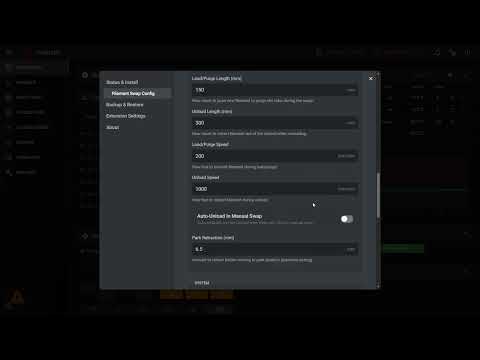
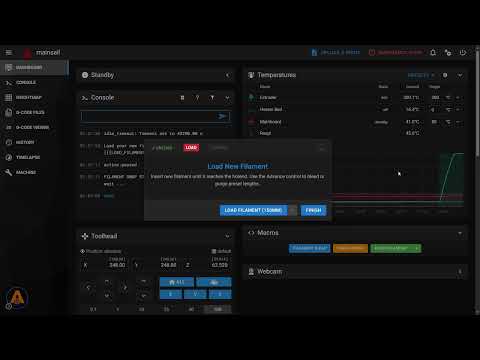
- 🖥️ Seamless Integration: Works on top of any Moonraker-based web interface. The extension injects a non-intrusive control button directly into your dashboard.
- 🔄 Guided Workflow: A clear, step-by-step visual timeline guides you through heating, unloading, loading, and purging.
- ⚙️ Complete Customization:
- Configure load/unload lengths, speeds, and temperatures.
- Set "Smart Park" coordinates with automatic max-travel detection.
- Customize purge amounts and retraction settings.
- 🧩 Powerful Macro System:
- Trigger custom G-code or existing macros at specific stages (Pre-Load, Post-Unload, etc.).
- Fully compatible with your existing Klipper macros.
- 🔊 Smart Alerts:
- Browser-based audio notifications for Filament Runout and M600 events.
- Plays M300 tunes directly through your browser (no beeper required on the printer!).
- 🌍 Multi-Language Support: Available in English, Spanish, German, French, and Chinese.
- 💾 Backup & Restore: Easily export your AFS configuration to JSON and restore it on other machines.
This extension is designed to work with standard Moonraker installations.
- Moonraker: Requires a standard installation with access to the
printer.objects.subscribeAPI and file management endpoints (/server/files/config). Most modern versions (post-2021) support this out of the box. - Klipper: No specific version requirements, but must support standard macro definition features.
- Web Interface: Compatible with Mainsail, Fluidd, or any other interface that runs on top of Moonraker via a Web Browser.
-
Chrome: Chrome Extensions
-
Edge (Desktop) + Edge Canary (Android): Microsoft Add-ons
-
Firefox: Mozilla Add-ons
- Download the Source: Clone this repository or download the ZIP and extract it to a folder on your computer.
git clone https://github.com/92jackson/Advanced-Filament-Swap.git
- Open Extensions Management:
- In Chrome, go to
chrome://extensions. - In Edge, go to
edge://extensions.
- In Chrome, go to
- Enable Developer Mode: Toggle the switch in the top right corner.
- Load Unpacked: Click the "Load unpacked" button and select the folder where you extracted the extension.
- Access: Open your printer's web interface (e.g.,
http://mainsail.local). You should see a new AFS icon button in the interface (usually bottom-left).
- Click the AFS icon in your web interface to open the Settings Modal.
- First Run: The extension may prompt you to perform an initial setup or check for configuration conflicts.
- Customize: Navigate through the tabs to adjust temperatures, speeds, and parking positions to match your printer's capabilities.
- Save: Changes are saved to your browser's local storage and synced with your printer where applicable.
Need help? Found a bug? Want to request a feature?
- Discord: Join the community on Discord for real-time support and discussions.
- GitHub Issues: Report bugs or suggest enhancements on our Issues Page.
Find this project useful?

Most of these macros can be safely hidden in Mainsail / Fluidd, the only ones you may want to keep for initiating manual swaps are the User-Facing Swap Macros.
Core Configuration
AFS_CFG— Central configuration hub and state machine. Holds all default settings (temperatures, speeds, park positions, etc.) and dispatches behavior for NEWJOB modes: RUN_OUT, SWAP_PRINT, SWAP_MANUAL, LOAD, and COMPLETE.
User-Facing Swap Macros
M600— Standard slicer filament-change command. Triggers an automatic print-swap flow (SWAP_PRINT) and plays the configured sound.RUN_OUT— Called by a filament runout sensor. Pauses the print, plays an alert, and prompts the user to swap filament.FILAMENT_SWAP— Manual filament change trigger. Parks the toolhead and guides the user through a swap without a slicer command.LOAD_FILAMENT— Advances new filament through the hotend (150mm default) or purges a custom length if PURGE= is passed.FINISH_SWAP— Called by the user when the swap is complete. Cancels the cooldown timer and resumes the print.
Low-Level Operation Macros
AFS_LOAD— Performs the actual filament load/purge move at configured speed, then retracts slightly to prevent ooze.AFS_UNLOAD— Performs the filament unload move (pushes 15mm first to prevent a bulbous tip, then retracts the full bowden length).AFS_TEMP_CHECK— Validates and enforces a safe hotend temperature before extrusion. Heats to target (blocking M109) or adjusts non-blocking (M104) if already close.AFS_SET_TARGET— UI-callable macro to override the swap temperature and immediately heat to it.
Pause / Resume / Park
PAUSE— Overrides Klipper's built-in pause. Saves state, retracts filament (unless bypassed), and calls M125 to park the head.RESUME— Overrides Klipper's built-in resume. Cancels the cooldown timer, restores state, and clears swap/pause flags.M125— Parks the toolhead at the configured maintenance position, homing first if needed and calculating a safe Z lift.
State & Messaging
AFS_STATE— WebSocket-facing state store. Holds processid, push counter, origin, status, eta, and ts for the frontend UI to poll.AFS_PUSH— Publishes state updates to AFS_STATE and optionally echoes messages to the Klipper console, depending on config flags.
Helper / Utility Macros
AFS_STORE_TEMPERATURE— Saves the current extruder target temperature into AFS_CFG so it can be restored after the swap.AFS_RESTORE_IDLE_TIMEOUT— Restores the printer's idle timeout to its pre-swap value (or config default).AFS_INCREMENT_ALERT_COUNT— Increments a persistent alert counter (saved to variables.cfg) and updates the AFS_STATE process ID.
Cooldown
AFS_COOLDOWN_TIMER(delayed_gcode) — A delayed trigger that fires after the configured cooldown_delay seconds to check if the hotend should be cooled.AFS_COOLDOWN_IF_IDLE— Called by the timer. Turns off the hotend heater if the printer is still in a swap state, optionally unpriming the nozzle first (runout scenario).
Beeper / Sound
M300— Plays a tone via beeper_pin at a given frequency and duration. Silences AFS_NOISE automatically if no beeper pin is configured.AFS_NOISE— Plays named sound sequences (FILAMENT_SWAP, RUN_OUT, BEEP, ALERT, CHIME) using repeated M300 calls.AFS_SILENT— Mutes AFS_NOISE sounds. Pass RESET to re-enable them.AFS_IGNORE_M600— Suppresses M600 commands (useful to prevent accidental triggers left in gcode). Pass RESET to start listening again.
Optional User Hooks (define in printer.cfg to use)
AFS_PRE_SWAP— Custom macro that runs just before the print is paused.AFS_POST_SWAP— Custom macro that runs just before the print resumes.