




"Iris, navigate to the bus stop."
"Iris, who is in front of me?"
"Iris, describe surroundings."
IRIS is a voice-controlled wearable AI assistant for the visually impaired, built on a Raspberry Pi 5. It listens for the wake word "Iris", transcribes the spoken command, and launches the appropriate AI module — then returns to listening when the module exits.
This repository is the Admin / Command Router — the main entry point that ties all 7 modules together.
This project is developed as a B.Tech Final Year Project titled “IRIS — AI-Powered Wearable Personal Assistant for the Visually Impaired” by T. Adithya Reddy from the Department of Electrical and Electronics Engineering, pursuing B.Tech in Electrical and Computer Engineering at Amrita Vishwa Vidyapeetham.
IRIS is a multidisciplinary assistive technology system that combines:
- Artificial Intelligence
- Computer Vision
- Embedded Systems
- Voice Interfaces
- Raspberry Pi Computing
- Real-time Navigation and Safety Systems
to create a wearable assistant aimed at improving independence and accessibility for visually impaired individuals.
This repository represents the central admin and command-routing architecture of the complete IRIS ecosystem, integrating multiple AI-powered assistive modules into a unified voice-controlled platform.
The author would like to express sincere gratitude to Jayasree K R Miss and Sruthy Miss for their continuous guidance, technical support, and mentorship throughout the development of this project. Special appreciation is also extended to project teammates Thushara Thampi and Malavika Sreejith for their valuable contributions, collaboration, and teamwork during the design and implementation phases.
The complete IRIS system has been developed with a strong focus on:
- Real-world usability
- Accessibility-driven engineering
- Low-cost assistive innovation
- Practical deployment on embedded hardware
with the vision of leveraging AI to build inclusive technology that can positively impact the lives of visually impaired individuals.
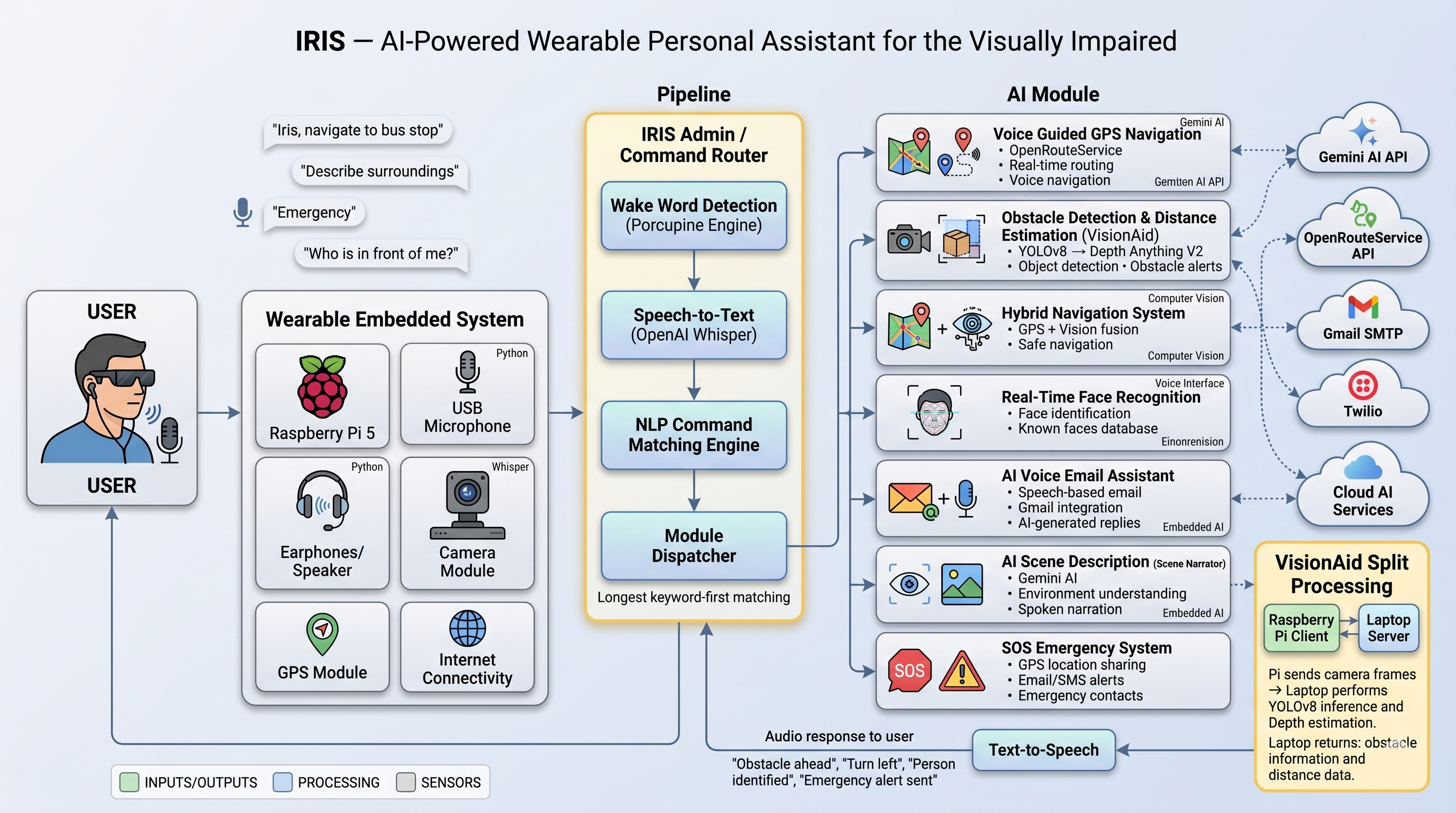
When a module finishes (or the user exits it), control returns to the admin loop and IRIS begins listening again.
| # | Module | Trigger phrases | Repo |
|---|---|---|---|
| 1 | GPS Navigation | "navigate to", "take me to", "gps" | Voice-Guided-GPS-Navigation |
| 2 | VisionAid (obstacle detection) | "obstacle", "vision aid", "obstacle mode" | VisionAid-AI-Navigation-Assistant |
| 3 | Hybrid Navigation (GPS + vision) | "hybrid", "navigate with vision" | AI-Vision-Assistant-for-the-Blind |
| 4 | Face Recognition | "who is this", "face recognition", "identify" | AI-Vision-Assistant-for-Real-Time-Face-Recognition |
| 5 | Email Assistant | "email", "write an email", "check my email" | AI-Voice-Based-Email-Assistant |
| 6 | Scene Narrator | "describe surroundings", "what is around me" | AI-Scene-Narrator |
| 7 | SOS Emergency | "emergency", "sos", "help" | Smart-SOS-alert-system |
IRIS-Admin/
│
├── iris_admin.py          ← Main entry point — run this on the Pi
├── setup.sh               ← One-time setup: clones all 7 module repos
├── requirements.txt       ← Admin-layer Python dependencies
├── .gitmodules            ← Git submodule declarations
├── .gitignore
├── README.md
│
└── modules/               ← Created by setup.sh (not committed to git)
    ├── gps_navigation/    →  Voice-Guided-GPS-Navigation-for-the-Visually-Impaired
    ├── visionaid/         →  VisionAid-AI-Navigation-Assistant-for-the-Visually-Impaired
    ├── hybrid_navigation/ →  AI-Vision-Assistant-for-the-Blind
    ├── face_recognition/  →  AI-Vision-Assistant-for-Real-Time-Face-Recognition
    ├── email_assistant/   →  AI-Voice-Based-Email-Assistant
    ├── scene_narrator/    →  AI-Scene-Narrator
    └── sos_emergency/     →  Smart-SOS-alert-system
1.  Porcupine runs continuously, listening for the wake word "Iris"
2.  Wake word detected → IRIS says "Yes?"
3.  Whisper records 4 seconds of audio and transcribes it
4.  Command router matches the text to a module using longest-keyword-first matching
5.  The matched module is launched as a blocking subprocess
6.  When the module exits → IRIS returns to wake-word listening (step 1)
Keyboard fallback: If Whisper is not installed, IRIS falls back to accepting typed commands via the terminal — useful for testing on a laptop.
- Raspberry Pi 5 (8 GB recommended) running Raspberry Pi OS
- USB microphone + earphones
- Python 3.10 or higher
- Internet connection for setup (Whisper model download, API calls)
- Free Porcupine access key from console.picovoice.ai — no credit card needed
git clone https://github.com/Adithya2369/IRIS-Admin.git
cd IRIS-AdminThis clones all 7 module repos into modules/:
chmod +x setup.sh
./setup.sh
If you prefer Git submodules instead of the script, see Using Git Submodules below.
pip install -r requirements.txtSystem packages needed on Raspberry Pi OS:
sudo apt update
sudo apt install -y portaudio19-dev espeak espeak-ng ffmpeg python3-devpython3 -c "import whisper; whisper.load_model('tiny')"This downloads ~75 MB once and caches it locally. Takes a few minutes on the Pi.
export PORCUPINE_ACCESS_KEY="your_key_from_picovoice"To make it permanent, add that line to ~/.bashrc.
Each module has its own config.py or configuration section inside its main script. Refer to the individual module READMEs for the keys/settings each one needs (API keys, SERVER_IP for VisionAid, etc.).
| Module | Key config |
|---|---|
| GPS Navigation | ORS_API_KEY in modules/gps_navigation/config.py |
| VisionAid | SERVER_IP + GEMINI_API_KEY in modules/visionaid/config.py |
| Hybrid Navigation | ORS_API_KEY + camera settings |
| Face Recognition | Known faces directory |
| Email Assistant | Gmail credentials + GEMINI_API_KEY |
| Scene Narrator | GEMINI_API_KEY |
| SOS Emergency | Gmail SMTP + Twilio credentials in modules/sos_emergency/sos.py |
python3 iris_admin.pyYou will hear: "Iris is ready. Say Iris to activate."
| You say (after "Iris") | What happens |
|---|---|
| "Navigate to Charminar" | GPS navigation launches, routes to Charminar |
| "Obstacle mode" | VisionAid starts detecting obstacles via YOLOv8 |
| "Hybrid navigation" | GPS + vision combined mode |
| "Who is in front of me" | Face recognition activates |
| "Write an email to Professor Rao asking for leave" | Email assistant composes and sends the email |
| "Describe surroundings" | Scene narrator gives a spoken description |
| "Emergency" | SOS alert sends GPS location to emergency contacts |
VisionAid is a split system:
server.pyruns on your laptop (handles YOLOv8 + Depth Anything V2 inference)pi_client.pyruns on the Pi (camera capture + TTS)
The admin launches pi_client.py. Make sure server.py is already running on the laptop and SERVER_IP is correctly set in modules/visionaid/config.py before activating this module.
If you prefer using Git submodules instead of setup.sh:
# Clone with submodules in one go
git clone --recurse-submodules https://github.com/Adithya2369/IRIS-Admin.git

# Or, if you already cloned without --recurse-submodules:
git submodule update --init --recursive

# To pull latest changes in all submodules later:
git submodule update --remote --merge| Problem | Fix |
|---|---|
"YOUR_PORCUPINE_ACCESS_KEY" error |
Export the key: export PORCUPINE_ACCESS_KEY="your_key" |
| No mic found | Run arecord -l to list devices; set MIC_DEVICE_INDEX in iris_admin.py |
| Whisper not installed | pip install openai-whisper (IRIS falls back to keyboard input without it) |
| Module script not found | Run setup.sh to clone modules, or check the path in MODULE_ENTRY |
| TTS produces no sound | sudo apt install espeak; check alsamixer volume |
| Command not recognised | Speak clearly; check COMMAND_MAP in iris_admin.py for valid phrases |
This project is intended for educational and research purposes as part of a B.Tech Final Year Project. You are free to use, modify, and build upon this code for non-commercial academic purposes with attribution.
T. Adithya Reddy
"Technology should serve everyone — including those who cannot see it."