chennai (chen N ai) is a hybrid AI agent and terminal user interface for exploring source code, dependencies, and binaries across many languages backed by real static-analysis. It integrates AppThreat atom (Java, Scala, JavaScript, Python, PHP, Ruby, C/C++) with dedicated non-atom backends for Rust (rusi), Go (golem), .NET (dosai), and compiled binaries / Android APK / iOS IPA (blint), all behind one keyboard-driven interface for static analysis, data-flow tracing, and AI-assisted code and security review. It is built on top of the chen library (Code Hierarchy Exploratory Network).
Unlike a traditional SAST engine or a generic LLM chatbot, chennai gives you direct access to the underlying analysis data so you can ask arbitrary questions about a program's structure and data flows without leaving the terminal. It runs entirely on your machine with no server backend and no data leaving your environment.
chennai includes a built-in AI agent that uses an atom, language-specific static slices, or binary metadata as grounding context. The agent can run queries, traverse data-flow paths, run graph algorithms, read source files, and search code, all orchestrated from a single chat interface inside the TUI. The agent supports both Anthropic and OpenAI compatible providers and can work either with or without an LLM.
| Backend | Targets | Data surfaced |
|---|---|---|
| atom | Java, Scala, JavaScript/TypeScript, Python, PHP, Ruby, C/C++ | methods, calls, namespaces, tags, literals, data flows, graph algorithms |
| rusi | Rust source | Declarations, imports, usages, call graph, data-flow slices, crypto, HTTP endpoints |
| golem | Go source | Packages, declarations, usages, call graph, taint summaries, crypto, HTTP endpoints |
| dosai | .NET (C#/VB/F#, assemblies) | Methods, call graph, data-flow nodes/slices, weakness candidates, dangerous-API reachability, API endpoints |
| blint | ELF/PE/Mach-O/WASM binaries, Android APK/AAB, iOS IPA | Binary metadata, hardening findings, capability reviews, symbols, strings, SBOM components, Android/iOS behaviours |
The right backend is selected automatically from the target: atom languages spawn the Scala engine; Rust, Go, and .NET resolve to their standalone analyzers; and a binary/APK/IPA file (detected by extension or magic bytes) routes to blint. Each backend exposes its own grounded tool set and system prompt to the agent.
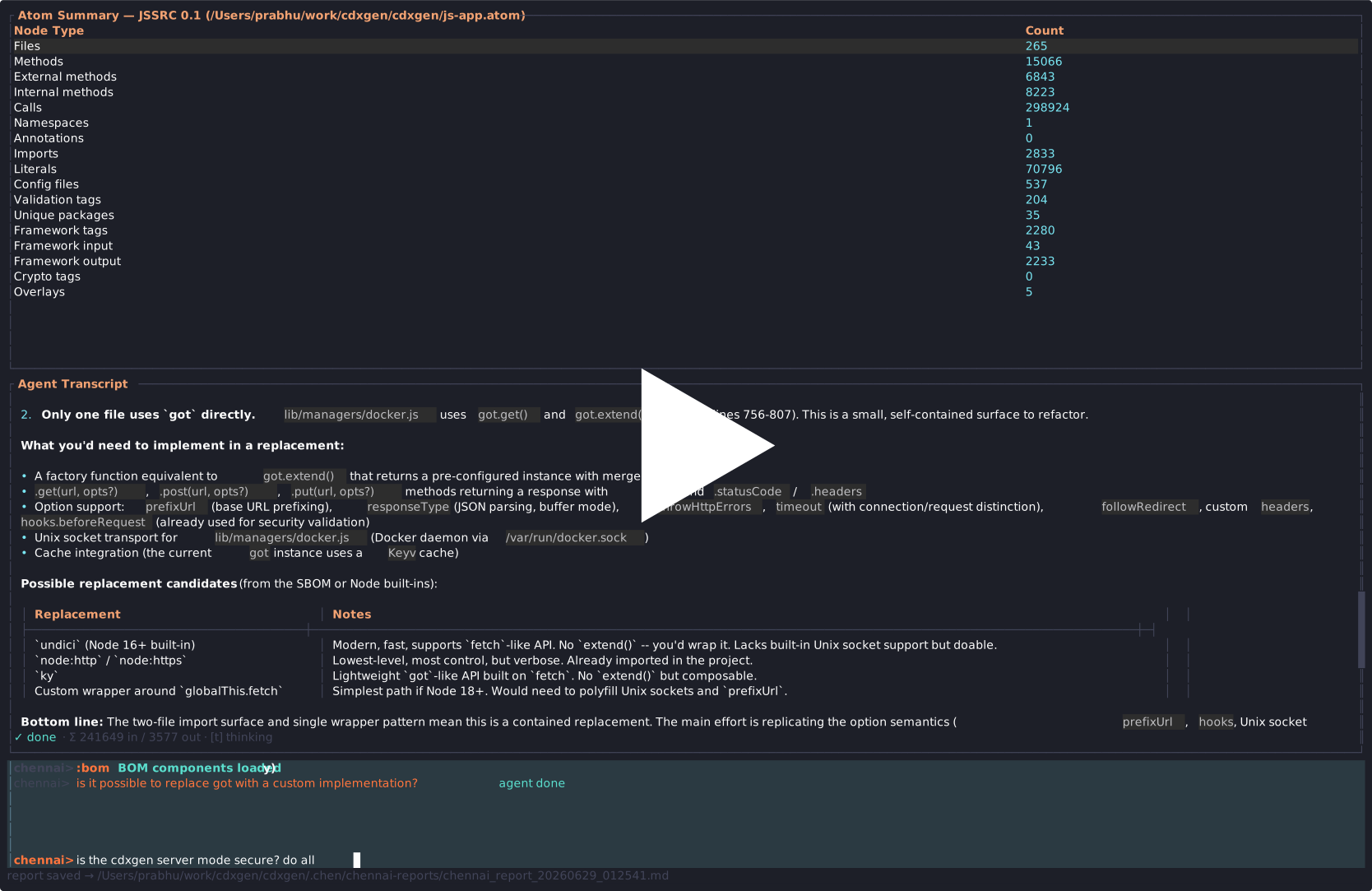
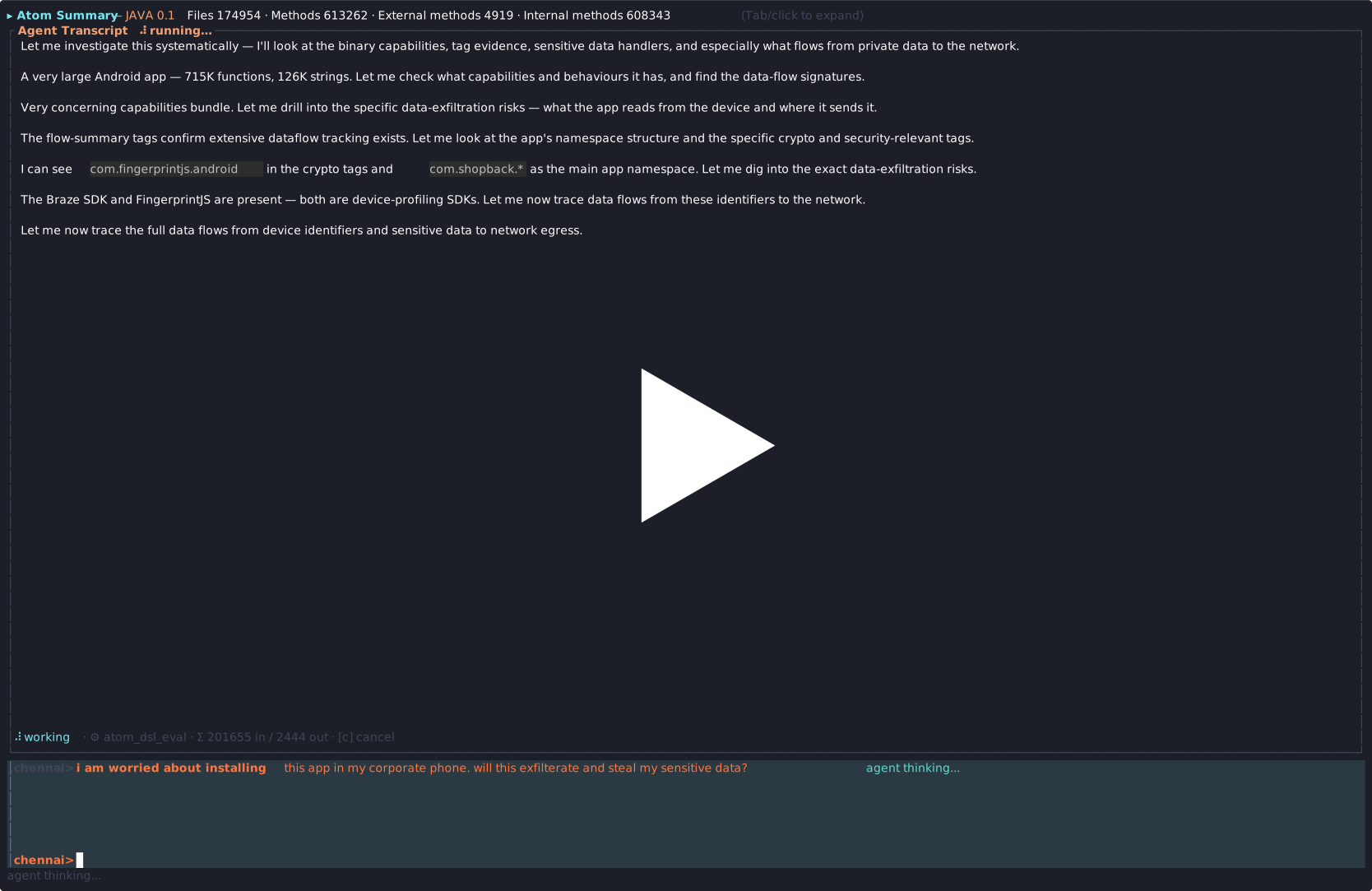
- Interactive exploration of atom files generated by the atom tool for languages such as JavaScript, Python, Java, Scala, PHP, Ruby, and C/C++. Open an atom, browse methods, calls, namespaces, tags, and literals without writing queries by hand.
- Interactive exploration of Rust, Go, and .NET codebases using rusi, golem, and dosai analysis reports. Browse declarations, imports, usages, call graphs, data flows, API endpoints, and cryptographic evidence with dedicated per-language tools.
- Binary, Android APK, and iOS IPA review with blint: inspect hardening findings, capability reviews, imported/exported symbols, SBOM components, and Android/iOS behavioural signals — treated as static evidence of presence, not proof of execution.
- Data-flow analysis with source to sink tracing. The TUI displays flows with grouped paths, sub-flow toggling, and mitigation indicators.
- Graph algorithm execution including PageRank, strongly connected components, topological sort, dominator trees, and interprocedural path finding.
- AI-assisted vulnerability analysis with slash commands for security review, code review, explain, and trace. The agent routes tool calls through the underlying analysis engine and returns structured findings.
- REPL-driven querying with tab completions, command history, and the full chen DSL available through the eval command (atom mode).
- For atom-based analysis: an atom file (from the atom tool) to open. The atom file is a Code Property Graph produced by running atom against a codebase.
- For Rust and Go analysis: the
rusi/golembinaries, bundled with cdxgen-plugins-bin or built from source. Override resolution withRUSI_CMD/GOLEM_CMD. - For .NET analysis: the
dosaibinary (use the full release). Override withDOSAI_CMD. The data-flow report is the primary source; the optional methods report is best-effort and will be skipped if dosai cannot load a project's assemblies. - For binary / APK / IPA analysis:
blinton PATH (uv tool install blintorpip install blint[extended]), plus LLVM for disassembly and the Android SDK for full APK depth. Override withBLINT_CMD. - Java 23 or newer if running the engine via the JAR fallback distribution (atom mode only).
- At least 4GB of available memory for the TUI and engine together. Larger codebases may need more. The non-atom backends (rusi, golem, dosai, blint) do not require the Scala engine.
brew tap appthreat/tap
brew trust --tap appthreat/tap   # only needed if HOMEBREW_REQUIRE_TAP_TRUST is set
brew install chennai
npm install -g @appthreat/chennai
Download the archive for your platform from the releases page, extract it, and add the chennai and chennai-engine binaries to your PATH:
# Example for macOS arm64
curl -sL https://github.com/AppThreat/chennai/releases/latest/download/chennai-darwin-arm64.tar.gz | tar xz
sudo chmod +x chennai chennai-engine
sudo cp chennai chennai-engine /usr/local/bin/
After installation the chennai command is available globally.
chennai [path-to-project-or-atom-file] [options]
The path is optional; when omitted, chennai analyses the current working directory (resolved to an absolute path).
A multi-arch (amd64/arm64) image is published to GitHub Container Registry. It bundles everything chennai needs across all modes -- the atom toolchains (Java, Scala, Node, PHP, Ruby), the Android SDK, the chennai engine and TUI, the standalone non-atom backends (rusi, golem, dosai), and blint (with LLVM) for binary / APK / IPA analysis. This is the simplest way to get every language and binary backend without installing toolchains locally.
docker pull ghcr.io/appthreat/chennai:latest

# Analyse the current directory (atom, Rust, Go, .NET, or a binary/APK/IPA).
docker run --rm -it \
  -e ANTHROPIC_API_KEY \
  -v "$(pwd)":/app:rw -w /app \
  ghcr.io/appthreat/chennai:latest /app
Notes:
- Pass your LLM credentials through with
-e ANTHROPIC_API_KEY(or-e OPENAI_API_KEY/-e OPENAI_BASE_URLfor OpenAI-compatible providers). - Mount the project read-write (
-v "$(pwd)":/app:rw) so generated reports (rusi-report.json,golem-report.json, dosai/blint outputs, the SBOM) are written back to the host. - For Android APK / iOS IPA analysis, mount the artifact and point chennai at the file:
-v "$(pwd)/app.apk":/app/app.apk ... /app/app.apk. - The image tags follow the convention
:latest,:vX.Y.Z(release tags), and per-arch:<tag>-amd64/:<tag>-arm64variants.
If you are not using the container image, install the non-atom backend binaries with the bundled script. It detects your OS/arch, downloads rusi + golem (from cdxgen-plugins-bin) and dosai (full build), and installs blint via uv/pip:
# Installs into $HOME/.local/bin (or /usr/local/bin with --system)
bash scripts/setup.sh

# Skip blint, or force re-download:
bash scripts/setup.sh --no-blint
bash scripts/setup.sh --force
Because the binaries land on PATH, chennai resolves them automatically (the RUSI_CMD / GOLEM_CMD / DOSAI_CMD / BLINT_CMD env vars override the lookup). blint disassembly additionally needs LLVM, and APK/IPA depth needs the Android SDK -- the container image bundles both.
Install or update the required analysis tools (cdxgen, atom, atom-parsetools) via npm:
chennai setup
This runs npm install -g --ignore-scripts @cyclonedx/cdxgen @appthreat/atom @appthreat/atom-parsetools.
Build and print the full system prompt that would be sent to the LLM agent as a markdown document. This command detects the project language and generates the appropriate prompt (atom-oriented or rusi-oriented). Optionally write it to a file with -o:
# Print to stdout (requires a project path for real analysis data)
chennai dump-system-prompt /path/to/project

# Write to a file
chennai dump-system-prompt /path/to/project -o prompt.md

# Template only (no project loaded -- shows placeholder values)
chennai dump-system-prompt
chennai auto-detects these tools in the following order:
| Tool | Env var | Search path |
|---|---|---|
| cdxgen | CDXGEN_CMD |
PATH, node_modules/.bin/cdxgen, npm global |
| atom | ATOM_CMD |
ATOM_CMD, PATH |
| rusi | RUSI_CMD |
RUSI_CMD, PATH (bundled with cdxgen-plugins-bin) |
| golem | GOLEM_CMD |
GOLEM_CMD, PATH (bundled with cdxgen-plugins-bin) |
| dosai | DOSAI_CMD |
DOSAI_CMD, PATH (bundled with cdxgen-plugins-bin) |
| blint | BLINT_CMD |
BLINT_CMD, PATH (uv venv path is preferred) |
| npm | PATH |
When you point chennai at a project directory that has no pre-existing analysis, it detects the language and offers to generate the appropriate analysis:
Atom-based languages (JavaScript, Python, Java, Scala, PHP, Ruby, C/C++):
$ chennai /path/to/project
No .atom file found in /path/to/project
Generate one for analysis?  This will:
  1. Run cdxgen to produce a CycloneDX SBOM
  2. Run atom --with-data-deps to build the atom file

Source: /path/to/project [Y/n]
If the tools are not installed but npm is available, chennai offers to install them automatically before proceeding.
Rust projects (detected by Cargo.toml):
$ chennai /path/to/rust/project
No rusi analysis found. Run rusi to analyze this Rust codebase? [Y/n]
Running rusi analysis... done.
Rusi analysis runs with the stable backend, static call graph, and security data-flow analysis. The resulting rusi-report.json is loaded and available for querying by the AI agent.
In headless mode (--ask), chennai runs the analysis automatically without prompting.
chennai integrates with cdxgen to automatically generate and load CycloneDX SBOMs for deeper dependency-aware analysis. When you invoke chennai with a source or reports directory, it first looks for any existing .cdx.json files. If none are found, it invokes cdxgen to create a BOM with the naming convention sbom-<language>-<lifecycle>.cdx.json.
npm install -g @cyclonedx/cdxgen
cdxgen will be auto-detected in PATH. You can also set the CDXGEN_CMD environment variable to point to a custom location. Once installed, chennai will automatically generate BOMs on startup when a source directory is available.
| Command | Description |
|---|---|
bom |
Display all BOM components as a searchable, sortable table |
bom <query> |
Filter BOM components by name, type, version, PURL, or license |
The BOM data is also injected into AI agent prompts for security and code reviews, improving the LLM's understanding of third-party dependencies, their licenses, and known vulnerabilities.
chennai maintains a per-project persistent memory of durable facts (architecture,
entrypoints, auth boundaries, confirmed/refuted findings, user corrections) under
<source_root>/.chen/facts-memory/.
- Each fact is a markdown file with YAML frontmatter, stored locally only and git-ignored — facts are never committed or uploaded.
- The AI agent automatically saves grounded facts (preferring callgraph/dataflow
results over text matches), loads the index into its system prompt every session,
and recalls full fact bodies on demand via the
project_memorytool. - Use the
:memoryREPL command to inspect and manage stored facts::memory list,:memory show <name>,:memory forget <name>,:memory prune,:memory rebuild. - Facts are auto-pruned at session start and after each save (de-duplication, staleness demotion, eviction of low-priority facts when over budget).
| Option | Default | Description |
|---|---|---|
--engine PATH |
auto | Path to the chennai-engine binary (atom mode only) |
--theme dark/light |
dark | Color theme |
--source PATH |
project dir | Project source root for file resolution |
--ask TEXT |
-- | Headless mode: ask a question and print the answer |
--provider STR |
anthropic | LLM provider (anthropic or openai) |
--model STR |
claude-opus-4-8 | LLM model name |
--api-key STR |
env var | API key for the LLM provider |
--base-url STR |
-- | Custom API base URL for OpenAI-compatible endpoints |
--reports-dir PATH |
.chen/chennai-reports | Directory for markdown reports and BOM files |
--system-prompt PATH |
-- | Path to a custom system prompt file (overrides the built-in prompt) |
--no-thinking |
false | Omit thinking blocks from the LLM request |
--effort STR |
high | Reasoning effort (low, medium, high, xhigh, max) |
CHENNAI_ENGINE: Path to the engine binary. Overrides auto-detection.ANTHROPIC_API_KEY: API key for Anthropic provider.OPENAI_API_KEY: API key for OpenAI-compatible providers.CHENNAI_PROVIDER: LLM provider (anthropicoropenai). Same as--provider.CHENNAI_MODEL: LLM model name. Same as--model.CHENNAI_BASE_URL: Custom API base URL for OpenAI-compatible endpoints. Same as--base-url.CDXGEN_CMD: Path to the cdxgen binary.ATOM_CMD: Path to the atom CLI binary (e.g./path/to/atom/atom.sh).RUSI_CMD: Path to the rusi binary. Overrides PATH lookup.CHENNAI_DEBUG: Set to any value to enable resolver diagnostics.
| Platform | Architecture | Engine | TUI |
|---|---|---|---|
| Linux | x64 (glibc) | native | native |
| Linux | arm64 (glibc) | native | native |
| Linux | x64 (musl/Alpine) | native (musl) | native (musl) |
| macOS | Apple Silicon | native | native |
| Windows | x64 | native | native |
Other platforms fall back to the JAR distribution for the engine while the TUI runs natively where available. Rusi-based Rust analysis does not require the Scala engine.
chennai has two analysis paths depending on the project language.
Two processes communicate over NDJSON on stdin/stdout.
Engine (chennai-engine): The engine is a Scala 3 application built with the chen library. It reads atom files and runs queries against the atom file. It is distributed as a GraalVM native-image binary on supported platforms and as a JAR distribution elsewhere. The engine accepts NDJSON request lines on stdin and writes NDJSON response lines to stdout. Each request has an id, a command, and arguments. The engine opens an atom file on startup and keeps it in memory for the duration of the session.
TUI (chennai): The TUI is a Rust application using ratatui and crossterm. It spawns the engine as a child process, opens the atom file, and presents a three-panel interface: a summary panel with row counts, a REPL panel for input, and an output panel for results. The TUI auto-detects the engine binary location -- by default it looks for chennai-engine in the same directory, then checks the standard development build paths.
For Rust projects, chennai uses rusi (Rust Source Inspector) instead of the atom tool and the Scala engine. Rusi produces a structured JSON report containing declarations, imports, usages, security signals, call graph nodes and edges, data-flow slices, and cryptographic evidence. The TUI loads this report and provides a set of rusi-specific tools to the AI agent. No separate engine process is needed -- the analysis data lives in memory within the TUI process.
The agent has access to six rusi tools: rusi_summary, rusi_query, rusi_callgraph, rusi_flows, rusi_detail, and rusi_crypto. These tools provide the same kind of structured analysis as the atom tools but are backed by the rusi report instead of a Code Property Graph. The system prompt is adapted to describe rusi's data model and instruct the agent to use rusi tools for analysis.
The TUI has three panels navigated with Tab and Shift+Tab.
In atom mode, displays the atom summary: language, version, and row counts for files, methods, calls, literals, namespaces, annotations, config files, and dependencies. Pressing Enter on a row runs a query for that type and displays results in the output panel.
In Rust mode, the summary panel shows placeholder data since there is no engine. The AI agent is the primary interface for exploring the rusi analysis report.
A command-line input at the bottom of the screen. Enter queries here to run them. The REPL supports:
- Command labels:
files,methods,calls,external methods,internal methods,namespaces,annotations,imports,literals,config files - DSL expressions: any chen DSL expression such as
atom.method.name(".*Handler")(atom mode only) - Tag queries:
atom.tag.name("crypto.*")(atom mode only) - Flow presets:
dataflows,reachables,cryptos(atom mode only) - Custom flow DSL: expressions containing
reachableByFlowsor.df((atom mode only) - DSL prefix with
=: forces raw eval mode (atom mode only) - BOM commands:
bomorbom <query>for dependency display - Natural language: any free text is routed to the AI agent when the agent is enabled
Tab completions are available with Ctrl+Space. Command history is accessible with Up and Down arrows.
In Rust mode, the agent is the recommended interaction method. The rusi tools (rusi_summary, rusi_query, rusi_callgraph, rusi_flows, rusi_detail, rusi_crypto) are available to the agent for structured analysis.
Displays query results. The output panel has several display modes:
Table view: Query results are shown as a scrollable, sortable table. Columns are sorted by pressing 1 through 9. Filter rows with /. Press Enter to open a detail pane for a row. The detail pane shows node properties, a child table (arguments, parameters, locals), and source code side by side.
Flow view: Data-flow paths are displayed as master-detail groups. Each group represents a source to sink path. Groups can be collapsed. Sub-flows are shown with s and mitigated flows (passing through sanitizers or validators) can be hidden with m.
Agent view: The AI agent output is rendered as a streaming transcript with thinking blocks, tool calls, and results. Tools results that return flow data can be installed into the flow view for further exploration.
| Key | Action |
|---|---|
| q | Quit |
| Tab / Shift+Tab | Cycle panels forward/backward |
| Up/Down (or j/k) | Navigate lists, scroll output |
| PageUp/PageDown (or b/Space) | Page through lists |
| Enter | Open detail or execute command |
| / | Filter table in output panel |
| 1-9 | Sort table by column |
| s | Toggle sub-flows in flow view |
| m | Toggle mitigated flows in flow view |
| d / r | Run dataflows or reachables preset |
| Ctrl+S | Save report to markdown file |
The full chen DSL is available through the eval command in atom mode. The reference documentation for all traversal steps and node types is maintained in the chen repository at docs/TRAVERSAL.md. The atom repository at docs/lessons/ has nineteen lessons covering everything from frontend setup through data-flow analysis and graph algorithms.
The entry point for queries is atom, representing the root of the Code Property Graph. Common starters include atom.file, atom.method, atom.call, atom.literal, atom.tag, and atom.namespace. These can be chained with steps like .name(".*Handler"), .isExternal(false), .callee, .caller, .cfgNext, .dominatedBy, and many others.
For type-based filtering the DSL provides .isCall, .isLiteral, .isIdentifier, .isMethod, .isFile, and similar predicates on any AST node.
chennai supports three flow presets accessible from the REPL or the summary panel:
dataflows: Runs reachableByFlows from framework-input tagged sources to framework-output tagged sinks.reachables: Runs reachableByFlows using the default reachables configuration.cryptos: Runs crypto-related data-flow analysis.
Custom flow queries use the reachableByFlows or df steps. For example:
atom.call.name(".*execute.*").reachableByFlows(atom.call.name(".*getInput.*"))
The flow view groups results by source-sink pair, shows each step in the path, and indicates methods that have sanitization or validation tags. The engine supports two reaching-definitions solvers: the default Flux solver (low-allocation, fast on large methods) and a classic solver for comparison.
Data-flow analysis in Rust mode is provided by rusi's security data-flow engine. The agent uses rusi_flows to query source-to-sink slices from the rusi report. Each slice carries a source name, sink name, source category, sink category, rule name, and path length. The agent can also use rusi_callgraph to trace call relationships and rusi_query to inspect declarations and usages around a flow.
Run via the algo command in the engine. Available algorithms:
- PageRank (
centrality): Ranks methods by PageRank score and in-degree centrality on the call graph. - Strongly connected components (
scc): Finds recursion clusters in the call graph. - Topological sort (
toposort): Orders methods callee-before-caller, grouped by SCC. - Dominator tree (
dominators): Computes immediate dominators per method over CFG edges. - Interprocedural paths (
paths): Finds BFS-limited call paths between a source and target method.
Rusi provides call graph analysis through the rusi_callgraph tool. The agent can query call graph nodes and edges by name pattern. The rusi report includes call graph mode, node metadata (name, qualified name, kind, file path, local/external status), and edge metadata (source, target, call type, position).
When an API key is configured (via environment variable or config file), the slash commands activate. These are entered in the REPL panel like any other command.
| Command | Purpose |
|---|---|
/security-review |
Reachability-grounded vulnerability analysis. Finds source-to-sink taint paths, ranks findings, and produces a markdown report. Uses high effort. |
/code-review |
Review code changes (diff or methods) for correctness and security. Uses medium effort. |
/explain |
Natural-language explanation of a method, data-flow, or code structure. Uses medium effort. |
/trace |
Prove or disprove a taint path between a given source and sink. Uses high effort. |
/help |
List available slash commands. |
Free text input (without a slash) is also routed to the agent for ad hoc questions.
The agent's available tools depend on the analysis mode.
Atom mode (14 tools): atom_traversal_docs, atom_summary, atom_query, atom_dsl_eval, atom_flows, atom_flows_through, atom_detail, atom_algorithms, bom_query, ripgrep, read_file, git_diff, git_log, git_show.
Rust/rusi mode (11 tools): rusi_summary, rusi_query, rusi_callgraph, rusi_flows, rusi_detail, rusi_crypto, bom_query, ripgrep, read_file, git_diff, git_log, git_show.
Agent-only mode (for Go, dotnet, binary without structured analysis): bom_query, ripgrep, read_file, git_diff, git_log, git_show.
The agent uses the streaming API of the configured provider and renders thinking blocks, text deltas, and tool calls in real time. Tool results are truncated to 48 KiB to stay within model token limits. When the agent produces flow results they are automatically installed into the flow view for interactive exploration.
Agent reports can be saved to markdown with Ctrl+S. Reports include the full transcript, token usage, and any generated data-flow paths or analysis results.
The agent is optional. When no API key is set, chennai operates as a fully offline code analysis tool with all query, data-flow, and algorithm features available through the REPL (atom mode) or through the agent-based interface (Rust mode). The slash commands and free-text agent features only activate when a provider is configured.
The agent can be configured with a TOML file at ~/.config/chennai/config.toml, environment variables, or CLI flags. CLI flags take precedence over environment variables, which take precedence over the config file.
Example config file:
provider = "openai"
model = "deepseek-chat"
api_key = "sk-..."
base_url = "https://api.deepseek.com"
effort = "high"- Rust toolchain (edition 2024)
- Scala 3.8.4 and sbt (for atom mode engine development)
- GraalVM Community Edition 25 for native-image builds (optional for development)
- Rusi binary (for Rust mode development, optional)
# Engine (staged JAR distribution, atom mode only)
(cd engine && sbt stage)

# Engine native image (requires GraalVM, atom mode only)
bash ci/native-image.sh

# TUI (required for all modes)
(cd tui && cargo build --release)

# Rusi (for Rust mode development, optional)
(cd /path/to/rusi && cargo build --release -p rusi-cli)
bash wrapper/nodejs/scripts/build-local.sh
chennai was built on a simple conviction: an LLM that cannot run code analysis is guessing. Most AI coding tools wrap a chat window around a vector index. They retrieve documentation, sprinkle in a few file contents, and hope the model's training prior is good enough. That works for boilerplate generation but fails for anything that requires precise answers about a real codebase -- reachability, data-flow paths, call graphs, dependency resolution.
chennai is the opposite: the LLM is the orchestrator, not the oracle. The code analysis is done by real tools -- the chen DSL for graph traversals, the rusi analysis engine for Rust codebases, the data-flow engine for taint paths, graph algorithms for structural analysis, and ripgrep for source search. The agent's job is to decide which tool to call and how to interpret the result, never to invent an answer from its training data.
A typical AI coding tool has tools bolted on: "search the codebase," "read a file," maybe "run a test." The tool list is an implementation detail the user never sees.
In chennai, the tools are the interface. Every tool is a real analysis capability exposed directly in the TUI as well. Users can run atom.method.name("auth").callee.toJson in the REPL (atom mode) or ask the agent to call rusi_query (Rust mode), see the exact same result the agent would get, and then ask the agent to explain it. The agent's tool calls are streamed to the transcript in real time -- users watch the agent think, pick tools, and interpret results. Nothing is hidden.
This design feeds both directions:
- User to Agent: You can explore manually, then ask the agent to go deeper. The console history section of the system prompt means the agent knows what queries you already ran and what they returned, so follow-up questions have real context.
- Agent to User: When the agent discovers something interesting, its tool results stay in the transcript. You can inspect the exact query that produced the finding.
The chen DSL is a user-facing query language designed for interactive exploration. The agent uses it via atom_dsl_eval, and you use it directly in the REPL with the same syntax, the same semantics, and the same results.
This symmetry means the agent does not have a "special" way of querying the atom that is hidden from you. Every query the agent runs is one you could have typed yourself. There is no black box between the agent's reasoning and the actual code analysis -- the full traversal reference is available through atom_traversal_docs, and every tool result is visible.
For Rust codebases, the rusi analysis report plays the same role as the Code Property Graph in atom mode. The agent queries the report using rusi-specific tools, and the results are structured evidence that can be inspected and cross-referenced with source code. The report contains declarations, imports, usages, security signals, call graph data, data-flow slices, and crypto evidence -- all organized into queryable sections.
The system prompt's grounding rules are not decorative -- they are the contract that makes the tool-based architecture work:
- Never invent call graphs, taints, or reachability. Every claim must trace to a tool result.
- Prefer structured evidence over source text search. Traversals, report queries, and data-flow slices are structured evidence; text search is for cross-referencing.
- If a tool returns nothing, state it plainly. The agent must not dress up a grep-based guess as a real finding.
- Concrete file:line references for every finding. The user must be able to verify every claim.
These rules mean the agent operates within a strict trust boundary. It is authorized to analyze the user's own code -- it does not need to be "harmless" or refuse to look at code. The tool results are the single source of truth, and the agent is explicitly directed to refuse to answer based on its training prior alone.
The agent is a feature of chennai, not the product. Every analysis capability -- queries, data-flows, algorithms, graph traversals -- works offline with no API key, no network, and no LLM. In atom mode, the TUI is a fully functional static analysis environment by itself. In Rust mode, the rusi report is loaded and available for agent-driven analysis. The agent layer adds natural-language orchestration on top, but it is strictly additive.
This means you can:
- Explore code with the REPL during development (atom mode)
- Run rusi analysis on Rust codebases for structured insights
- Save queries as reproducible analysis steps
- Run the agent only when you need natural-language reasoning about what you found
The architecture ensures that the agent's value is proportional to the quality of the underlying analysis tools, not the size of the LLM's context window or training corpus.
MIT