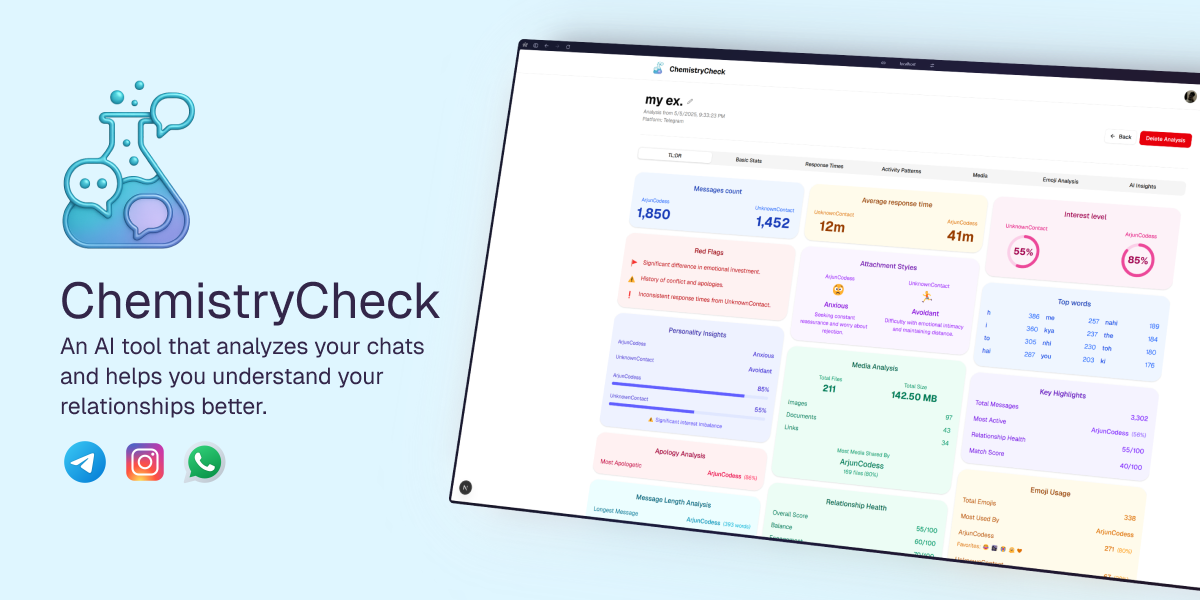
Decode your chats. Understand your relationships. Get brutally honest insights about what's really happening between the lines. Upload WhatsApp, Telegram, or Instagram chat exports and let AI analyze communication patterns, spot red flags, and reveal relationship dynamics. Plus, chat with an AI that has full context of your conversation history.
ChemistryCheck is an AI-powered chat analysis tool that helps you understand what's really happening in your conversations. Upload your chat history from WhatsApp, Telegram, or Instagram, and get comprehensive insights into communication patterns, relationship dynamics, and potential red flags.
The main idea is straightforward: analyze chat exports to reveal patterns that might not be obvious at first glance. Who's more invested? Are there warning signs? Is this genuine connection or something else? The AI analyzes message frequency, response times, word usage, emoji patterns, and more to give you honest, data-driven insights.
I built it to help people see beyond the surface of their conversations. It uses modern web tools and AI to process chat data, generate statistics, and provide actionable insights through an intuitive dashboard. The analysis includes everything from basic stats (message counts, word frequency) to advanced AI-powered relationship health scores and personality insights.
Want to run ChemistryCheck locally? Here's what you need to do.
- Node.js version 18 or newer
- A PostgreSQL database (I use Neon, but any PostgreSQL database works)
- A Google Gemini API key for AI insights
- Google OAuth credentials (optional, for social login)
-
Grab the code
git clone https://github.com/your-username/chemistrycheck.git cd chemistrycheck -
Install everything
npm install # or pnpm install -
Set up your environment
Create a
.envfile in the root directory with the following variables:GOOGLE_GENERATIVE_AI_API_KEY= BLOB_READ_WRITE_TOKEN= APP_URL=http://localhost:3000 BETTER_AUTH_URL=http://localhost:3000 BETTER_AUTH_SECRET= DATABASE_URL= GOOGLE_CLIENT_ID= GOOGLE_CLIENT_SECRET=
-
Set up the database
Run the database migrations:
npx drizzle-kit push
-
Start the development server
npm run dev
# or
pnpm dev
The application should be running at http://localhost:3000.
-
Upload Chat Exports
- Support for WhatsApp (.txt), Telegram (.json), and Instagram (.json) chat exports
- Secure file upload using Vercel Blob storage
- Automatic platform detection and parsing
- Changed your mind? Delete your uploaded file instantly before analysis starts
- Clear transparency about how your data is handled—shown right after upload
- Chat files are deleted from storage immediately after analysis is complete. The project is fully open source for transparency.
-
AI-Powered Analysis
- Analyzes message patterns, response times, word frequency, and emoji usage
- Generates relationship health scores and interest percentages
- Identifies communication patterns and potential red flags
- Provides personality insights and attachment style analysis
-
Comprehensive Dashboard
- View all your analyses in one place
- Visual identification of WhatsApp, Telegram, and Instagram analyses with colored platform icons
- Detailed statistics and visualizations
- Activity patterns (messages by hour, day, month)
- Response time analysis
- Media statistics
- Emoji analysis
- AI-generated insights and summaries
-
RAG Chatbot 🆕
- Chat with an AI that has full context of your conversation
- Ask questions like "When did we first say I love you?" or "Find messages about our trip"
- Semantic search powered by pgvector embeddings
- Owner-only access (hidden on public/shared links)
-
Shareable Analysis
- Make analyses public and shareable
- View detailed breakdowns of communication patterns
- Sign up or sign in to your account
- Navigate to "New Analysis" and select your platform (WhatsApp, Telegram, or Instagram)
- Upload your chat export file
- Get redirected to the analysis page instantly while processing happens in the background
- View comprehensive insights once the AI finishes analyzing
- Access your analysis history from the main dashboard
The analysis includes everything from basic message counts to advanced AI insights about relationship dynamics, helping you understand what's really happening in your conversations.
- Next.js 15.2.3 with App Router for the main framework
- React 19 for the user interface
- TypeScript for type safety
- Node.js to run everything
- Drizzle ORM for database management
- Neon PostgreSQL (or any PostgreSQL database) for data storage
- Better Auth for authentication and session management
- Vercel AI SDK for unified AI interactions and streaming
- Google Gemini AI (gemini-3-flash-preview) for generating relationship insights and analysis
- Gemini gemini-embedding-001 for semantic embeddings (RAG chatbot)
- pgvector for vector similarity search
- Inngest for background job processing (parsing & embedding)
- Custom chat parsers for WhatsApp, Telegram, and Instagram exports
- Tailwind CSS for styling
- Radix UI for accessible components (dialogs, dropdowns, tabs, etc.)
- Lucide React for icons
- Next Themes for dark/light mode support
- Recharts for data visualization
- React D3 Cloud for word cloud visualizations
- Vercel Blob for secure file storage
- Vercel for hosting and deployment
- Vercel Analytics for tracking usage
- ESLint for code quality
- Drizzle Kit for database migrations
- pnpm/npm for package management
This application is set up to deploy on Vercel.
-
Vercel Setup
- Connect your GitHub repository to Vercel
- Set up the environment variables in the Vercel dashboard
- Deploy automatically when you push to main
-
Environment Variables You Need
GOOGLE_GENERATIVE_AI_API_KEY=
BLOB_READ_WRITE_TOKEN=
APP_URL=https://your-domain.vercel.app
BETTER_AUTH_URL=https://your-domain.vercel.app
BETTER_AUTH_SECRET=
DATABASE_URL=
GOOGLE_CLIENT_ID=
GOOGLE_CLIENT_SECRET=
-
Database Setup
- Set up a PostgreSQL database (Neon, Supabase, or any PostgreSQL provider)
- Run migrations:
npx drizzle-kit push - Ensure the
DATABASE_URLis correctly configured
-
Custom Domain
- Set up your custom domain in Vercel if desired
- Update
APP_URLto match your domain
The application will be live and ready to analyze chat conversations!
ArjunCodess - The sole developer and creator of ChemistryCheck
Built with the goal of helping people understand their relationships better through data-driven insights.
- Vercel for making deployment smooth and hosting the application
- shadcn/ui for providing excellent UI components to build upon
- Google Gemini for powering the AI insights
- Drizzle ORM for making database management straightforward
- Better Auth for handling authentication seamlessly
- The open source community for all the amazing tools and libraries that made this possible
ChemistryCheck - Decode your chats. Understand your relationships.
Built with ❤️ for those seeking honest insights