A minimal Neovim plugin for managing a toggleable terminal and sending text to it. Designed for REPL-driven development with IPython support and cell-based execution.
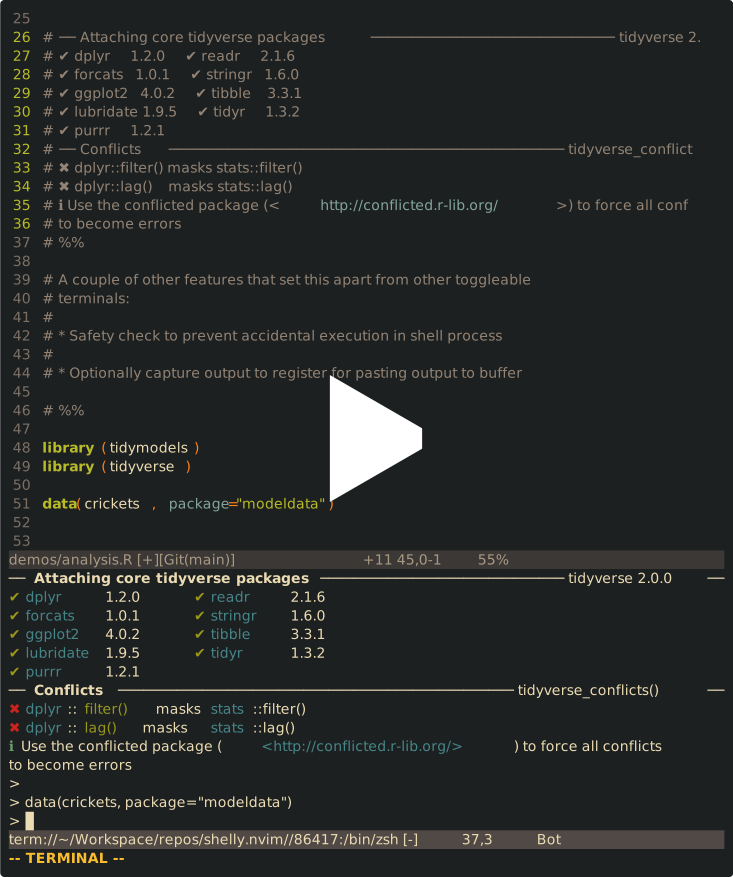
- Toggleable terminal – Horizontal or vertical split that remains visible
- Smart text sending – Lines, visual selections, operator motions, or cells
- IPython aware – Auto-detects IPython and uses
%cpastefor multi-line input - Cell execution – Send code cells delimited by
# %%,-- %%,```, orIn[n]markers - Output capture – Terminal output is automatically captured into a register after each send, commented and ready to paste
- Safety first – Prevents accidental code execution in shell processes
- Persistent – Terminal buffer persists across toggles
lazy.nvim:
{
    "BlakeJC94/shelly.nvim",
    cmd = {
        "Shelly",
        "ShellyToggle",
        "ShellyOpen",
        "ShellyClose",
        "ShellyCycle",
        "ShellySendCell",
        "ShellySendLine",
        "ShellySendSelection",
    },
    opts = {
        split = {
            direction = "horizontal",
            size = 14,
            position = "bottom",
        },
    },
    keys = {
        {

            "<C-Space>",
            function()
                require("shelly").cycle()
            end,
            mode = { "n", "t" },
        },
        {
            "<C-c>",
            function()
                require("shelly").send_visual_selection()
            end,
            mode = "x",
            desc = "Send visual selection to terminal",
        },
        {
            "<C-c><C-c>",
            function()
                require("shelly").send_current_cell()
            end,
            mode = "n",
            desc = "Send current cell to terminal",
        },
        {
            "<C-c>",
            function()
                vim.o.operatorfunc = "v:lua.require'shelly'.operator_send"
                return "g@"
            end,
            mode = "n",
            expr = true,
            desc = "Send motion to terminal",
        },
        {
            "<Leader>a",
            ":Shelly ",
            mode = "n",
        },
        {
            "<Leader>A",
            function()
                require("shelly").toggle()
            end,
            mode = "n",
        },
    },
}Default options:
require("shelly").setup({
    cmd = vim.o.shell,           -- Command to run in terminal
    cwd = vim.fn.getcwd,         -- Working directory (can be function)
    split = {
        direction = "horizontal", -- "horizontal" or "vertical"
        size = 16,               -- Height or width depending on direction
        position = "bottom",      -- "top", "bottom", "left", "right"
    },
    wo = {                      -- Window-local options
        cursorcolumn = false,
        cursorline = false,
        number = false,
        relativenumber = false,
        signcolumn = "no",
        spell = false,
        wrap = false,
    },
    capture_register = "+",     -- Register to store output after each send; set to nil to disable
    capture_comment = true,  -- prepend comment strings to captured lines
    capture_delay = 800,        -- ms to wait after sending before reading terminal output
    prompt_patterns = {         -- Lua patterns for lines to strip from captured output
        r = {
            "^> ",
            "^+ ",
        },
        python = {
            "^>>> ",
            "^%.%.%.: ",
            "^In %[%d+%]: ",
            "^%%cpaste",
            "^<EOF>",
        }
    },
})| Command | Description |
|---|---|
:Shelly <text> |
Send text to terminal (supports % expansion) |
:ShellySendLine |
Send current line |
:ShellySendSelection |
Send visual selection (range command) |
:ShellySendCell |
Send current cell (between delimiters) |
:ShellyCycle |
Toggle terminal focus and mode |
| Mode | Key | Action |
|---|---|---|
| n | <C-c><C-c> |
Send current cell |
| n | <C-c>{motion} |
Send text covered by motion |
| v | <C-c> |
Send visual selection |
| n | <C-Space> |
Jump to terminal and enter insert mode |
| t | <C-Space> |
Exit terminal mode, go to last window |
Cells are automatically detected between:
# %%or-- %%(Jupyter/Julia style)In [n]:(IPython prompts)```(Markdown code blocks)
When sending a cell, the cursor jumps to the next cell automatically.
After every send, Shelly waits capture_delay ms then reads the new lines from
the terminal buffer, cleans them up, and stores the result in capture_register
as linewise content. Use p to paste the output below the cursor.
The captured output is:
- Stripped of ANSI/terminal escape sequences
- Stripped of echoed input lines
- Stripped of prompt and control lines (configurable via
prompt_patterns) - Prefixed with the source buffer's comment string (e.g.
#for Python,--for Lua)
Set capture_register = nil to disable capture entirely.
When IPython is detected in the terminal, multi-line code is automatically sent
using %cpaste -q mode to preserve indentation and avoid syntax errors.
- Neovim 0.7+ (for
nvim_create_autocmd) pgrepandps(for process detection, standard on Unix systems)
Major credit goes to @ingur for their work on floatty.nvim. This project began as a modification to this wonderful plugin, and eventually morphed into this