
A library for creating control hints as TextDraw elements in Pawn (SA-MP).
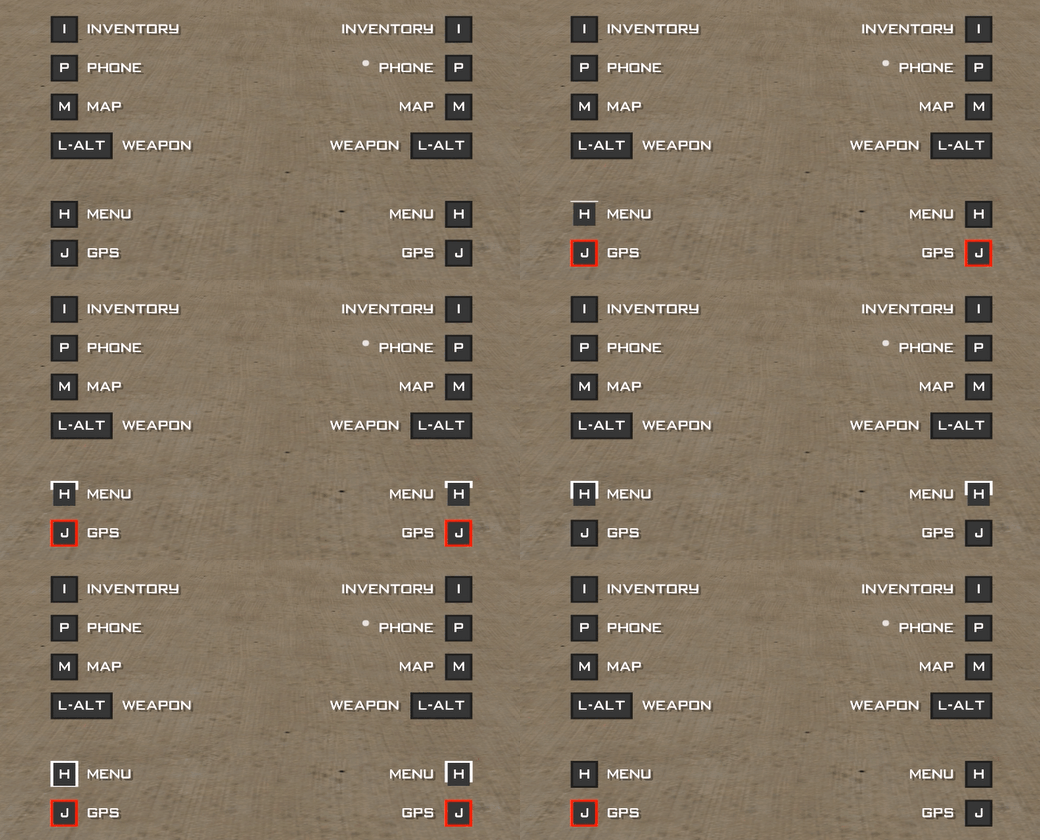
Include in your code and begin using the library:
#include <control-hints>CreateControlHint(playerid, 20.0, 150.0, "Inventory", "I", .show = CH_SHOW_HINT, .textAlignment = CH_TEXT_ALIGN_LEFT, .selectable = 0);
CreateControlHintBelow(playerid, 0.0, 5.0, "Phone", "P", .show = CH_SHOW_HINT, .textAlignment = CH_TEXT_ALIGN_LEFT, .selectable = 0);new HintInventory[MAX_PLAYERS];
HintInventory[playerid] = CreateControlHint(playerid, 20.0, 150.0, "Inventory", "I", .show = CH_SHOW_HINT, .textAlignment = CH_TEXT_ALIGN_LEFT, .selectable = 0);
public OnPlayerKeyStateChange(playerid, newkeys, oldkeys) {
if(newkeys == KEY_WALK) {
StartControlHintAnimation(playerid, HintInventory[playerid], 0xFFFFFFFF, .speed = 15.0);
return 1;
}
if(oldkeys == KEY_WALK) {
if(IsControlHintAnimating(playerid, HintInventory[playerid])) {
StopControlHintAnimation(playerid, HintInventory[playerid]);
}
return 1;
}
return 1;
}
forward OnPlayerControlHintAnimationEnd(playerid, hintid);
public OnPlayerControlHintAnimationEnd(playerid, hintid) {
if(hintid == HintInventory[playerid]) {
SendClientMessage(playerid, 0xFF00FFAA, "Animation ended");
}
return 1;
}Click to expand the list
CreateControlHint(playerid, Float:x, Float:y, const description[], const control[], show = CH_SHOW_HINT, textAlignment = CH_TEXT_ALIGN_LEFT, selectable = 0)
Create a hint
Float:x- X-CoordinateFloat:y- Y-Coordinatedescription[]- Description textcontrol[]- Control button textshow- Show hinttextAlignment- Set the text alignment (CH_TEXT_ALIGN_LEFT or CH_TEXT_ALIGN_RIGHT)selectable- Whether the hint is selectable
CreateControlHintBelow(playerid, Float:xOffset, Float:yOffset, const description[], const control[], show = CH_SHOW_HINT, textAlignment = CH_TEXT_ALIGN_LEFT, selectable = 0)
Create a hint below the previous hint
Float:xOffset- X-Offset from the previous hintFloat:yOffset- Y-Offset from the previous hintdescription[]- Description textcontrol[]- Control button textshow- Show hinttextAlignment- Set the text alignment (CH_TEXT_ALIGN_LEFT or CH_TEXT_ALIGN_RIGHT)selectable- Whether the hint is selectable
CreateControlHintAbove(playerid, Float:xOffset, Float:yOffset, const description[], const control[], show = CH_SHOW_HINT, textAlignment = CH_TEXT_ALIGN_LEFT, selectable = 0)
Create a hint above the previous hint
Float:xOffset- X-Offset from the previous hintFloat:yOffset- Y-Offset from the previous hintdescription[]- Description textcontrol[]- Control button textshow- Show hinttextAlignment- Set the text alignment (CH_TEXT_ALIGN_LEFT or CH_TEXT_ALIGN_RIGHT)selectable- Whether the hint is selectable
Destroy a control hint
playerid- The ID of the playerhintid- The ID of the hint- Note:
hintidwill be set to 0 after being destroyed
Destroy all control hints for a player
playerid- The ID of the player
Check if a control hint is valid
playerid- The ID of the playerhintid- The ID of the hint- Returns
trueif the hint is valid,falseotherwise
Show a control hint
playerid- The ID of the playerhintid- The ID of the hint
Hide a control hint
playerid- The ID of the playerhintid- The ID of the hint
Check if a control hint is visible
playerid- The ID of the playerhintid- The ID of the hint- Returns
trueif the hint is visible,falseotherwise
Hide all control hints for a player
playerid- The ID of the playerremember- Whether to remember the hidden state- Note:
remember- iftrue, hints that were visible will be restored byShowAllControlHints
Show all control hints for a player
playerid- The ID of the player
UpdateControlHintText(playerid, hintid, const description[], const control[] = "", show = CH_SHOW_HINT)
Update the text of a control hint
playerid- The ID of the playerhintid- The ID of the hintdescription[]- New description textcontrol[]- New control button textshow- Show or hide the hint after updating
Sets the anchor X position to the hint's X, used as the base for CreateControlHintAbove/Below.
playerid- The ID of the playerhintid- The ID of the hintoffset- The X offset from the anchor point
Sets the anchor Y position to the hint's Y, used as the base for CreateControlHintAbove/Below.
playerid- The ID of the playerhintid- The ID of the hintoffset- The Y offset from the anchor point
Set the position of a control hint
playerid- The ID of the playerhintid- The ID of the hintx- The X positiony- The Y positionshow- Show or hide the hint after setting the position
GetControlHintPosition(playerid, hintid, &Float:x, &Float:y, Float:xOffset = 0.0, Float:yOffset = 0.0)
Get the position of a control hint
playerid- The ID of the playerhintid- The ID of the hintx- The X positiony- The Y positionxOffset- The X offset from the anchor pointyOffset- The Y offset from the anchor point
Start a control hint animation
playerid- The ID of the playerhintid- The ID of the hintbackgroundColor- The background color of the animationspeed- The speed of the animation- Calls
OnPlayerControlHintAnimationEndwhen the animation ends
Stop a control hint animation
playerid- The ID of the playerhintid- The ID of the hint
Check if a control hint is animating
playerid- The ID of the playerhintid- The ID of the hint- Returns
trueif the hint is animating,falseotherwise
Highlight the background of a control hint
playerid- The ID of the playerhintid- The ID of the hintbackgroundColor- The background color to highlighttimeout- The duration of the highlight in milliseconds
Click to expand the list
Called when a control hint animation ends
playerid- The ID of the playerhintid- The ID of the hint
Called when a control hint is clicked
playerid- The ID of the playerhintid- The ID of the hint
Click to expand the list
#define CH_MAX_CONTROL_HINTS 32

#define CH_DESCRIPTION_LENGTH 128
#define CH_CONTROL_LENGTH 64

#define CH_LETTER_SIZE_X 0.1598
#define CH_LETTER_SIZE_Y 0.9199
#define CH_BACKGROUND_HEIGHT 11.5
#define CH_HINT_STACK_GAP 1.0

#define CH_BACKGROUND_COLOR 0x1e1e1eFF
#define CH_FOREGROUND_COLOR 0x353535FF

#define CH_TEXT_COLOR 0xFFFFFFFF
#define CH_DESCRIPTION_COLOR 0xFFFFFFFF

#define CH_INVALID_ID 0

#define CH_TEXT_ALIGN_LEFT 		1
#define CH_TEXT_ALIGN_RIGHT 	3

#define CH_HIDE_HINT 	0
#define CH_SHOW_HINT 	1