Debug, inspect, and visualize AI agent conversations.
A self-contained OpenCode plugin that captures, serves, and visualizes AI agent conversations — tokens, reasoning, tool calls, latency, and cost — all from a single local process.
Inspect tokens, reasoning, tool calls, latency, costs, and conversation flow from OpenCode and other AI agents — all in your browser.


Docs, features, and everything you need to get started:
Upload an exported session or connect to a live OpenCode instance to inspect every message, tool call, reasoning block, and token—all in your browser.
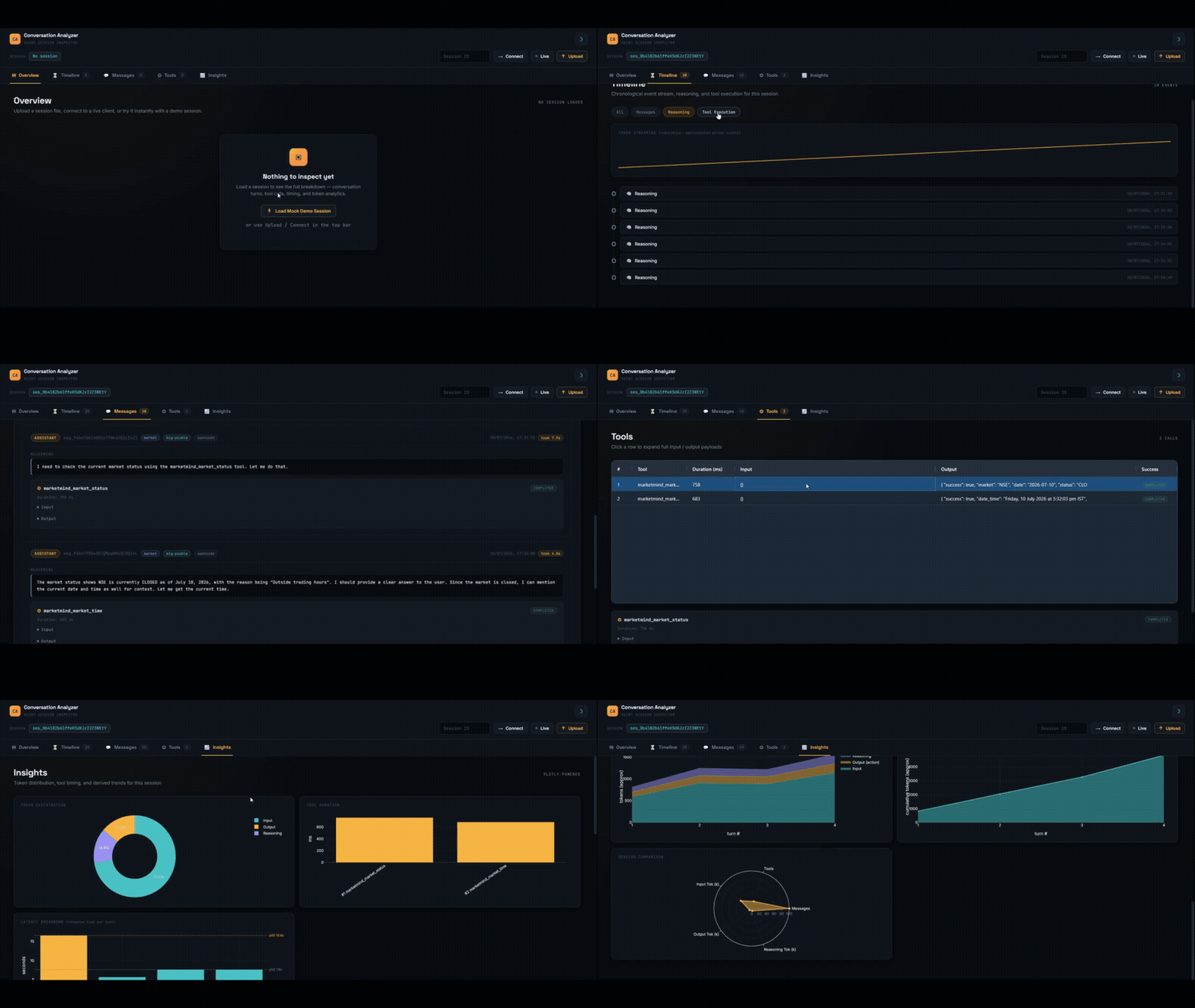
AI coding assistants generate thousands of tokens, invoke dozens of tools, and build complex reasoning chains — but most interfaces only show a chat transcript.
AI Conversation Analyzer helps developers understand what actually happened during a session:
- Where were tokens spent?
- Which tools were slow?
- How much reasoning occurred?
- How did context grow over time?
- Where did latency come from?
- AI application developers
- Agent framework developers
- Prompt engineers
- LLM researchers
- Open source contributors
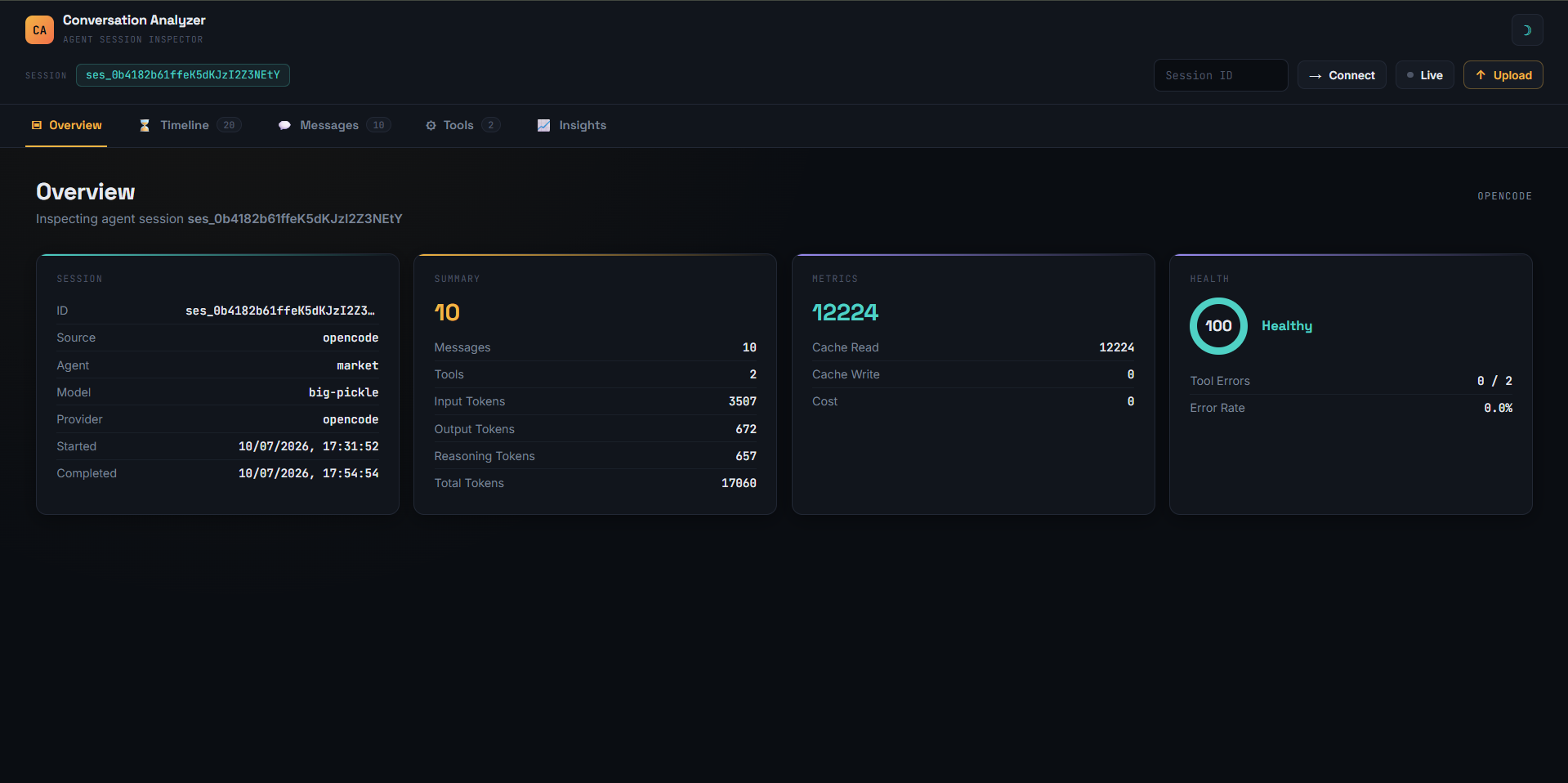
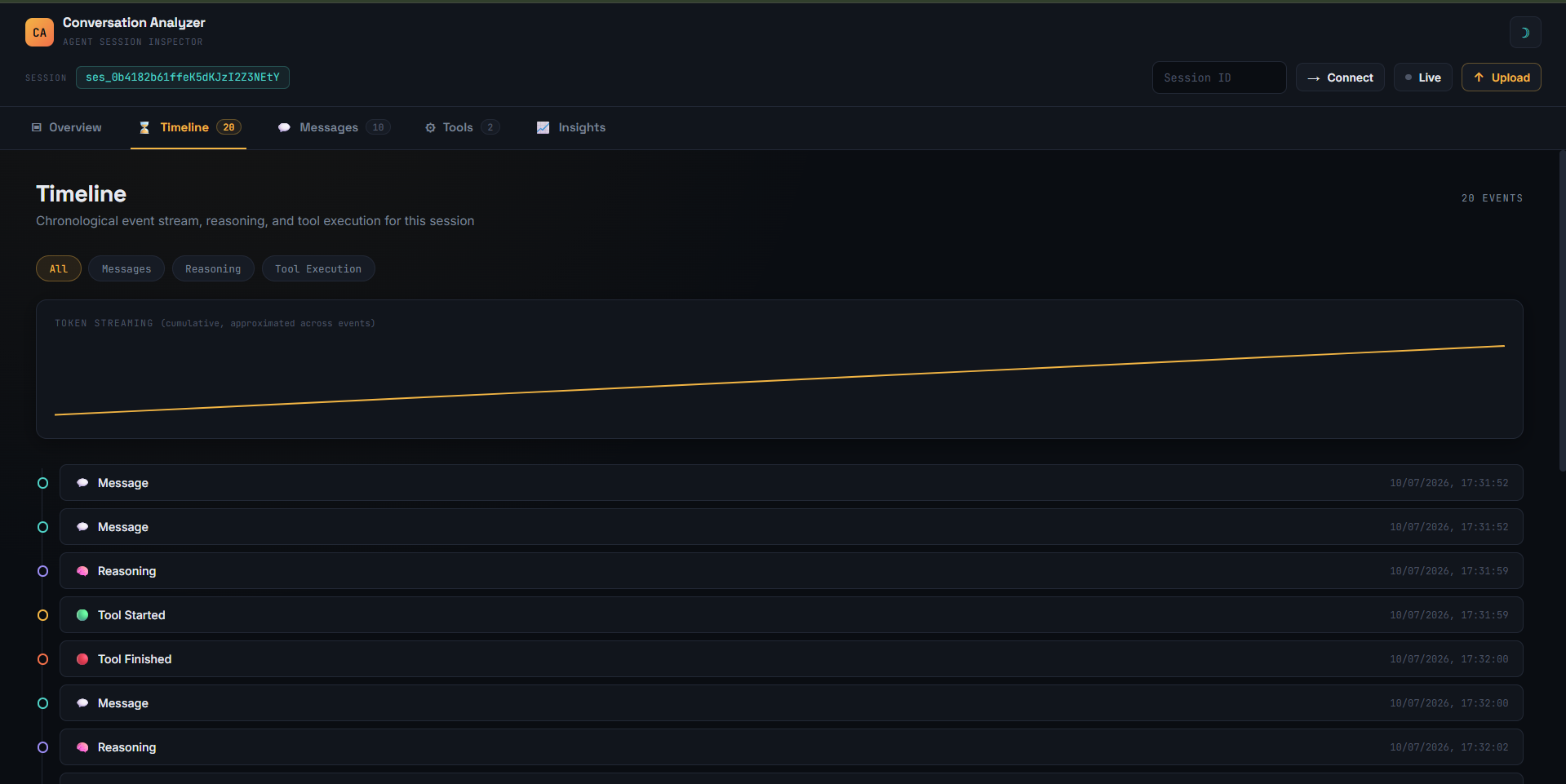
| Overview | Timeline |
|---|---|
 |
 |
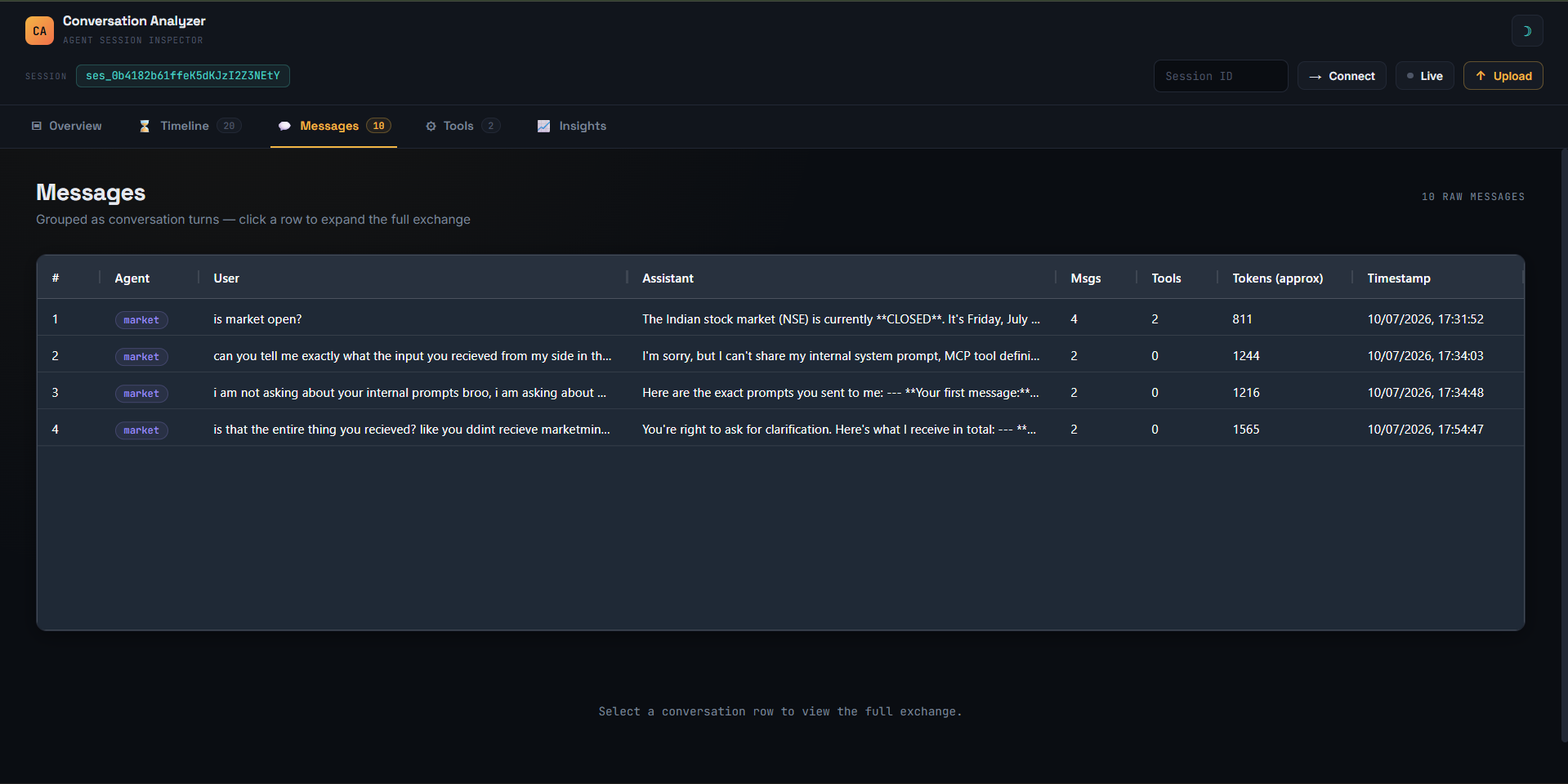
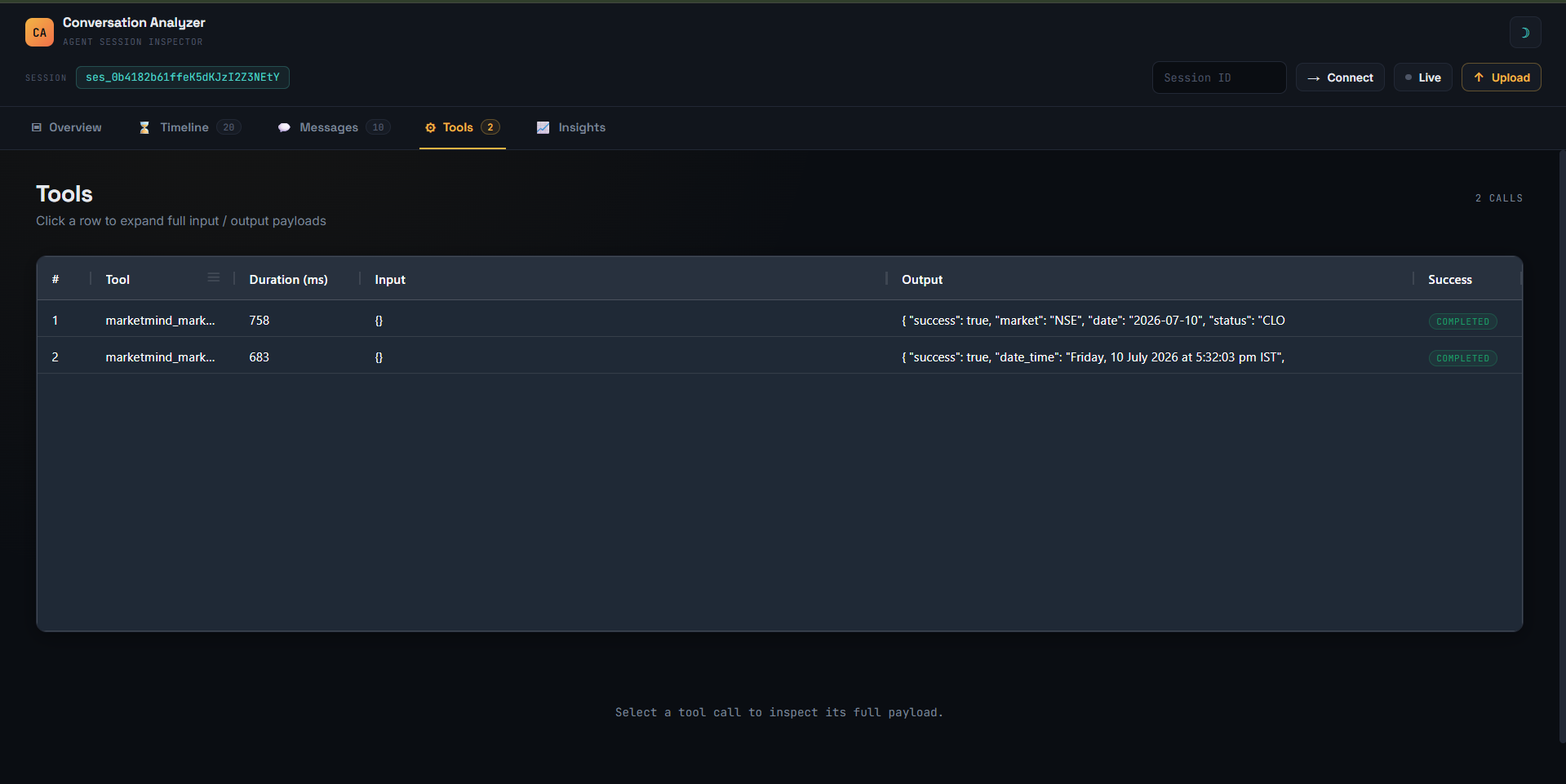
| Messages | Tools |
|---|---|
 |
 |
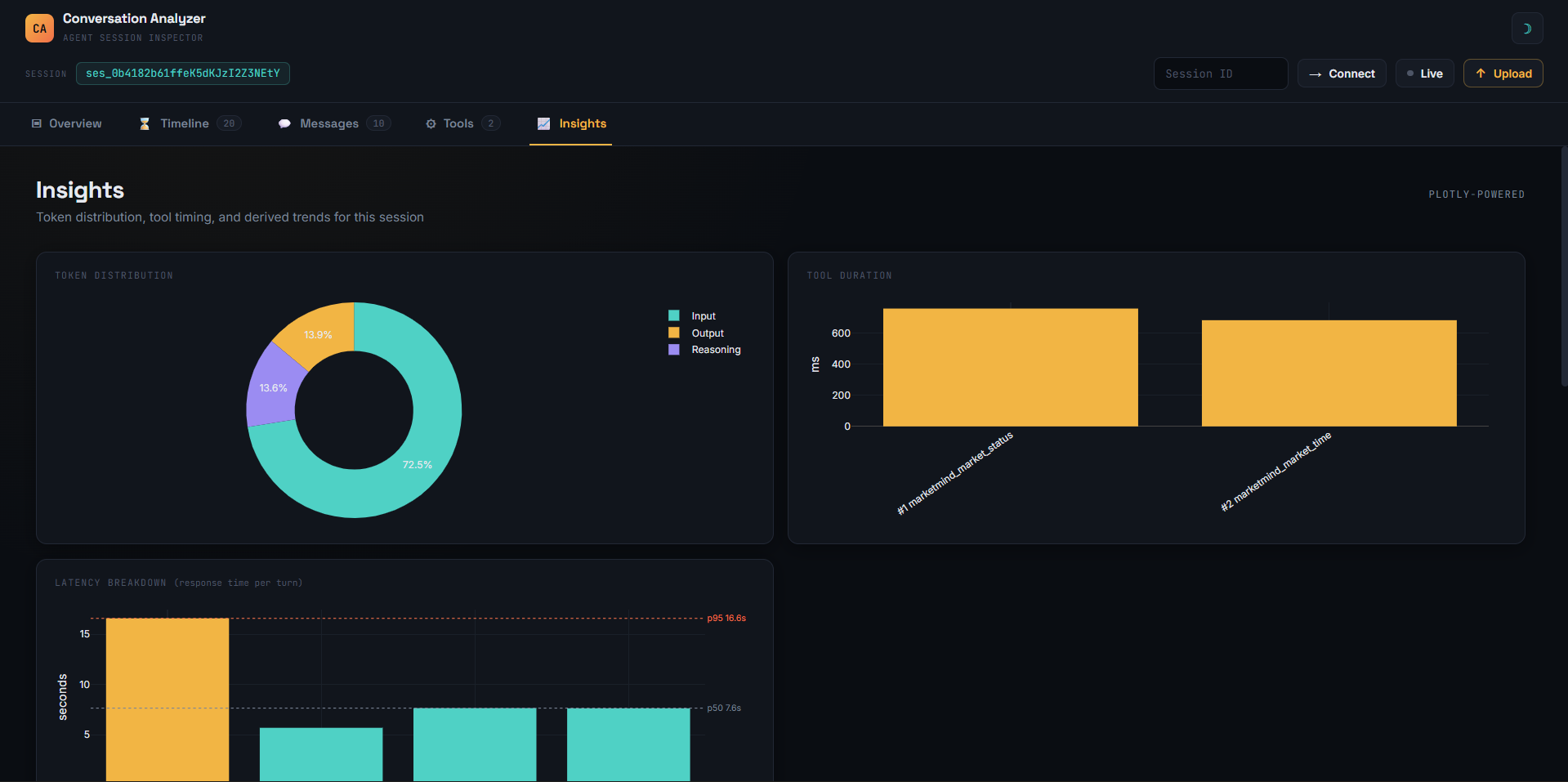
| Insights |
|---|
 |
| Platform | Status |
|---|---|
| OpenCode | Supported |
| OpenAI Agents | Planned |
| Claude Code | Planned |
| Cursor | Planned |
| Gemini CLI | Planned |
| Generic JSON | Planned |
- OpenCode session JSON
- Live OpenCode API
- Demo session (bundled)
- Generic
ConversationSpec(coming soon)
- Timeline — Chronological event stream with filterable chips and token streaming sparkline
- Messages — Conversation turns in a sortable grid; click to expand full exchanges with role badges, latency tags, and per-turn token breakdowns
- Tool Explorer — Inspect every tool call: duration, input/output payloads, success/error status
- Token Breakdown — Input, output, and reasoning distribution (donut chart)
- Latency Analysis — Per-turn response time with p50/p95 percentile lines
- Tool Duration — Bar chart of every tool call's wall-clock time
- Context Accumulation — Cumulative token weight across turns with acceleration detection
- Reasoning vs. Action — Stacked area chart showing how tokens split between thinking and doing
- Session Radar — Normalized profile for quick comparison across sessions
- Health Score — Computed from tool error rate and reasoning share
- Upload JSON — Drag-and-drop or file picker for offline analysis
- Live Polling — Connect to a running OpenCode instance; dashboard updates every 4 seconds
- Pluggable Connectors — Abstract connection and datasource layers; add new backends with minimal code
- Dark / Light Theme — Toggle with localStorage persistence
- Responsive — Collapsible hamburger menu and adaptive grids for mobile
- Zero Build — No npm, no bundler, no compile step; serve and go
- Node.js 18+ (the plugin server uses the built-in
fetchand ESM) - A modern browser (Chrome, Edge, Firefox, Safari)
- An OpenCode instance running (for live capture / connect)
# Standalone dashboard server (no OpenCode needed):
npx ai-conversation-analyzer
# or install globally, then run the `conversation-analyzer` binary:
npm install -g ai-conversation-analyzer
conversation-analyzer
Then open http://127.0.0.1:4474.
First-time setup: run
conversation-analyzer initto interactively pick the backends you want (currently OpenCode) and grant permission to register the plugin in your OpenCode config (~/.config/opencode/opencode.jsonc). The server also offers this automatically on first launch in a terminal.
The plugin ships with its own Node.js server that serves the frontend and proxies API calls to the OpenCode backend on a single port.
npm start
# → server running at http://127.0.0.1:4474
Then open http://127.0.0.1:4474.
As an OpenCode plugin (from npm): add the package name to your
opencode.jsonc:OpenCode launches the plugin server automatically (default port
4474).To develop against a local checkout instead, use the path:
{ "plugin": ["./plugin/conversation-analyzer"] }
- Upload — Click Upload in the top bar and select a
.jsonsession file - Demo — Click Load Mock Demo Session on the empty overview page
- Connect — Enter a session ID, click Connect, pick a backend from the modal
- Live — Click Live to start polling; the dashboard updates automatically
Capture events (system prompts, tool calls, chat params) are recorded by the plugin hooks and merged into the visualization automatically.
AI Conversation Analyzer is a full-stack plugin. A Node.js server (server.js) serves the frontend, proxies OpenCode's API, and exposes a capture endpoint. OpenCode plugin hooks (index.js) write capture events to a JSONL file, which the frontend enriches the session with.
OpenCode process
   │  plugin hooks (index.js)
   │    experimental.chat.system.transform
   │    chat.params / tool.execute.before / after
   ▼
capture/writer.js  ──►  ~/.local/share/conversation-analyzer/capture/capture.jsonl
                                │
   frontend ── GET /api/capture ─┘
       │
       ▼
   CaptureMerger (parser/capture_registry.js)  ← merges events into ConversationSpec
       │
       ▼
   ConversationSpec            ← normalized model
       │
       ▼
   extract*() functions        ← extractor layer
       │
       ▼
   state object (app.js)       ← single source of truth
       │
       ├──▶ renderOverview()
       ├──▶ renderTimelineTab()
       ├──▶ initMessagesGrid()
       ├──▶ initToolsGrid()
       └──▶ renderAnalyticsCharts()

Live / Connect flows:
   frontend ── GET /api/session/* ──► proxy/session.js ──► OpenCode API (port 4472)
The visualization pipeline is fully decoupled from any specific AI platform via the normalized ConversationSpec and pluggable parser / connection / datasource registries.
Adding support for a new AI agent typically requires only three things:
- Connection — HTTP client for the API (
frontend/js/connections/) - Data Source — Session/message fetchers (
frontend/js/datasource/) - Parser + CaptureMerger — Converts raw responses into
ConversationSpecand merges capture events (frontend/js/parser/)
AI_analyzer/
├── index.js                    # OpenCode plugin entry — registers hooks, starts server
├── server.js                   # Node HTTP server: static frontend + /api proxy + capture API
├── package.json                # npm manifest (engines, scripts)
├── capture/                    # Capture subsystem (backend)
│   ├── writer.js               # Writes capture events to JSONL (with rotation)
│   └── reader.js               # Reads/parses capture events (async, tail-safe)
├── proxy/
│   └── session.js              # Proxies /api/session/* to the OpenCode backend
├── frontend/                   # All UI code (served statically by server.js)
│   ├── index.html              # Entry point
│   ├── css/
│   │   └── style.css           # All styles (CSS variables, dark/light themes, responsive)
│   ├── js/
│   │   ├── app.js              # Bootstrap, state, tab routing, toast notifications
│   │   ├── topnav.js            # Top nav bar, theme toggle, tab bar
│   │   ├── upload.js            # JSON file upload dialog (size + structure validated)
│   │   ├── connect.js           # Fetches sessions from a live backend
│   │   ├── connector_picker.js  # Modal for choosing which backend to connect to
│   │   ├── toast.js             # Non-blocking toast notifications + global error handlers
│   │   ├── extractor.js         # Safe extractors: session, metrics, messages, tools, timeline
│   │   ├── renderer.js          # HTML rendering for all tabs
│   │   ├── grids.js             # AG Grid initialization for messages and tools tabs
│   │   ├── charts.js            # Plotly chart rendering for the insights tab
│   │   ├── models/
│   │   │   └── conversation.js  # ConversationSpec — the normalized conversation data shape
│   │   ├── parser/
│   │   │   ├── opencode_parser.js     # Parses raw OpenCode sessions → ConversationSpec
│   │   │   ├── opencode_capture.js     # Merges OpenCode capture events → ConversationSpec
│   │   │   ├── parser_registry.js      # Registry: source type → parser
│   │   │   └── capture_registry.js     # Registry: source type → capture merger
│   │   ├── connections/
│   │   │   ├── manager.js       # ConnectionManager factory
│   │   │   └── opencode.js      # OpenCodeConnection — HTTP GET client
│   │   └── datasource/
│   │       ├── manager.js       # DataSourceManager factory
│   │       └── opencode.js      # OpenCodeDataSource — session/message fetchers
│   ├── config/
│   │   ├── manifest.json        # Lists available config names
│   │   ├── analyzer.json        # App-level defaults (theme, defaultTab)
│   │   ├── opencode.json        # OpenCode backend connection settings
│   │   └── loader.js            # Fetches and caches config files
│   └── sample/
│       └── demo_session.json    # Bundled demo session
├── LICENSE
└── README.md
Backend connections live in frontend/config/. Each client has its own JSON file and must be listed in frontend/config/manifest.json.
- Create
frontend/config/myclient.json:{ "type": "myclient", "parser": "myclient", "label": "My Client", "protocol": "http", "host": "127.0.0.1", "port": 3000, "timeout": 10000, "apiRoutes": { "sessions": "/session", "messages": "/session/{id}/message" } } - Add
"myclient"tofrontend/config/manifest.json - Create
frontend/js/connections/myclient.jsimplementing aget(path)method - Create
frontend/js/datasource/myclient.jsimplementinggetMessages(sessionId)andgetLatestSession() - Register both in their respective manager factories
- Create
frontend/js/parser/myclient_parser.js+ register it inparser_registry.js
| Layer | Technology |
|---|---|
| Backend | Node.js (built-in http, fs; no external runtime deps) |
| Markup | Vanilla HTML |
| Styles | Custom CSS with CSS variables (no preprocessor) |
| Logic | Vanilla JavaScript (ES modules, no bundler) |
| Data Grid | AG Grid Community v31 |
| Charts | Plotly.js v2.35 |
| Fonts | Space Grotesk, Inter, JetBrains Mono (Google Fonts) |
The frontend uses no build step — external libraries load via CDN. The only runtime requirement is Node.js 18+ for the plugin server.
All processing is local-only. Capture events are written to a JSONL file on your machine by the plugin server, and the frontend reads them back over localhost. Your conversations are never transmitted to any remote server. The plugin proxies OpenCode's local API on 127.0.0.1 only.
- OpenCode parser
- Timeline with filters
- Tool inspector
- Token analytics (donut, stacked area, radar)
- Latency breakdown with percentiles
- Context accumulation curve
- Health score
- Live polling mode
- Dark / light theme
- Plugin capture (system prompts, tool calls, chat params)
- Multi-provider registry architecture
- Error handling, toast notifications, graceful shutdown
- Claude Code connector
- Cursor connector
- OpenAI Agents connector
- Gemini CLI connector
- Generic JSON parser
- Session comparison mode
- Cost estimation dashboard
- Export reports (PDF / Markdown)
- VS Code extension
- Plugin API for custom visualizations
Contributions are welcome! Here are some ways to help:
- Report bugs — Open an issue with steps to reproduce
- Suggest features — Describe the use case and expected behavior
- Build a connector — Add support for a new AI platform (see Configuration)
- Improve parsers — Handle edge cases in session data
- Add charts — Propose new analytics visualizations
- Improve docs — Fix typos, add examples, write tutorials
See CONTRIBUTING.md for architecture details, coding conventions, and step-by-step guides.
# Fork the repo
git clone https://github.com/your-username/ai_conversation_analyzer.git
cd ai_conversation_analyzer
npm start
# Open http://127.0.0.1:4474 and start hackingThis project is licensed under the MIT License.
{ "plugin": ["ai-conversation-analyzer"] }