This app connects to MySQL on port 3306 There are 2 ways to instantiate MySQL
See application.properties connection details
- Make sure Docker daemon is running
cd mysql_docker
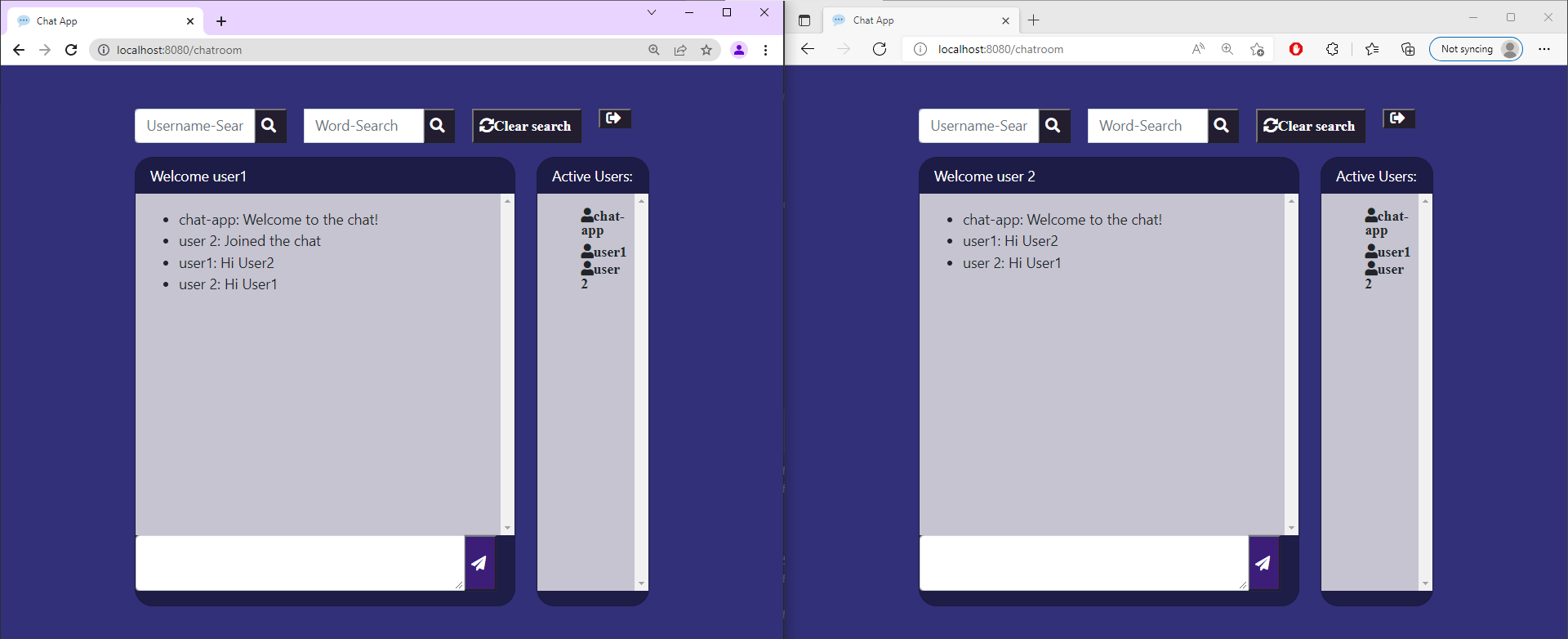
. run.shThis is a simple chat app with a single chatroom. Websocket was used to connect all users to one chatroom. There are 2 Pages in this application: 1. Login Page 2. Chatroom Page. The user logs in in the login page and can chat with any other user logged on.
- default.html - All Thyemeleaf templates must derive their layouts from default.html
- fragments.html Various fragments exist in fragments.html that can be used by multiple templates.
- chat-client.html - The chatroom.
- login.html - The
In this JS file we connect to the Websocket from th clients side. And hold all of the client-side logic for sending and receiving messages using
Here lies the code relevant to searching functionalities in the chatroom. The 2 searches are:
- Searching for messages containing a sub-string/word.
- Searching for messages by a particular user.
css for all pages can be found in styels.css
This Application instantiates a two tables in a MySQL Database.
- User table - for storing all connected users with their session ID's
- Message table for storing all messages sent in the chat.
- The username is passed to the API from the login form.
- The API triggers creating the User element in the User database.
- The user is then redirected to the chatroom page.
- When entering the chatroom the user subscribes to the websocket endpoint.
3 Exceptions can occur during runtime:
- The user tries to log in but a user with the same name is logged in.
- The user tries to access the chatroom before logging in
- The user tries to log in while still connected to the chat in the same session.
In All three cases the user is redirected to the Login Page. And the relevant error message is displayed on the top of the page using thyeme-leaf.
The api package is the REST API for connecting to each Database, "user" and "message". For the user Database there is the internal user package and for message there is the message package.
Message holds all information about a message.
Messages are stored in "message" table in DB.
In this class we can instantiate our Massage DB. MessageController This acts as the endpoint to our Messages API.
This is the Service Layer of "message" DB.
This is the repository layer for our message database.
This is an Enum class for determining the type of message that was sent. Based on a messages type, the front end can decide how to react.
User holds all information about a User. Users are stored in "user" table in DB.
In this class we can instantiate our User DB.
This acts as the endpoint to our User API.
This is the Service Layer of "user" DB.
This is the repository layer for our user database.
Here we hold our controllers that are not part of the REST API.
This class controls HTTP Request mapping of our app. This include: login, logout and chatroom.
This Class is in charge of mapping messages sent by WebSocket. exception Package Here we store various Custom Runtime Exceptions. As well, we have a Exception handler for these Exceptions.
This ControllerAdvice is in charge of routing all User related exceptions. UserAlreadyRegisteredException Instantiates a new User already registered exception.
Instantiates a new User not exist exception.
Here we hold all of the server side logic for instantiating our Websocket protocol.
This class configures our STOMP endpoints. Connects to Event listeners and Handshake interceptors.
This class Handles Websocket Events. Custom Handles for CONNECT and DISCONNECT exist here.
This class intercepts the WebSocket handshake. Here session attributes are added to STOMP protocol. As well, in the event of refreshing the page, we make sure the user is not removed from the database.
Web socket authentication interceptor. This interceptor Class can be used to validate the messages being passed. Unfortunately, no authentication was implemented in this project so this has no use to us.