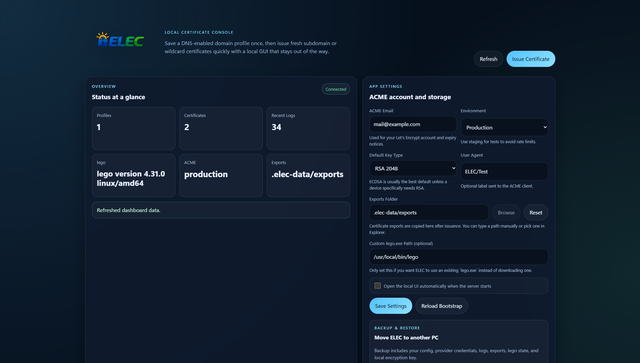
ELEC is a lightweight local GUI for Let's Encrypt certificate issuance. It can run as a Windows desktop app from source or .exe, or as a self-hosted Docker service with the same web UI.
- Save a domain profile once with its DNS provider and credentials.
- Reuse that profile to issue fresh certificates for subdomains, SAN sets, or
*.example.comwildcard names. - Export PEM bundles and optional PFX bundles.
- Preview a hosts-file mapping such as
192.168.1.1 gateway.example.comfor local appliances like a Ubiquiti Cloud Gateway. - Backup and restore the full ELEC data set when moving to another machine.
- Build a Windows
.exepackage from the project. - Host the UI in Docker for always-on certificate operations.
- Node.js 22+ for source/development mode.
- Control over the public DNS zone for the domain you want to validate.
- DNS provider API credentials supported by
lego.
- Install dependencies:
npm install --cache .npm-cache - Run in dev mode:
npm run dev - Run normally:
npm start - Smoke test:
npm run smoke - Validation tests:
npm test
Then open http://127.0.0.1:3210 if the browser does not launch automatically.
- Build the packaged app:
npm run build - Output file:
build/ELEC.exe
The current packaging path uses pkg with a generated CommonJS packaging target so the standalone executable starts cleanly.
- Start the service:
docker compose up --build -d - Open the UI: http://127.0.0.1:3210
- Stop it:
docker compose down
The default compose file stores ELEC state in the named volume elec-data.
- Build the image:
docker build -t elec . - Run it:
docker run -d --name elec -p 3210:3210 -v elec-data:/app/.elec-data elec
- The image pins
legotov4.31.0by default and installs the Linux binary into/usr/local/bin/lego. ELEC_HOST=0.0.0.0,ELEC_AUTO_OPEN=false, andELEC_LEGO_BINARY_PATH=/usr/local/bin/legoare set in the container so the service is reachable and does not try to launch a local browser.- The Windows-only shell actions such as
Browsefor folders andOpen Export Folderare not available in Docker or non-Windows environments. - For persistence, keep
/app/.elec-dataon a volume or bind mount.
A ready-to-edit SSL reverse-proxy template is included at deploy/nginx/elec-ssl.conf.template.
Typical use:
- replace
example.comwith your hostname - replace the certificate and key paths with your real TLS files
- keep
127.0.0.1:3210if Nginx runs on the same host, or change it to your Docker service name such aselec:3210 - test with
nginx -t - reload with
systemctl reload nginx
The template disables proxy buffering so ELEC's live certificate task logs continue streaming correctly through Nginx.
- Run
start-elec.bat,npm start, ordocker compose up --build -d. - Save your ACME email and output settings.
- Create a domain profile with the root domain, DNS provider, and provider credential JSON.
- Issue a certificate for names such as
gateway.example.comor*.example.com, example.com. - Use the generated hosts preview to point the public certificate name at your LAN IP if needed.
- Let's Encrypt does not permanently trust a domain after one issuance. Each new certificate is validated again, but ELEC makes that fast by reusing your stored DNS automation profile.
- For wildcard issuance, use DNS-01 and include both
*.example.comandexample.comif you want the apex covered too. - On Windows desktop, the app can auto-download
lego.exeunless you provide a custom path in Settings. - In Docker, the Linux
legobinary is preinstalled and exposed throughELEC_LEGO_BINARY_PATH. - Secrets are encrypted locally using a generated AES key stored in
.elec-data/local/secretbox.key. - The backup ZIP includes config, encrypted secrets, exports, logs, lego data, and the local key material required to decrypt saved credentials on the restored instance.
ELEC stores its working data inside the project or container working directory by default:
.elec-data.elec-data/local
That includes config, encrypted secret blobs, logs, lego state, and exported certificate artifacts. You can override the locations with ELEC_STORAGE_ROOT and ELEC_LOCAL_STORAGE_ROOT if you want them elsewhere.