Tracking campus events can be difficult and time-consuming. Physical flyers often clutter bulletin boards and can be hard to find. Manual entry of event details into a personal calendar is prone to errors. With that in mind, the primary goal of FlyerScan is to simplify the process of tracking on-campus events for students. By automating the extraction of event details from flyers, students can easily add events to their personal calendars and stay informed about upcoming activities. The project aims to satisfy the following criteria:
- Accounts for users’ needs and requirements
- Requires software development
- Uses a machine learning or recognition component
- Builds interaction techniques
- Able to scan a flyer and determine it is a flyer
- Able to extract date, time, location, and event from the flyer
- Generate calendar file from the information pulled from the flyer
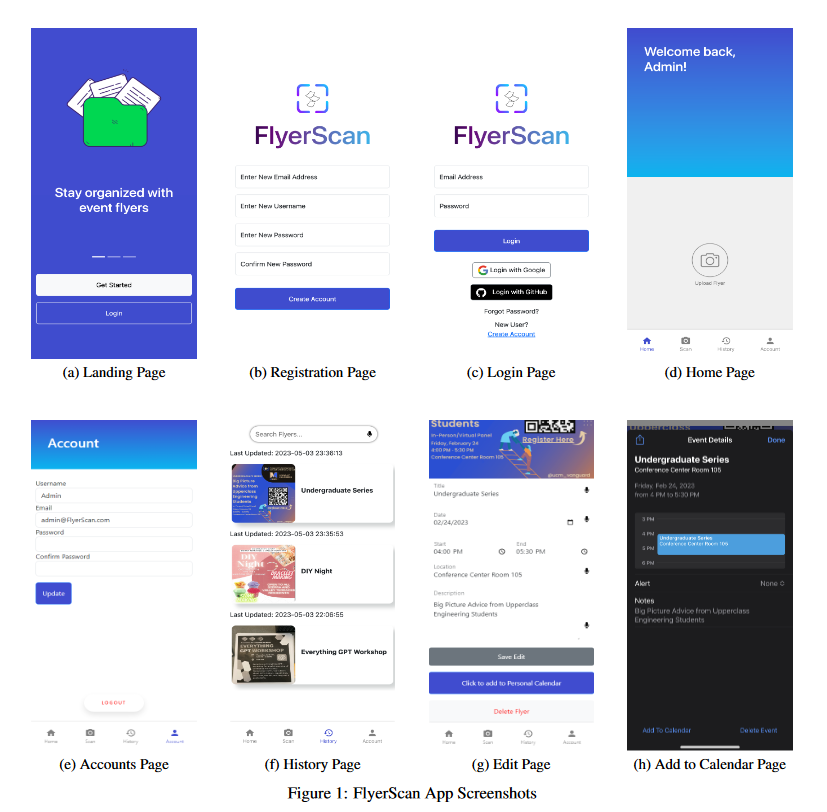
- Review screen with final event information and option for manual correction with keyboard or voice dictation
- History of past scans stored in database
- User Account management
- Responsive design
Start with a creating virtual environment
python -m venv venv
Then activate the virtual environment
Activate environment for windows
venv/Scripts/Activate
Activate environment for linux/darwin
source venv/bin/activate
Then install the requirements in the virtual environment
pip install -r requirements.txt
Then run the main flask file
python manage.py
Open another terminal with the environment active, then load up the models with
python BERTmanage.py
You'll have to create a service worker account in order to use Google Drive to store the images as we did, and store the credentials into the .serviceCred.json file. PARENT_FOLDER_ID refers to the id of the Google drive folder you'll be using to store the images.
You'll also have to get client id and client id secret for github and google in order to use the social login for both, enter the details into the .env file. You'll also need to get OCR_API_KEY, the OCR api key can be gotten from https://ocr.space/OCRAPI for free.