


Python package to benchmark query performance on a PostgreSQL database. It allows you to measure the execution time of queries over multiple runs, providing detailed metrics about each run's performance.
- Main purpose of this library is to easily microbenchmark queries without boilerplate.
- This tool is not for Database Administrators (Yet).
- There's a lot of re-thinking and work in progress ongoing on this project
- Most of the things will be backwards-compatible, but some things might deprecate/break in future releases.
- Since I'm developing this library as I go, mostly for my personal use, code here and there is sub-optimal.
pip install pgbenchmarkimport psycopg2
from pgbenchmark import Benchmark
conn = psycopg2.connect(
dbname="postgres",
user="postgres",
password=" << Your Password >> ",
host="localhost",
port="5432"
)
benchmark = Benchmark(db_connection=conn, number_of_runs=1000)
benchmark.set_sql("SELECT 1;")
for result in benchmark:
# {'run': X, 'sent_at': <DATETIME WITH MS>, 'duration': '0.000064'}
pass
""" View Summary """
print(benchmark.get_execution_results())
# {'runs': 1000,
# 'min_time': '0.000576',
# 'max_time': '0.014741',
# 'avg_time': '0.0007',
# 'median_time': '0.000642',
# 'percentiles': {'p25': '0.000612',
# 'p50': '0.000642',
# 'p75': '0.000696',
# 'p99': '0.001331'}
# }benchmark.set_sql("./test.sql")pgbenchmarkYou'll see the ouput
[ http://127.0.0.1:8000 ] Click to open pgbenchmark Interface
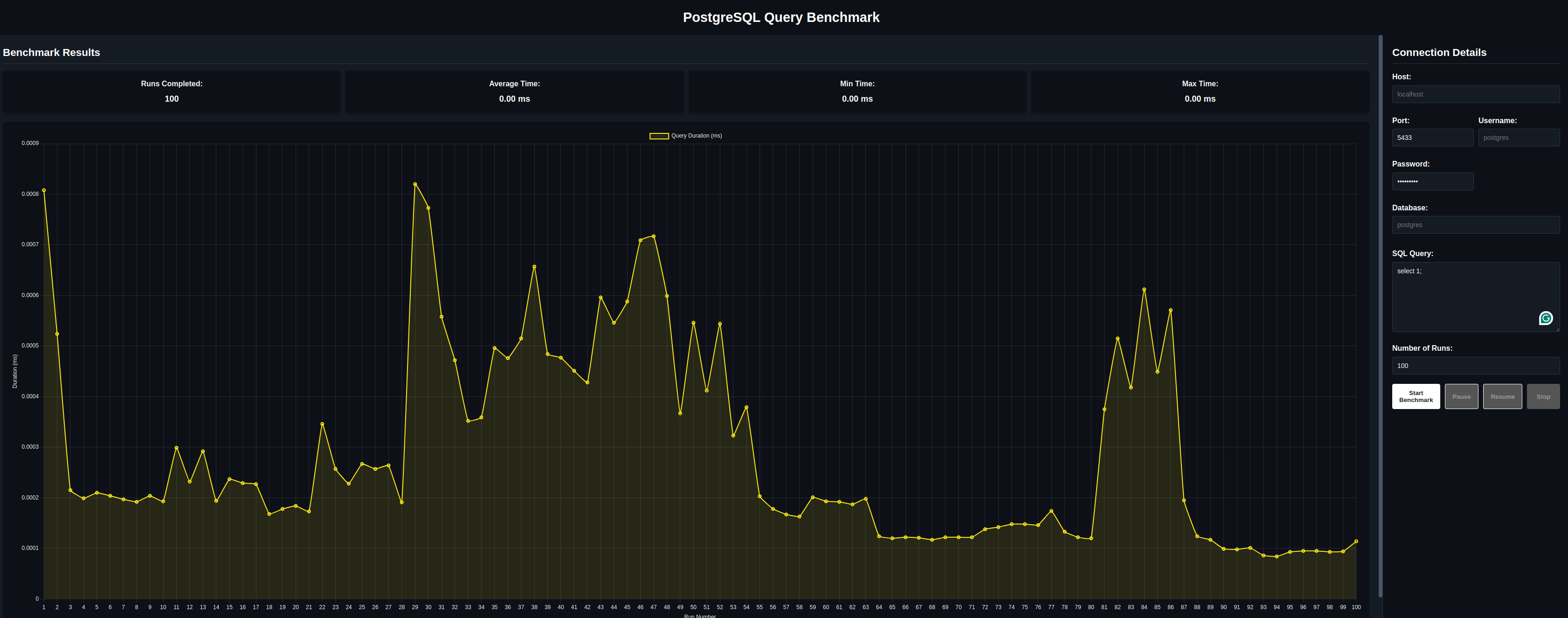
Pause and Resume buttons are not working for now :(
- Providing Nothing at all. Benchmark will use standard default factory values
from pgbenchmark import Benchmark

benchmark = Benchmark(number_of_runs=1000)
benchmark.set_sql("SELECT 1;")

for iteration in benchmark:
pass- Providing Connection Details as Dict.
from pgbenchmark import Benchmark

params = {
    "dbname": "postgres",
    "host": "localhost",
    "port": "5432",
    "user": "postgres",
    "password": "postgres",
}

benchmark = Benchmark(db_connection=params, number_of_runs=1000)
benchmark.set_sql("SELECT 1;")

for iteration in benchmark:
pass- Psycopg2 connection object directly
from pgbenchmark import Benchmark

params = {
    "dbname": "postgres",
    "host": "localhost",
    "port": "5432",
    "user": "postgres",
    "password": "postgres",
}

benchmark = Benchmark(db_connection=params, number_of_runs=1000)
benchmark.set_sql("SELECT 1;")

for iteration in benchmark:
passfrom pgbenchmark import ParallelBenchmark
pg_conn_params = {
"dbname": "postgres",
"user": "postgres",
"password": "",
"host": "localhost",
"port": "5432"
}
# --- Configuration ---
N_PROCS = 20
N_RUNS_PER_PROC = 1000
SQL_QUERY = "SELECT 1;"
parallel_bench = ParallelBenchmark(
num_processes=N_PROCS,
number_of_runs=N_RUNS_PER_PROC,
db_connection_info=pg_conn_params
)
parallel_bench.set_sql(SQL_QUERY)
if __name__ == '__main__':
print("===================== Simply `run()` and get results at the end ==============================")
parallel_bench.run()
print("===================== Or... Iterate Live and get results per-process =========================")
for result_from_process in parallel_bench.iter_successful_results():
print(result_from_process)
final_results = parallel_bench.get_execution_results()To emulate "real" scenarios, with different random or pre-defined queries, you can use set_sql_formatter method
to generate queries. Same syntax as Jinja2 using {{ [X] }} for variables.
def generate_random_value():
    return round(random.randint(10, 1000), 2)


N_RUNS_PER_PROC = 1000

SQL_QUERY = "SELECT {{random_value}};"

# ....

parallel_bench.set_sql(SQL_QUERY)

"""===================== use `ANY` function to generate values for your query =============================="""
parallel_bench.set_sql_formatter(for_placeholder="random_value", generator=generate_random_value)