Automatically sort, rename, clean, and process files the moment they land in a folder — no manual work, no missed files.
Built for teams and freelancers who deal with repetitive file management: incoming CSVs from clients, PDF invoices, exported reports, bulk uploads. Drop a file in, walk away. It's handled.
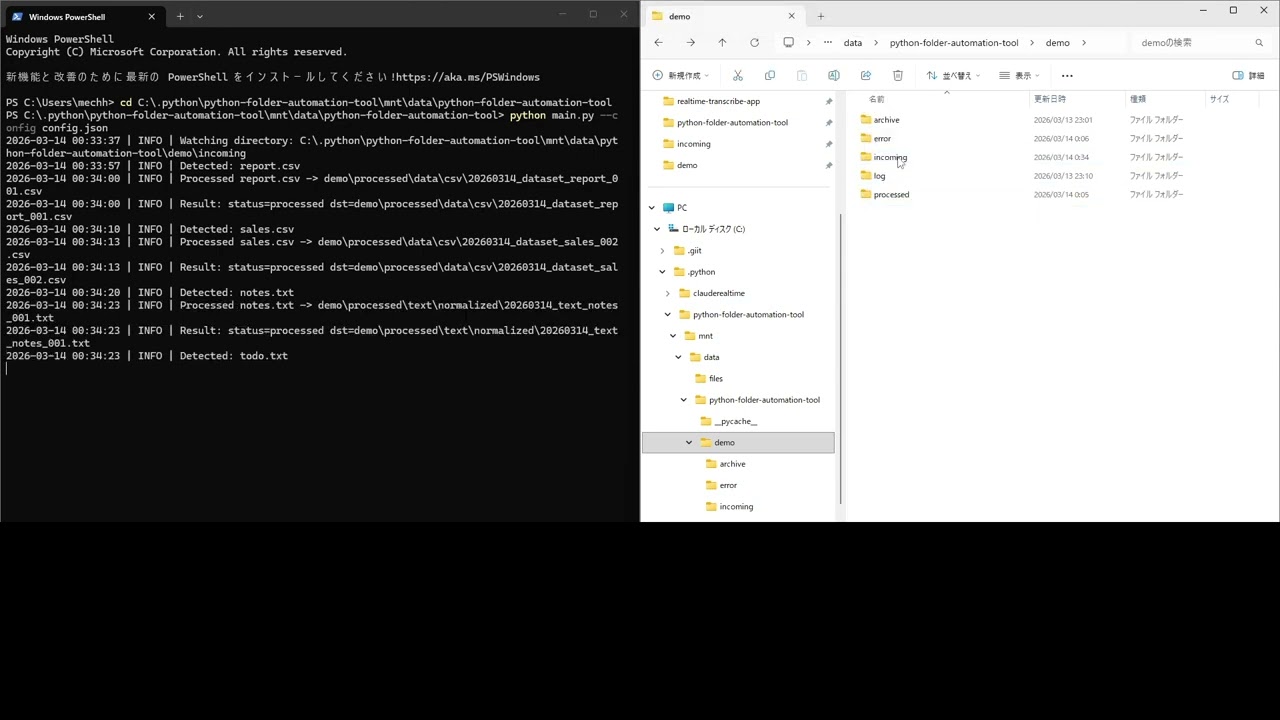
| Feature | Detail |
|---|---|
| 📡 Real-time monitoring | Watches a folder 24/7 using watchdog |
| 🗃️ Rule-based routing | Routes files by extension and filename keywords |
| ✏️ Smart renaming | Auto-renames with date, prefix, slug, and counter |
| 🧹 CSV cleaning | Strips whitespace, normalizes headers, drops empty rows |
| 📄 TXT normalization | Strips trailing spaces, ensures UTF-8 output |
| 🔁 Retry with backoff | Retries failed files up to N times automatically |
| 🔍 Dry-run mode | Preview exactly what would happen — without moving anything |
| 📦 Batch mode | Process all existing files once and exit |
| 🔔 Webhook notifications | POST to Slack, Zapier, or any endpoint on success/failure |
| 📋 Rotating logs | JSON or plain-text logs with automatic rotation |
# 1. Clone and install
git clone https://github.com/HAYATOKudo/python-folder-automation-tool
cd python-folder-automation-tool
pip install -r requirements.txt

# 2. Create a starter config
python main.py --init .

# 3. Start watching
python main.py --config config.json
Drop a file into the watch folder. Done.
All behavior is controlled by a single config.json. No code changes needed.
{
  "watch_dir": "./watch",
  "processed_dir": "./processed",
  "archive_dir": "./archive",
  "error_dir": "./error",
  "log_dir": "./logs",
  "rules": [
    {
      "name": "csv_cleaning",
      "enabled": true,
      "extensions": [".csv"],
      "destination_subdir": "data/csv",
      "rename": {
        "prefix": "dataset",
        "use_date": true,
        "counter_width": 3
      },
      "csv_options": {
        "strip_whitespace": true,
        "drop_empty_rows": true,
        "lowercase_headers": true
      }
    }
  ]
}
Rules are matched top-to-bottom by extension and optional filename keywords. Unmatched files are moved to processed/unmatched/ — nothing is ever silently lost.
# Watch continuously (default)
python main.py --config config.json

# Process existing files once and exit
python main.py --config config.json --once

# Preview without moving anything
python main.py --config config.json --once --dry-run

# Generate a starter config in a directory
python main.py --init ./myprojectprocessed/
data/csv/
20260314_dataset_report_001.csv ← cleaned, renamed
documents/invoices/
20260314_invoice_receipt_001.pdf
text/normalized/
20260314_text_notes_001.txt
unmatched/
unknown_file.xyz ← no rule matched, kept safe
archive/
... ← optional copies
error/
broken_file.csv ← failed after retries
logs/
automation.log
Fire a POST request to any URL on file success or failure:
"notifications": {
  "webhook": {
    "enabled": true,
    "url": "https://hooks.slack.com/services/YOUR/WEBHOOK/URL"
  }
}
Payload example:
{
  "event": "file_processed",
  "payload": {
    "status": "processed",
    "source": "/watch/report.csv",
    "destination": "/processed/data/csv/20260314_dataset_report_001.csv",
    "rule": "csv_cleaning"
  }
}- Python 3.10+ — no external dependencies beyond
watchdog - watchdog — cross-platform filesystem monitoring
- Zero database — pure filesystem, runs anywhere
- Windows / macOS / Linux — fully tested on all three
- Sorting client deliverables as they arrive
- Auto-cleaning CSV exports from Shopify, HubSpot, Airtable
- Processing scanned invoice PDFs into an organized archive
- Building lightweight internal workflow automation without Zapier
- Feeding files into downstream pipelines (ETL, ML training data, backups)
MIT — free to use, modify, and deploy commercially.
Built with Python. Runs anywhere. Does exactly what it says.