
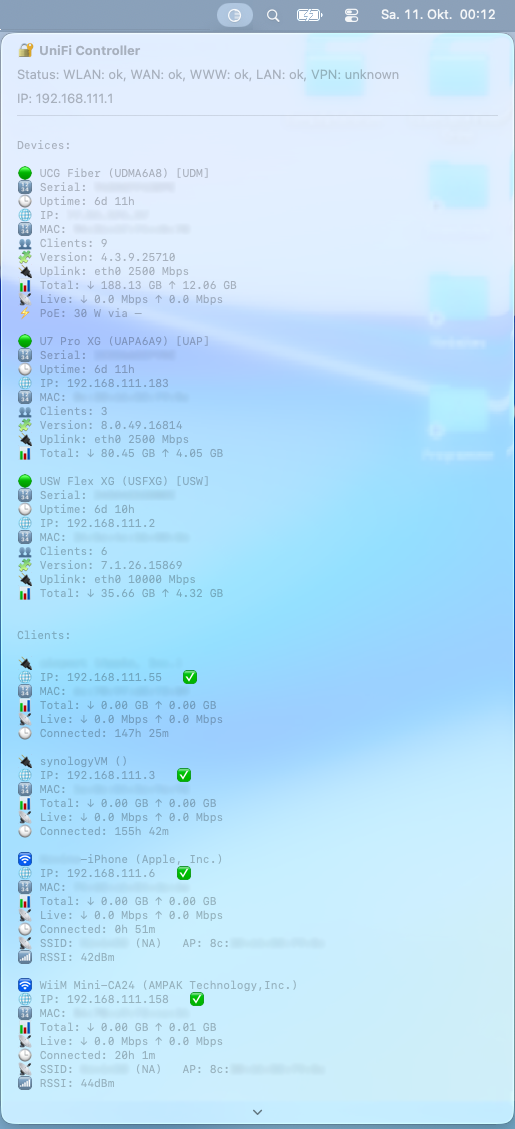
Monitor your UniFi Network directly from the macOS menu bar —
view gateway health, connected devices, live throughput, PoE stats, and client information in real-time.
Developed by Kevin Tobler 🌐 www.kevintobler.ch
UniFiStatusBarApp is a lightweight macOS utility that connects to your local UniFi Network Controller and displays key system metrics right in the macOS menu bar.
Features include:
- 🔹 Automatic detection of your UniFi Controller (Gateway IP)
- 🔹 Live health status, device list, and client connections
- 🔹 Real-time throughput (Mbps) and PoE information
- 🔹 Compact menu bar UI for quick network insights
- 🔹 Local API access — no cloud login required
- macOS 14.6 (Sonoma) or newer
- UniFi Controller reachable in your local network (Network Version 9.4.19 or newer)
- A valid UniFi API Key (
Settings → System → API Access)
- Unzip the App and run it or move it to the Applications folder
When starting the app for the first time:
- The app automatically detects your local UniFi Gateway (e.g.
192.168.1.1) - A small settings window appears asking for your API Key
- Paste your UniFi key and press 💾 Save and Connect
- The app refreshes automatically and starts displaying live stats
| Category | Description |
|---|---|
| 🌐 Controller | Shows online/offline status and UniFi subsystems |
| 🧩 Devices | Lists all UniFi devices (Gateway, Switches, APs) |
| 📊 Clients | Displays connected clients, signal strength, and uptime |
| ⚡ PoE Stats | Detects total PoE draw per device |
| 🔄 Auto-Refresh | Updates data every 2 seconds |
| 🔒 Local Access | Works entirely offline (via HTTPS API) |
- 🧭 Menu Bar Icon:
- ⚙️ Settings Button: Opens API key window
- 💾 Save and Connect: Stores your key securely
- 🔁 Auto-Reload: When API key is saved, app reconnects automatically
📧 internet@kevintobler.ch
🐙 github.com/KeepCoolCH