



The PDF redaction toolkit for Node.js and Lambda. No native binaries.
Two complementary halves, one package:
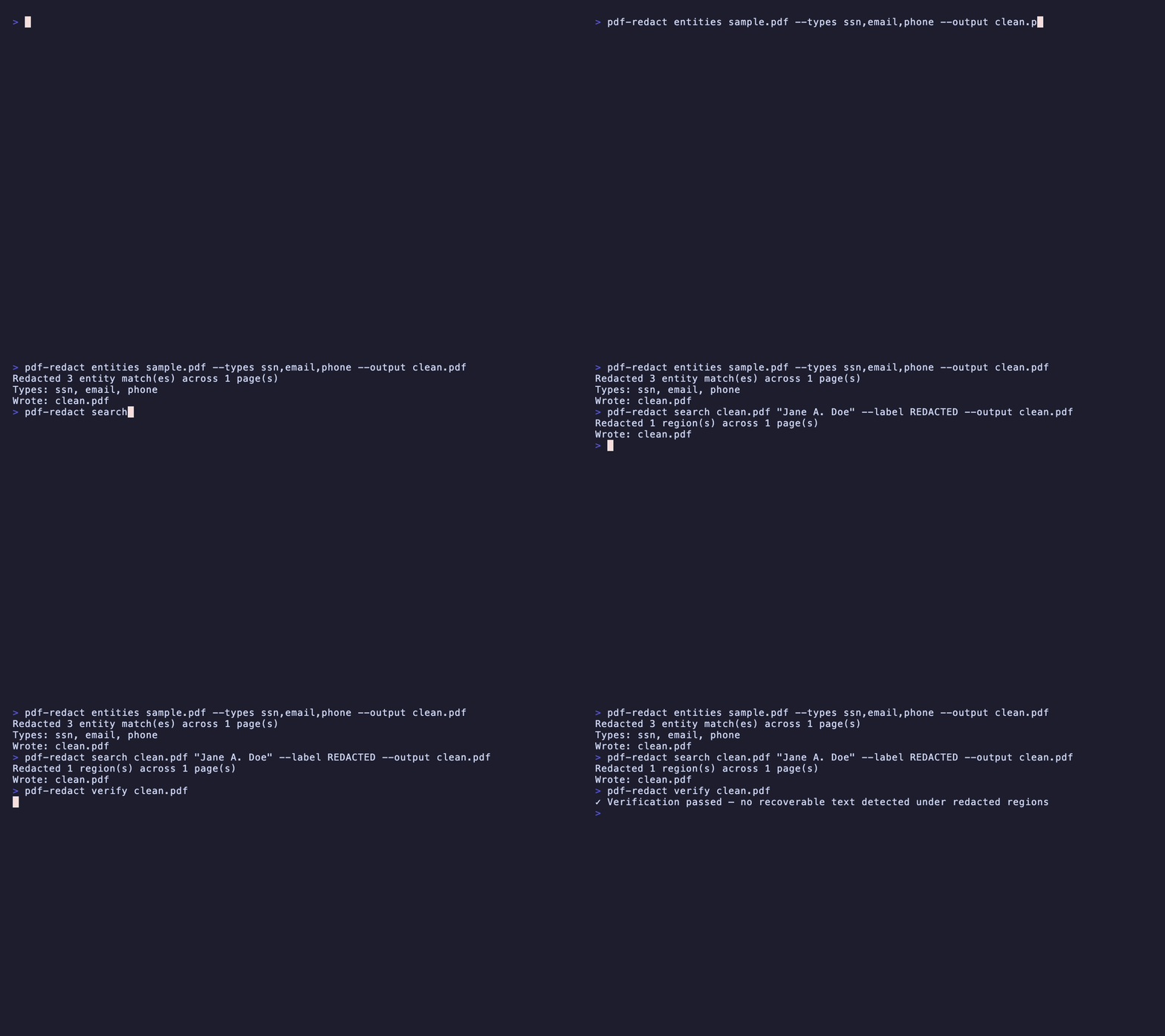
- Redact — strip the text-drawing operators out of the PDF content stream and draw a visual bar, so the text is genuinely removed (not just covered), with a built-in
verify()that proves it. Plus entity/FOIA patterns, exemption stamping, and an audit-log manifest. - Audit & unseal — go the other way: detect fake redaction in a PDF you received (text under boxes, recoverable prior revisions, metadata/annotation leaks) and lift the fake bars to reveal what they hid. See Audit & unseal.
Powers scrubzero.org. Folds in the former
@liiift-studio/unsealpackage (now deprecated).
Pure TypeScript on top of
pdf-lib+pdfjs-dist. Noqpdf, no Ghostscript, no native addons — deploys to AWS Lambda as-is.
The one rule: content-stream scrubbing is best-effort, so the real guarantee is redact →
verify()→ reject anything that isn'tclean. See Limitations & security model before relying on it for high-stakes redaction.
| Before | After |
|---|---|
 |
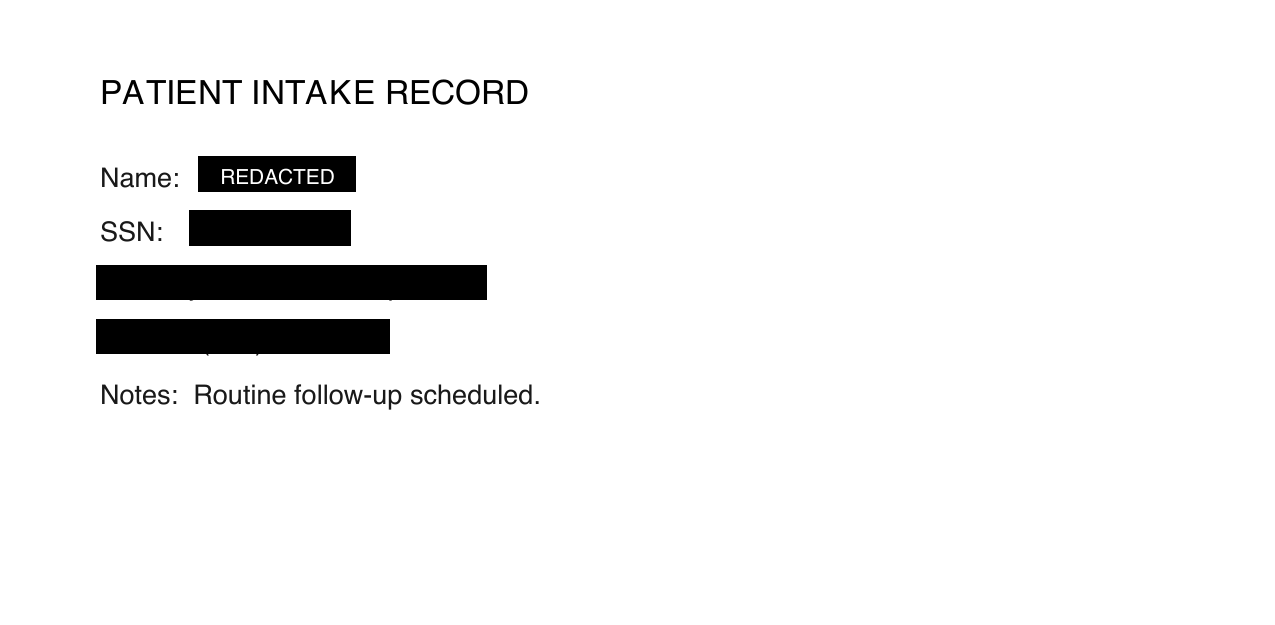 |
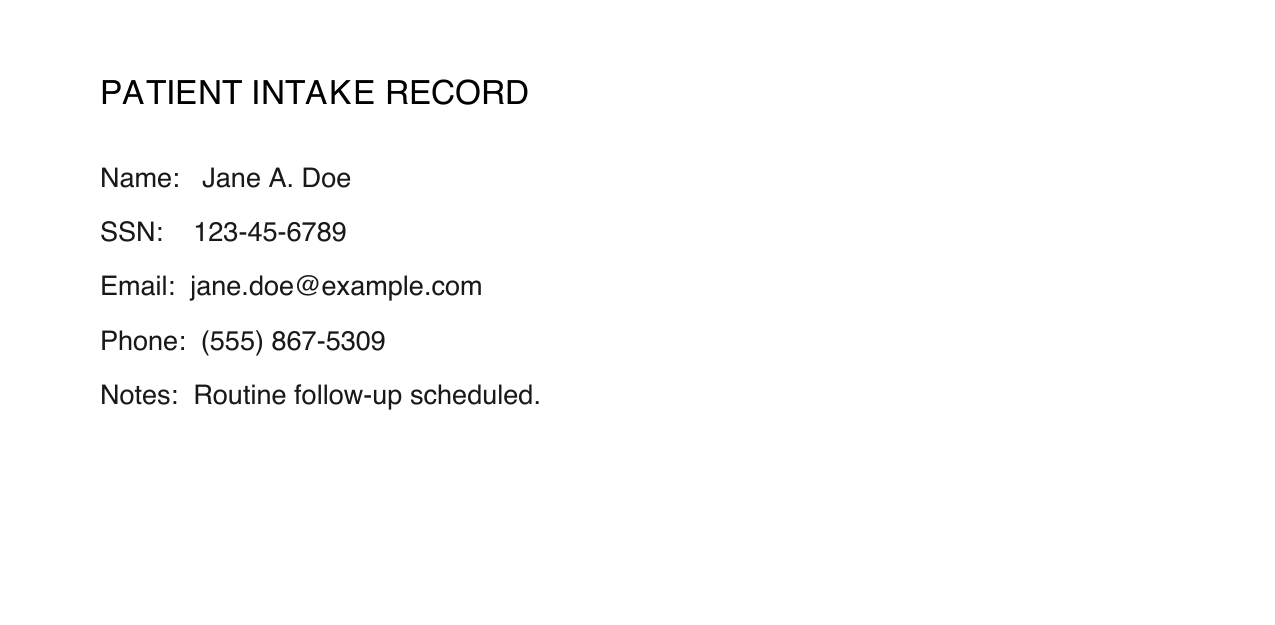
The bars in the "after" image aren't just paint: the underlying glyphs have been blanked in the content stream, so a copy-paste or pdftotext of that region returns nothing.
npm install scrubzeroPublished as the scoped package
scrubzero. Product site: scrubzero.org.
import { readFile, writeFile } from 'node:fs/promises';
import { redact, searchAndRedact } from 'scrubzero';

// --- Redact a known region ---
const pdfBytes = await readFile('input.pdf');
const result = await redact(pdfBytes.buffer, [
  {
    page: 1,
    x: 100,
    y: 200,
    width: 300,
    height: 20,
    color: [0, 0, 0],
  },
]);
await writeFile('output.pdf', result.pdf);
console.log(`Redacted ${result.redactedCount} region(s) on pages ${result.pagesAffected}`);

// --- Search and redact by pattern ---
const result2 = await searchAndRedact(pdfBytes.buffer, [
  { pattern: /\b\d{3}-\d{2}-\d{4}\b/g },            // Social Security Numbers
  { pattern: /\b[\w.]+@[\w.]+\.\w{2,}\b/g },         // Email addresses
  { pattern: 'John Smith', color: [0.8, 0, 0] },     // Literal string, red bar
]);
await writeFile('output-search.pdf', result2.pdf);
Buffer gotcha: the API takes an
ArrayBuffer. A NodeBufferfromreadFile()is a view over a pooledArrayBuffer, sobuf.buffercan carry bytes from neighbouring allocations. For a copy-safe slice usebuf.buffer.slice(buf.byteOffset, buf.byteOffset + buf.byteLength)(orUint8Array.from(buf).buffer) when reading many files in a pipeline.
# Search and redact by pattern (plain text or /regex/)
npx scrubzero search input.pdf "John Smith" --output redacted.pdf
npx scrubzero search input.pdf "/\d{3}-\d{2}-\d{4}/" --output redacted.pdf

# Redact built-in entity types
npx scrubzero entities input.pdf --types ssn,email,phone --output redacted.pdf

# Verify a redacted PDF has no text under visual bars (exits non-zero on a violation)
npx scrubzero verify redacted.pdf

# Redact a specific region by coordinates
npx scrubzero redact input.pdf '[{"page":1,"x":100,"y":200,"width":300,"height":20}]' --output out.pdf
Common flags:
| Command | Flag | Description |
|---|---|---|
search, entities, redact |
--output <file> |
Output path (default redacted.pdf) |
search |
--color <hex> |
Bar colour, e.g. #000000 (default black) |
search |
--label <text> |
Draw a label (e.g. REDACTED) inside each bar |
redact |
--manifest |
Also write a <output>.manifest.json audit manifest |
| any | --json |
Print a machine-readable JSON summary |
verify exits with a non-zero status code when it finds recoverable text, so it drops straight into CI or a pre-flight gate.
Most "redaction" tools work by drawing a black rectangle on top of the original text layer. The text is still encoded in the file and trivially extractable — copy-paste it, run pdftotext, or open the file in a PDF editor and delete the rectangle. This is not redaction.
scrubzero removes text drawing operators from the content stream bytes before writing the output, making the redacted content unrecoverable without specialised forensic tooling.
flowchart LR
    A[Input PDF] --> B[pdfjs-dist:<br/>extract text +<br/>positions]
    B --> C{Region or<br/>pattern match?}
    C -->|yes| D[Scrub text operators<br/>in content stream<br/>length-preserving]
    C --> E[pdf-lib:<br/>draw visual bar<br/>over region]
    D --> E
    E --> F[Sanitize metadata<br/>+ flatten annotations]
    F --> G[Redacted PDF]
    G -. optional .-> H[verify:<br/>any text left<br/>under a bar?]
The visual bar and the content-stream scrub are two independent layers. The bar guarantees the region looks redacted; the scrub removes the recoverable text. verify() exists to confirm the second layer actually fired — see Limitations & security model.
Redact specific rectangular regions from a PDF.
async function redact(
  pdf: ArrayBuffer,
  regions: RedactionRegion[],
  options?: RedactOptions,
): Promise<RedactResult>| Field | Type | Description |
|---|---|---|
page |
number |
1-indexed page number |
x |
number |
Left edge of the region in PDF points, from the left of the page |
y |
number |
Top edge of the region in PDF points, from the top of the page |
width |
number |
Width of the region in PDF points |
height |
number |
Height of the region in PDF points |
color |
[number, number, number] |
RGB fill color, each channel 0–1. Default: [0, 0, 0] (black) |
label |
string |
Optional label rendered inside the bar when addRedactionMarkers is true |
exemptionCode |
string |
FOIA exemption code (e.g. "6", "7(C)") |
exemptionBasis |
string |
Human-readable basis for the exemption |
Coordinate origin (important):
RedactionRegionuses a top-left origin —x/yare measured from the top-left corner of the page, like screen coordinates. This differs from the bottom-left origin used bypdfjstext items, which is what thephiDetectorandredactWithPHIDetectorcallbacks receive and return. Example: on an 8.5×11 page (792 pt tall), to redact a 20 pt band one inch (72 pt) down from the top, passy: 72; a PHI detector describing the same band would report it aty: 700(bottom-left).
Find text patterns in a PDF and redact all matching locations.
async function searchAndRedact(
  pdf: ArrayBuffer,
  patterns: SearchPattern[],
  options?: RedactOptions,
): Promise<RedactResult>| Field | Type | Description |
|---|---|---|
pattern |
RegExp | string |
Regular expression or literal string to search for |
pages |
number[] |
Limit to specific 1-indexed page numbers. Default: all pages |
color |
[number, number, number] |
RGB fill color for matched bars. Default: [0, 0, 0] |
label |
string |
Optional label for redaction markers |
phiDetector |
function |
Custom PHI detection hook — see below |
Integrate with AWS Comprehend Medical, Azure Text Analytics, or a custom NER model:
const result = await searchAndRedact(pdfBytes.buffer, [
  {
    pattern: '', // unused when phiDetector is set
    phiDetector: async (items, pageNum) => {
      // items: Array<{ str, x, y, width, height }> — text items with PDF coordinates
      // Return bounding boxes of detected PHI in the same coordinate space
      const detections = await myNERModel(items.map(i => i.str).join(' '));
      return detections.map(d => ({
        x: d.boundingBox.x,
        y: d.boundingBox.y,
        width: d.boundingBox.width,
        height: d.boundingBox.height,
      }));
    },
  },
]);Redact built-in entity types using pre-built regex patterns.
import { redactEntities, EntityPatterns } from 'scrubzero';

const result = await redactEntities(pdfBytes.buffer, ['ssn', 'email', 'phone']);
Available entity types: ssn, phone, email, credit-card, ip-address, date, name, attorney-client-marker
The built-in
nameanddatepatterns are deliberately heuristic and will over- or under-match on real documents. Treat entity redaction as a first pass, thenverify()and spot-check.
Every redaction can carry an exemption code — stamped on the bar (with addRedactionMarkers) and recorded per-match in the audit manifest (with generateManifest). A FOIA officer applying different exemptions to different data on the same page gets a defensible, per-redaction log; a flawless scrub with no exemption stamp is not a releasable record.
import { redactEntities, DEFAULT_FOIA_EXEMPTIONS } from 'scrubzero';

const result = await redactEntities(
  pdfBytes.buffer,
  ['ssn', 'email', 'attorney-client-marker'],
  { addRedactionMarkers: true, generateManifest: true, redactorId: 'agent-7' },
  { ssn: '(b)(6)', email: '(b)(6)', 'attorney-client-marker': '(b)(5)' },
);

// result.manifest.entries[n] = { page, bbox, basisCode, basisText, label, redactorId, timestamp, sha256Before, sha256After }
DEFAULT_FOIA_EXEMPTIONS maps each entity type to a sensible default code/basis (PII → (b)(6) personal privacy, privilege markers → (b)(5)). searchAndRedact accepts exemptionCode/exemptionBasis per SearchPattern for custom patterns. From the CLI:
scrubzero entities document.pdf --types ssn,email --foia --manifest --redactor agent-7
scrubzero search document.pdf "Case 1:24-cr-00318" --exemption "(b)(7)(C)" --manifest
The --manifest flag writes <output>.manifest.json — the exportable redaction log — alongside the redacted PDF.
Process multiple PDFs concurrently with per-item error isolation. Each result's error is a string message (empty/undefined on success).
import { redactBatch } from 'scrubzero';

const results = await redactBatch([
  { pdf: pdf1.buffer, patterns: [{ pattern: /SSN:\s*\d{3}-\d{2}-\d{4}/g }] },
  { pdf: pdf2.buffer, regions: [{ page: 1, x: 50, y: 100, width: 200, height: 20 }] },
], 4); // concurrency limit

for (const r of results) {
  if (r.error) console.error(`Item ${r.index} failed:`, r.error);
  else await writeFile(`output-${r.index}.pdf`, r.result!.pdf);
}Redact PHI using a standalone detector function. The detector receives text items with their PDF coordinates (bottom-left origin) and returns bounding boxes to redact.
import { redactWithPHIDetector } from 'scrubzero';

const result = await redactWithPHIDetector(
  pdfBytes.buffer,
  async (items, pageNum) => {
    // items: Array<{ str, x, y, width, height }>
    // Return regions to redact in the same coordinate space
    return items
      .filter(item => looksLikePHI(item.str))
      .map(item => ({ x: item.x, y: item.y, width: item.width, height: item.height }));
  },
);Verify that a redacted PDF has no text remaining beneath its visual redaction bars. Re-extracts text and filled rectangles with pdfjs-dist and reports any text that overlaps a bar — so it catches the case where a bar was drawn but the content-stream scrub missed.
import { verify } from 'scrubzero';

const result = await verify(redactedPdf.buffer);
console.log(result.clean);       // true if no recoverable TEXT found under any bar
console.log(result.violations);  // VerificationViolation[]
console.log(result.warnings);    // VerificationWarning[] — cases the text check can't see
interface VerificationViolation {
page: number;
bbox: [number, number, number, number];
recoveredText: string;
}
interface VerificationWarning {
type: 'image-under-redaction' | 'scanned-page';
page: number;
message: string;
}
cleancovers the text layer only. The text check is blind to raster imagery, so a scanned page — or a bar drawn over an image — can returnclean: truewhile the sensitive content survives in the image pixels. When that risk is present,verify()populateswarnings. A document is only verifiably safe whenclean === trueandwarningsis empty; the CLI'sverifycommand exits non-zero if either check fails.
Treat
verify()as part of the redaction, not an afterthought. Because content-stream scrubbing is best-effort (see below), runningverify()on the output — and failing closed when it isn't clean — is what turns "looks redacted" into "is redacted".
The other half of the toolkit (folded in from the former @liiift-studio/unseal): given a PDF you received, is it actually redacted? audit() reports fake or insecure redaction; unseal() lifts the fake bars and returns a readable PDF plus what was recovered.
verify() (above) is the narrow post-redaction self-check on your own output; audit() is the broader forensic pass on someone else's document.
import { audit, unseal, AuditPresets } from 'scrubzero';

const report = await audit(pdf.buffer, AuditPresets.quick);
// report.clean       — false if any fake/insecure redaction was found
// report.findings[]  — { check, severity, page, bbox, detail, recoveredText }
//                      checks: text-under-box | incremental-save | metadata-leak
//                              | pending-annotation | glyph-position
// report.sha256      — digest of the audited bytes

const result = await unseal(pdf.buffer);
// result.pdf         — the document with the fake redaction stripped (now readable)
// result.findings[]  — what was recovered and how it was hidden
// result.auditReport — the full audit of the original
Presets: AuditPresets.quick (fast structural checks), .compliance (adds glyph-position analysis), .forensic (all deterministic checks). CLI:
npx scrubzero audit received.pdf --preset forensic --json
npx scrubzero strip received.pdf --output revealed.pdf --report findings.json
The LLM "pattern oracle" (Tier 3 candidate ranking) from the standalone
unsealpackage is not bundled here — scrubzero stays dependency-light (no AI SDK). The deterministic checks are the audit.
| Field | Type | Default | Description |
|---|---|---|---|
flattenAnnotations |
boolean |
true |
Flatten existing annotations before redacting |
sanitizeMetadata |
boolean |
true |
Wipe DocInfo dictionary fields and XMP metadata stream |
addRedactionMarkers |
boolean |
false |
Render a visible label (e.g. REDACTED) inside each bar |
generateManifest |
boolean |
false |
Attach a structured audit manifest to the result |
redactorId |
string |
— | Operator identifier recorded in the manifest |
basisCode |
string |
— | FOIA or other exemption code recorded in the manifest |
| Field | Type | Description |
|---|---|---|
pdf |
Uint8Array |
The redacted PDF bytes, ready to write to disk or stream |
redactedCount |
number |
Total number of regions redacted |
pagesAffected |
number[] |
Sorted 1-indexed list of pages that had at least one redaction |
warnings |
RedactWarning[] |
Cautions where a bar was drawn but nothing was removed — a scanned page or a region over image/vector content, where the covered content stays recoverable. Empty when every region's text was scrubbed. |
manifest |
RedactionManifest |
Audit manifest — present when generateManifest: true |
Each RedactWarning is { type: 'visual-only-region' | 'scanned-page'; page: number; message: string }. A non-empty warnings array means part of the document was only covered, not redacted — surface it to the user rather than reporting success.
The manifest (when requested) records, per region, the page, bounding box, redactorId, basisCode, an ISO timestamp, and SHA-256 digests of the input and output PDFs — an integrity-checkable audit trail for FOIA/HIPAA workflows. (The manifest is a plain JSON object; sign or seal it yourself if you need tamper-evidence.)
scrubzero does real content-stream removal, but you should understand exactly what that guarantee covers before relying on it for high-stakes redaction:
- Content-stream scrubbing is best-effort, with a safe fallback. Scrubbing parses raw (often FlateDecode-compressed) content streams and blanks the string arguments of text operators inside the target region. If a stream can't be parsed — unusual encodings, exotic compression, malformed PDFs — the scrub is skipped and the visual bar is still drawn, so the region never looks un-redacted, but the underlying text may survive. Always run
verify()and fail closed on violations. verify()is itself best-effort and can fail open. It re-extracts text and detects filled bars withpdfjs; if a page can't be parsed it reports no violations, soclean === truecan mean "nothing left to recover" or "this page couldn't be analysed". Don't treat a clean result on an unusual/unparseable file as proof on its own — combine it with an out-of-band check (e.g. confirmpdftotextof the region is empty) for the highest-stakes documents.- The redacted string may persist outside the page content. Redaction targets the visible text layer. Values can also live in PDF form fields (AcroForm), bookmarks/named destinations, embedded files, or prior incremental-update revisions; these are not scrubbed. Re-save through a linearising/sanitising step, or strip those structures, if they might carry the sensitive value.
- Region matching is heuristic. Text position is estimated from
Tm/Tdoperators with a small margin and assumes scale ≈ 1 / no rotation. Heavily transformed, rotated, or vector-outlined text may not be matched precisely. - Only the text layer is touched — but scanned pages are now flagged. Text rendered as part of an embedded image (a scanned page, a screenshot) is covered by the bar but not removed — there is no OCR layer to strip.
scrubzerodetects this:redact()returns ascanned-page/visual-only-regionwarning andverify()returns ascanned-pagewarning instead of a falseclean. Treat those warnings as "not redacted" — for scanned documents, rasterise-and-replace is the safer approach. - No image or vector-content redaction. Redaction targets text. Logos, photos, and drawings under a bar are hidden visually but remain in the file. Regions over such content raise a
visual-only-regionwarning so the caller isn't misled by a green result. - Synthetic data only in examples. The sample document and patterns above use fake, non-real identifiers.
For anything where exposure is unacceptable, redact → verify() → reject any output that isn't clean, and keep the original out of the same delivery path.
scrubzero targets Node.js >=18 and has no native binary dependencies. It ships as dual ESM + CJS so it works in both "type": "module" packages and CommonJS environments.
On AWS Lambda, deploy as-is — no additional configuration needed. The package uses Node.js built-in zlib for PDF stream decompression rather than native addons.
The hero GIF and before/after stills are produced by a committed, reproducible harness (no manual captures):
npm run capture # builds dist, generates a synthetic fixture, records the VHS demo, renders the stillsRequires VHS (brew install vhs) and poppler's pdftoppm (brew install poppler). Outputs land in assets/, which is kept out of the published tarball and referenced from this README via absolute raw.githubusercontent.com URLs.
MIT — Copyright Liiift Studio