An advanced medical imaging and DICOM processing library for Flutter, poIred by a high-performance Rust core and GPU Shaders.
Go beyond basic image loading. Deliver workstation-grade rendering, 16-bit precision, and real-time windowing in your medical apps.
Why? • Key Features • Installation • Basic Usage • Advanced Usage • Contributing
In medical imaging, an 8-bit approximation is often a liability. Your app needs clinical precision, not just a picture.
Most image libraries in Flutter are designed for JPEGs and PNGs. They clamp your data to 8-bits per channel and lack the mathematical context needed for medical diagnostics. A doctor needs to see the exact Hounsfield Units, adjust the contrast (Windowing) in real-time, and zoom without UI stutter. Pure Dart DICOM parsers struggle with the sheer size of 16-bit volumetric data, leading to memory crashes and frozen screens.
| Feature | Standard Image |
dart_dicom (Pure Dart) |
Flutter-Dicom |
|---|---|---|---|
| Parsing Engine | Platform Native | Dart | 🚀 High-Perf Rust Native Core |
| Bit-Depth Precision | 8-bit (Lossy) | 16-bit (Slow) | ✅ Native 16-bit (Full Range) |
| Rendering Engine | Skia/Impeller | CPU Canvas | ⚡ GPU Fragment Shaders |
| UI Responsiveness | ✅ | ⚡ Zero UI-Thread Blocking | |
| Interactive Windowing | ❌ | ❌ | 📈 Real-time Contrast/Brightness |
| Detailed Metadata | ❌ | ✅ | 🩺 Full Tag Dictionary Access |
| Memory Efficiency | 🔴 High | 🔴 High | 🔋 Zero-Copy FFI Buffers |
| Ready-to-use Widget | ❌ | ❌ | 🤝 Built-in DicomViewer |
| Demo |
|---|
 |
| Viewer View | Viewer View | Metadata View |
|---|---|---|
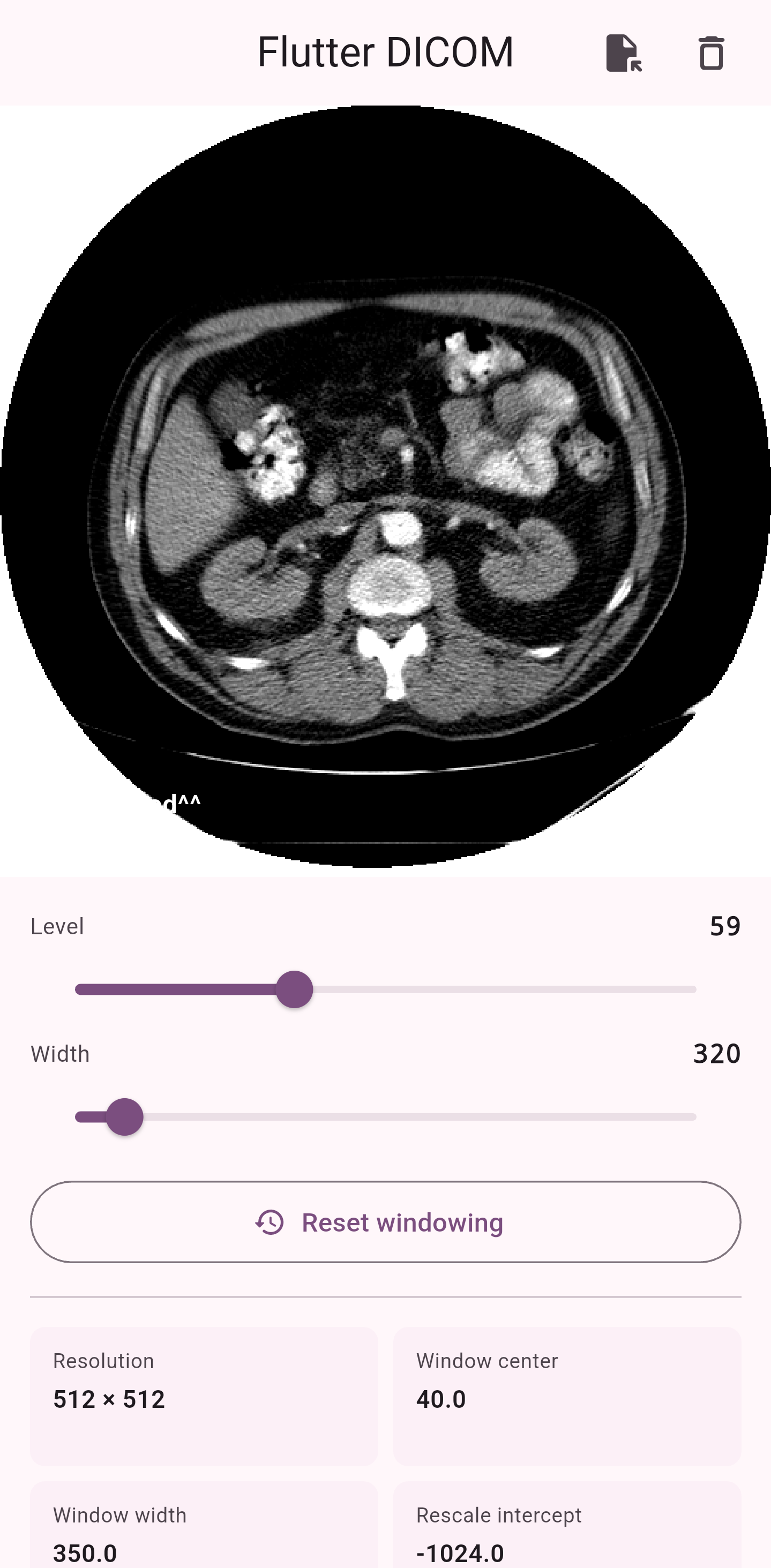 |
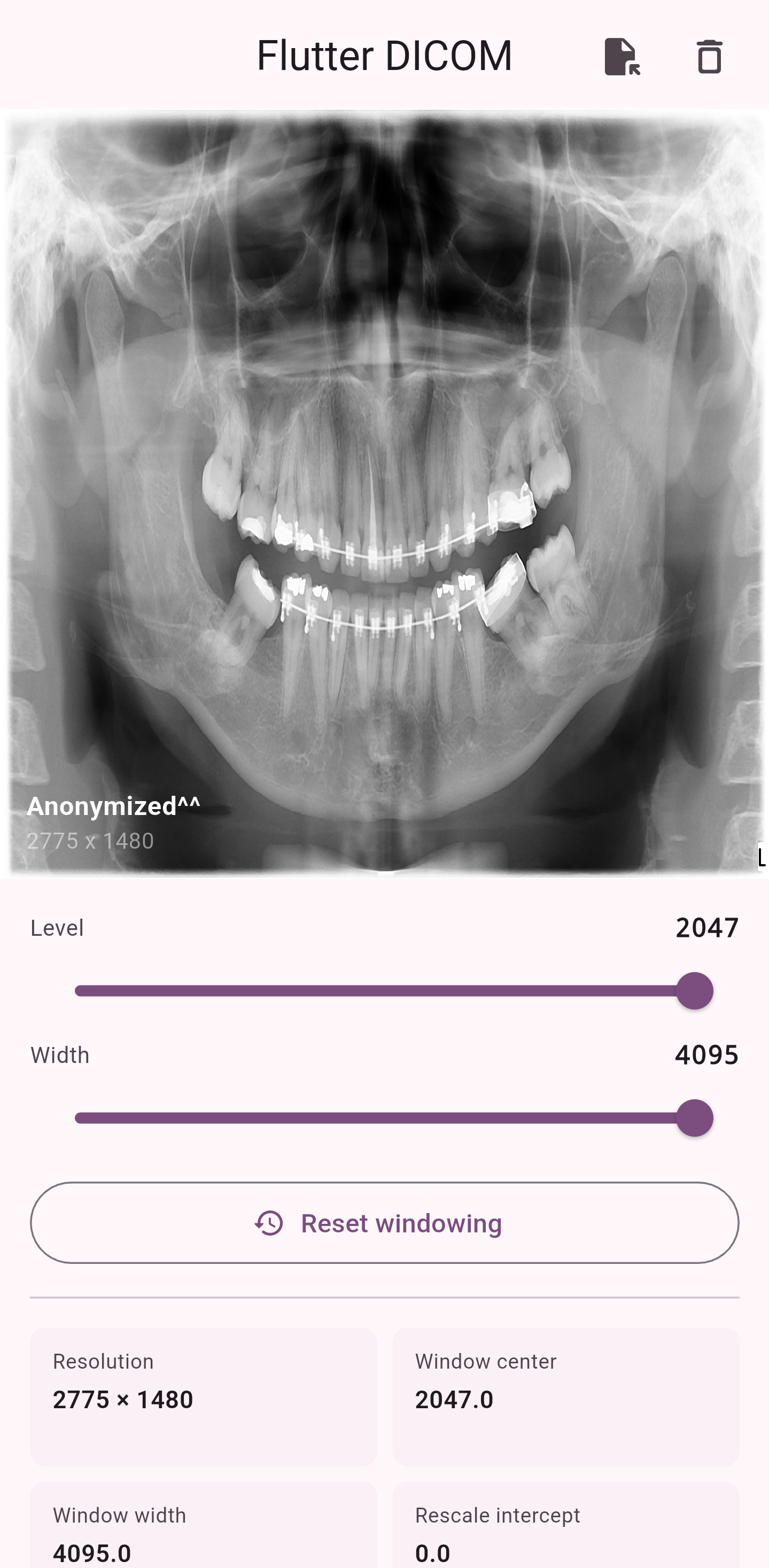 |
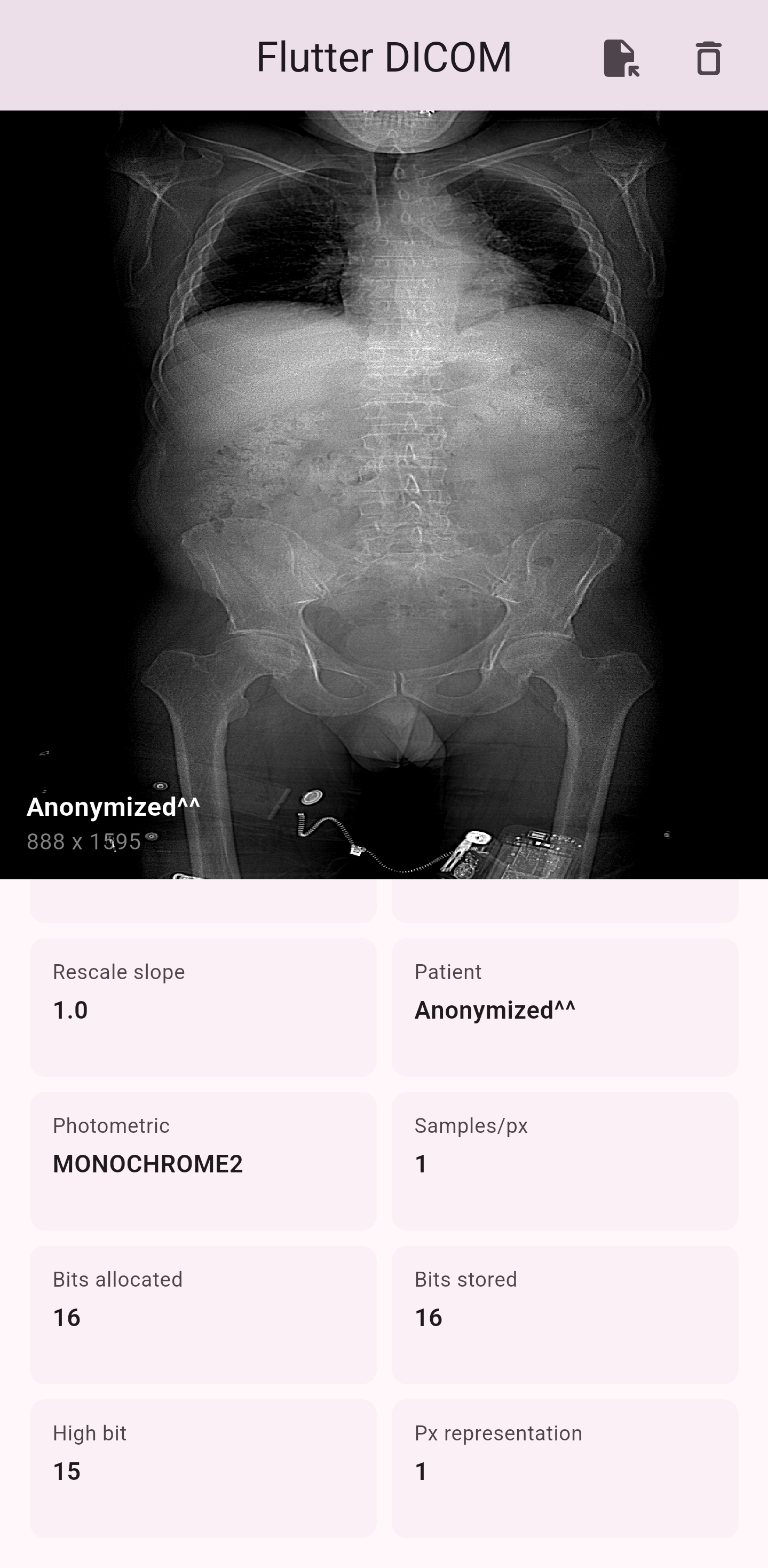 |
Tip
Don't worry about the "Rust Core"! Adding Flutter-Dicom to your project is designed to be as simple as adding any other Flutter package. While it uses a high-performance Rust engine, you don't need to be a Rust expert or manage complex builds manually. You just install the language once, and the library handles all the heavy lifting, compiling itself automatically for whatever platform (Android, iOS, macOS, Windows, Linux) or architecture you are targeting.
Since this library uses a high-speed bridge to connect Flutter and Rust, you need the Rust compiler installed on your development machine.
- Windows: Download and run rustup-init.exe.
- macOS / Linux: Run the following command in your terminal:
curl --proto '=https' --tlsv1.2 -sSf https://sh.rustup.rs | sh
Important
Once Rust is installed, the build system will automatically detect your Flutter target and compile the Rust core into a high-performance native shared library. You only need to set this up once!
Add the package to your pubspec.yaml:
dependencies:
flutter_dicom: ^0.1.0+2Initialize the library in your main() function before starting the app.
import 'package:flutter/material.dart';
import 'package:flutter_dicom/flutter_dicom.dart';

Future<void> main() async {
  WidgetsFlutterBinding.ensureInitialized();
  // Load the native Rust binary into memory
  await RustLib.init();

  runApp(const MyApp());
}The DicomController is the brain of your Viewer. Pair it with the DicomViewer widget for an instant medical-grade experience.
import 'package:flutter/material.dart';
import 'package:flutter_dicom/flutter_dicom.dart';

class MyMedicalApp extends StatefulWidget {
  @override
  State<MyMedicalApp> createState() => _MyMedicalAppState();
}

class _MyMedicalAppState extends State<MyMedicalApp> {
  final _controller = DicomController();

  @override
  void initState() {
    super.initState();
    // Initialize shaders and load a file
    _controller.initialize().then((_) {
      _controller.loadFromFile(filePath: '/sdcard/scans/head_ct.dcm');
    });
  }

  @override
  Widget build(BuildContext context) {
    return Scaffold(
      body: DicomViewer(controller: _controller),
    );
  }

  @override
  void dispose() {
    _controller.dispose(); // Critical: Free GPU textures
    super.dispose();
  }
}// Manually set Window Center and Width
void applyBoneWindow() {
_controller.adjustWindowing(deltaX: 1500, deltaY: 300);
}
// Reset to file defaults
void reset() => _controller.resetWindowing();You can tune the Rust engine for specific use cases, such as fast-loading metadata while skipping expensive pixel processing.
await _controller.loadFromFile(
  filePath: path,
  config: DicomConfig(
    autoNormalize: true,
    skipPixels: true, // Meta-data only mode
  ),
);For enterprise apps, inject a custom DicomService to handle different storage backends (S3, local cache, etc.).
// 1. Define the service with a specific loader
final service = DicomService(loader: FileDicomLoader());

// 2. Inject into the controller
final controller = DicomController(service: service);If you are curious about how I maintain 16-bit integrity through an 8-bit texture interface, look at shader logic:
void main() {
    vec4 texColor = texture(u_texture, uv);

    // Unpack R (High Byte) and G (Low Byte)
    float high = texColor.r * 255.0;
    float low = texColor.g * 255.0;
    float raw_value = (high * 256.0 + low) - 32768.0;

    // HU = (Pixel * Slope) + Intercept
    float hu = (raw_value * u_rescale_slope) + u_rescale_intercept;
    // ... Windowing calculations follow
}The Flutter-Dicom library is meticulously optimized for both blistering speed and strict memory efficiency. The following benchmarks were executed on an AMD Ryzen™ 7 5800H (16 Threads) using a clinical dataset of 267 DICOM frames. The results highlight the massive performance overhead provided by our Rust + GPU Shader architecture.
| Metric | Performance | Status |
|---|---|---|
| Max Throughput | ~296 FPS | ✅ Ultra Fast |
| Pipeline Latency | 3.73 ms / frame | ✅ Sub-16ms |
| Windowing Speed | 3,402 Ops/s | ✅ Real-time |
| Scrubbing Speed | 323 Ops/s | ✅ Fluid |
| Stability (p99) | 6.00 ms | ✅ Consistent |
FFI bridge ensures that frame data flows from disk to GPU without bogging down the Dart isolate. Averaging 296.2 FPS, the engine delivers rock-solid consistency.
Latency Distribution: Out of 801 sampled frames, the mean processing time was 2.68 ms. Even the 99th percentile (p99) maxed out at just 6.00 ms, keeping us well below the 16.6ms threshold required for 60 FPS.
▶ LATENCY DISTRIBUTION (801 Samples)
────────────────────────────────────────────────────
  Mean Latency   : 2.68 ms
  p50 (Median)   : 2.00 ms
  p95            : 4.00 ms
  p99            : 6.00 ms  ✅ (Well below 16.6ms target)
────────────────────────────────────────────────────
  Latency Histogram (bucket=5 ms):
    0– 5 ms │ ████████████████████████████   766
    5–10 ms │ █                               35
   10–15 ms │                                  0
   15–20 ms │                                  0
   20–25 ms │                                  0
────────────────────────────────────────────────────
Offloading Hounsfield Unit (HU) mapping to the GPU means complex math doesn't slow down your UI.
- Windowing Stress Test: Processed 14,685 rapid contrast adjustments in just 4.32 seconds (~3,402 ops/sec). Doctors can drag to adjust window levels as fast as humanly possible with instantaneous visual feedback.
- Rapid Scrubbing: Simulating fast bidirectional scrolling through the 267-frame series yielded 323 operations per second.
Testing the complete lifecycle ensures there are no memory leaks during extended diagnostic sessions.
- Full Pipeline: Loading, parsing, rendering, windowing (x5), and disposing of all 267 files sequentially took under 1 second (996.0 ms total).
- Controller Lifecycle: Creating, loading, and safely destroying controllers for 267 frames averaged 3.57 ms per file, proving rock-solid garbage collection and GPU texture freeing.
Medical data can be messy. The core engine is built to handle anomalies gracefully without crashing your Flutter app.
- Mathematical Overflow: Passing extreme windowing values (e.g.,
9.0e+307and-9.0e+307) resulted in safe handling with 0 load errors. - Concurrency Handling: Rapid burst loads (firing 10 file loads with minimal await gaps) maintained a 232.6 Effective FPS without race conditions.
Contributions are welcome! Here’s how to get started:
- Fork the repository.
- Create a new branch:
git checkout -b feature/YourFeature - Commit your changes:
git commit -m "Add amazing feature" - Push to your branch:
git push origin feature/YourFeature - Open a pull request.
💡 Please read our Contributing Guidelines and open an issue first for major feature ideas or changes.
This project is licensed under the GPL-3.0 License. See the LICENSE file for full details.
Made with ❤️ by MostafaSensei106

