Releases: PilotWave11/OpenFFBoard
OpenFFBoard v1.13.0 (RMD Beta) v0.4.5

Firmware changes
For beta testing only. USE AT YOUR OWN RISK.
Changes this version
- Bugfix: Axis out-of-bounds error when using small axis range settings. The previous fix only handled large multi-turn errors (integer multiples greater than 1 single turn).
Configurator changes
Changes this version
Firmware
OpenFFBoard v1.13.0 (RMD Beta) v0.4
Firmware changes
For beta testing only. USE AT YOUR OWN RISK.
Changes this version
- New motion command is added for future testing of trajectory-based closed loop control.
- Bugfix: Axis out-of-bounds error when relative multi-turn position was exactly equal to zero.
Configurator changes
Changes this version
-
Slight changes to layout and some new additions:
-
The Home button returns the stick on-demand to the last stored zero position. The Zero button sets the current position as the new zero position. The Brake button is still inoperative in this version.
-
A new "Speed" meter is located between the "Position" and "Torque" meters.
-
The encoder "Debug" information has been moved into a new "Advanced" pane, which can be shown/hidden by clicking it at the bottom of the Command control panel.
-
A new "Motion" panel is also included in the "Advanced" pane, which is currently being used for testing purposes. The command is disabled by default for safety.
-
A new PID parameter tuning interface can be found in the Settings tab! This is mainly a convenience to allow reading/writing the PI constants of the MCX directly within the configurator instead of needing to use the MyActuator Assistant. These are considered advanced settings and it is recommended to make small changes to these values, as incorrect settings can cause runaway instability in the motor!
And finally,
- Tooltips! Hover over labels and fields to see a helpful description.
Firmware
OpenFFBoard v1.13.0 (RMD Beta) v0.3
Firmware changes
Changes this version
- Motors now start in suspended state when powered on.
For beta testing only. USE AT YOUR OWN RISK.
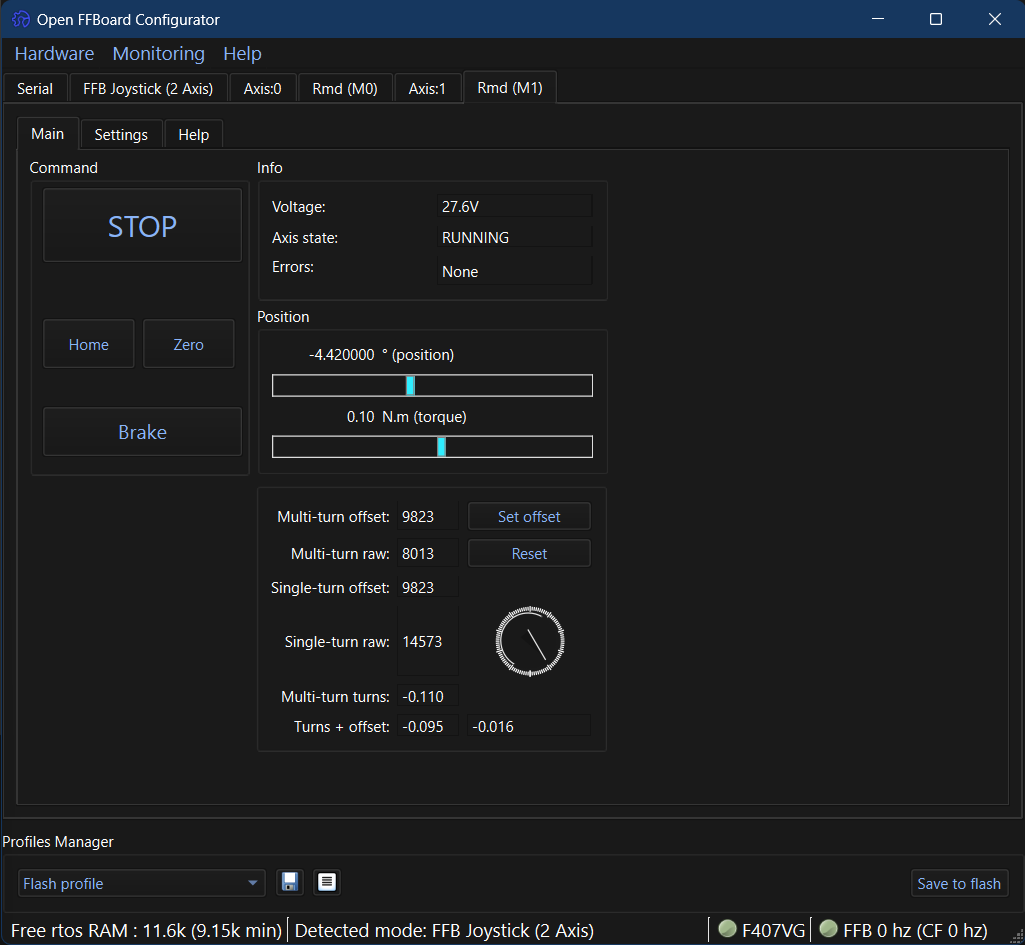
Configurator changes
Changes this version
-
Overhauled layout.
- Three new tab pages: Main, Settings, and Help
-
Click the Run button to enter closed loop mode after confirming settings/meters are correct.
- The motor may be stopped any time by pressing the Stop button.
-
The Home, Zero, and Brake buttons will serve for future functionality.
-
Additional encoder position debug information included below position/torque meters:
- The MCX motor zero offset may now be set directly by pressing the Set offset button next to the "Multi-turn offset" box.
- Press the Reset button next to the "Multi-turn value" box to reset the multi-turn value itself as well as re-zero the internal offset.
-
The Settings page contains a slightly re-organized CAN settings, maximum torque safety setting, and two new CAN commands:
- The "Set RMD CAN ID" button is non-functional and will work in the next version.
- The "Set RMD Baudrate" button can be used after selecting an option in the pull-down box to the left. THIS COMMAND CAN POTENTIALLY BREAK CAN COMMUNICATION AND/OR RS485 OVER UART. USE THIS ONLY AS LAST RESORT IF YOU HAVE LOST COMMUNICATION WITH THE MYACTUATOR ASSISTANT 3.0.
- The Plan parameters are currently unused but will work in the next version.
-
The Help tab has been slightly upgraded to support more in-depth documentation.
Firmware
OpenFFBoard v1.13.0 (RMD Beta) v0.2.5
Firmware changes
Changes this version
- Added torque CDC command and read back of torque from closed loop command.
- For beta testing only. USE AT YOUR OWN RISK.
Configurator changes
Changes this version
-
Fixed position meter not reporting correct decimal precision.
-
Added instantaneous torque meter in physical units.
- Now supports changing the axis CAN Id after clicking Submit, and saving to flash. This can be used to match any values set in the MyActuator Assistant.
Firmware
OpenFFBoard v1.13.0 (RMD Beta) v0.2
Firmware changes
Changes this version
- Store center position, CAN Id, and max torque values to flash after clicking 'Save to flash' on the appropriate tab.
- For beta testing only. USE AT YOUR OWN RISK.
Configurator changes
Changes this version
- Now supports changing the axis CAN Id after clicking Submit, and saving to flash. This can be used to match any values set in the MyActuator Assistant.
Firmware
OpenFFBoard v1.13.0 (RMD Beta)
Firmware changes
Changes this version
- Initial support for integrated MyActuator RMD motor drivers.
- For beta testing only. USE AT YOUR OWN RISK.
Configurator changes
Changes this version
- Initial interface support for RMD driver