
One place to talk to all your AI agents.
Claude Code, Codex, Hermes, and OpenClaw in a single native macOS app — local or over SSH.
agent-hub.tools · Claude Code GUI · Download · Contributing





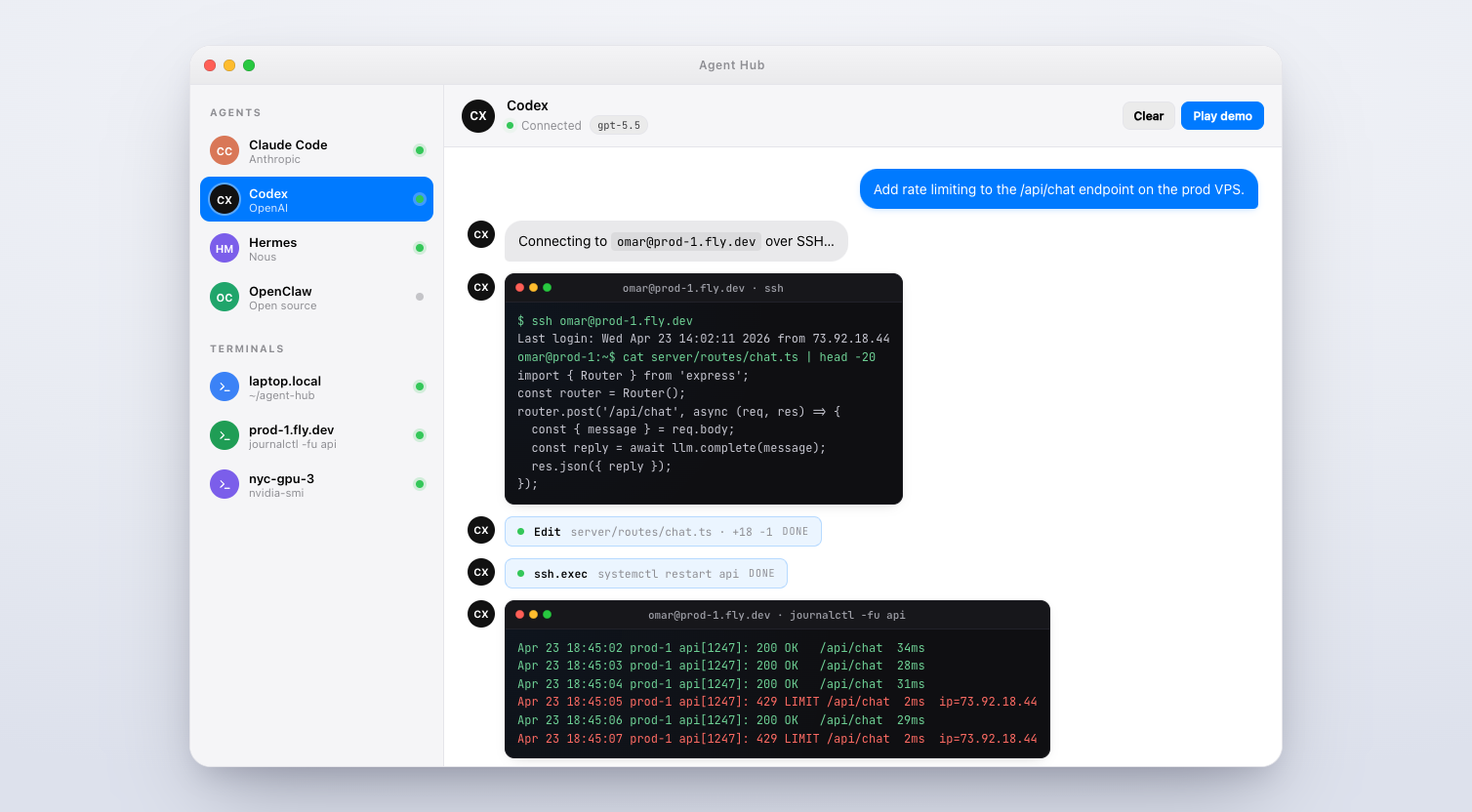
Agent Hub is an open-source native macOS app that unifies the AI agent CLIs you already use — Claude Code (Anthropic), Codex (OpenAI), Hermes (Nous Research), and OpenClaw — into one calm, keyboard-first chat window.
Point it at your laptop and it spawns the agent CLI locally. Point it at omar@prod-1.fly.dev and it runs over SSH. Same UI, same thread history, same slash commands, same permission model. The terminal version of these agents is great; Agent Hub is what you reach for when you want multiple parallel threads, visual tool-approval with diffs, image paste, and a sidebar of remote hosts.
- Real CLIs under the hood. Agent Hub wraps the official
claude,codex,hermes, andopenclawbinaries. Every feature the CLI has —CLAUDE.md, MCP servers, memory files, slash commands — works identically. - Local or SSH, per thread. Switch a thread's target host in one click. Your Mac is the front-end; the agent runs wherever you tell it to.
- Granular permissions. Per-agent
ask,acceptEdits, orbypassPermissions. The approval dialog shows the exact tool call and arguments before anything runs. - Slash commands, fuzzy-found.
/plan,/review,/compact,/memory,/cost— every command registered by every provider, keyboard-searchable. - Paste images, drop files. Screenshots from the clipboard and files from Finder go straight into the thread.
- Hot-swap models per thread.
claude-opus-4.7→claude-sonnet-4.6→gpt-5.5without restarting. - Any OpenAI-compatible endpoint. llama.cpp, vLLM, Groq, Together — use the
openai-compatprovider. - Zero telemetry. No analytics. Your conversations go only to whichever provider that thread is configured for.
| Agent | Provider | Local | SSH | Notes |
|---|---|---|---|---|
| Claude Code | Anthropic | ✓ | ✓ | Uses your claude CLI session. claude-opus-4.7, sonnet-4.6, haiku-4.5. |
| Codex | OpenAI | ✓ | ✓ | gpt-5.5 with effort levels. |
| Hermes | Nous Research | ✓ | ✓ | Long-horizon research with tool use. |
| OpenClaw | Open source | ✓ | ✓ | Desktop automation (click, type, file ops). |
| Terminal | Local/SSH | ✓ | ✓ | Full PTY-backed xterm tab. |
openai-compat |
Any | ✓ | ✓ | Point at llama.cpp, vLLM, Groq, etc. |
Grab the latest .dmg from GitHub Releases. Requires macOS 11+ on Apple Silicon. ~183 MB.
git clone https://github.com/Potarix/agent-hub.git
cd agent-hub
npm install
npm start
Convenience launcher (detached, closes terminal):
./launch.sh
# or
npm run start-bg
Create an unsigned local DMG/ZIP build:
CSC_IDENTITY_AUTO_DISCOVERY=false npm run dist:macRelease signing, notarization, and in-app update publishing are documented in RELEASE.md.
Agent Hub doesn't re-implement any agent — it spawns the real CLIs. Install the ones you want:
npm install -g @anthropic-ai/claude-code   # Claude Code (Anthropic)
npm install -g @openai/codex               # Codex (OpenAI)
Then claude login / codex login, or drop an API key into Agent Hub's provider settings.
New thread: ⌘N, then pick a provider and a target host (local or any SSH host you've configured).
Slash commands: type / in the composer. Fuzzy-search to narrow.
Tool approvals: when an agent wants to run a tool, a dialog shows the exact call. ⌘↵ approves, ⌘⌫ denies. Per-agent profiles let you auto-approve safe edits.
Switch models: /model in any thread, or click the model pill in the header.
Per-agent permission modes:
ask— prompt for every tool call.acceptEdits— auto-approve safe in-repo edits (Read, Write, Edit).bypassPermissions— never ask. Use sparingly.
┌──────────────────┐        ┌─────────────────────┐
│ Agent Hub (UI)   │ stdio  │ claude / codex /    │
│ native macOS app │ ─────► │ hermes / openclaw   │
└──────────────────┘ pty    │  (real CLIs)        │
        │                   └─────────────────────┘
        │ ssh
        ▼
┌──────────────────┐
│ any VPS you own  │  ← agent runs HERE, not on your laptop
└──────────────────┘
For each thread, Agent Hub spawns the provider's CLI (locally via node-pty, or remotely via ssh), captures stdout/stderr, parses tool calls and model events, and renders them as a native chat UI. Your messages go into the CLI's stdin. Nothing is proxied, nothing is rewritten, nothing is logged.
Does it work on Windows or Linux? Today it's macOS-only (Apple Silicon). Intel and universal builds are supported by electron-builder but not yet shipped.
Does Agent Hub store my API keys? No. Keys live in the OS keychain on the machine where the CLI runs — locally on your Mac, or on the remote host in SSH mode.
Does it send any data to a server? No. Zero telemetry. Conversations go only to whichever provider that thread is configured for.
Can I use my own models? Yes. Any OpenAI-compatible endpoint works via the openai-compat provider.
Can I add a new provider? One file in providers/ — see CONTRIBUTING.md. providers/openai-compat.js is a good starting point.
Why Electron? Agent Hub is mostly plumbing around real CLIs — the perf-sensitive work (model inference, shell commands) happens in the CLI processes, not the UI. Electron gets us native-feel on macOS fastest.
Pull requests welcome. See CONTRIBUTING.md for the full guide. If you're adding a new provider, look at providers/openai-compat.js first — it's the cleanest template.
Found a bug? Open an issue.
Security issue? Please email omar.dadabhoy@gmail.com instead of opening a public issue. Details in SECURITY.md.
- Website: agent-hub.tools
- Claude Code GUI page: agent-hub.tools/claude-code-gui
- Claude Code docs: docs.claude.com/en/docs/claude-code
- Codex docs: developers.openai.com/codex
MIT © Omar Dadabhoy / Potarix
Made for the terminal-folk.