Interior Design App
Alexander Grisby Brian Kenkel
In a world of online shopping, it’s hard to be able to plan your perfect home layout. Use INSERT NAME HERE to fully plan out your living space.
- Upload floorplans once
- Drag and Drop furniture and arrange it to see multiple different mockups
- Be able to rearrange a room without leaving your couch to see
- Get Ideas straight from the app
- Browse Furniture and be able to test different types in your room from the app
- Develop a budget for it If you’re moving to a new place, or trying to reimagine your current place, imagine it with INSERT APP HERE.
- Left Sidebar with folders?
- Floorplan entry
- Link to Pinterest with Interior Decorating Ideas
- Link to Shopping sites with AR view?
- Last opened Floorplan is there
- On right, shapes that can be dragged and dropped, representing different pieces of furniture
- Asks you to enter dimensions of the room, maybe draw it? And auto straightens lines
- Asks where windows and doors are
- Asks for a name to be saved under
- Floor plan of previous opens up
- Has furniture preloaded, sizes to scale
- Can add own furniture
- Opens menu for link to product or browse
- Tries to scrape data off website [ not feasible in time frame probably, considering data is everywhere and not consistent]
- Asks for dimensions
- Adds to menu
- List of topics/tags
- Pulls up relevant pinterest showings
As a User, I want to be able to visualize my floor plan and dimensions so that I can know the dimensions of it. Dependencies - None currently
- Given a set of dimensions [ parameters: dimensions]
- When I enter them
- Then The room with the set of dimensions is rendered
- Given a canvas [ parameters - user input]
- When I draw on it for an odd room layout
- Then the lines straighten and ask for dimensions
- Given an image of a floor plan [ parameters - test image]
- When it gets translated by the app
- Then it translates into a useable format
As a user, I want a way to visualize furniture pieces so that I can arrange them to my liking.
- Given a Floorplan
- When I decorate it
- Then I can visualize dimensions
- Given a Floorplan
- When I use the furniture tab
- Then I can drag and drop furniture
As a user, I want a way to add new furniture pieces from either online or custom ones so that I can use new furniture in my plans.
- Given a new piece of furniture
- When I enter it in
- I can use it to decorate the area.
- Given a submitted piece of furniture
- When I add it to my selections
- I can use it to decorate the area
As a user, I want a way to be able to store floorplans that I’ve made and bring them up again so that I can reference them.
- Given a already customized floorplan
- When I save the floorplan
- Then it shows up as something to compare to
- Given a list of customized floorplans
- When I select one
- Then I can continue without having to start over
As a user, I want to be able to find inspiration in other designs so that I can customize around that.
- Given a set of tags
- When I can look up various floorplans
- Then I can use them as inspiration for mine
- Given a search term
- When I look up the term I can find floorplans
- Then I can use them as inspiration for mine
Show data classes (DTOs), Activities, Fragments, MVVM, etc.
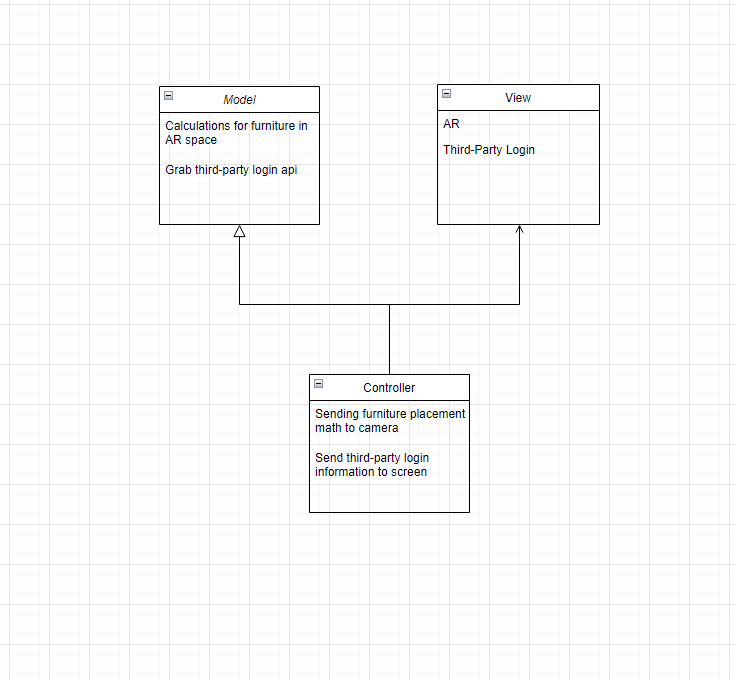
The model class will process all the data logic for the furniture in AR space and the logic for a third party login. The view class will process the display of AR and the third party login. The controller class will take in user input and communicate back and forth between the model and view class receiving and sending data for the furniture placement in AR and the third party login.
WIP Stories
- I can visualize an entire building with this
- I can use design options such as colors, wallpapers
- I can not have to enter dimensions from online storefronts
- I can compare multiple pieces of furniture with an easy interface
- I can use AR to visualize what would fit in the floorplan.
- There should be a budget for each floorplan
- There should be notes for each floorplan
Each story should be a separate Project in GitHub. The title of the project should be the name of the story. As long as you have these stories listed as Projects in GitHub, I can look at your projects to see your backlog. No need to repeat it in the design document.
A scrum or kanban board, using GitHub projects (preferred), Trello, Scrumy.com, or something similar, that contains:
View Github Projects: https://github.com/users/ProvidenceV/projects/1/views/1
DevOps/Product Owner/Scrum Master: Alexander Grisby Frontend Developer: Alexander Grisby / Brian Kenkel Integration Developer: Alexander Grisby / Brian Kenkel
Communication tool you will use for your 8:00 Sunday group stand up (Zoom, Teams, etc.) If you choose a different tool and/or different time, that's fine, just indicate it in the document.
Teams/Zoom