Cluster architecture
The docker cluster being deployed here can be represented this way.
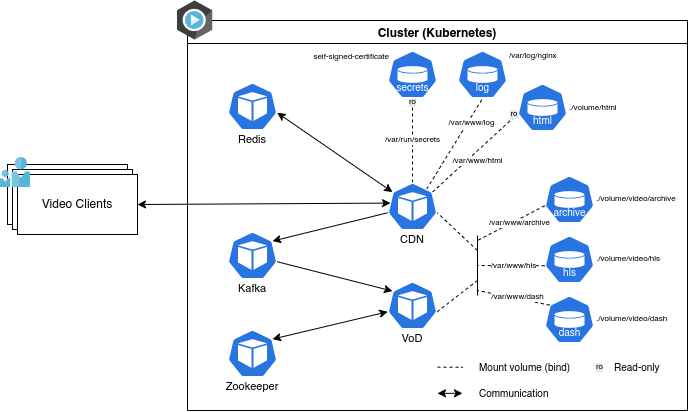
Figure 1 - Diagram of the cluster. CDN, Redis, Kafka, VoD, Zookeper are Docker containers. All the rest are volumes. The core Docker containers in this project are CDN and VoD.
In brief, CDN takes the role of the web server: it provides a web page to clients from where they can decide to play the video, and also send the various video chunks. The actual transcoding is performed by VoD. Indeed, in the online-transcoding configuration, while providing video chunks to the client, CDN instructs VoD to transcode. To do so, it sends appropriate messages via the messaging functions provided by Kafka. In the offline-transcoding mode, that we added in this fork of the project, we also rely on VoD to transcode the video chunks.
aa: Est le paragraphe ci-dessus correct?
It is executed from the latest official Redis image from the Docker Hub.
Redis is an in-memory data structure project implementing a distributed, in-memory key-value database with optional durability.1
It is executed from the latest official Zookeeper image from the Docker Hub.
Apache Zookeeper is essentially a service for distributed systems offering a hierarchical key-value store, which is used to provide a distributed configuration service, synchronization service, and naming registry for large distributed systems.2
In this project, Zookeper is used to keep some state information. For instance, Zookeper keeps track, for each video, whether it has already been transcoded, or is it currently being transcoded, etc.
aa: Est mon paragraphe précédent correct?
It is executed from the latest Kafka image from the Docker Hub.
Apache Kafka is a stream-processing software platform that aims to provide a unified, high-throughput, low-latency platform for handling real-time data feeds.3
It is one of the two core Docker containers of this project. It is executed from a local image named ovc_cdn_service whose Dockerfile is located in the /cdn-server/ directory (here) and uses the openvisualcloud/xeon-ubuntu1804-media-nginx:20.3.1 Docker image.
The ovc_cdn_service image is constructed by the execution of the /cdn-server/build.sh script (which calls /script/build.sh).
[WIP] Something, somewhere, is mounting volumes onto it.
| Name | Host path | Mount path | More |
|---|---|---|---|
| archive | /volume/video/archive | /var/www/archive | |
| dash | /volume/video/dash | /var/www/dash | |
| hls | /volume/video/hls | /var/www/hls | |
| html | /volume/html | /var/www/html | read-only |
| log | /var/log/nginx | /var/www/log | read-only |
| secrets | /var/run/secrets | secret: self-signed-certificate |
When deployed, it is executed with the command bash -c /home/main.py&/usr/local/sbin/nginx.
This executes /cdn-server/main.py in the background and keeps the CT alive until the nginx service stops.
aa: What is CT?
The service's roles are therefore to:
- handle the web server, ie. the web page containing the video player and the tools to upload a video as well as any other HTTP request coming from an external client.
- perform some light tasks relative to the platform, like generating a thumbnail when a new video is uploaded.
- send notifications through the Kafka service, like alerting the VoD service when a file is requested.
It is the other core Docker container of this project. This is the transcoding server that is deployed when requesting at least one vod node when being asked by the execution of the make command start_kubernetes (cf. Deployment steps). It is executed from a local image named ovc_software_transcode_service whose Dockerfile is located in the /xcode-server/software/ directory (here) and uses the openvisualcloud/xeon-ubuntu1804-media-ffmpeg:20.3.1 Docker image.
The ovc_software_transcode_service image is constructed by the execution of the /xcode-server/software/build.sh script (which calls /script/build.sh).
[WIP] Something, somewhere, is mounting volumes onto it.
| Name | Host path | Mount path |
|---|---|---|
| archive | /volume/video/archive | /var/www/archive (here are the mp4 and thumbnail files) |
| dash | /volume/video/dash | /var/www/dash |
| hls | /volume/video/hls | /var/www/hls |
archive is the "source" folder, where videos are before being transcoded. After transcoding, chunks are stored in dash and hls folder-
When deployed, it is executed with the command bash -c /home/main.py.
This executes /xcode-server/software/main.py in the foreground and keeps the CT alive until it is manually stopped (infinite loop).
The service's role is to transcode a video when the associated stream (DASH or HLS) is requested. For more information on the transcoding process, refer to the pages related to transcoding of the Observation section.
- WIP - Last edited on April 26, 2020