A worked Example
Lets say we are creating a simple app with the following functionality.

It has a single login screen with
-
Email validation.
-
Password validation
-
The sign-in button only active when password and email are valid.
-
loading state for login api call.
-
Success state after login
The completed code for this example is available here.
The Login Activity.
Lets start by making a Login Activity that inherits from Flux activity. The layout for login activity is available here.
class LoginActivity : FluxActivity<LoginEvents, LoginState, LoginEffects> {
FluxActivity is a activity class that forces the programmer to build the screen according to the RxFlux specification. You will notice it accepts three type parameters. Looking at FluxActivity you can see the details.
abstract class FluxActivity<T : Event, U : State, E : Effect>
They are expected to be subtypes of Event, State and Effect..
A State represents the entire set of possible states that this Login Screen can render. View states are data classes that implement the *State *interface, the code for LoginState is shown below:
data class LoginState(
    // Loading state.
    val loading: Boolean = false,
    // Form state.
    val email: String = "",
    val password: String = "",
    val emailError: String = "",
    val passwordError: String = "",
    // Button state.
    val canSignIn: Boolean = false

) : State
View states are implemented as data classes to leverage the autogenerated equals/hashcode and copy semantics.
An Event represents all possible events a screen can generate. These are sealed classes that implement the *Event *interface, the code for *LoginEvents *is shown below:
sealed class LoginEvents : Event {
    data class EmailChanged(val email: String) : LoginEvents()
    data class PasswordChanged(val password: String) : LoginEvents()
    data class LoginClicked(
     val email: String, val password: String
    ) : LoginEvents()
}
Effects are an extension to Flux that RxFlux adds. They represent one off events that do not modify state but are handled by the view anyway. A good example of these are transient error state I.e popup dialogs, snackbars and toasts. They are also used to represent Navigation events, the code for LoginEffects is shown below.
sealed class LoginEffects : Effect {
    object OpenLoggedIn: LoginEffects(), Navigation
}
These three class, Effect, Event and State, accurately in a type safe way represent and document, all of the users interactions, UI updates and Navigation events a single screen can perform. This has numerous benefits when looking at the codebase for a new screen, you can immediately see what a user can do on a screen, what a user can see and what Screen the user could see next. Good clear code is its own documentation.
A flux activity inherits from FluxView. (Remeber RxFlux-core is a pure kotlin, android agnostic implemenation) it has the following definition.
interface FluxView<T : Event, U : State, E : Effect> {
    val events: Observable<T>

    */**
     * View should redraw its self to represent the new [viewState].
     * **@param **viewState representation of the views current state.
     */
    *fun stateChanged(viewState: U)

    */**
     * View should handle [effect].
     * **@param **effect [Effect] to handle
     */
    *fun receivedEffect(effect: E)

}
Therefore, Our login activity will need to implement each of these properties and functions, and will not compile until they are implemented.
class LoginActivity : FluxActivity<LoginEvents, LoginState, LoginEffects>() {
    override val events: Observable<LoginEvents> = *...*
    override val fluxViewModel: MainFlux = ...

    override fun onCreate(savedInstanceState: Bundle?) {
        super.onCreate(savedInstanceState)
        setContentView(R.layout.*activity_login*)
    }

    override fun stateChanged(viewState: LoginState) {
      *...*
    }
}
Each of these properties and functions have a clear distinct role.
-
The *events *property emits events as the user interacts with the screen.
-
*stateChanged *re-renders the screen when the state changes.
-
receivedEffect proccess effects when they are delivered to the screen.
Focusing on events, we use RxBinding from Jake Wharton to generate View Events and use a lazy initialiser to keep immutability and avoid issues withg views that are not yet inflated.
override val events: Observable<LoginEvents> by *lazy ***{
    **// Emit LoginClicked event on click
    val onLoginClick = signInButton.*clicks*().map **{
        **LoginEvents.LoginClicked(
            emailEntry.*text*.*toString*(),
            passwordEntry.*text*.*toString*()
        )
    **}

    **// text entry is debounced to prevent lots of events
    val debounceTextEntry: Long = 300

    // emit EmailChanged event on text entry
    val onEmailChanged = emailEntry.*textChanges*()
        .skipInitialValue()
        .debounce(debounceTextEntry, TimeUnit.MILLISECONDS)
        .map **{ **LoginEvents.EmailChanged(**it**.toString()) **}

    **// emit PasswordChanged event on text entry
    val onPasswordChanged = passwordEntry.*textChanges*()
        .skipInitialValue()
        .debounce(debounceTextEntry, TimeUnit.MILLISECONDS)
        .map **{ **LoginEvents.PasswordChanged(**it**.toString()) **}

    **// merge all events in to single observable
    *listOf*(
        onLoginClick,
        onEmailChanged,
        onPasswordChanged
    ).*merge*()
**}**
Understanding the above code requires knowledge of RxJava, RxBinding and RxKotlin extensions. But it simply creates an events for each UI interaction and merges all events into a single Observable stream.
“fun stateChanged(viewState: State)” is called each time the view needs to re-render or update its state. It has a straight foward implementation in our example.
override fun stateChanged(viewState: LoginState) {
    emailEntry.*rxSetText*(viewState.email)
    passwordEntry.*rxSetText*(viewState.password)

    emailEntryContainer.*error *= viewState.emailError
    passwordEntryContainer.*error *= viewState.passwordError

    signInButton.*isEnabled *= viewState.canSignIn
    signInButton.*isInvisible *= viewState.loading
    progressBar.*isInvisible *= !viewState.loading
}
N.B *rxSetText *is a utility function that sets the text on an view only when it is different from the text displayed. This is necessary to avoid the textChanges observable emitting in a loop.
When the view needs to respond to effects ‘***fun receivedEffect(effect: Effect)’ ***is called. In Login activity we simply navigate to the success screen.
override fun receivedEffect(effect: LoginEffects) {
    when (effect) {
        LoginEffects.OpenLoggedIn -> startActivity(LoggedInActivity.newIntent(this))
    }
}
Effects simplify and avoid a common problem with MVI architectures. Handling once off events when other items in a viewState are updated. This blog does a good job out outlining the problem.
In short our UI is reactive and it observes changes to the View State. Any change in the View State will cause the UI, or some part of it, to be updated. After a rotation or another configuration change, the last value of View State is re-emitted and “ stateChanged(viewState: LoginState)” is called again. This makes sure that the data on the screen is shown again after the UI-component has been recreated. However, if the View State contains a one off event, I.E a navigation event, we do not want this event to be actioned again after a configuration change. We do not want to navigate to the same screen again after the user has rotated the phone and then hits the Back button. Events are one-shot values, they should not be remembered.
Effects avoid this problem by keeping one off events like navigation out of the View State. To solve this problem, Google recomends a SingleLiveEvent, effects are a simplier easier to reason about solution
Now we understand how to render and respond to updates to the UI, how do we create the buisness logic that emits these events? The keen eyed among you may have noticed that we still have a property that LoginActivity has not provided.
abstract class FluxActivity<T : Event, U : State, E : Effect> : AppCompatActivity(), FluxView<T, U, E> {
    **abstract val fluxViewModel: FluxViewModel<T, U, E>**
A FluxViewModel is an android ViewModel that connects a FluxActivity to The classes that implement business logic.
These classes are:
-
The ResultCreator: A ResultCreator is a function that maps from Events to one or more Results.
-
Results: Results modify state. In Flux a result is called an Action.
-
The Reducer: Reducers specify how the application’s state changes in response to Results sent to the Dispatcher. Remember that *Result’*s only describe what happened, but don’t describe how the application’s state changes.
-
The EffectMapper: An EffectMapper is a function that maps from Results to Effects.
The FluxViewModel connects and manages the lifecyles of these classes. It handles configurations changes seamlessly and supports serialisation of the view state and managing the disposal/threading of Rx subscriptions via ubers AutoDisposeable.
In short the FluxViewModel:
-
It connects the views events to a ResultCreator
-
Results from the ResultCreator are sent to the Dispatcher.
-
A Store which is connected to the Dispatcher and its users a reducer to modify state which is sent to the FluxActivity.
-
An EffectMapper is connected to the Dispatcher and sends effects to the FluxActivity.
You may have noticed A few unfamiliar classes, like Dispatcher and Store. These are the internal types that power RxFlux. They have a one to one correlation with the types in Flux/Redux. In short:
-
a Dispatcher: sends Results to any class registers to it.
-
A Store: holds the data of an application. Stores register with the application’s dispatcher so that they can receive Results. The data in a store must only be mutated by responding to an Results. Every time a store’s data changes it must emit a “change” event. There should be many stores in each application.
-
A Reducer: Reducers specify how the application’s state changes in response to Results sent to the store. Remember that ***Results ***only describe what happened, but don’t describe how the application’s state changes. A store is created from one or more Reducers.
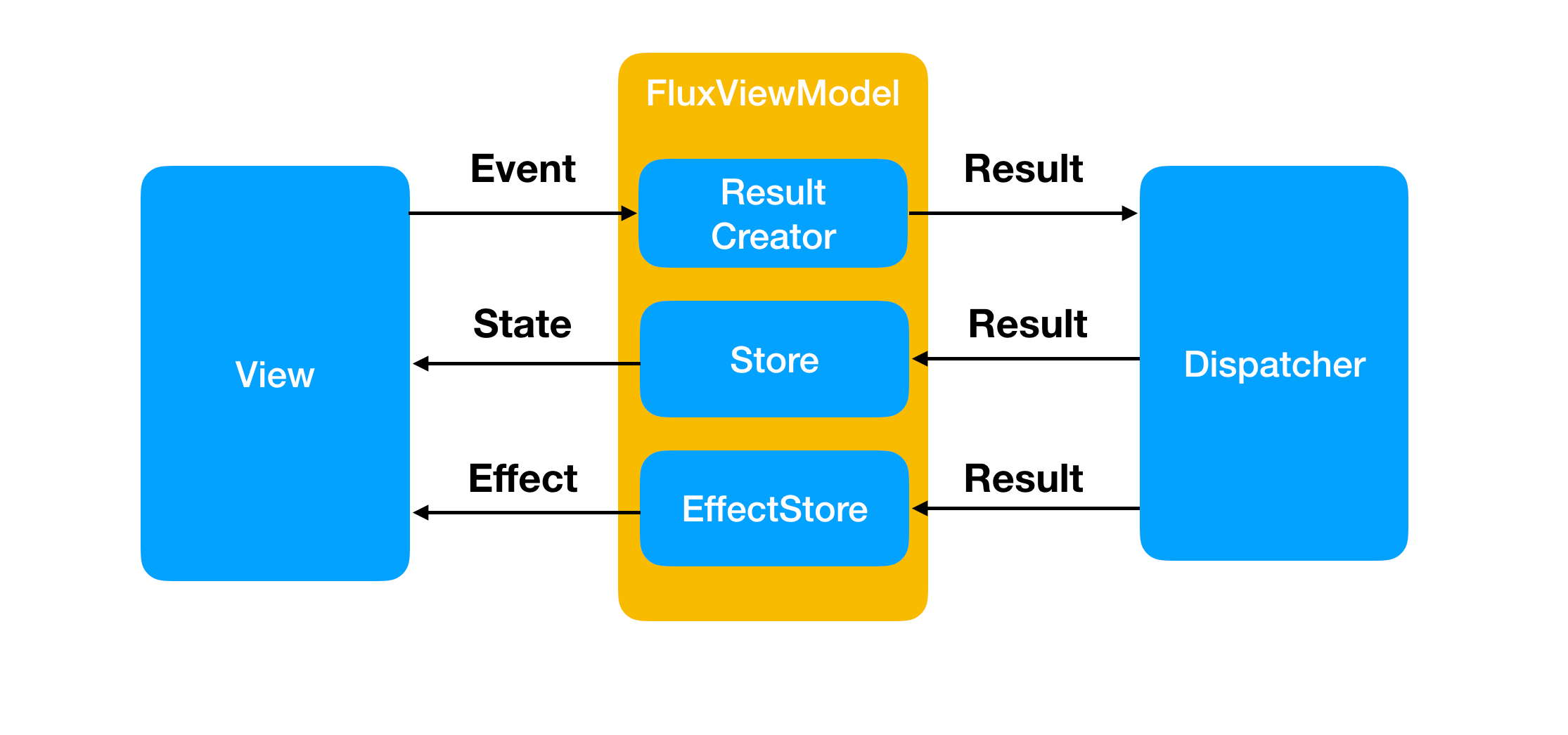
This all sounds terribly complicated and I can imagine most of you are screaming over engineering. Abstracting away common problem, creating a framwork for handling and talking about them is not over engineering. It’s programming.
The FluxViewModel for LoginActivity Can be seen below.
class LoginFlux(
   reducer: LoginReducer,
   effectMapper: LoginEffectMapper,
   resultCreator: LoginResultCreator
) :
    FluxViewModel<LoginEvents, LoginState, LoginEffects>(
        reducer,
        // initial state of view
        LoginState(),
        effectMapper,
        resultCreator
    )
It defines the inital state for the view the EffectMapper that will be creating effects and the ResultCreator that will be creating results.
The ResultCreator for LoginActivity can be seen below.
class LoginResultCreator() : ResultCreator<LoginEvents> {

    override fun createResults(events: Observable<LoginEvents>): Observable<Result> = ...
    }
}
Lets add the functionality step by step. First let’s** **check that the form data is valid.
In order to check if the form data is valid we need to look at the EmailChangedEvent and the PasswordChangedEvent in the events Observable. This is where the Observable.ofType operator comes in handy
override fun createResults(events: Observable<LoginEvents>): Observable<Result> {
// get the events we care about
val passwordChanged = events.*ofType*<LoginEvents.PasswordChanged>()
val emailChanged = events.*ofType*<LoginEvents.EmailChanged>()
Now we need to validate the data.
val isPasswordValid =
   passwordChanged.map **{ it**.password.*isValidPassword*() **}**.share()
val isEmailValid =
   emailChanged.map **{ it**.email.*isEmailValid*() **}**.share()
N.B isValidPassword() and ***isEmailValid() ***are simple extension functions that return Results. I.E
sealed class PasswordValidResult : Result {
    object Valid : PasswordValidResult()
    object TooShort : PasswordValidResult()
}

fun String.isValidPassword() = when {
    length < 4 -> PasswordValidResult.TooShort
    else -> PasswordValidResult.Valid
}
lets send the results to the reducer.
fun createResults(events: Observable<LoginEvents>): Observable<Result>
{
    // get the events we care about
    val passwordChanged = events.*ofType*<LoginEvents.PasswordChanged>()
    val emailChanged = events.*ofType*<LoginEvents.EmailChanged>()
    val loginClicked = events.*ofType*<LoginEvents.LoginClicked>()

    // check that form data is valid
    val isPasswordValid =
passwordChanged.map **{ it**.password.*isValidPassword*() **}**.share()
    val isEmailValid =
emailChanged.map **{ it**.email.*isEmailValid*() **}**.share()
**

    **return *listOf*(
        isPasswordValid,
        isEmailValid
    ).*merge*()
}
Lets use these results PasswordValidResult and EmailValidResult to modify the LoginState using a reducer.
class MainReducer : Reducer<LoginState> {

    override fun reduceToState(oldState: LoginState, result: Result): LoginState = ...
}
We will use the copy semantic of data class to update the LoginState as each Result comes in.
override fun reduceToState(oldState: LoginState, result: Result): LoginState =
 when (result) {
    is PasswordValidResult -> {
        when (result) {
            PasswordValidResult.Valid ->
              oldState.copy(passwordError = "")
            PasswordValidResult.TooShort ->
              oldState.copy(passwordError = "Password too short :(")
        }
    }
    is EmailValidResult -> {
       when (result) {
           EmailValidResult.Valid ->
               oldState.copy(emailError = "")
           EmailValidResult.TooShort ->
               oldState.copy(
                emailError = "Email Too short :("
               )
           EmailValidResult.BadlyFormatted ->
               oldState.copy(
                  emailError = "Email badly formatted Short :("
               )
    }
}
Api calls generate three results, Loading, Success, Error. We model this using a sealed class of Results.
sealed class LoginResult : Result {
    object Loading : LoginResult()
    data class Error(val error: String) : LoginResult()
    data class Success(val user: User) : LoginResult()
}

class UserDataFetcher(private val server: Server) {

    fun login(email :String, password: String): ObservableSource<out Result> =
        server.login(email, password)
            .map<LoginResult> **{
                **LoginResult.Success(**it**)
            **}**.onErrorReturn **{
                **Timber.e(**it**,"error loading User")
                LoginResult.Error(**it**.message.*orEmpty*())
            **}
            **.toObservable()
            .startWith(LoginResult.Loading)

}
Then in the ResultCreator we merger this with out previous results.
fun createResults(events: Observable<LoginEvents>): Observable<Result> {

...

// perform the login
val loginUser = loginClicked.flatMap **{
**userDataFetcher.login(**it**.email, **it**.password)
**}

**return *listOf*(
    isPasswordValid,
    isEmailValid,
    loginUser
).*merge*()
and the reducer handles each Result modifying the state appropriately.
is LoginResult -> {
    when (result) {
        LoginResult.Loading -> oldState.copy(loading = true)
        is LoginResult.Error -> oldState.copy(loading = false)
        is LoginResult.Success -> oldState.copy(loading = false)
    }
}
The navigation to the success screen is performed using the EffectMapper. When we get the LoginResult.Success result send a** LoginEffects.OpenLoggedIn **to the UI.
class LoginEffectMapper : EffectMapper<LoginEffects> {

    override fun mapToEffect(result: Result): LoginEffects? {
        return when(result) {
            is LoginResult.Success -> LoginEffects.OpenLoggedIn
            else -> null
        }
    }
}