Build • Publish • Distribute Incus Custom Images
ScottiBYTE Incus Forge is a lightweight Home Lab focused web application for publishing, managing, and distributing custom Incus images through SimpleStreams repositories.
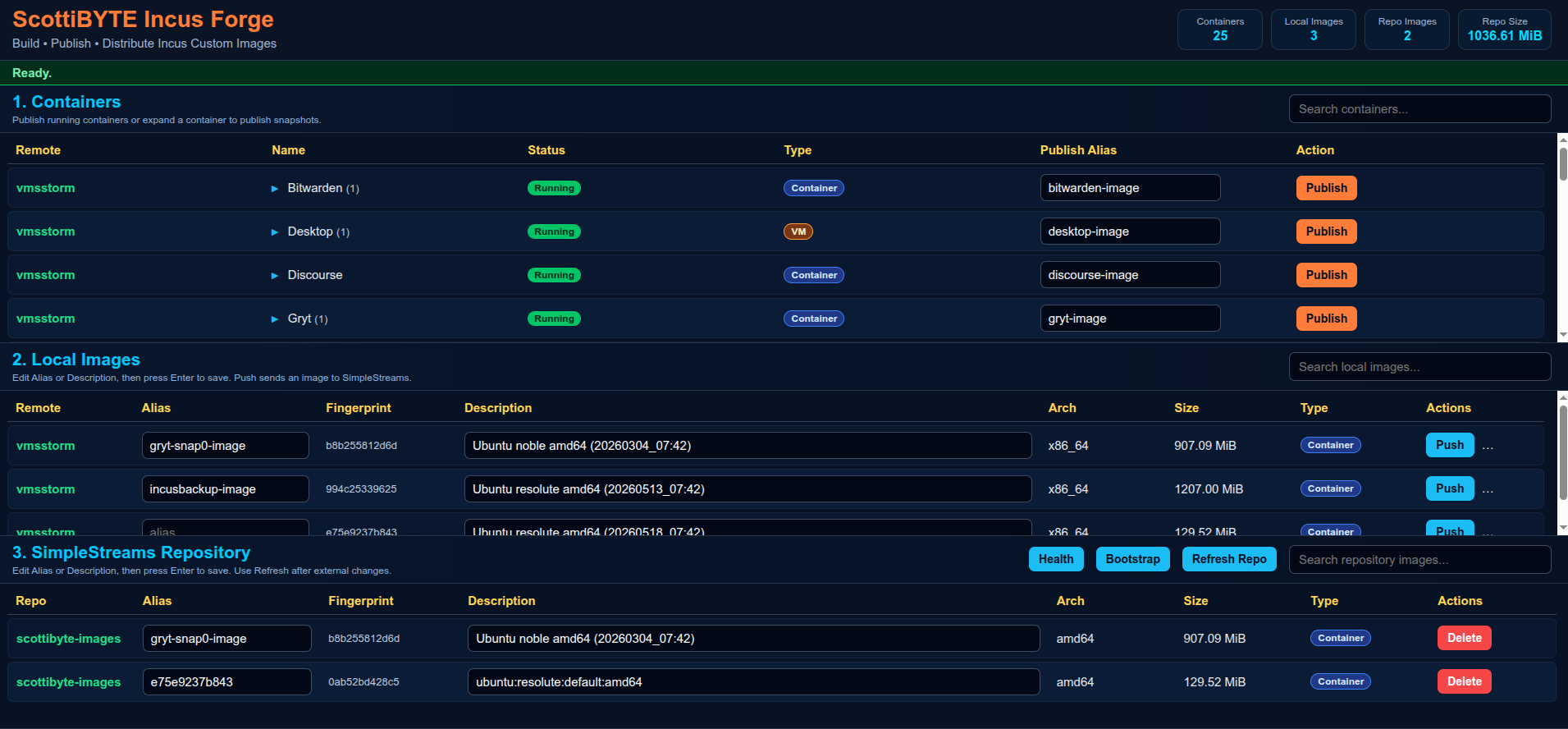
Incus Forge allows Home Labbers and administrators to:
- Publish running Incus containers as reusable images
- Publish snapshots directly from the UI
- Push images into SimpleStreams repositories
- Manage local Incus images
- Maintain centralized image repositories
- Distribute reusable Incus images across multiple environments
The platform is intentionally designed to remain:
- Lightweight
- Docker deployable
- Home Lab friendly
- Native Incus focused
- Understandable
- Minimal dependency
- Database free
- Publish running containers
- Publish snapshots
- Snapshot expansion rows
- Custom image aliases
- Push images to SimpleStreams repositories
- Delete repository images
- Refresh repository metadata
- Repository health validation
- Repository bootstrap support
- Live statistics cards
- Container and VM badges
- Responsive layout
- Async publishing operations
- Lightweight interface design
- Full Docker deployment
- Portable configuration
- Native Incus client integration
- SSH based repository synchronization
Recommended deployment model:
| System | Purpose |
|---|---|
| IncusForge | Web UI and image management |
| IncusSimplestreams | SimpleStreams repository |
| Existing Incus Hosts | Source containers and VMs |
Benefits:
- Cleaner separation
- Easier upgrades
- Improved security
- Easier troubleshooting
- Better disaster recovery
- Simpler scaling
incus launch images:ubuntu/26.04 IncusForgeEnter shell:
incus shell IncusForgeFrom the IncusForge container:
incus remote add vmsstorm https://vmsstorm:8443Accept the certificate.
Enter trust password or token.
Verify:
incus remote listExample:
+-------------------+------------------------------------+
| NAME              | URL                                |
+-------------------+------------------------------------+
| vmsstorm          | https://vmsstorm:8443             |
| scottibyte-images | https://images.scottibyte.com     |
+-------------------+------------------------------------+
Incus Forge synchronizes images to the SimpleStreams repository using SSH and rsync.
Generate SSH key if needed:
ssh-keygen -t ed25519Copy key to repository server:
ssh-copy-id scott@192.168.80.88Verify access:
ssh scott@192.168.80.88 "hostname && whoami"Expected:
IncusSimplestreams
scott
mkdir -p ~/incusforge

cd ~/incusforgenano config.jsonPaste:
{
  "port": 3030,
  "simplestreams": {
    "name": "scottibyte",
    "publicUrl": "https://images.mydomain.com",
    "sshHost": "172.16.2.111",
    "sshUser": "scott",
    "webRoot": "/var/www/html",
    "imageDir": "/var/www/html/images",
    "streamsDir": "/var/www/html/streams"
  }
}
Save file.
nano docker-compose.ymlPaste:
services:
  incusforge:
    image: scottibyte/incusforge:latest

    container_name: incusforge

    restart: unless-stopped

    ports:
      - "3030:3030"

    environment:
      PORT: "3030"
      HOME: /home/scott
      INCUS_CONF: /incus-client
      CONFIG_PATH: /app/config.json

    volumes:
      - ./config.json:/app/config.json:ro
      - ${HOME}/.config/incus:/incus-client:ro
      - ${HOME}/.ssh:/home/scott/.ssh:ro
Save file.
docker compose up -dVerify logs:
docker logs -f incusforgeExpected:
ScottiBYTE Incus Forge running on port 3030
Open browser:
http://YOUR-IP:3030
Create repository container:
incus launch images:ubuntu/26.04 IncusSimplestreamsEnter shell:
incus shell IncusSimplestreamsnano bootstrap-simplestreams.shPaste:
#!/usr/bin/env bash
set -euo pipefail

WEB_ROOT="${WEB_ROOT:-/var/www/html}"
IMAGE_DIR="${IMAGE_DIR:-$WEB_ROOT/images}"
STREAMS_DIR="${STREAMS_DIR:-$WEB_ROOT/streams}"
REPO_USER="${REPO_USER:-$USER}"

echo "=== ScottiBYTE Incus Forge SimpleStreams Bootstrap ==="

echo "[1/8] Installing required packages..."
sudo apt update
sudo apt install -y nginx xz-utils python3 python3-yaml incus-extra openssh-server curl ca-certificates rsync jq

echo "[2/8] Enabling SSH..."
sudo systemctl enable --now ssh || sudo systemctl enable --now sshd

echo "[3/8] Enabling nginx..."
sudo systemctl enable --now nginx

echo "[4/8] Creating repository directories..."
sudo mkdir -p "$IMAGE_DIR"
sudo mkdir -p "$STREAMS_DIR/v1"

echo "[5/8] Setting ownership and permissions..."
sudo chown -R "$REPO_USER:$REPO_USER" "$WEB_ROOT"
sudo chmod -R 775 "$WEB_ROOT"

echo "[6/8] Creating metadata files..."

if [ ! -f "$STREAMS_DIR/v1/index.json" ]; then
cat > "$STREAMS_DIR/v1/index.json" <<'JSON'
{"index":{"images":{"datatype":"image-downloads","path":"streams/v1/images.json","products":[],"format":"products:1.0"}},"format":"index:1.0"}
JSON
fi

if [ ! -f "$STREAMS_DIR/v1/images.json" ]; then
cat > "$STREAMS_DIR/v1/images.json" <<'JSON'
{"content_id":"images","datatype":"image-downloads","format":"products:1.0","products":{}}
JSON
fi

echo "[7/8] Validating repository..."
command -v incus-simplestreams >/dev/null
command -v xz >/dev/null
command -v nginx >/dev/null

echo "[8/8] Bootstrap complete."

echo
echo "Repository ready."
echo
echo "Next step:"
echo "ssh-copy-id $REPO_USER@<repository-ip>"
Save file.
chmod +x bootstrap-simplestreams.sh

REPO_USER=scott WEB_ROOT=/var/www/html ./bootstrap-simplestreams.shOpen browser:
http://YOUR-REPOSITORY-IP/images
Verify metadata:
curl http://YOUR-REPOSITORY-IP/streams/v1/index.jsonincus remote add scottibyte-images \
https://images.scottibyte.com \
--protocol=simplestreamsVerify:
incus remote list- Expand container row
- Enter image alias
- Click Publish
- Expand container snapshots
- Enter snapshot image alias
- Click Publish Snapshot
- Locate image in Local Images
- Click Push
- Repository metadata updates automatically
incus image list scottibyte-images:- Incus trust relationships use native Incus certificates
- SSH synchronization uses standard user SSH keys
- No database exposure
- No direct repository write APIs
- Native Linux file permissions
- Repository synchronization isolated through SSH
Error:
xz: executable file not found
Fix:
sudo apt install xz-utilsdocker exec -it incusforge bash
incus remote listssh scott@192.168.80.88docker logs -f incusforgeincus image list scottibyte-images:- Multiple repository profiles
- Repository selection drop-down
- Repository authentication profiles
- Background task queue
- Remote repository synchronization
- Repository replication
- Job history
- Enhanced async progress indicators
If you find Incus Forge useful:
- Subscribe to the ScottiBYTE YouTube channel
- Join the community discussions
- Share feedback and ideas
- Open issues and feature requests
Need help with Incus Forge, Docker deployment, Incus profile management, container creation, or ScottiBYTE utilities?
Join the ScottiBYTE Rocket.Chat community:
New users can start in #general. From there, you can find other ScottiBYTE project channels and community discussions.
For bugs and feature requests, please continue to use GitHub Issues. For quick questions and community discussion, use Rocket.Chat.