This page will explain how to access the building data stored in the ABC-RP data lake. Before you can access the data you will need to acquire a Google Service account key file. Please submit a data access request via the ABC-RP Data Application Form.
For information on the standards supported by ABC-RP please review the messaging on-boarding documentation.
Raw telemetry data is held in a Google BigQuery table. The supporting metadata is held in a Google Sheet. API access to both Sheets and BigQuery is required to make use of the data. Please see Python examples of this in the PythonExample folder.
Data stored in the Big Query data lake is very lightweight. The data stored is anonymized. Only those with access to the relevant Google Sheet will be able to associate data within the data lake to a particular property.
The metadata for each data point is stored once and associated with many entries in the BigQuery data lake:
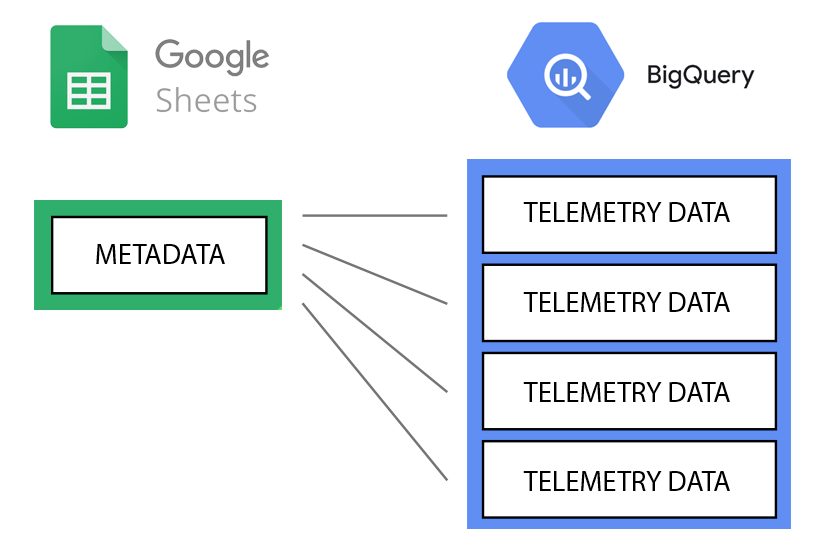
Here is an example of the supporting metadata in Sheets:
| Field name | Example |
|---|---|
| pointuid | 5a6e50d0b61d57400cf4555021a8ece9591f7f97027a4f54a260a4334af3d18c |
| device | JE-STH-BLD1_TPS-75 |
| pointname | zone_air_temperature_sensor |
| units | degrees_celsius |
| section | GF_KITCHEN |
This is the metadata for the ground floor kitchen temperature in the house JE-STH-BLD1.
Here is an example of an entry from the BigQuery data lake:
| Field name | Type | Example |
|---|---|---|
| pointuid | STRING | 5a6e50d0b61d57400cf4555021a8ece9591f7f97027a4f54a260a4334af3d18c |
| instance | STRING | s2 |
| application | STRING | abc-rp-iot |
| timestamp | TIMESTAMP | 2021-12-18T11:33:19.194Z |
| presentvalue | NUMERIC | 22.5 |
The above data lake entry shows the temperature in the kitchen of the house JE-STH-BLD1 on the 18th of December 2021.
Additional data may be added to the Sheets metadata as it becomes available.
The BigQuery table has millions of entries, each with a pointuid that corresponds to an entry in a Sheet.
The pointuid of the example BigQuery entry above is the same as the example Sheets entry.
Using the combination of the above data we can access the kitchen temperature readings of the building JE-STH-BLD1.
If we searched the data lake for all pointuid's of 5a6e50d0b61d57400cf4555021a8ece9591f7f97027a4f54a260a4334af3d18c we would retrieve all the temperature readings of the kitchen of the house JE-STH-BLD1.
This is shown in the first SQL example below.
SELECT * FROM `udmi.telemetry_main` WHERE pointuid = "5a6e50d0b61d57400cf4555021a8ece9591f7f97027a4f54a260a4334af3d18c"
By combing the pointuid's found in the Sheets, we can build complex SQL statements to access building data.
The following example retrieves the lowest temperature recorded in the kitchen of the building JE-STH-BLD1 between the 15th and 22nd of January 2022.
SELECT * FROM `udmi.telemetry_main`
WHERE pointuid = "5a6e50d0b61d57400cf4555021a8ece9591f7f97027a4f54a260a4334af3d18c" AND timestamp BETWEEN "2022-01-15" AND "2022-01-22"
ORDER BY timestamp ASC
LIMIT 1
When a Service Account key has been provided, you can access the BigQuery API via C#, Go, Java, Node.js, PHP, Python, or Ruby.
We have provided Python examples in the PythonExample folder.
We have not provided a Service Account key in the PythonExample folder. A Service Account key and list of final instructions will be provided once you have been approved for data access.
Note: The Service Accounts have data access frequency caps in place. The data should be accessed and stored on your platform if you are intending to access the same data frequently, such as in a web app.