Robust API test automation framework built with Robot Framework, Python, RequestsLibrary, Docker and GitHub Actions, following modern QA engineering and CI/CD best practices.
This project demonstrates a scalable API automation architecture with reusable components, centralized configurations, JSON Schema validation, negative API testing, Docker-based execution, automated reporting and continuous integration workflows suitable for professional QA portfolios.





- Automated REST API validation
- Modular and scalable project architecture
- Reusable Robot Framework keywords
- Centralized payload and endpoint management
- Environment-based configuration
- Multi-environment execution support
- JSON Schema response validation
- Positive and negative API test scenarios
- Negative API testing with invalid payloads
- Smoke and regression execution strategy
- Docker-based test execution
- Containerized execution with Robot Framework and Allure Report
- CI/CD pipeline with GitHub Actions
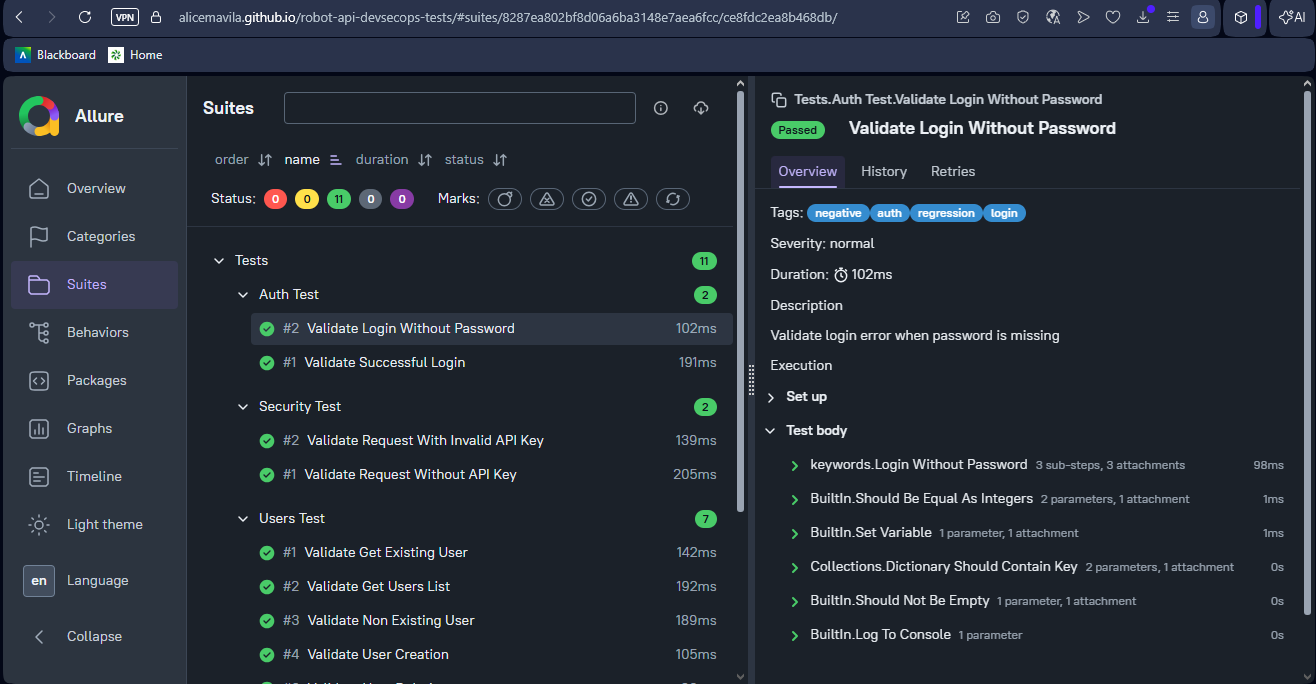
- Allure Report integration
- Automated report publishing with GitHub Pages
- Artifact generation and storage through GitHub Actions
- Clean and maintainable test structure
- Security-oriented API validations
- Robot Framework LSP configuration with
robot.toml
| Technology | Purpose |
|---|---|
| Robot Framework | Test automation framework |
| Python | Support libraries, custom validators and configurations |
| RequestsLibrary | API requests and validations |
| JSON Schema | API response contract validation |
| Docker | Containerized and reproducible test execution |
| GitHub Actions | Continuous Integration |
| Allure Report | Advanced test reporting |
| ReqRes API | Test API environment |
| dotenv | Environment variable management |
robot-api-devsecops-tests/
│
├── .github/
│   └── workflows/
│       └── api-tests.yml
│
├── assets/
│   └── allure-report.png
│
├── resources/
│   ├── config/
│   │   ├── endpoints.py
│   │   └── variables.py
│   │
│   ├── libraries/
│   │   └── schema_validator.py
│   │
│   ├── payloads/
│   │   └── user_payloads.py
│   │
│   ├── schemas/
│   │   ├── create_user_schema.json
│   │   ├── error_response_schema.json
│   │   ├── login_success_schema.json
│   │   ├── update_user_schema.json
│   │   ├── user_schema.json
│   │   └── users_list_schema.json
│   │
│   └── keywords.robot
│
├── tests/
│   ├── auth_test.robot
│   ├── negative_test.robot
│   ├── security_test.robot
│   └── users_test.robot
│
├── .dockerignore
├── .env.example
├── .gitignore
├── Dockerfile
├── requirements.txt
├── robot.toml
├── run_tests.bat
└── README.md
Test reports and execution outputs are generated locally, through Docker or by GitHub Actions and should not be committed to the repository.
Generated files and folders such as the examples below are ignored by Git:
reports/
output/
allure-results/
allure-report/
log.html
report.html
output.xml
.env- Validate successful login
- Validate login without password
- Validate successful login response schema
- Validate error response schema for authentication errors
- Validate request without API key
- Validate request with invalid API key
- Validate security headers
- Validate get existing user
- Validate get users list
- Validate non-existing user
- Validate user creation
- Validate user update
- Validate user deletion
- Validate response structure
- Validate existing user response schema
- Validate users list response schema
- Validate created user response schema
- Validate updated user response schema
- Validate successful login response schema
- Validate error response schema
- Validate login without email
- Validate login with empty payload
- Validate register without password
- Validate register with empty payload
git clone https://github.com/alicemavila/robot-api-devsecops-tests.git
cd robot-api-devsecops-testspython -m venv venvvenv\Scripts\activate.\venv\Scripts\Activate.ps1source venv/bin/activatepip install -r requirements.txtCreate a .env file in the project root directory based on the .env.example file.
ENVIRONMENT=dev
BASE_URL=https://reqres.in/api
API_KEY=YOUR_API_KEY
DEFAULT_TIMEOUT=30
VERIFY_SSL=TrueENVIRONMENT=dev
BASE_URL=https://reqres.in/api
API_KEY=YOUR_API_KEY
DEFAULT_TIMEOUT=30
VERIFY_SSL=TrueNever commit the
.envfile because it may contain sensitive information such as API keys, tokens or credentials.
This project supports environment-based configuration through the ENVIRONMENT variable.
Available environment examples:
ENVIRONMENT=dev
ENVIRONMENT=hml
ENVIRONMENT=prod
ENVIRONMENT=ci
The environment configuration is managed in:
resources/config/variables.pyThe default environment is:
ENVIRONMENT=devIn CI/CD, the environment is configured as:
ENVIRONMENT=cirobot -d reports tests/robot -i smoke -d reports tests/robot -i regression -d reports tests/robot -i negative -d reports tests/run_tests.batThis project supports containerized test execution using Docker.
Docker execution allows the test suite to run in a standardized environment, reducing local setup issues related to Python, dependencies, Java and Allure CLI.
docker build -t robot-api-devsecops-tests .docker run --rm --env-file .env -v "${PWD}/reports:/app/reports" robot-api-devsecops-testsdocker run --rm --env-file .env -v "%cd%/reports:/app/reports" robot-api-devsecops-testsdocker run --rm --env-file .env -v "$(pwd)/reports:/app/reports" robot-api-devsecops-testsThe Docker execution runs the full Robot Framework test suite and generates Robot Framework reports and Allure report files inside the reports directory.
Expected execution result:
15 tests, 15 passed, 0 failed
After running the tests with Docker, the generated reports will be available in:
reports/Main report files:
reports/output.xml
reports/log.html
reports/report.html
reports/allure-results/
reports/allure-report/
To serve the generated Allure report locally without using Allure CLI, run:
python -m http.server 8080 --directory reports/allure-reportThen access:
http://localhost:8080
robot --listener "allure_robotframework;reports/allure-results" --outputdir reports tests/robot ^
--listener "allure_robotframework;reports/allure-results" ^
--outputdir reports ^
tests/robot \
--listener "allure_robotframework;reports/allure-results" \
--outputdir reports \
tests/allure generate reports/allure-results -o reports/allure-report --cleanallure open reports/allure-reportallure serve reports/allure-resultsAllure CLI and Java must be installed locally to generate and open the Allure report on your machine.
If you do not want to install Allure CLI locally, use the Docker execution instead.
Access the published Allure Report:
https://alicemavila.github.io/robot-api-devsecops-tests/
This project uses GitHub Actions for automated execution and reporting.
Pipeline execution includes:
- Repository checkout
- Python setup
- Dependency installation
- Environment variable creation
- Automated Robot Framework execution
- Allure results generation
- Allure report generation
- Robot Framework report artifact upload
- Allure report artifact upload
- GitHub Pages deployment
The following secrets should be configured in GitHub Actions:
| Secret | Description |
|---|---|
| BASE_URL | Base API URL used during CI execution |
| API_KEY | API key used to authenticate requests against the ReqRes API |
Recommended values:
BASE_URL=https://reqres.in/api
API_KEY=YOUR_API_KEY
To configure them:
- Go to the GitHub repository
- Click on Settings
- Go to Secrets and variables
- Click on Actions
- Create the required repository secrets
This project validates API response contracts using JSON Schema.
Schemas are stored in:
resources/schemas/The custom validation library is stored in:
resources/libraries/schema_validator.pySchema validation helps ensure that API responses follow the expected structure, required fields and data types.
This project includes a robot.toml file to improve Robot Framework Language Server support in editors such as VSCode.
The configuration helps the editor resolve Python variable files and avoid false-positive warnings for variables loaded from:
resources/config/variables.py
resources/config/endpoints.py- Modular architecture
- Separation of concerns
- Reusable keywords
- Centralized configurations
- Centralized payload management
- Centralized schema management
- Environment isolation
- Multi-environment support
- Sensitive data protection with
.envand GitHub Secrets - JSON Schema validation
- Positive and negative test coverage
- Docker-based execution
- Reproducible test environment with containers
- CI/CD automation
- Tagging strategy
- Scalable framework structure
- Automated reporting
- Clean code principles
- Maintainable test design
- Generated reports excluded from version control
- Editor/LSP configuration for improved maintainability
This project uses the public ReqRes API as a test environment.
Because it depends on a public API, responses and availability may vary depending on the service status, authentication rules or usage limits.
The goal of this project is to demonstrate API test automation practices, project organization, schema validation, negative testing, Docker-based execution, CI/CD integration and reporting strategy for QA portfolio purposes.
- Parallel execution
- Performance testing integration
- API contract testing
- Database validation layer
- Authorization validation by user role
- Rate limit validation
QA Engineer focused on:
- Test Automation
- API Testing
- Robot Framework
- Docker-based Test Execution
- CI/CD Pipelines
- Software Quality Engineering
GitHub: https://github.com/alicemavila