On-device voice + vision AI for NVIDIA Jetson. No cloud, no API keys, sub-second response.
Kokoro TTS + Nemotron STT + Qwen2.5-VL VLM — all running locally on Jetson Thor. Ask it questions, point a camera, get spoken answers in ~700ms.
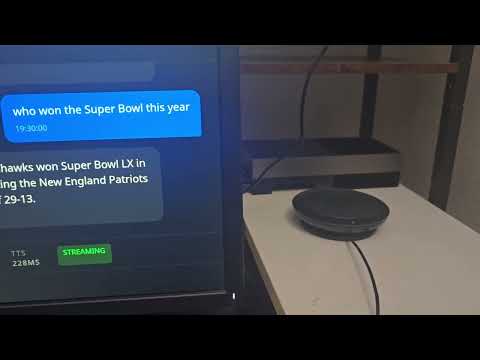
(Clicking the thumbnail didnt work? Try the link for watching it in action: https://youtu.be/zOygCx3Tuxc)
sudo sysctl -w vm.drop_caches=3        # reclaim GPU memory

# Download the compose file and start
curl -fLO https://raw.githubusercontent.com/amarrmb/jetson-assistant/main/docker-compose.yml
docker compose up -d                    # pulls ~12GB, vLLM loads model (~5 min)
docker compose logs -f assistant        # watch it come up
Note: vLLM may restart once on first boot due to CUDA graph memory allocation. This is normal —
restart: unless-stoppedhandles it automatically. Wait ~5 minutes.
Audio setup: Set ALSA_CARD to your audio device name (find it with aplay -l):
# Example: use a USB speaker/mic
ALSA_CARD=USB docker compose up -d

# Or use a specific card name
ALSA_CARD="Jabra" docker compose up -d
Plug in a mic and speaker, and start talking:
"What time is it?"                          → built-in clock
"What do you see?"                          → VLM describes the camera feed
"Take a photo"                              → saves a snapshot to ~/photos
"Watch the camera for someone approaching"  → background VLM monitoring + alert
"Remember that my wifi password is abc123"  → persistent memory
"What do I have saved?"                     → recall memories
"Set a timer for 60 seconds"                → spoken countdown alert
"How's the system doing?"                   → CPU temp, memory, uptime
"Search the web for NVIDIA GTC 2026"        → DuckDuckGo live search
"Speak in Japanese"                         → switches TTS + LLM language
With multi-camera (--camera-config):
"What cameras do I have?"                   → lists all registered cameras
"What's happening at the front door?"       → VLM checks a named camera
"Watch the garage for the door opening"     → per-camera background monitor
"Add a camera called patio at rtsp://..."   → register by voice
To stop: docker compose down
To customize the config, mount a local configs/ directory:
# Clone the repo (or just copy configs/)
git clone https://github.com/amarrmb/jetson-assistant.git
# Edit configs/thor-sota.yaml, then restart with the mount:
docker compose down && docker compose up -dThe assistant is configured via YAML files in configs/. Key settings:
| Setting | Flag / YAML key | Default | Description |
|---|---|---|---|
| TTS backend | --tts / tts_backend |
kokoro |
kokoro, qwen, piper |
| STT backend | --stt / stt_backend |
nemotron |
nemotron, whisper, sensevoice |
| LLM backend | --llm / llm_backend |
vllm |
vllm, ollama, openai |
| Vision | --vision |
off | Enable USB camera |
| Wake word | --no-wake |
on | Disable wake word (always listen) |
| Camera config | --camera-config |
none | Multi-camera JSON file |
Environment variables:
| Variable | Default | Description |
|---|---|---|
ALSA_CARD |
(system default) | Audio device name from aplay -l (e.g. USB, Jabra) |
JETSON_ASSISTANT_HOST |
0.0.0.0 |
Server bind address |
JETSON_ASSISTANT_PORT |
8080 |
Server port |
JETSON_ASSISTANT_MODEL_CACHE |
~/.cache/jetson-assistant |
Model cache directory |
System prerequisites (Ubuntu/Debian):
sudo apt-get install -y libportaudio2 espeak-nglibportaudio2— required bysounddevicefor local mic/speaker audioespeak-ng— required by Kokoro TTS phonemizer
Install:
git clone https://github.com/amarrmb/jetson-assistant.git
cd jetson-assistant

# Recommended: full assistant with Kokoro TTS + Nemotron STT + camera
pip install -e ".[kokoro,nemotron,assistant,vision]"

# Or pick individual extras:
pip install -e ".[kokoro]"              # Kokoro TTS only
pip install -e ".[nemotron]"            # Nemotron STT only
pip install -e ".[assistant]"           # Voice assistant core (includes vLLM client, web search, browser audio)
pip install -e ".[vision]"             # Camera support (opencv)
pip install -e ".[all]"                # Everything
Run:
# Start vLLM separately, then run
docker compose up -d vllm
./scripts/run-sota-demo.sh
Or on Jetson with the setup script: ./scripts/install_jetson.sh
The pre-built image (ghcr.io/amarrmb/jetson-assistant:thor) works out of the box. If you want to modify the code and rebuild:
# On Jetson Thor (aarch64 only)

# 1. Download the flash-attn wheel (127MB, not stored in git)
gh release download v0.1.0 -p 'flash_attn-*.whl' -D wheels/

# 2. Build
docker build -t jetson-assistant:thor .
The flash-attn wheel is pre-compiled for Jetson Thor (Python 3.12, CUDA 13.0, sm_110). See wheels/README.md for build-from-source instructions if you need a different target.
Adapting for other hardware:
- Change the PyTorch index URL in
Dockerfilefor your CUDA version - Rebuild flash-attn for your GPU arch (see
wheels/README.md) - Swap the vLLM image in
docker-compose.ymlfor your platform - Adjust
--gpu-memory-utilizationfor your GPU memory
Custom tools — the assistant supports tool calling. Add tools via the plugin system:
# my_tools.py
from typing import Annotated

def register_tools(registry, context=None):
    @registry.register("Get the current weather")
    def weather(city: Annotated[str, "City name"]) -> str:
        return f"72F and sunny in {city}"
Add to your config YAML:
external_tools:
  - my_tools
Python API:
from jetson_assistant import Engine

engine = Engine()
engine.load_tts_backend("kokoro")
result = engine.synthesize("Hello world", voice="af_heart")
result.save("output.wav")
REST + WebSocket API — run jetson-assistant serve --port 8080 for HTTP integration.
CLI:
jetson-assistant tts "Hello world"
jetson-assistant stt audio.wav
jetson-assistant benchmark tts --backends kokoro,piper
See docs/ for full reference: assistant, backends, API, hardware.
pip install -e ".[dev]"
make test       # unit tests
make lint       # ruff
make smoke      # smoke test
make ci # full pre-push checkApache 2.0 — See LICENSE
- Kokoro — near-human TTS
- NVIDIA NeMo — Nemotron STT
- faster-whisper — optimized Whisper
- Qwen3-TTS — neural TTS
- Piper — lightweight TTS
Built by DeviceNexus.ai.