



Aquarius Bot Manager (ABM) is a control plane for a whole VPS — or a whole fleet of VPSes — of AquariusProxy and ZenithProxy bots, each in its own tmux session, driven from a CLI and a web UI. Spin up a fresh box, install the manager, deploy proxies, then monitor and operate them. Pure Python stdlib + tmux — no pip installs, no Docker.
AquariusProxy is a ZenithProxy fork, so they share the same launch model and config structure; this manager drives either (or a custom fork) on the same host.
📖 Install guides, the full CLI/feature reference, and configuration live on the Aquarius Bot Manager Wiki. This README is just an overview of what's here. Read Security before exposing the dashboard to anything but your own machine.
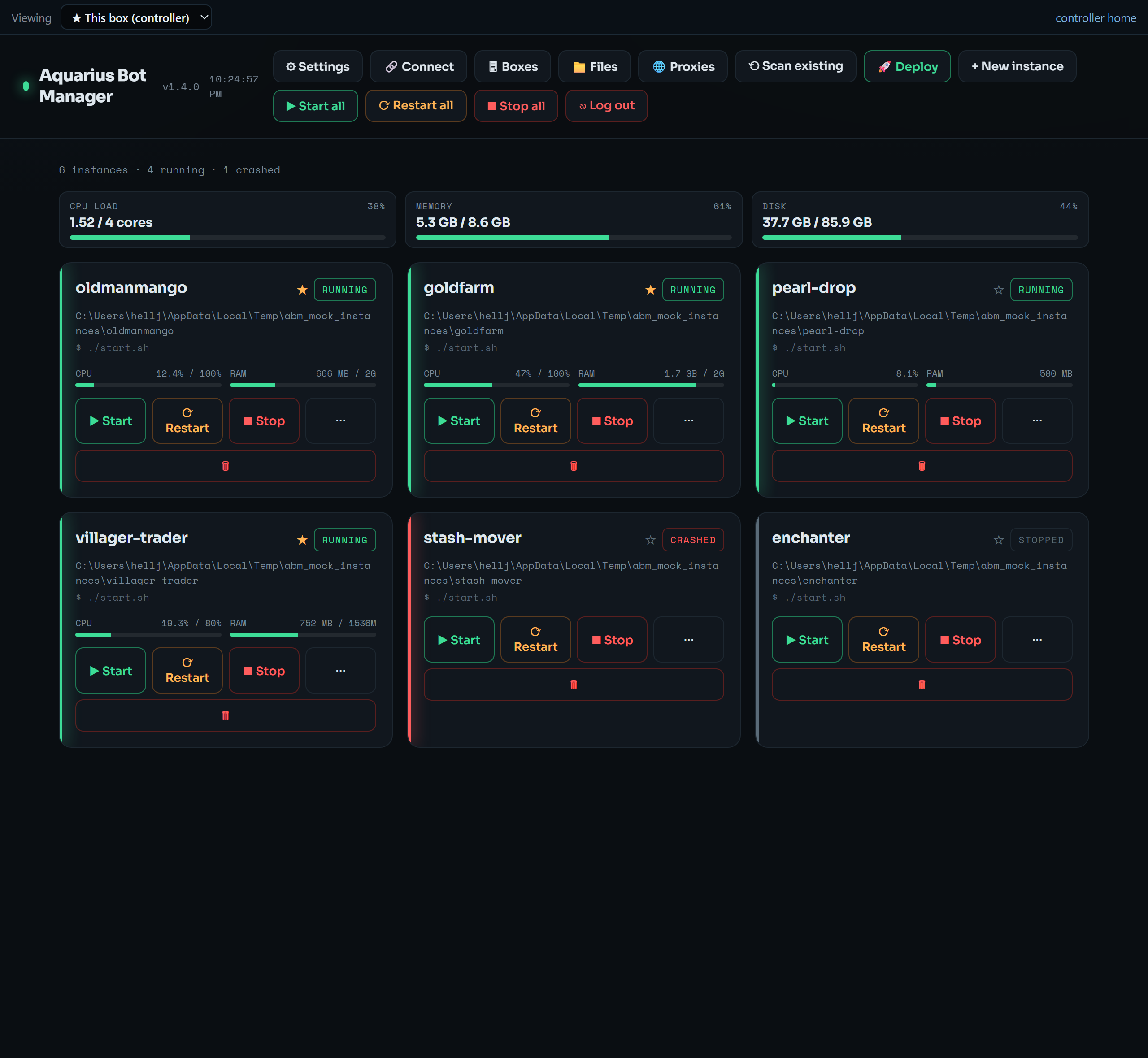
One card per bot (status, live CPU/RAM, start/stop/restart) under a host gauge strip; bulk lifecycle, Deploy, Proxies, Files, Boxes, Share, Users and Settings are one click away. Full screenshot tour in the wiki.
The 3.x line turns the single-host manager into a front-facing control plane with real access control. Full notes on the Changelog.
| Feature | What it adds |
|---|---|
| Live Control Surface | A per-bot cockpit at /control?inst=<name> — every module, a world map, vitals, and a command runner on one page, in three switchable themes. Built into AquariusProxy; ZenithProxy bots get it via the zenith-abm-bridge plugin. Control Surface → |
| Shareable guest links | Hand someone a single URL scoped to specific bots at a tier (view / operate / config), with expiry + instant revoke. No account needed. |
| Public sharing | Give the dashboard a public HTTPS address from a menu of providers ABM installs for you — Cloudflare Quick Tunnel (no account), Tailscale Funnel (userspace, no root), ngrok, a named Cloudflare tunnel, or your own reverse proxy. |
| Named user accounts (RBAC) | Real per-person logins with roles view / operate / config / admin, each scoped to specific bots — added directly or via a one-time invite link. Live disable / reset / delete. |
| Fine-grained permissions | Per user, control exactly which modules they may use and configure, whether they get the free-form console, and whether they may start/stop/restart — enforced server-side, not just hidden. |
| Multi-VPS controller | Connect other boxes over SSH tunnels, switch into any box's dashboard in one tab, run fleet-wide bulk actions, and connect/provision/destroy DigitalOcean droplets. Multi-VPS Controller → |
| Automation scheduler | Cron / interval / daily jobs + an on-crash auto-restart watchdog, this box or cross-box, with optional Discord pings. |
A quick map of the surface — each links to its wiki page for the full guide.
- Lifecycle & console — start / stop / restart (per bot or all), a live tmux console with quick-command presets, and a structured config/module editor with a raw-JSON fallback. Usage →
- Deploy proxies — one click stands up a new AquariusProxy / ZenithProxy / custom-fork bot: ABM downloads that fork's launcher, unzips it, and registers it (the launcher self-bootstraps Java + the jar). Configuration →
- Proxies — a host/port/user/pass editor with bulk / round-robin assignment and one-click Webshare import. Proxies →
- Monitoring & caps — whole-VPS and per-bot CPU/RAM/disk gauges with alert thresholds, plus enforced per-bot memory/CPU caps via cgroups.
- Jailed file manager — browse / edit / rename / delete files (incl. upload/download and cross-box transfer), realpath-jailed to an allowlist of roots.
- Access control — shareable guest links, named user accounts with roles + per-bot scopes, and per-user fine-grained module/console/lifecycle permissions. Security →
- Multi-VPS controller & fleet — drive your other boxes from one tab over SSH tunnels; DigitalOcean connect / provision / destroy. Multi-VPS Controller → · Fleet (DigitalOcean) →
- Automation — scheduled restarts/commands + on-crash watchdog, this box or fleet-wide, with Discord notifications.
- Appearance — themes, a custom background image, density, selectable fonts, and a selectable sidebar (icon rail / full / command center, left or right) with dedicated Fleet, Activity and per-bot Telemetry pages and a ⌘K command palette.
- Self-update & backup — in-place
git pullself-update (bots untouched) with an "update available" badge and an optional daily timer; portable config backup/restore.
On a fresh Ubuntu box, one command installs everything (deps, the manager, systemd units, lingering for resource caps), starts the web UI, and prints the exact line to reach it:
curl -fsSL https://raw.githubusercontent.com/aquariusnetwork9/Aquarius-Bot-Manager/main/install.sh | sudo bashIt asks how you want to reach the UI:
- SSH tunnel (default, most secure) — stays on
127.0.0.1; the installer prints a ready-to-pastessh -L … you@<your-ip>line. Paste it on your computer, openhttp://localhost:8765. - Public HTTPS — fronts the manager with Caddy so you just open
https://<vps>(a domain gets a trusted cert).
There's no CLI password step — the first time you open the UI it walks you through creating your login, then you click 🚀 Deploy to add proxies. That's the whole flow.
➡️ Manual install, scripted/non-interactive flags, cloud-init, node-mode, and the access modes are on the Installation wiki page.
Requirements: python3 (3.8+) and tmux (sudo apt install tmux). No other dependencies.
Everything in the UI has a headless abm equivalent. A taste:
abm list                       # roster + status
abm start bot1                 # or: all      (also: stop / restart / logs)
abm deploy bot1 --source aquarius   # stand up a new proxy (or: zenith / --repo owner/repo)
abm proxybulk --list "1.2.3.4:1080,5.6.7.8:1080" --mode roundrobin --restart
abm webshare import --token <KEY> --auth userpass --save-token --restart
abm node add box2 ubuntu@1.2.3.4    # register another VPS over an SSH tunnel
abm selfupdate                 # update the manager in place (bots untouched)
abm serve --host 127.0.0.1 --port 8765   # run the web UI
➡️ Full command reference on the Usage wiki page.
manager.py— the program (CLI + web server, single source of truth)schema.py— curated AquariusProxy/ZenithProxy config schema for the structured editorabm— short CLI wrapper (abm restart bot1)control/— the Live Control Surface assets served by the managerfleet.py— experimental multi-droplet fleet controller (DigitalOcean);abmfleetis its wrapperinstall.sh/cloud-init.yaml— fresh-VPS installer + first-boot provisioning templateaquarius-bot-manager*.service— systemd units (web UI + boot autostart)instances.example.json/nodes.example.json— config + node-registry examples
Dashboard access (for the owner or an admin user) is equivalent to a shell on the box — it runs commands inside bots, edits configs, deploys code, and browses files. Scoped roles, guest links, and per-user permissions do limit what a given person can reach, but the owner/admin do not.
By default the manager binds 127.0.0.1 and is reached over an SSH tunnel. Set a password, and if you expose it, use HTTPS. Public sharing refuses to turn on without a login. Read the Security wiki page in full before exposing the dashboard.
manager.py is a single stdlib-only file (CLI + a ThreadingHTTPServer whose SPA is an embedded HTML/JS string). No build step.
python3 manager.py serve --host 127.0.0.1 --port 8765   # run the web UI locally
python3 -m py_compile manager.py                        # syntax check
The VPSes track main and update via abm selfupdate (git pull --ff-only + a KillMode=process restart, so bots survive). Tagged Releases are cut for downloaders.
See Architecture & Limitations for the design and the honest list of what it does not do.