Saliency detection with a convolutional autoencoder including an edge contrast penalty term to the loss to enforce sharp edges
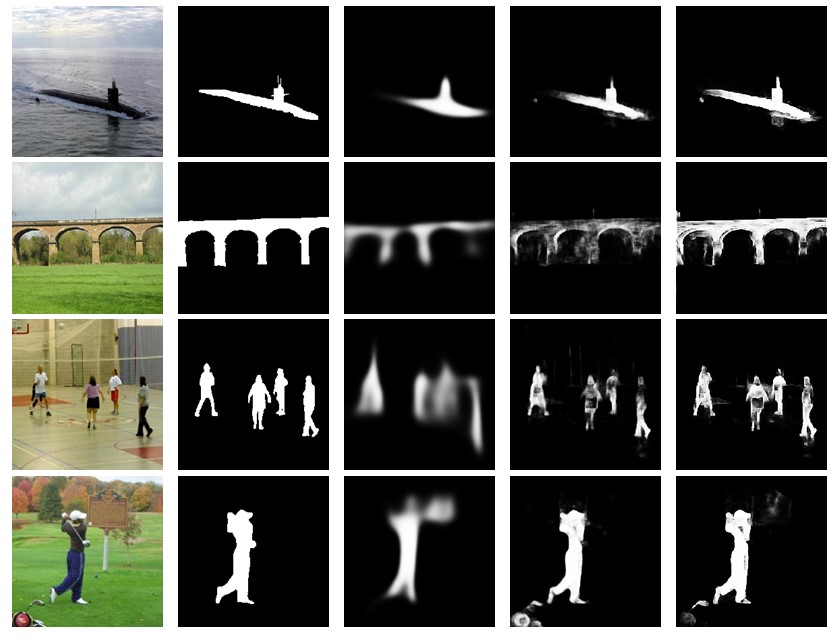
This project is a convolutional autoencoder that perform saliency detection. Specifically it generates saliency maps directly from raw pixels inputs. Both encoder and decoder are based on the VGG architecture. A specific penalty term has been added to the loss to improve the peormance aswell as direct conenctions between the convolutional and deconvolution layers.

From left to right: image, ground truth, baseline, baseline with direct connections, baseline with direct connections and contrast penalty term added to the loss
- Python 2.7.6 or 3
- Tensorflow 0.12 (or above) with GPU supported
- Numpy
-
First you need to make sure that the images and their labels are located in the approriate folders. If you plan to use the most commons datasets, such as MSRA10K or ECSSD or DUT-OMRON you can download the images and labels into the following folders
.../datasets_split/NAME/images/*and.../datasets_split/NAME/labels/*whereNAME = msra10kfor MSRA10K,NAME = ecssdfor ECSSD andNAME = dutomronfor DUT-OMRON. These are the relative paths where the python files are located. -
Then you need to have a model available (meaning a file with the weight of the network). By default, there are three available models that are B, B+D and B+D+E. B is the baseline autoencoder, B+E has direct connections in addition and B+D+E has both direct connections and the edge contrast penalty enable. If you have no model, then you can start by training one from scratch using the following command:
demo.py -o train -m B -init scratch
If you want to train a model using available weights, such as VGG16 on ILSVRC then you can use the following command
demo.py -o train -m B -init pretrain
For example you can download the following weight file here and place in the folder .../vgg_weight/*
To save the final weights from the baseline model so that other model can be trained from this point, make sure to use the command
demo.py -o train -m B -init pretrain -s_copy
Afterward you could train a different models with this weight using a command such as
demo.py -o train -m BDE -init restore_w_only
Finally you could resume the training of the same model and train for a final 1000 steps with
demo.py -o train -m BDE -init restore -step 1000
- If a model is available, you can test its performance on dataset ECSSD for instance with
demo.py -o score -m B -p test -d ecssd -save
This command will also save the resulting saliency maps in .../log/MODEL_NAME/* where MODEL_NAME depends on which model you are testing.