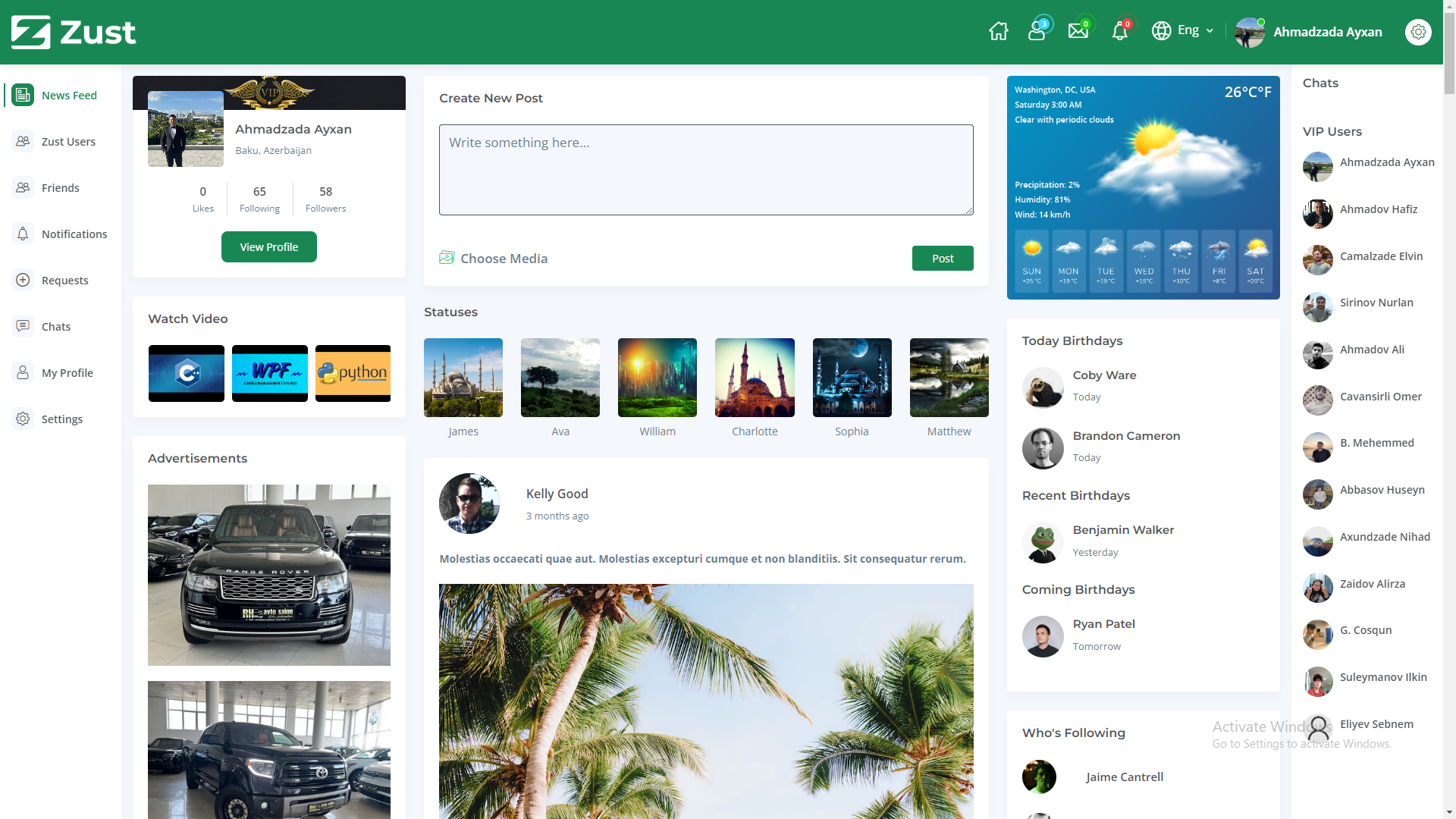
Zust is a full-featured social media web application built with ASP.NET Core MVC. Users can create profiles, share posts (text, images and video), like and comment, send and accept friend requests, chat in real time, and receive live notifications.
Originally built on .NET 6 + SQL Server, Zust has been modernized to run on .NET 10 with PostgreSQL (Neon) and is deployable to Render via Docker.
- Features
- Tech Stack
- Architecture
- Local Development
- Neon Setup
- Render Deployment
- Environment Variables
- Demo Data
- Screenshots
- License
- 🔐 Authentication & profiles — registration, login and rich user profiles (ASP.NET Core Identity).
- 📝 Posts — create text/image/video posts with media hosted on Cloudinary.
- ❤️ Likes & comments — engage with posts.
- 👥 Friendships — send, accept and manage friend requests.
- 💬 Real-time chat — one-to-one messaging powered by SignalR.
- 🔔 Live notifications — instant updates via SignalR.
- 📰 News feed — posts, videos and suggestions.
| Layer | Technology |
|---|---|
| Runtime | .NET 10 (ASP.NET Core MVC + Razor views) |
| Real-time | SignalR |
| Auth | ASP.NET Core Identity (cookie-based) |
| Data | Entity Framework Core 10 (Code First) |
| Database | PostgreSQL (Neon) |
| Media | Cloudinary |
| Mapping | AutoMapper |
| Hosting | Render (Docker) |
Zust is a single, server-rendered ASP.NET Core application organized in layers (no separate frontend — the UI is rendered with Razor, so there is no need for a Vercel/Next.js frontend):
Zust.sln
├── Zust.Web          → ASP.NET Core MVC app: controllers, Razor views, SignalR hubs, DI/startup (Program.cs)
├── Zust.Business     → application/service layer (business logic)
├── Zust.DataAccess   → EF Core DbContext, repositories, migrations helpers, seeding
├── Zust.Core         → cross-cutting abstractions
└── Zust.Entities     → domain models (User, Post, Comment, Like, Friendship, Chat, Message, Notification, …)
Request flow: Browser → MVC controllers / API controllers → Business services → DataAccess (EF Core) → PostgreSQL. Real-time features go Browser ⇄ SignalR UserHub.
- .NET 10 SDK
- A Neon (or any PostgreSQL 14+) connection string — see below
- (Optional) A Cloudinary account for media uploads
# 1. Clone
git clone https://github.com/aykhan019/zust
cd zust

# 2. Configure local secrets (kept out of git)
cp Zust/appsettings.Development.json.example Zust/appsettings.Development.json
#   then edit Zust/appsettings.Development.json with your local Postgres + Cloudinary values

# 3. Restore & build
dotnet restore
dotnet build

# 4. Apply migrations to your local database
dotnet ef database update --project Zust/Zust.Web.csproj --startup-project Zust/Zust.Web.csproj

# 5. Run
dotnet run --project Zust/Zust.Web.csproj
The app reads its connection string from ConnectionStrings:Default (or a DATABASE_URL URI). In Development this comes from appsettings.Development.json; in Production from environment variables.
Tip: Prefer not to keep a connection string in a file? Use user secrets instead:
dotnet user-secrets init --project Zust/Zust.Web.csproj
dotnet user-secrets set "ConnectionStrings:Default" "Host=localhost;Port=5432;Database=zust;Username=postgres;Password=postgres" --project Zust/Zust.Web.csproj
-
Create a project at neon.tech (pick a region near your Render region).
-
In the project dashboard open Connection Details and enable Pooled connection — the host will contain
-pooler. Use the pooled host: Render's free tier is IPv4-only and the pooler is the reliable choice. -
Build an Npgsql connection string (SSL is required by Neon):
Host=ep-<id>-pooler.<region>.aws.neon.tech;Port=5432;Database=<db>;Username=<user>;Password=<your-password>;SSL Mode=Require;Trust Server Certificate=trueThis is the value you set as
ConnectionStrings__Default(and the same value goes inZust/appsettings.Development.jsonfor local dev, since local and host share one Neon database). Alternatively, Zust also accepts aDATABASE_URLinpostgresql://user:pass@host/db?sslmode=requireURI form and converts it automatically, forcing SSL. -
Apply migrations against Neon:
ConnectionStrings__Default="Host=ep-<id>-pooler.<region>.aws.neon.tech;Port=5432;Database=<db>;Username=<user>;Password=<password>;SSL Mode=Require;Trust Server Certificate=true" \
  dotnet ef database update --project Zust/Zust.Web.csproj --startup-project Zust/Zust.Web.csproj
Migrations are also applied automatically on app startup, so this step is optional if you deploy straight to Render.
Zust deploys to Render as a Docker web service. A render.yaml blueprint is included.
Option A — Blueprint (recommended):
- Push this repo to GitHub.
- In Render, New → Blueprint, point it at the repo. Render reads
render.yaml. - Fill in the environment variables marked
sync: false(see below) in the dashboard. - Deploy. Render builds the
Dockerfile, injectsPORT, and the app binds Kestrel to it.
Option B — Manual:
- New → Web Service, connect the repo, choose Docker runtime.
- Set Health Check Path to
/home/index. - Add the environment variables below.
The app listens on Render's PORT, honors X-Forwarded-* headers (correct HTTPS/cookies behind Render's proxy), serves static files and runs SignalR over the same origin. EF Core migrations run automatically on startup.
| Variable | Required | Description |
|---|---|---|
ASPNETCORE_ENVIRONMENT |
✅ | Production on Render, Development locally. |
ConnectionStrings__Default |
✅ | Npgsql connection string for Neon PostgreSQL (see Neon Setup). |
AppSettings__Token |
✅ | App token/secret used for token signing. Use a long random value. |
CloudinarySettings__CloudName |
✅* | Cloudinary cloud name (*required for media uploads). |
CloudinarySettings__ApiKey |
✅* | Cloudinary API key. |
CloudinarySettings__ApiSecret |
✅* | Cloudinary API secret. |
DATABASE_URL |
⬜ | Alternative to ConnectionStrings__Default; a postgresql://… URI. |
ALLOWED_ORIGINS |
⬜ | Comma-separated extra CORS origins (only needed if you add an external SPA). |
SEED_DEMO_DATA |
⬜ | Set to true once to seed demo users/posts, then remove. |
Locally these live in
Zust/appsettings.Development.json(git-ignored). Never commit real secrets —appsettings.jsonships with empty placeholders only.
To present the app publicly with content, set SEED_DEMO_DATA=true for one run. On startup, after migrations, Zust seeds a handful of demo users and posts (idempotent — it only inserts when the tables are empty).
Demo accounts use the password Demo@1234 (e.g. aladdin@zust.demo, maya@zust.demo, liam@zust.demo, sofia@zust.demo). Remove SEED_DEMO_DATA after the first successful run.
Zust is released under the MIT License.