








Setbian is a lightweight, GUI-based post-installation setup tool that helps Debian users transform a fresh installation into a fully functional workstation with minimal effort. Built using Python + Tkinter, Setbian provides a simple checkbox-based interface to batch-install essential applications, developer tools, and utilities — without requiring complex terminal commands or manual repository configuration.
- Official Website: https://bhuvanesh-m-dev.github.io/setbian
- App Portal: https://bhuvanesh-m-dev.github.io/setbian/app-portal
Setbian bridges the gap between Debian’s stability-first philosophy and real-world usability needs — especially for users migrating from Windows or Ubuntu who still want the purity, control, and openness of Debian.
- Learn more: About Page
Developers can submit their Linux applications to the Setbian ecosystem.
- Publishing Guide: How to Publish
- Contribution Values: Contribute
- Community: Discussions
Debian prioritizes freedom, security, and minimalism — but a fresh installation often lacks codecs, drivers, and essential tools needed for everyday use.
Setbian exists to:
-
✨ Reduce post-installation friction
-
🧑🤝🧑 Provide a human-centered onboarding experience
-
🛡️ Preserve Debian’s stability and openness
-
⚡ Enable fast, repeatable workstation provisioning
-
Read more: Vision & Roadmap
-
Language & Framework: Python + Tkinter (lightweight, dependency-minimal)
-
Execution Model: GUI orchestrating
apt/dpkgviasubprocess -
Package Format: Native
.debpackage -
Privilege Handling: Runs as normal user; escalates only when required
-
Repository Automation: Configures trusted third-party repos when needed
-
Design: Checkbox-based batch installer with live progress feedback
-
Full Docs: Technical Documentation
Setbian focuses on practical, high-value essentials such as:
-
Browsers: Chromium
-
Media: VLC Media Player
-
Developer Tools: VS Code, Git, Curl
-
System Utilities: GParted, Neofetch
-
Communication: Telegram
-
Explore: App Catalog
-
🔒 Least-privilege execution
-
🧩 Leverages native Debian tools (
apt,dpkg) -
🪶 Transparent install feedback
-
💻 Works reliably on minimal environments
-
Security Updates: Releases & Updates
The Setbian App Portal is a community-driven platform where:
-
🧑💻 Developers publish apps via Pull Requests
-
📦 Apps are
.deb-packaged with clear licensing (MIT/GPL/Apache) -
🤝 Collaboration and open contribution are core values
-
Visit: App Portal
- Project Updates: Updates & Releases
- Press & News: Announcements
“Setbian is not just about installing applications — it is about making Linux more approachable, collaborative, and meaningful.”
The project values clarity, transparency, respect for developers, and community-centric growth.
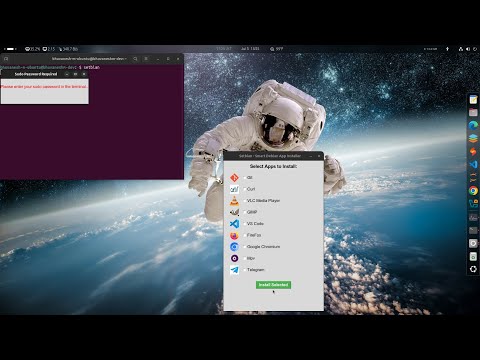
🚀 Experience the power of Setbian in under 2 minutes!Simplify your Debian system configuration with just a few clicks — no terminal hassle.Watch the full walkthrough and installation guide below:
Bhuvanesh M
Developer • Linux Ecosystem Builder • Open-Source Contributor
- Ecosystem & Portal Info: About the Ecosystem
