


Basic Overview :: Description :: Installation :: Commands :: Future Scope :: Contributors
ClassMateBotV2Video_compressed.2.mp4
This project helps to improve the life of students, TAs and teachers by automating many mundane tasks which are sometimes done manually. ClassMateBot is a discord bot made in Python and could be used for any discord channel.
In Iteration 2, we added 6 main quality-of-life improvements to be more useful to admins (Professor and TA) and students alike.
There are three basic user groups in a ClassMateBot, which are Students, Professor and TAs. Some basic tasks for the bot for the students user group should be automating the task of group making for projects or homewroks, Projection deadline reminders, etc. For TAs it is taking up polls, or answering FAQs asked by the students. Our ClassMateBot focuses on the student side of the discord channel, i.e. currently it focuses on the problems faced by the students while using these discord channels.The user stories covered here would be more concerned about the activities for the channel for Software Engineering class in North Carolina State University for the Fall 2021 semester.
For Iteration 2, we aimed to expand the Bot's functionality so Professors and TAs can be more efficient and widened our scope outside of just our Software Engineering class. We researched how different classes in different programs (ex. Social Sciences, English, Humanities) could benefit from an improved bot. We believe our bot's commands like auto-grouping students, sending emails directly from discord to students, sentiment analysis, visualizing data/statistics, greatly benefits class management and information distribution.
You can find the Original Features from Iteration 1 here
Auto-Grouping command allows TAs and Professors to automatically assign students into groups for project works. The Iteration 1 provided join command which can be used by students to join a specific group. Post deadline, If students have not yet joined a group, then the TA can simply use the auto-grouping command to assign those students into groups having vacant positions. Groups with maximum vacant positions are given the first priority. A simple example is shown below :

Students can now configure their email address to receive attachments and various notifications such as reminders. Students can create or update the configured email address using the below-mentioned commands in the Version 2 commands section.

Students can also get the attachments mailed to their configured email address by reacting with white_heavy_mark to the attachment message.

Students can analyze the sentiment of the message. This will give the sentiment and the polarity score of the message.
Students can analyze the sentiment using the below comments.

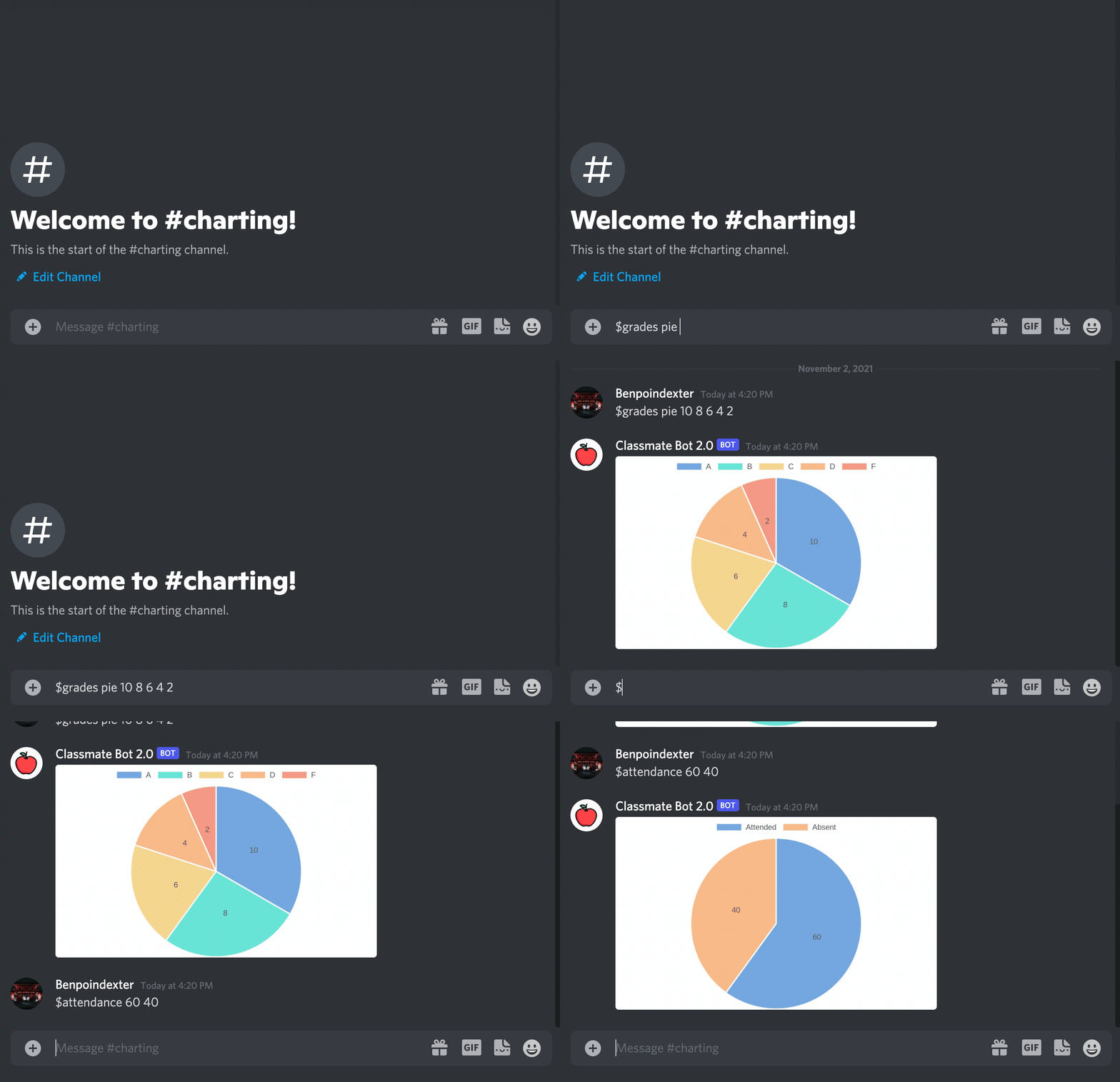
Admins (In this case, TAs and Professors) can quickly make graphcs and charts directly in discord to share with students/users. Admins can use this feature to share grade distributions, lecture participation/attendance, or other course statistics. Pre-existing graph commands (such as grades or attendance) were made for ease-of-use so there are less command arguments for the admin to type. If the admin requires a custom chart, a command exists to do just that where admins can specify all data labels and information. All charts are named and stored into a json file when they are created. Students have acess to a command that allows them to view previously presented charts.
Another problem that the students face is that they cannot save all the messages which contain important URLs that are helpful to them so we have built a user command where a student can retrieve all the links which are shared in the group with one click. This command lets users access all messages which contain URLs. The messages Containing URL are automatically get appended in a file and the file is attached when the $send_links command is input.

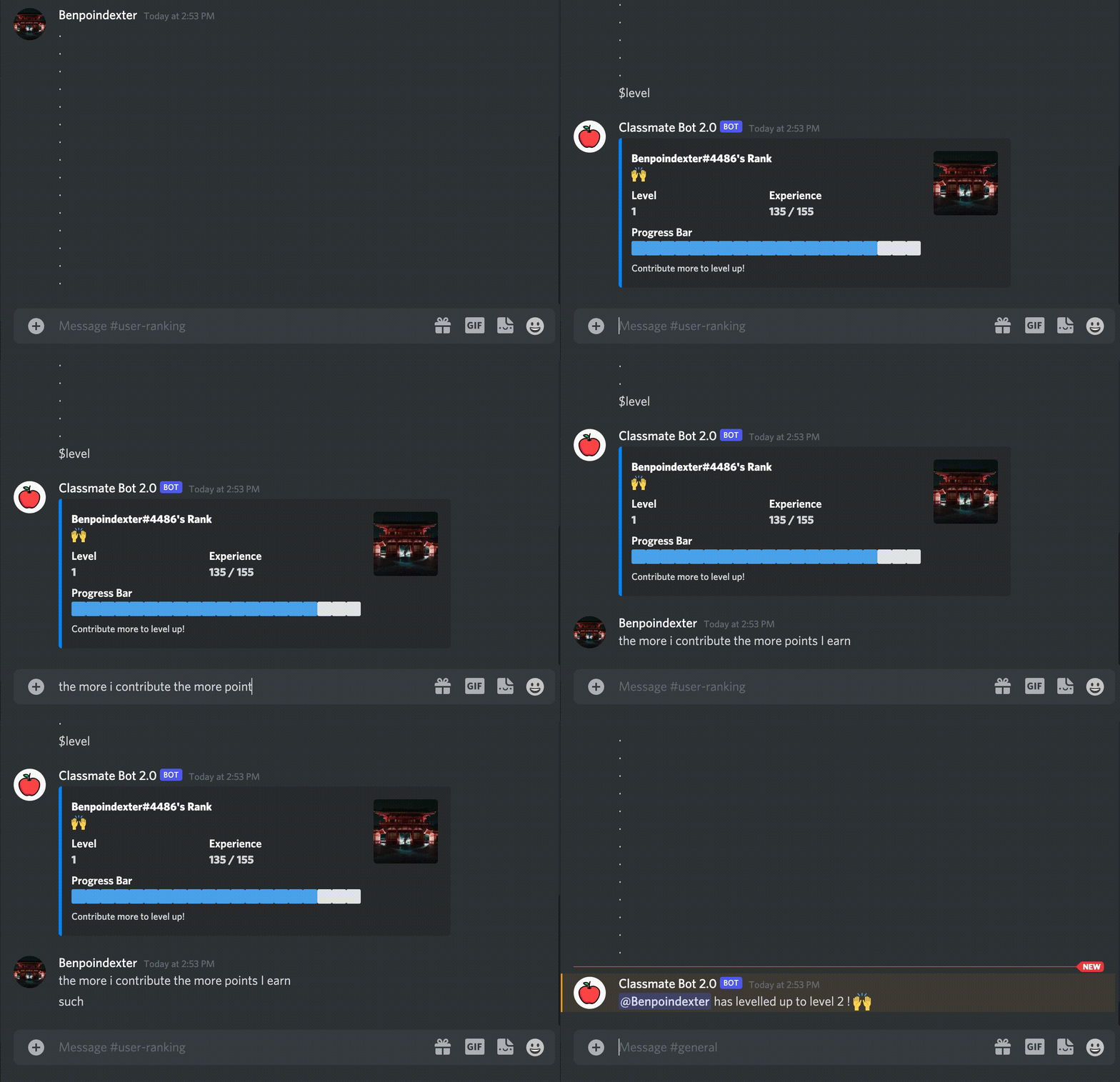
Users are all given a participation rank the moment they join a discord community with the ClassMateBot. As the user participates in the server, such as replying to the professor, answering questions, helping other students, etc., they increase their participation score. Courses within the Humanities and Social Sciences rely on student participation. Professors can use this feature to check which students are participating more and factor that into a class participation grade. Users can also check which level/rank they hold. Admins also have the ability to add/remove points from users.
- Clone the Github repository to a desired location on your computer. You will need git to be preinstalled on your machine. Once the repository is cloned, you will then
cdinto the local repository.
git clone https://github.com/chandur626/ClassMateBot.git
cd (into the ClassMateBot folder. If you type the commmand "ls", you should see the contents of the ClassMateBot folder)
- This project uses Python 3, so make sure that Python and Pip are preinstalled. All requirements of the project are listed in the
requirements.txtfile. Use pip to install all of those.
pip install -r requirements.txt
- Once the installation is complete with requirements installed, you have to generate a .env file and place it in the root of your project folder. The .env file contains your bot TOKEN and your Discord GUILD (guild is your discord server name). Check out this video to see how you can setup your discord developer settings and .env file. You may also contact Niraj Lavani (nrlavani@ncsu.edu) for additional information on this process.
PLEASE DO NOT SHARE THE TOKEN ONLINE,
DO NOT UPLOAD TO GITHUB OR ELSE THE TOKEN WILL AUTOMATICALLY GET DESTROYED AND HAS TO BE REGENERATED.
- Once all the requirements are installed, use the python command to run the
bot.pyfile.
python3 bot.py
Data Visualization
User Ranking
Email Specification
Auto-Grouping
Sentiment Analysis
Link Saving
For the newComer.py file
For the voting.py file
For the deadline.py file
📂 $change_reminder_due_date command
📂 $clear_all_reminders command
For the pinning.py file
For the groups.py file
Project 3 TODO tasks are located in the Projects tab.