An interactive GPU-accelerated galaxy simulator built with TypeScript and WebGPU. Tweak astrophysical and rendering parameters live, explore presets, and profile performance.
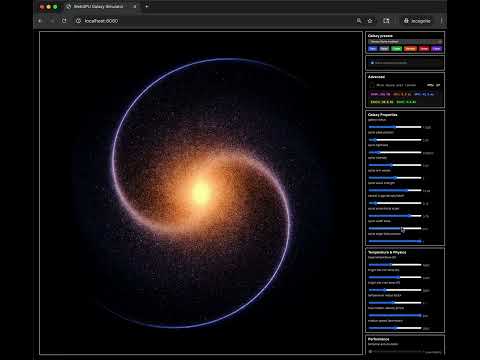
- Real-time particle-based galaxy rendering with WebGPU
- Temporal accumulation with 16-slice ring buffer for smooth visuals
- Post-processing: HDR, bloom, tone mapping, exposure/saturation controls
- Overdraw limiting and optional overdraw heatmap
- Extensive UI with live sliders and preset management (create, save, rename, delete, export)
- Built-in CPU/GPU timing and VRAM usage estimates (advanced options)
- A browser with WebGPU support (https://caniuse.com/webgpu)
- Chrome 113+ recommended
- Safari 26+
- Firefox 141+ (behind flag)
- If the app reports “WebGPU not supported,” switch to a supported browser and ensure the page loads over HTTPS.
npm install
npm run dev
Visit http://localhost:8080
- Start local dev server with
npm run dev - Dev build to
public/withnpm run build - Prod build to
public/withnpm run prod
- The canvas auto-scales and the simulator starts on load.
- Use the left/right control panels to tune:
- Galaxy shape and distribution (radius, spiral parameters, densities, counts)
- Star/dust sizing and brightness
- Temperature and color response
- Rendering parameters (exposure, saturation, bloom, tone map curve)
- Performance controls (temporal accumulation, framerate limit, overdraw)
- Presets
- Backed by
localStorageunder keygalaxy-presets - Buttons let you Save/Reset/Create/Rename/Delete/Export
- Default presets come from
src/galaxy-presets.json
- Backed by
- Advanced options
- Toggle shows GPU timings, VRAM estimates, and debug tools
- Setting is saved in
localStorageasshowAdvancedOptions
public/
  index.html, styles.css, galaxy-simulator-bundle.js (build output)
src/
  index.ts                  # App entry; bootstraps GalaxySimulator
  GalaxySimulator.ts        # Orchestrates managers, main loop
  entities/Galaxy.ts        # Galaxy model, presets, localStorage
  managers/                 # Camera, FPS, Resource, Rendering, UI, Accumulation
  compute/Particles.ts      # Compute pipeline populating particle buffer
  resources/                # GPU resource managers (MSAA, HDR, Bloom, ToneMap, etc.)
  shaders/                  # WGSL shaders (core, compute, postprocessing)
  utils/                    # Packing, math, helpers
- “WebGPU not supported”
- Use a recent Chrome/Edge, ensure HTTPS, or enable WebGPU in your browser flags/preferences
- Black screen or no stars
- Ensure your GPU/driver supports WebGPU; try lowering star count and enabling performance mode
- Sudden dimming/ghosting after changing presets
- Accumulation ring buffers are cleared automatically; one frame may appear darker as weights reset
- GPU timing shows N/A
timestamp-queryisn’t available on your device; CPU timing still works
- TypeScript + webpack 5; bundles to
public/galaxy-simulator-bundle.js - Uniform packing shared via
src/utils/GalaxyUniformPacker.tsandsrc/constants/uniformLayout.ts - Temporal accumulation ring uses 16 RGBA16F layers blended via
postprocessing/accum.average.frag.wgsl - Switching presets forces a clear of the 16 layers to avoid ghosting from stale data
- Overdraw counting uses an atomic buffer and can be visualized with the debug shader
Max Overdraw = 4096disables overdraw buffers and overdraw debug (performance mode)