Live UI editor for React Native. Tap any component in your running simulator and edit its styles — every change is written straight back to your source code, with Metro Fast Refresh updating the UI in milliseconds.




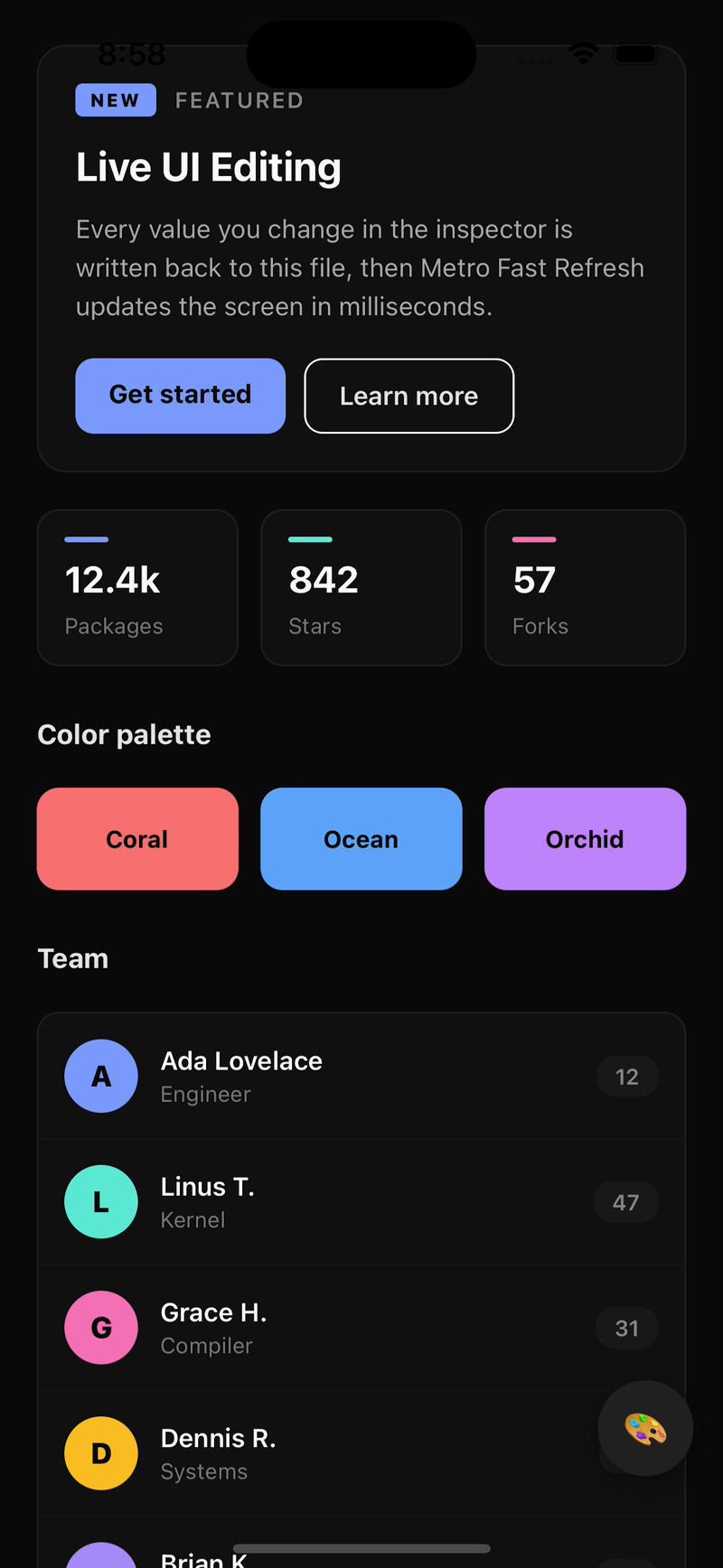
Tap the floating bubble → selection mode activates → tap any component → the inspector panel slides up with the component's styles, tree, and props. Edit a value, and the source file is rewritten via AST in real time while Metro Fast Refresh re-renders the UI.
Click the thumbnail to watch the full video.
| Feature | Details | |
|---|---|---|
| 🎯 | Tap-to-inspect | Tap any on-screen component. Walks the React fiber tree to find the nearest user-code source, skipping library internals. Works on both Fabric and the legacy architecture. |
| 💅 | Live style editing | Edit any style and watch it apply instantly via Metro Fast Refresh. The AST engine rewrites the exact JSX element in your source — including style={styles.foo} references, which are resolved back into your StyleSheet.create() declaration. |
| 🔍 | Preview mode | Every edit is held in a server-side preview buffer until you tap ✓ Commit or ↺ Cancel. Cancel reverts the file to its exact original state — your git diff stays clean. |
| ↶↷ | Undo / Redo | 50-deep edit history. Commit a preview → get a single consolidated undo entry. Tap ↶ to revert the whole batch in one go. |
| ➕ | Add any RN property | Tap "+ Add property" to open a searchable modal of ~80 React Native style properties, grouped by category (Layout, Flex, Spacing, Sizing, Position, Background, Border, Shadow, Typography, Transform, Visibility). |
| 📜 | Auto-scroll on select | Tap a component hidden behind the inspector panel and rn-studio walks the fiber tree to find the nearest ScrollView / FlatList / SectionList ancestor and scrolls it so your component lands in the top 12% of the screen. |
| 💾 | Selection persists across reloads | Cmd+R the simulator and your last-selected component is re-selected automatically via the React DevTools fiber-root walker. |
| 🎛️ | Three-tab inspector | Styles (edit), Tree (component hierarchy), Props (read-only inspection). All scrollable. |
| 🎨 | Minimal indigo UI | Clean #7C9BFF accent on a pure #111 dark background. No distracting lime greens. |
| 🪶 | Zero extra deps | No react-native-reanimated, no react-native-gesture-handler required. Pure RN + stock Animated API. |
| 🚫 | Zero production overhead | <StudioProvider enabled={__DEV__}> short-circuits to {children} in release builds. Babel plugin is dev-only. |
| 🚀 | One-command setup | npx rn-studio init wires up babel.config.js and package.json for you. |
npm install rn-studioThen run the init command — it patches babel.config.js, adds the studio script to package.json, and prints the snippet to paste into App.tsx:
npx rn-studio init📋 Manual setup (if you prefer)
// babel.config.js
module.exports = {
  presets: ['module:@react-native/babel-preset'],
  plugins: [
    ...(process.env.NODE_ENV !== 'production'
      ? ['rn-studio/babel-plugin']
      : []),
  ],
};// package.json
{
"scripts": {
"studio": "rn-studio-server"
}
}import { StudioProvider } from 'rn-studio';
export default function App() {
return (
<StudioProvider enabled={__DEV__} bubblePosition="bottom-right">
<YourApp />
</StudioProvider>
);
}Open two terminal tabs:
# Terminal 1 — Metro
npx react-native start

# Terminal 2 — rn-studio server
npm run studio
Launch your app in the simulator. A floating 🎨 bubble appears in the bottom-right. Tap it, tap any component, and start editing.
| Layer | What it does |
|---|---|
| 🔧 Babel plugin | Annotates every JSX element at compile time with __rnStudioSource = { file, line, column, componentName } |
| 🫧 Floating bubble | Toggles selection mode with a spring-animated draggable overlay |
| 🎯 Selection overlay | Uses RN's built-in getInspectorDataForViewAtPoint (Fabric + legacy) to hit-test touches, then walks the fiber .return chain to the nearest user-code source |
| 🪞 Inspector panel | Bottom-sheet with Styles / Tree / Props tabs — fully scrollable, auto-scrolls the underlying ScrollView so the selected component stays visible |
| 🌉 WebSocket bridge | Streams edits from the app over ws://localhost:7878 with exponential-backoff reconnect |
| 🛠️ AST engine | Reads the target file with recast + @babel/parser, locates the exact JSX opening element by (line, column), and rewrites the style prop. Handles inline objects, array styles, and StyleSheet.create() references. Refuses to touch node_modules. |
| 🔄 Metro Fast Refresh | Picks up the file change and updates your UI in milliseconds |
| 📚 Undo / Preview state | Server keeps a 50-deep undo stack plus a preview buffer for uncommitted edits |
| Prop | Type | Default | Description |
|---|---|---|---|
enabled |
boolean |
false |
Show the studio UI. Pass __DEV__ to enable in development only. |
serverPort |
number |
7878 |
CLI server port |
bubblePosition |
'bottom-right' | 'bottom-left' | 'top-right' | 'top-left' |
'bottom-right' |
Starting corner for the floating bubble |
theme |
'dark' | 'light' |
'dark' |
Panel theme (currently dark only) |
const {
  // Selection state
  isActive,           // boolean — selection mode toggled?
  isSelecting,        // boolean — waiting for a tap?
  selectedComponent,  // ComponentNode | null

  // Actions
  toggleActive,       // () => void
  selectComponent,    // (node: ComponentNode) => void
  clearSelection,     // () => void

  // Style editing
  updateStyle,        // (key: string, value: string | number) => void
  addStyleProperty,   // (key: string, value: string | number | boolean) => void

  // Undo / Redo
  undo,               // () => void
  redo,               // () => void
  canUndo,            // boolean
  canRedo,            // boolean

  // Preview mode
  hasPendingPreview,  // boolean
  commitPreview,      // () => void
  cancelPreview,      // () => void
} = useStudio();Every edit made while a component is selected is held in a server-side preview buffer until you explicitly commit or cancel.
┌──────────────────────────────────────────────────────────────┐
│  Tap component       →  BEGIN_PREVIEW  →  server snapshots   │
│                                             the file         │
│                                                               │
│  Edit fontSize 14→28  ┐                                       │
│  Edit color #fff→blue ├──  each write hits disk              │
│  Edit padding 10→24   │    Metro Fast Refresh shows it       │
│                       │    BUT nothing enters the undo stack │
│                                                               │
│   ┌──── Preview badge shows in panel header ────┐            │
│   │    ↺  ✓   replace   ↶  ↷                     │            │
│   └──────────────────────────────────────────────┘           │
│                                                               │
│  Your choice:                                                 │
│                                                               │
│   ✓ Commit  → server packs all edits into a SINGLE undo      │
│               entry labeled "preview (N edits)".             │
│               You can still ↶ to revert the whole batch.     │
│                                                               │
│   ↺ Cancel  → server writes the original snapshot back.      │
│               File is pristine. No undo entry created.       │
│               Your git diff stays clean.                      │
└──────────────────────────────────────────────────────────────┘
Auto-commit triggers: switching to a different component, closing the panel, toggling the bubble off. Auto-cancel triggers: client disconnect (app reload, server restart).
- 🎛️ Drag the floating bubble anywhere on screen — its position is saved to
AsyncStorage(optional dependency). - ⌫ Cmd+R in the simulator — your last-selected component is re-selected automatically.
- 🎨 Tap a color swatch to see it highlighted, then edit the hex directly.
- ➕ Tap "+ Add property" inside the Styles tab to search all ~80 React Native style properties.
- 📑 Switch to the Props tab to inspect every non-style prop of the selected component (read-only for now).
- 🌳 Switch to the Tree tab to navigate nested rn-studio-annotated children.
Three independent guarantees ensure zero production overhead:
- 🔌 Babel plugin early-returns when
NODE_ENV === 'production'—__rnStudioSourceis never emitted in release bundles. - 🧩
<StudioProvider enabled={false}>short-circuits to<>{children}</>— no context, no WebSocket, no overlay. - 📦 Consumer convention — pass
enabled={__DEV__}so the whole system ties to React Native's own dev flag.
v0.3.2 — Fix styles disappearing on undo
Undo/redo/cancel now refresh the inspector's style list from the live fiber tree instead of leaving stale or empty state. New shared extractStylesFromFiber utility used by both the overlay and the provider.
v0.3.1 — Preview mode ✓ ↺
Every style edit is held in a server-side preview buffer. Tap ✓ to commit (single consolidated undo entry) or ↺ to revert the file to its exact state at selection time. Auto-commits on deselect, auto-cancels on disconnect.
v0.3.0 — Add property picker, init CLI, undo/redo, persistence, auto-scroll
Five major features shipped together:
- Searchable modal listing ~80 RN style properties across 11 groups
npx rn-studio init— zero-config project bootstrap- 50-deep undo/redo stack with ↶ ↷ buttons
- Selection persistence across Cmd+R via AsyncStorage + fiber walker
- Auto-scroll walks the fiber tree to bring the selected component into view above the 60% panel
v0.2.0 — Selection flow fix for Fabric + AST StyleSheet resolution
Replaces legacy UIManager.findSubviewIn with getInspectorDataForViewAtPoint. Walks the fiber .return chain instead of the flat hierarchy. AST engine resolves style={styles.foo} into StyleSheet.create() entries. Dropped hard peer deps on reanimated and gesture-handler.
Full history: GitHub Releases
Pull requests welcome! For major changes, please open an issue first so we can talk it through.
Local development:
git clone https://github.com/dgutierrezd/rn-studio.git
cd rn-studio
npm install
npm run build     # compile TS to dist/
The dist/ output is what gets published to npm. The bin/ folder contains the CLI entry points (rn-studio-server, rn-studio-init), which run against the compiled dist/ast/AstEngine.js.
MIT © dgutierrezd