
A full-stack Rust application for online editing of markdown documents, featuring a REST API backend with SQLite storage and a Leptos-powered web frontend.
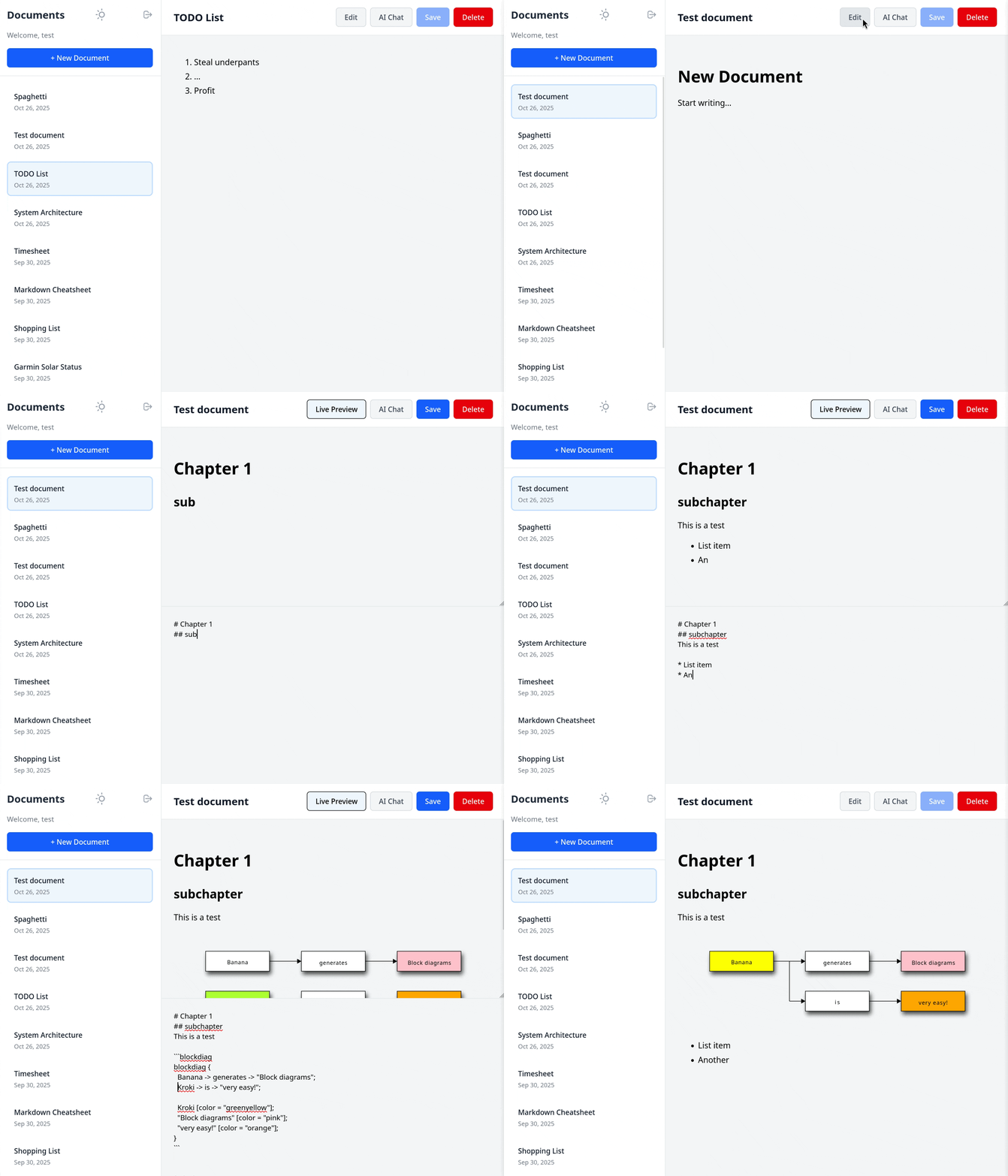

- User Authentication: Username/password authentication with JWT tokens
- Document Management: Create, edit, rename, and delete markdown documents
- Real-time Preview: Switch between edit and preview modes
- Responsive UI: Clean, modern interface with document sidebar and dark mode
- Mobile Friendly: Dynamic sidebar for good usability on desktop and mobile
- Configurable Registration: Option to disable new user registration
- Markdown Rendering: Full markdown support with syntax highlighting
- AI Integration: Ask a local Ollama server for suggestions about your current document
- Diagram support: Write graphical sequence-, block-, mermaid-, structurizr- and other diagrams right in your documents
- Backend: Axum REST API with SQLite database
- Frontend: Leptos WebAssembly application
- Authentication: JWT-based with bcrypt password hashing
- Database: SQLite with SQLx migrations
- AI: Ollama via REST API
- Diagrams: via Kroki

- Rust (1.70+)
wasm-packfor building the frontendtrunkfor serving the frontend during development
# Install required tools
cargo install trunk wasm-pack- Clone and setup the workspace:
git clone https://github.com/dividebysandwich/dr-markdown.git
cd dr-markdown- Backend setup:
cd backend
cargo sqlx database create
cargo sqlx migrate run
cp ../.env.example .env
# Edit .env file with your configuration
# alternatively set environment variables such as DATABASE_URL
cargo run --release
The backend will start on http://localhost:3001
- Frontend setup (in a new terminal):
cd frontend
trunk serve --release
The frontend will start on http://localhost:8080
The application can be configured via environment variables:
DATABASE_URL: SQLite database path (default:./documents.db)JWT_SECRET: Secret key for JWT tokens (change in production!)SERVER_ADDR: Backend server listen address (default:127.0.0.1)SERVER_PORT: Backend server port (default: 3001)ALLOW_REGISTRATION: Allow new user registration (default: true)LEPTOS_APP_BASE_PATH: Base path of the application (default: ``)API_URL: Address the frontend uses to reach the backend (default:http://localhost:3001/api)OLLAMA_ADDR: Address to a (local or remote) Ollama instance (default:http://localhost:11434)OLLAMA_MODEL: The model to use (default:llama3.2)KROKI_URL: The address of a kroki server, default is https://kroki.io
POST /api/auth/register- Register new userPOST /api/auth/login- Login userGET /api/auth/profile- Get current user profile
GET /api/documents- List user's documentsPOST /api/documents- Create new documentGET /api/documents/:id- Get document by IDPUT /api/documents/:id- Update documentDELETE /api/documents/:id- Delete documentPOST /api/llm- Post document context and user question to the configured Ollama server
- Backend (terminal 1):
cd backend
cargo watch -x run- Frontend (terminal 2):
cd frontend
trunk serve --open- Backend:
cd backend
cargo build --release- Frontend:
cd frontend
trunk build --release
The built frontend files will be in frontend/dist/.
Migrations are automatically applied when the backend starts. Migration files are located in backend/migrations/.
- JWT Secret: Change the default JWT secret in production
- Password Hashing: Uses bcrypt with default cost factor
- CORS: Currently configured for development (permissive)
- Input Validation: Server-side validation on all inputs
- SQL Injection: Protected by SQLx parameter binding
To prevent new users from registering, set the environment variable:
ALLOW_REGISTRATION=falseYou can use a local Ollama server to help you with writing and analyze documents.
Just install ollama, download a model like llama3.2 and configure OLLAMA_ADDR and OLLAMA_MODEL
The frontend includes custom CSS for markdown rendering in frontend/index.html. Modify the styles in the <style> section to customize the appearance.
The database schema is defined in backend/migrations/001_initial.sql. To modify the schema:
- Create a new migration file in
backend/migrations/ - Add your SQL changes
- Restart the backend to apply migrations
- CORS Errors: Make sure the backend is running on port 3001
- WebAssembly Errors: Ensure
wasm-packis installed and up to date - Database Errors: Check that the database directory and file are writable, that you configured the environment variables and created the database with the
cargo sqlxcommands shown above - JWT Errors: Verify the JWT secret is set correctly
The backend uses Rust's standard logging. Set RUST_LOG=debug for verbose output:
RUST_LOG=debug cargo run