
Volto add-on: Various Volto schema-based widgets.
This Volto addon provides several "abstract" widgets, to allow complex information to be editable by the schema-based forms. It centers around the concept: "we can create a form to edit a JSON object by using a schema" and so it provides, right now, widgets to edit "list of JSON objects", a "mapping of JSON objects" and a single "JSON object, but I choose the schema for it".
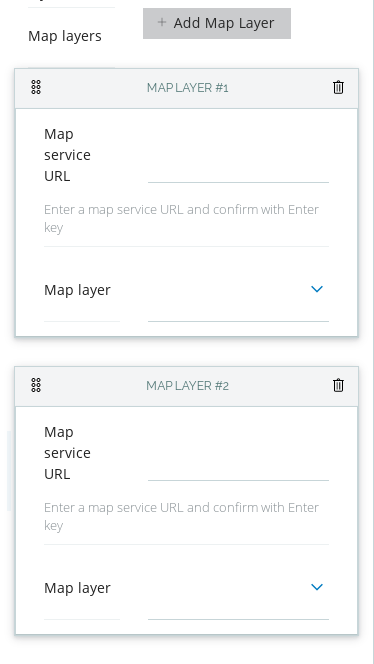
This widget allows you to edit a list of objects by creating, editing and
deleting instances of objects editable with the provided schema parameter.
The list is sortable with drag&drop. You can also provide a schema extender,
a function with signature (schema, data) => schema, which will adjust, per
instance of object, its schema. To use this widget, in the schema, set the
widget field to object_list_inline.
Example of how the data could look like for a block:
"a55c5053-ba81-4f73-ab29-7cdea74df20f": {
	"@type": "dataTable",
	"columns": [
		{
			"@id": "f899ca76-68be-4ded-aa0b-669c04c27309",
			"column": " PERC_HA_07\n(in %)",
			"renderer": "progress",
			"title": "21"
		},
		{
			"@id": "94315c5a-e031-4b7e-acb2-93887878a252",
			"column": " PERC_HA_07\n(in %)",
			"title": "12"
		}
	],
}
The columns field, in this case, is data generated by the FlatListObject.
The schema for this field could look like (ColumnSchema() just generates
another instance of a schema, suitable for the column definition of our
specific use case):
columns: {
  title: 'Columns',
  description: 'Leave empty to show all columns',
  schema: ColumnSchema(),
  widget: 'object_list_inline',
},
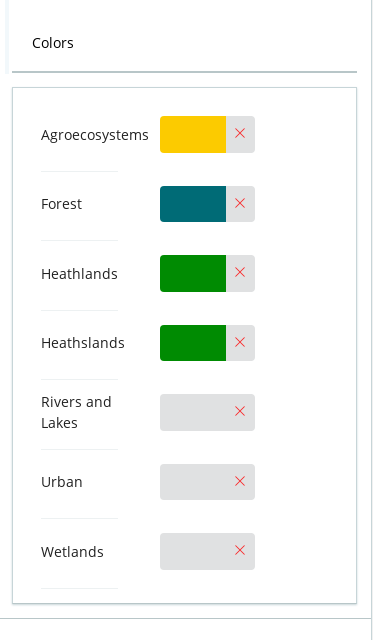
This widget allows editing the properties of an object. For example, in the
following block data, the row_colors value is generated by an instance of the
MappingWidget.
"4430a32a-a266-497b-88e7-72fead5ab718": {
  "@type": "dottedTableChart",
  "column_data": "habitat_group",
  "row_colors": {
    "Bad": "#ed1834",
    "F - Heathland, scrub and tundra": "#88c24f",
    "Good": "#3c8000",
    "Poor": "#f2a70e",
    "Unknown": "#8d8d8d"
  },
  "row_data": "assessment",
  "size_data": "quantity"
},
You need to provide the options, which is a list of objects with {id, title} and the field_props, which are parameters for the actual field that
will be used to edit the values. In our case the schema definition that was
used to edit the above value is (note, the options are empty, we're populating
them in the edit component, before passing the schema to the form):
row_colors: {
  title: 'Colors',
  widget: 'option_mapping',
  field_props: {
    widget: 'simple_color',
    available_colors: settings.available_colors,
  },
  options: [],
}
To use this widget, in the schema, set the widget field to option_mapping.
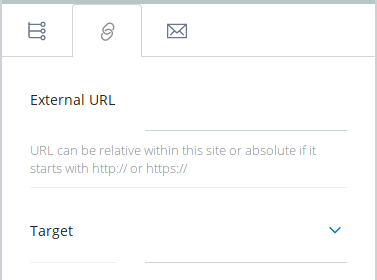
With this widget you can choose the type of value that will be used, from a predefined list of schemas. A schema that would use this type of widget could look like:
const LinkEditSchema = {
  title: 'Link',
  fieldsets: [
    {
      id: 'default',
      title: 'Default',
      fields: ['link'],
    },
  ],
  properties: {
    link: {
      title: 'Link',
      widget: 'object_by_type',
      schemas: [
        {
          id: 'internal',
          icon: internalSVG,
          schema: InternalLinkSchema,
        },
        {
          id: 'external',
          icon: externalSVG,
          schema: ExternalLinkSchema,
        },
        {
          id: 'email',
          icon: emailSVG,
          schema: EmailLinkSchema,
        },
      ],
    },
  },
  required: [],
};
To use this widget, in the schema, set the widget field to object_by_type.
  git clone https://github.com/eea/volto-object-widget.git
  cd volto-object-widget
  make
  make start
Go to http://localhost:3000
make start now defaults to Volto 18. To run the same setup against Volto 17, use:
  VOLTO_VERSION=17 make
  VOLTO_VERSION=17 make start
-
Make sure you have a Plone backend up-and-running at http://localhost:8080/Plone
docker compose up backend
-
Start Volto frontend
-
If you already have a volto project, just update
package.json:"dependencies": { "@eeacms/volto-object-widget": "*" }
and
volto.config.js:const addons = ['@eeacms/volto-object-widget'];
-
If not, create one with Cookieplone, as recommended by the official Plone documentation for Volto 18+:
uvx cookieplone project
cd project-title
-
Install or update dependencies, then start the project:
make installFor a Cookieplone project, start the backend and frontend in separate terminals:
make backend-start
make frontend-start
For a legacy Volto 17 project, install the package with
yarnand restart the frontend as usual. -
Go to http://localhost:3000
-
Happy editing!
See RELEASE.md.
See DEVELOP.md.
The Initial Owner of the Original Code is European Environment Agency (EEA). All Rights Reserved.
See LICENSE.md for details.