Setting Up CI With Azure Pipelines#3924
Setting Up CI With Azure Pipelines#3924mickeygousset wants to merge 1 commit intoexpressjs:masterfrom mickeygousset:master
Conversation


|
Hey @mickeygousset, can you talk a little about what the project would gain from this? |

|
Hey @wesleytodd: So here are some of the benefits with going with Azure Pipelines (full disclosure, I am a Microsoft FTE): Azure Pipelines offers 10 free concurrent pipelines for open source projects (more information here). Based off my initial testing, this allows me to run both the Linux and Windows builds with a combined time of less than 8 minutes. And I may be able to increase the number of pipelines if needed. All the steps located in one file (Azure-pipelines-steps.yml) for both Windows and Linux builds. Any new build steps you would need to add can be added to this file, for both builds. We can also extend this build to work on Mac as well, or for other versions of Node, by modifying the matrices in the Azure-pipelines.yml file. Test results are published as part of the build, allowing you to see the test statistics easily, and providing a richer results experience. Those are some of the benefits, from my perspective. |

|
Hi 👋 thanks for your response! I haven't looked too hard at it yet, but I guess I also have a couple of questions as well to help us:
Other than the above questions, the faster total completion time is nice if it's really 8 minutes end-to-end, as currently it's about a 15 minute turn around time for this repo. Of course waiting around for build times are typically not a bottleneck in the current workflow at all, so some of the questions, especially around user management, is likely much more important if it's a tradeoff for a benefit we're not going to realize. |
|
Hey @dougwilson: Great questions! Let me see if I can provide some explanations. Node.JS Installation Is there a chance you don't need to build for the earlier node versions? Or is that a requirement? Build Output And here is what the Github integration using Checks looks like: kaylangan/react#3 Access |
Yes, they are required as those are the version of Node.js the master branch of this repo supports. The next major version will drop versions, though. What is the minimum version that the node build tools support?
I'm not even sure what to make of this as it is using a bunch of terms I'm not familiar with 😄 does that mean that we just configure it to work like travis ci? |
IIRC, it was 0.12, 1.8, 2.5, 3.3 that the Node Tool task had issues with.
Sorry about not explaining better! Sorry, I get a little wordy. The blog post I mentioned above provides a little detail, but let me see if I can flesh it out better. In Azure DevOps, the first step is to create an organization. Then in that organization, you create a team project. The team project is a container for everything, such as Azure Pipelines. For example, my organization is https://dev.azure.com/devopsmickeypublic, and my team project where I'm building my fork of expressjs is https://dev.azure.com/devopsmickeypublic/Testing%20Pipelines%20-%20Public. Team projects have a concept of being public or private. For an OSS project, you would want it to be public. In order to create an organization in Azure Devops, you need to sign in using a Microsoft Account (MSA). An MSA is an email address that you have specified to be an MSA. If you have a Hotmail or Outlook account, those are what people have usually used as MSAs, but you can use others. When you go to create an Azure DevOps organization, it will prompt you to either log in using an MSA, or create one. So we have a public team project in an organization. In fact, if you click the link above for my public team project, you will see what a normal user, who hasn't been granted any access, can see in my public team project. You are able to view build results, but are not able to edit anything in the interface, such as build variables. If you had other team members that needed edit access to the build system in Azure DevOps, then you would have to go into security and add them as a contributor. In general you probably aren't going to need to do this for many people, as most people don't need the ability to modify things such as build variables. Now in order to hook up Github and Azure Pipelines, to allow Pipelines to do the builds based off the YAML file, you go into the Github Marketplace and install Azure Pipelines. This walks you through the process of connecting Github and Azure Pipelines using a Personal Access Token (PAT). I suspect this is similar to what you do with Travis. Does that help at all? |
|
Thank you that does help. That is quite different from Travis. It even sounds like if whoever sets up the build in azure pipelines and they leave the project, everything would just stop working since their account will be removed access? |
|
Good observation, but not exactly true. Let me explain. Whoever creates the organization (https://dev.azure.com/) is set as the owner of that organization. An organization can have only one owner, but it can be reassigned to other people. So, for example, I could create an org called dev.zure.com/expressjsrocks, and then I could set Doug as the owner. Now, in addition to the owner, there is a security level called Project Collection Administrators. Anyone you put in the the Project Collection Administrators group will be able to do pretty much anything the owner can do, except delete the organization. You want to keep the project collection administrators group relatively small, as you expect, but you could add your core team members here. These people would be able to modify the build settings in Azure DevOps. If in fact you wanted to isolate permissions even more, we could do that to where the ONLY thing they could modify is build information. Obviously, there are a bunch of other security permissions, but you probably would not have to worry about those. Off the top of my head, the only major issue you might encounter is if the owner of the org decided to delete the organization. They have that ability, but they would have to explicitly click the button and confirm it. If that happened, we could work with you to recover it and reassign it. But if that person decided to leave the project, and they were the owner, I would assume they would move the project to another owner, not delete it. |

 dougwilson
left a comment
dougwilson
left a comment
dougwilson
left a comment
There was a problem hiding this comment.
Taking a look though all the scripts and config here, these were the only comments I had.
| Node.js 8.12: | ||
| NODE_VERSION: '8.12' | ||
| Node.js 9: | ||
| NODE_VERSION: '9' |
There was a problem hiding this comment.
Is this downloading the nightly version like we currently do or is it now downloaded the last released version?
There was a problem hiding this comment.
No, it is not downloading the nightly version, it is downloading the latest released version. I could add that to my script which does the install.
The Node Tool task (mentioned earlier) also doesn't support nightly versions at this time.
| Node.js 9: | ||
| NODE_VERSION: '9' | ||
| Node.js 10: | ||
| NODE_VERSION: '10' |
There was a problem hiding this comment.
Current config has a failure on this version not considered an overall failure. Is this sey up this way / is there a method to set that up? It is used a lot along with the nightlys as sometimes a bad version can get published which will stay until at least the next day.
There was a problem hiding this comment.
So yes, I could make that work. What I would do is create a separate matrix for the ones that can fail and the build still be considered successful. If one of those builds then fails, I can mark the build as Partially Successful.
| export NVM_DIR="$HOME/.nvm" | ||
|
|
||
| # crude version selector since nvm doesn't support it | ||
| nodeVersion=`echo ${{ parameters.NODE_VERSION }} | sed -e 's/\.x$//g'` |
There was a problem hiding this comment.
So this sed removes a ".x" on the end, but I couldn't figure out how that would end up on the version numbers. Did I misunderstand the sed here, or maybe just don't understand how the version numbers end up in this parameter?
|
Gotcha, thank you. Your initial description made it sound like the personal access token was how azure connected to github. It sounds like that is only used once and thrown away and ongoing access for builds does not use a personal access token. And yes, the group of admins is small; right now with travis which uses github logins and permissions it is anyone who can admin this repo. We'll need to come up with some mechanism to note that there are now two places to manage ownership and I guess everyone will need to create microsoft accounts, otherwise they cannot be assigned access (like I cannot just add them by their github username), is that right? |
|
Correct, you cannot add them by their GitHub username, they will need a Microsoft Account (MSA). |

|
BTW: In case you missed the announcement. You can now connect to Azure DevOps using GitHub account. MSA no longer necessary. |

|
Hi! Would it make sense to use GitHub actions instead? |
|
I think GitHub Actions would be a great thing to explore, to see if it would work in this instance. |
|
Hey! We discussed this on one of the TC meetings late last year and decided to go in the direction of GH Actions. We haven't made a ton of progress on it, but if anyone wants to help out there are tons of small repos we can start with: https://expressjs.github.io/statusboard/ |
|
Closing, as if we move away from Travis CI it would be to GitHub Actions. |
5 participants


I've created an Azure Pipelines build for express. This build will work for both Linux and Windows. I'd be happy to work with you to get this set up for your review, or show you the results from my fork.
It can upload coveralls information for both Linux and Windows. You just need to create a build variable with your coveralls key.
Here is a partial view of the build completing for multiple Linux versions.
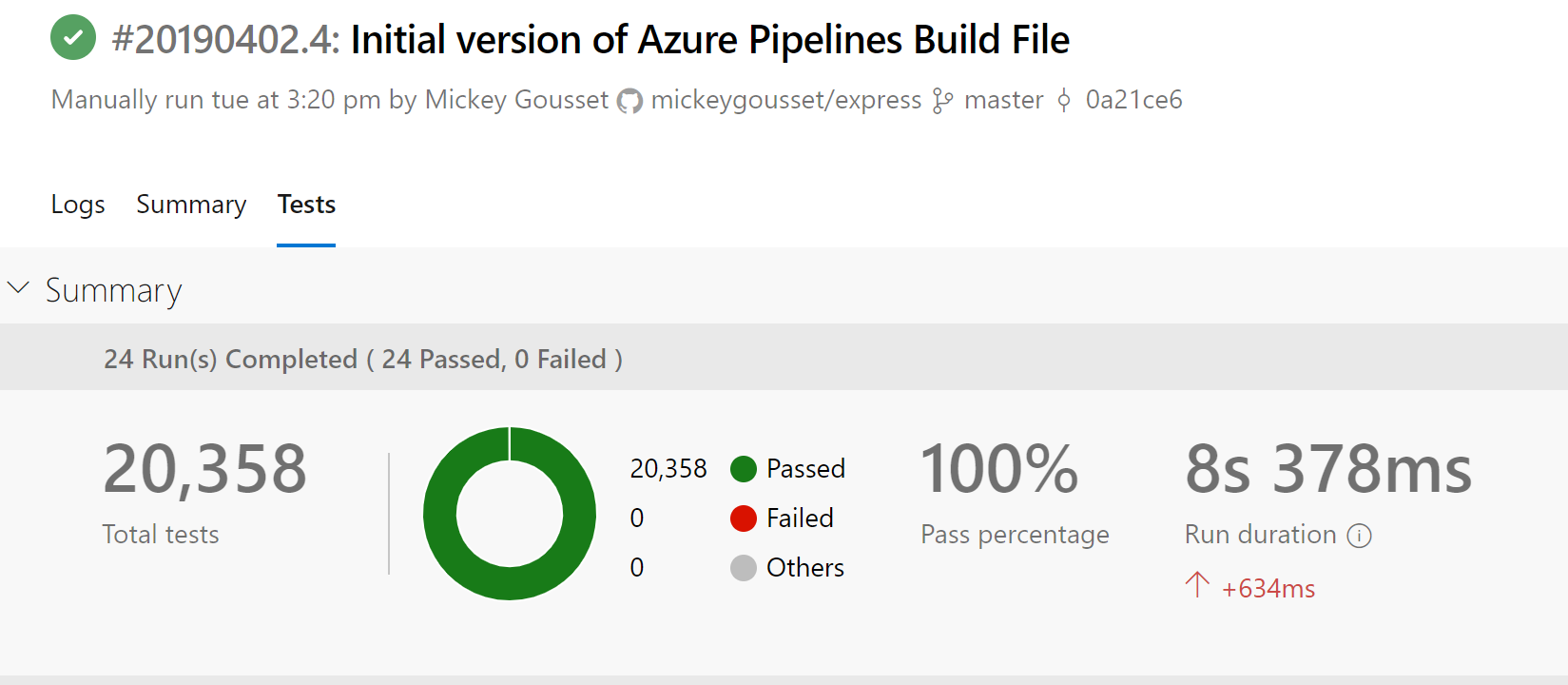
Test result information is also lit up.
Build time for the entire build (Linux + Windows) was around 8 minutes.
EDIT:
also added an issue related to this #3927