This dbt package transforms data from Fivetran's Snapchat Ads connector into analytics-ready tables.
- Number of materialized models¹: 29
- Connector documentation
- dbt package documentation
- dbt Core™ supported versions
>=1.3.0, <3.0.0
This package enables you to produce modeled tables that leverage Snapchat Ads data, generate a comprehensive data dictionary, and better understand your marketing performance based on different levels of granularity.
Final output tables are generated in the following target schema:
<your_database>.<connector/schema_name>_snapchat_ads
By default, this package materializes the following final tables:
| Table | Description |
|---|---|
| snapchat_ads__account_report | Represents daily performance aggregated at the account level, including spend, swipes, impressions, and total_conversions.Example Analytics Questions:
|
| snapchat_ads__campaign_report | Represents daily performance aggregated at the campaign level, including spend, swipes, impressions, and total_conversions.Example Analytics Questions:
|
| snapchat_ads__ad_report | Represents daily performance at the individual ad level, including spend, swipes, impressions, and total_conversions.Example Analytics Questions:
|
| snapchat_ads__url_report | Represents daily performance at the individual URL level, including spend, swipes, impressions, and total_conversions, enriched with ad context.Example Analytics Questions:
|
| snapchat_ads__ad_squad_report | Represents daily performance aggregated at the ad squad level (equivalent to ad groups in other platforms), including spend, swipes, impressions, and total_conversions.Example Analytics Questions:
|
| snapchat_ads__campaign_country_report | Represents daily performance aggregated at the campaign level by country, including spend, swipes, impressions, and total_conversions, enriched with geographic context.Example Analytics Questions:
|
| snapchat_ads__campaign_region_report | Represents daily performance aggregated at the campaign level by region, including spend, swipes, impressions, and total_conversions, enriched with geographic context.Example Analytics Questions:
|
¹ Each Quickstart transformation job run materializes these models if all components of this data model are enabled. This count includes all staging, intermediate, and final models materialized as view, table, or incremental.
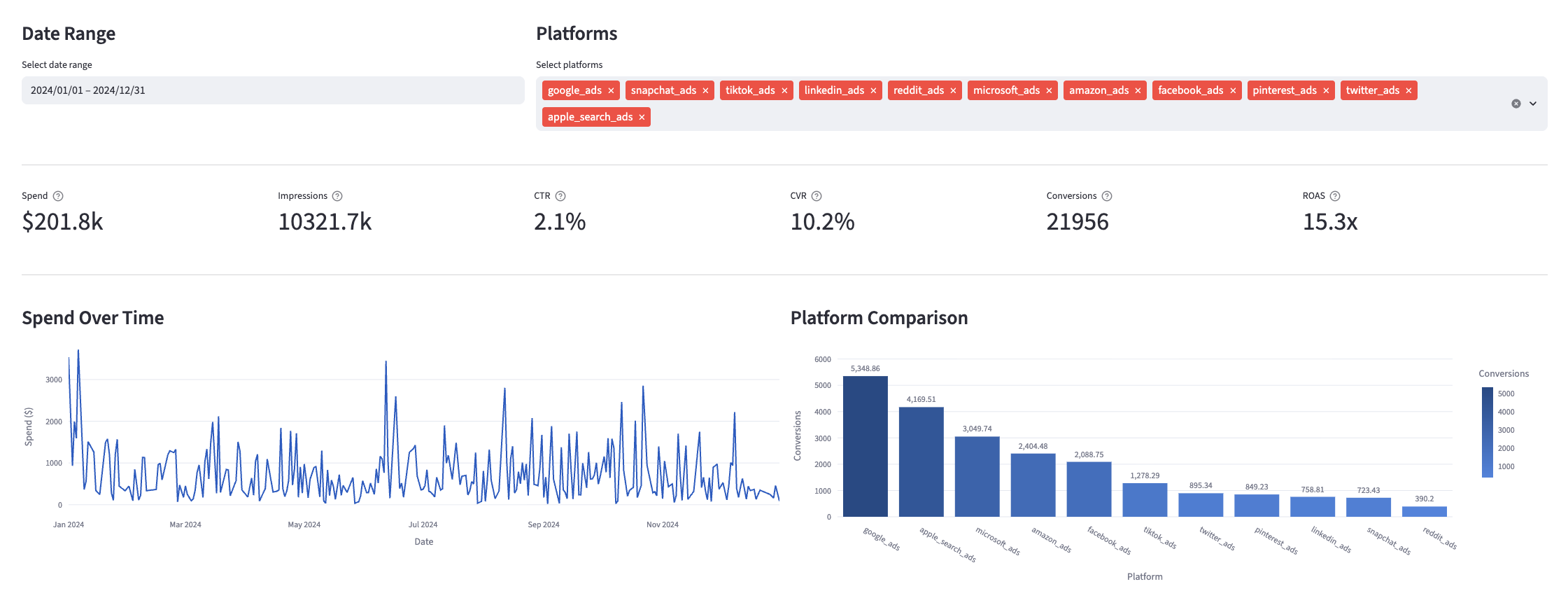
Many of the above reports are now configurable for visualization via Streamlit. Check out some sample reports here.
To use this dbt package, you must have the following:
- At least one Fivetran Snapchat Ads connection syncing data into your destination.
- A BigQuery, Snowflake, Redshift, Databricks, or PostgreSQL destination.
You can either add this dbt package in the Fivetran dashboard or import it into your dbt project:
- To add the package in the Fivetran dashboard, follow our Quickstart guide.
- To add the package to your dbt project, follow the setup instructions in the dbt package's README file to use this package.
If you are not using the Ad Reporting combination package, include the following Snapchat Ads package version in your packages.yml file:
TIP: Check dbt Hub for the latest installation instructions or read the dbt docs for more information on installing packages.
packages:
  - package: fivetran/snapchat_ads
    version: [">=1.3.0", "<1.4.0"] # we recommend using ranges to capture non-breaking changes automatically
All required sources and staging models are now bundled into this transformation package. Do not include
fivetran/snapchat_ads_sourcein yourpackages.ymlsince this package has been deprecated.
If you are using a Databricks destination with this package you will need to add the below (or a variation of the below) dispatch configuration within your dbt_project.yml. This is required in order for the package to accurately search for macros within the dbt-labs/spark_utils then the dbt-labs/dbt_utils packages respectively.
dispatch:
  - macro_namespace: dbt_utils
search_order: ['spark_utils', 'dbt_utils']By default, this package runs using your destination and the snapchat_ads schema. If this is not where your Snapchat Ads data is (for example, if your Snapchat Ads schema is named snapchat_ads_fivetran), add the following configuration to your root dbt_project.yml file:
vars:
    snapchat_ads_database: your_destination_name
snapchat_ads_schema: your_schema_nameIf you have multiple Snapchat Ads connections in Fivetran and would like to use this package on all of them simultaneously, we have provided functionality to do so. For each source table, the package will union all of the data together and pass the unioned table into the transformations. The source_relation column in each model indicates the origin of each record.
To use this functionality, you will need to set the snapchat_ads_sources variable in your root dbt_project.yml file:
# dbt_project.yml

vars:
  snapchat_ads:
    snapchat_ads_sources:
      - database: connection_1_destination_name # Required
        schema: connection_1_schema_name # Required
        name: connection_1_source_name # Required only if following the step in the following subsection

      - database: connection_2_destination_name
        schema: connection_2_schema_name
        name: connection_2_source_name
Previous versions of this package employed two separate, mutually exclusive variables for unioning:
snapchat_ads_union_schemasandsnapchat_ads_union_databases. While these variables are still supported,snapchat_ads_sourcesis the recommended variable to configure.
If you use Fivetran Transformations for dbt Core™ and are unioning multiple Snapchat Ads connections, you can define your sources in a property .yml file, using this as a template. Set the variable has_defined_sources: true under the Snapchat Ads namespace in your dbt_project.yml. Otherwise, your Snapchat Ads connections won't appear in your DAG. See the union_connections macro documentation for full configuration details.
Expand/Collapse details
For certain models, we have disabled them by default because of a smaller percentages of accounts syncing the underlying tables. To enable them, add the following configuration to your root dbt_project.yml file:
vars:
    snapchat_ads__using_campaign_country_report: true # Enables the snapchat_ads__campaign_country_report model. False by default. Requires the campaign_geo_country_daily_report source table.
snapchat_ads__using_campaign_region_report: true # Enables the snapchat_ads__campaign_region_report. False by default. Requires the campaign_geo_region_daily_report source table.By default, this package will select swipes, impressions, spend, conversion_purchases_value, and total_conversions (as well as fields set via snapchat_ads__conversion_fields in the next section) from the source reporting tables to store into the staging models. If you would like to pass through additional metrics to the staging models, add the below configurations to your dbt_project.yml file. These variables allow for the pass-through fields to be aliased (alias) if desired, but not required. Use the below format for declaring the respective pass-through variables:
vars:
    snapchat_ads__ad_hourly_passthrough_metrics:
      - name: "new_custom_field"
        alias: "custom_field_alias"
        transform_sql: "coalesce(custom_field_alias, 0)" # reference the `alias` here if you are using one
      - name: "unique_int_field"
        alias: "field_id"
      - name: "another_one"
        transform_sql: "coalesce(another_one, 0)" # reference the `name` here if you're not using an alias
    snapchat_ads__ad_squad_hourly_passthrough_metrics:
      - name: "this_field"
    snapchat_ads__campaign_hourly_report_passthrough_metrics:
      - name: "unique_string_field"
        alias: "field_id"
    snapchat_ads__campaign_daily_country_report_passthrough_metrics: # sources from the campaign_geo_country_daily_report table. Persists through to snapchat_ads__campaign_country_report.
      - name: "new_measure_country_report"
    snapchat_ads__campaign_daily_region_report_passthrough_metrics: # sources from the campaign_geo_region_daily_report table. Persists through to snapchat_ads__campaign_region_report.
- name: "new_measure_region_report"Note: Make sure to exercise due diligence when adding metrics to these models. The metrics added by default (swipes, impressions, spend, and conversions) have been vetted by the Fivetran team, maintaining this package for accuracy. There are metrics included within the source reports, such as metric averages, which may be inaccurately represented at the grain for reports created in this package. You must ensure that whichever metrics you pass through are appropriate to aggregate at the respective reporting levels in this package.
Important: You do NOT need to add conversions in this way. See the following section for an alternative implementation.
Separate from the above passthrough metrics, the package will also include conversion metrics based on the snapchat_ads__conversion_fields variable, in addition to the conversion_purchases_value field.
By default, the data models consider conversion_purchases to be conversions. These should cover most use cases, but, say, if you would like to consider adding payment info, adding to wishlist, adding to the cart, etc. to also be conversions, you would apply the following configuration with the original source names of the conversion fields (not aliases you provided in the section above):
# dbt_project.yml
vars:
snapchat_ads__conversion_fields: ['conversion_purchases', 'conversion_add_billing', 'conversion_save', 'conversion_add_cart']By default, the snapchat_ads_url_report model will filter out records where the URL field is null. If you would like to include these records in your final model, add the following configuration to your root dbt_project.yml file:
vars:
ad_reporting__url_report__using_null_filter: false # Default value is trueIf an individual source table has a different name than the package expects, add the table name as it appears in your destination to the respective variable. This is not available when running the package on multiple unioned connections.
IMPORTANT: See this project's
dbt_project.ymlvariable declarations to see the expected names.
vars:
snapchat_ads_<default_source_table_name>_identifier: your_table_name By default, the package applies case-insensitive comparisons when resolving source_relation values. If your destination is case-sensitive and you want downstream transformations to respect the exact casing of your source database and schema names, set the following variable:
vars:
fivetran_using_source_casing: trueBy default, this package builds the Snapchat Ads staging models within a schema titled (<target_schema> + _snapchat_ads_source) and your Snapchat Ads modeling models within a schema titled (<target_schema> + _snapchat_ads) in your destination. If this is not where you would like your Snapchat Ads data to be written to, add the following configuration to your root dbt_project.yml file:
models:
    snapchat_ads:
      +schema: my_new_schema_name # Leave +schema: blank to use the default target_schema.
      staging:
+schema: my_new_schema_name # Leave +schema: blank to use the default target_schema.Expand for more details
Fivetran offers the ability for you to orchestrate your dbt project through Fivetran Transformations for dbt Core™. Learn how to set up your project for orchestration through Fivetran in our Transformations for dbt Core setup guides.
This dbt package is dependent on the following dbt packages. These dependencies are installed by default within this package. For more information on the following packages, refer to the dbt hub site.
IMPORTANT: If you have any of these dependent packages in your own
packages.ymlfile, we highly recommend that you remove them from your rootpackages.ymlto avoid package version conflicts.
packages:
    - package: fivetran/fivetran_utils
      version: [">=0.4.0", "<0.5.0"]

    - package: dbt-labs/dbt_utils
      version: [">=1.0.0", "<2.0.0"]

    - package: dbt-labs/spark_utils
version: [">=0.3.0", "<0.4.0"]The Fivetran team maintaining this package only maintains the latest version of the package. We highly recommend you stay consistent with the latest version of the package and refer to the CHANGELOG and release notes for more information on changes across versions.
A small team of analytics engineers at Fivetran develops these dbt packages. However, the packages are made better by community contributions.
We highly encourage and welcome contributions to this package. Learn how to contribute to a package in dbt's Contributing to an external dbt package article.
We thank everyone who has taken the time to contribute. Each PR, bug report, and feature request has made this package better and is truly appreciated.
A special thank you to Seer Interactive, who we closely collaborated with to introduce native conversion support to our Ad packages.
In creating this package, which is meant for a wide range of use cases, we had to take opinionated stances on a few different questions we came across during development. We've consolidated significant choices we made in the DECISIONLOG.md, and will continue to update as the package evolves. We are always open to and encourage feedback on these choices, and the package in general.
- If you have questions or want to reach out for help, see the GitHub Issue section to find the right avenue of support for you.
- If you would like to provide feedback to the dbt package team at Fivetran or would like to request a new dbt package, fill out our Feedback Form.