ElectronPolymer is a starter kit that allows the creation of an Electron project with Polymer 3 . The core of the application uses fluid library.
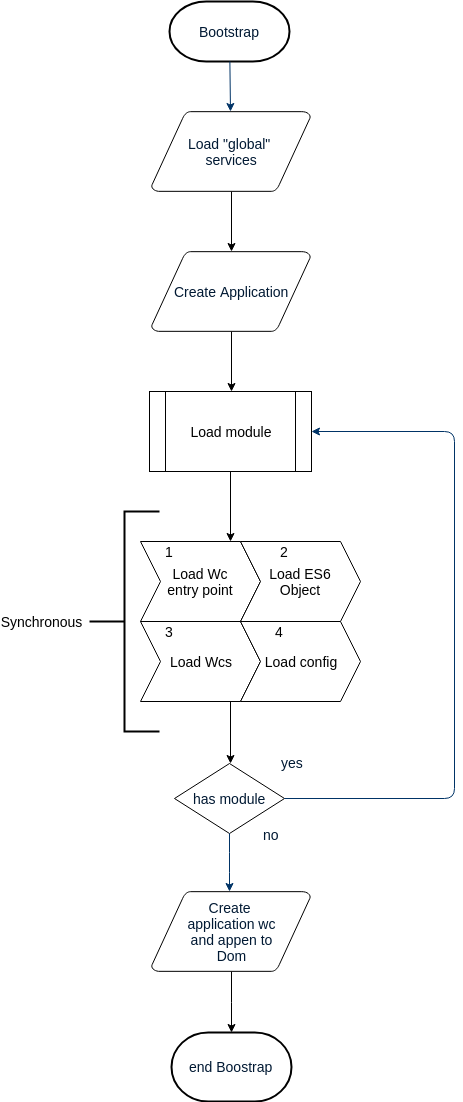
The application is modular, before launching the application all the modules are loaded. This flow ensures that the services and web components are loaded before the application starts. The entry point of the application is boot.js where all the services are located
The structure of a Module is as seen below:
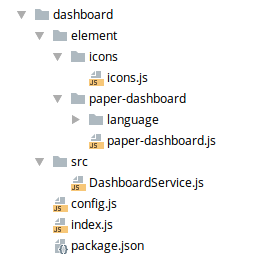
This structure is respected in the relative package.json
{
    "title": "Dashboard",
    "name": "dashboard",
    "icon": "dashboard:menu",
    "configEntryPoint": "config.js",
    "entryPoint": {
        "name": "dashboard-index",
        "path": "index.js"
    },
    "autoloads": [
        "src/DashboardService.js"
    ],
    "autoloadsWc": [
        {
            "name": "dashboard-icons",
            "path": "element/icons/icons.js"
        }
    ]
}-
TITLE
The module label.
-
NAME
The label of the module MUST BE unique.
-
ICON
The label of the iron icon used in the menu.
-
CONFIGENTRYPOINT
The label of the class (file) that loads all the services for this module. The class MUST IMPLEMENT the method init().
-
ENTRYPOINT
The object that contains the information (name and path) of the webcomponent. The webcomponent is used as the entrypoint of the module.
-
AUTOLOADS
Array of the ES6 class that are loaded globally in the application by their name class (you can call the class from the developer tool writing the name of the class on the command line).
-
AUTOLOADSWS
Array of objects (name and path) of the web component that are loaded to the browser.
The flow of loading a module is as follows (the steps are loaded synchronously):
- load wc entry point
- load ES6 object
- load web components
- load config
After all the modules have loaded the application triggers the event bootstrap-module. The application listens to the event and creates the applicationt-layout which is attacted to the DOM.
To help the developers you can use the cli.
Npm is required to install the project, once the repository has been cloned run:
npm installnpm startnpm run testTo bundle the application you first need to modify the app/config/config.json file to set the env to prod, then the application MUST BE built with polymer-cli, run this command:
npm run build-polymerOnce the build process has finished, the build folder will be created, then the application can be packaged with the following command:
npm run distyou can also run the pre build bundle:
npm run start-pre-build