Convert HTML + CSS to images — no browser required
A Python library that transforms HTML and CSS into images.
- Browser-Free Rendering — No browser required
- CSS Support — Flexbox layout, gradients, shadows and more
- Output Formats — PNG, JPG, and SVG (basic support for SVGs)
pip install html2picfrom html2pic import Html2Pic
html = '''
<div class="card">
<h1>Hello, html2pic!</h1>
<p>Transform HTML to images with ease</p>
</div>
'''
css = '''
.card {
display: flex;
flex-direction: column;
align-items: center;
padding: 40px;
background: linear-gradient(135deg, #667eea 0%, #764ba2 100%);
border-radius: 20px;
width: 400px;
}
h1 {
color: white;
font-size: 32px;
font-weight: bold;
margin: 0 0 12px 0;
}
p {
color: rgba(255, 255, 255, 0.9);
font-size: 18px;
margin: 0;
}
'''
renderer = Html2Pic(html, css)
image = renderer.render()
image.save("output.png")Result:
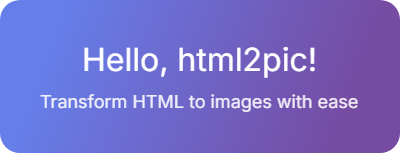
html2pic translates web markup into PicTex rendering instructions:
HTML + CSS → DOM Tree → Style Application → PicTex Builders → Image
- Parse HTML with BeautifulSoup
- Parse CSS with tinycss2
- Apply Styles using CSS cascade, specificity, and inheritance
- Translate styled nodes to PicTex layout primitives (Canvas, Row, Column, Text, Image)
- Render using PicTex's Skia-based engine
html2pic supports a comprehensive subset of modern CSS. Here's what you can use:
| Property | Values | Notes |
|---|---|---|
display |
block, flex, none |
Flexbox is fully supported |
flex-direction |
row, column, row-reverse, column-reverse |
|
justify-content |
start, center, end, space-between, space-around, space-evenly |
|
align-items |
start, center, end, stretch |
|
align-self |
Same as align-items |
Override per-item alignment |
flex-grow |
Number | Control growth ratio |
flex-shrink |
Number | Control shrink ratio |
flex-wrap |
wrap, wrap-reverse, nowrap |
Multi-line containers |
gap |
px, % |
Spacing between flex items |
| Property | Values | Notes |
|---|---|---|
width, height |
px, %, auto, fit-content |
|
min-width, max-width |
px, % |
Size constraints |
min-height, max-height |
px, % |
Size constraints |
aspect-ratio |
Number or ratio (e.g., 16/9) |
Maintain proportions |
padding |
px, %, em, rem |
Shorthand and individual sides |
margin |
px, %, em, rem |
Shorthand and individual sides |
border |
Width, style, color | Styles: solid, dashed, dotted |
border-radius |
px, % |
Shorthand or individual corners |
Individual corner radius:
border-top-left-radiusborder-top-right-radiusborder-bottom-left-radiusborder-bottom-right-radius
| Property | Values | Notes |
|---|---|---|
background-color |
Hex, RGB, RGBA, named | Alpha channel supported |
background-image |
url(), linear-gradient() |
See gradients section below |
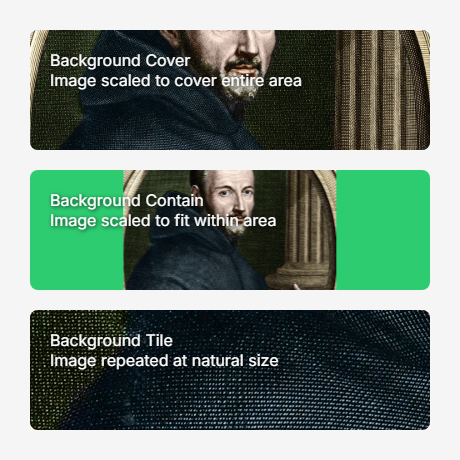
background-size |
cover, contain, tile |
For images |
box-shadow |
offset-x offset-y blur color |
RGBA supported |
Linear Gradients:
/* Angle-based */
background-image: linear-gradient(135deg, #667eea, #764ba2);

/* Direction keywords */
background-image: linear-gradient(to right, red, blue);

/* Color stops */
background-image: linear-gradient(90deg, #ff0000 0%, #00ff00 50%, #0000ff 100%);| Property | Values | Notes |
|---|---|---|
font-family |
Font names, file paths | See @font-face below |
font-size |
px, em, rem |
|
font-weight |
normal, bold, 100-900 |
|
font-style |
normal, italic |
|
color |
Hex, RGB, RGBA, named | |
text-align |
left, right, center, justify |
|
line-height |
Number, px, % |
|
text-decoration |
underline, line-through |
|
text-shadow |
offset-x offset-y blur color |
@font-face Support:
@font-face {
    font-family: "CustomFont";
    src: url("./fonts/custom.ttf");
    font-weight: normal;
    font-style: normal;
}

@font-face {
    font-family: "CustomFont";
    src: url("./fonts/custom-bold.ttf");
    font-weight: bold;
}

h1 {
    font-family: "CustomFont", Arial, sans-serif;
    font-weight: bold;
}
Features:
- Multiple weights and styles per family
- Fallback chains (prioritizes @font-face, then system fonts)
- Relative, absolute paths, and URLs
| Property | Values | Notes |
|---|---|---|
position |
static, relative, absolute, fixed |
|
top, right, bottom, left |
px, %, em, rem |
|
transform |
translate(), translateX(), translateY() |
Only translate supported |
Centering with transforms:
.centered {
    position: absolute;
    top: 50%;
    left: 50%;
    transform: translate(-50%, -50%);
}- Tag:
div,p,h1, etc. - Class:
.my-class - ID:
#my-id - Universal:
*
Complete examples with source code are available in the examples/ directory.
Simple flexbox card with centered content:
Social media style card with avatar and information:

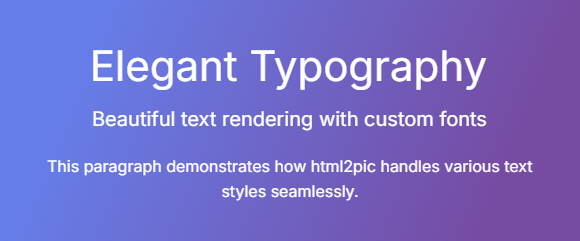
Advanced text styling and formatting:
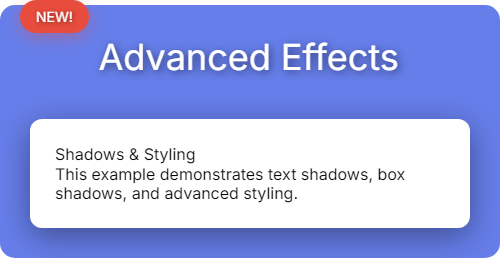
Shadows, positioning, and advanced styling:
Background image support with different sizing modes:
View all examples with source code
Main renderer class.
Methods:
| Method | Returns | Description |
|---|---|---|
render(crop_mode=CropMode.CONTENT_BOX) |
BitmapImage |
Render to PNG/JPG |
render_as_svg(embed_font=True) |
VectorImage |
Render to SVG |
debug_info() |
dict |
Get parsing and styling details |
Output Formats:
The returned BitmapImage and VectorImage objects provide:
# Save to file
image.save("output.png")

# Convert to other formats
numpy_array = image.to_numpy()
pil_image = image.to_pillow()

# Display
image.show()html2pic supports a subset of CSS, several features are not implemented:
| Feature | Status | Alternative |
|---|---|---|
| CSS Grid | ❌ Not supported | Use Flexbox |
| Transforms (rotate, scale, skew) | ❌ Not supported | Only translate() works |
| Animations & Transitions | ❌ Not supported | Generate static images |
| Radial/Conic Gradients | ❌ Not supported | Use linear-gradient() |
| Complex Selectors | ❌ Not supported | Use simple tag, class, or ID selectors |
Pseudo-classes (:hover, :nth-child) |
❌ Not supported | Apply styles directly |
| Media Queries | ❌ Not supported | Set explicit dimensions |
| Overflow & Scrolling | ❌ Not supported | Content must fit container |
Contributions are welcome! Please feel free to:
- Report bugs via GitHub Issues
- Suggest features or improvements
- Submit pull requests
For major changes, please open an issue first to discuss your ideas.
MIT License - see LICENSE file for details.
Built with:
- PicTex — High-performance rendering engine (Skia + Taffy)
- BeautifulSoup — HTML parsing
- tinycss2 — CSS parsing
See CHANGELOG.md for version history and migration guides.
Note: This software is currently in early alpha stage. It lacks test coverage and may contain bugs or unexpected behavior. Use with caution in production environments and please report any issues you encounter.

