Author:
ChungYi Fu (Kaohsiung, Taiwan)
https://www.facebook.com/francefu
Repository:
https://github.com/fustyles/fuClaw
fuClaw is an embedded multimodal AI agent framework that runs on edge devices.
It integrates:
- Telegram Bot API (HTTPS long polling)
- MQTT Broker communication
- Gemini Chat Web Interface
- Gemini Chat Web Interface via MQTT (WebSocket)
- Google Gemini GenerateContent API
- Gemini Grounded Web Search
- Gemini Multimodal Vision Reasoning
- Prompt-driven JSON Tool Routing
- GPIO Digital and Analog I/O Control
- Camera Capture and Image Upload
- Real-time Video Streaming
- Persistent Conversation Memory
- FreeRTOS Concurrent Task Scheduling
The runtime operates as a hybrid autonomous agent, combining:
Conversation + Reasoning + Tools + Vision + Memory + Hardware
fuClaw now ships as a dual-platform, dual-transport firmware family. Every combination of platform and transport shares the identical Gemini reasoning engine, tool dispatcher, and persistent memory design:
| Telegram Bot | MQTT | |
|---|---|---|
| Realtek AmebaPro2 (RTL8735B) | AmebaPro2_fuClaw_TelegramBot_SD_SG90_DHT11.ino |
AmebaPro2_fuClaw_MQTT_SD_SG90_DHT11.ino |
| ESP32-S3-WROOM-CAM | ESP32S3_CAM_fuClaw_TelegramBot_SD_SG90_DHT11.ino |
ESP32S3_CAM_fuClaw_MQTT_SD_SG90_DHT11.ino |
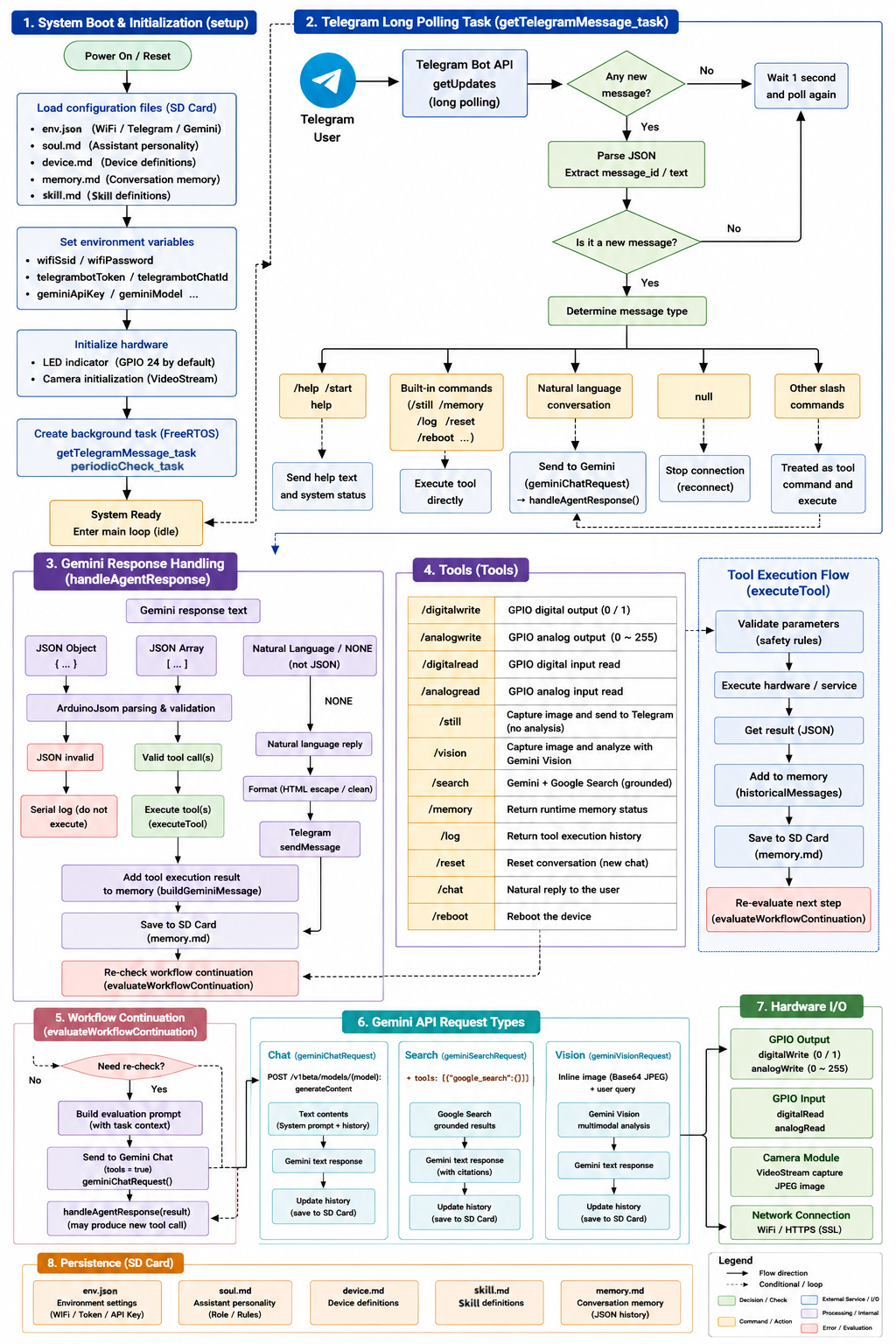
Telegram / MQTT / Web Chat User
↓
Communication Task
(Telegram Long Polling / MQTT / Web Chat)
↓
Message Router
↓
Gemini Reasoning Engine
(Chat / Search / Vision / Workflow)
↓
JSON tool_call output
↓
ArduinoJson validation
↓
Tool Dispatcher
↓
Hardware / Chat / Search / Vision Execution
↓
Result injection into memory
↓
Telegram / MQTT / Web Chat Reply
This is a prompt-orchestrated tool-routing system.
Gemini does NOT use native function-calling APIs.
Instead:
- Gemini emits structured JSON tool_call responses
- Local firmware validates all tool calls
- Invalid JSON is rejected
- Execution is strictly sequential
- Hardware actions are never simulated
Atomic execution rule:
One response may perform only ONE hardware action:
- one pin
- one operation
- one value
Multi-step workflows are executed step-by-step.
/digitalwrite
GPIO digital output
/analogwrite
GPIO analog output
/digitalread
GPIO digital input
/analogread
GPIO analog input
/servo
Servo angle control (window actuator)
/dht11
Read temperature & humidity
/syncrtc
Update the hardware RTC
/getrtc
Get the hardware RTC current time
/still
Capture image
/vision
Capture + multimodal analysis
/search
Grounded web search
/delay
Pause execution for specified milliseconds
/getMemory
Runtime memory diagnostics
/getLog
Show tool execution history
/reset
Reset conversation state
/chat
Natural language reply
/reboot
Reboot the device
/schedule
Add scheduled tasks
/getSchedule
Get all scheduled tasks
/getUnfinishedSchedule
Get unfinished scheduled tasks
/updateScheduleStatus
Update the executed status of scheduled tasks
/modifySchedule
Modify or delete scheduled tasks
/clearSchedule
Clear scheduled tasks
/tcpSendMessage
Send a message to another device or agent over TCP
/mqttSendMessage
Send a message to another device or agent over TCP or any subscriber via MQTT
/mqttSendImage
Send a video snapshot to another fuClaw device or any subscriber via MQTT
/telegramSendMessage
Send a message to Telegram Bot
/telegramSendImage
Send a video snapshot to Telegram Bot
/lineSendMessage
Send a message to Line Bot
env.json
Device name / WiFi / Telegram / MQTT / Gemini credentials / Gemini model / Time zone / Schedule timeout tolerance
device.md
Devices definition (GPIO pin mappings, plus reserved/empty-by-default blocks for agent-to-agent MQTT/TCP targets and household-admin Telegram/Line/MQTT notification channels)
skill.md
Skills definition
soul.md
Custom assistant personality prompt
memory.md
Conversation history persistence
schedule.json
schedule tasks
scheduleTodayExecuted.md
Stores scheduled tasks executed today
index.html
Configuration manager (Web Chat Interface)
index_agent.html
Agent manager (Web Chat Interface)
index_schedule.html
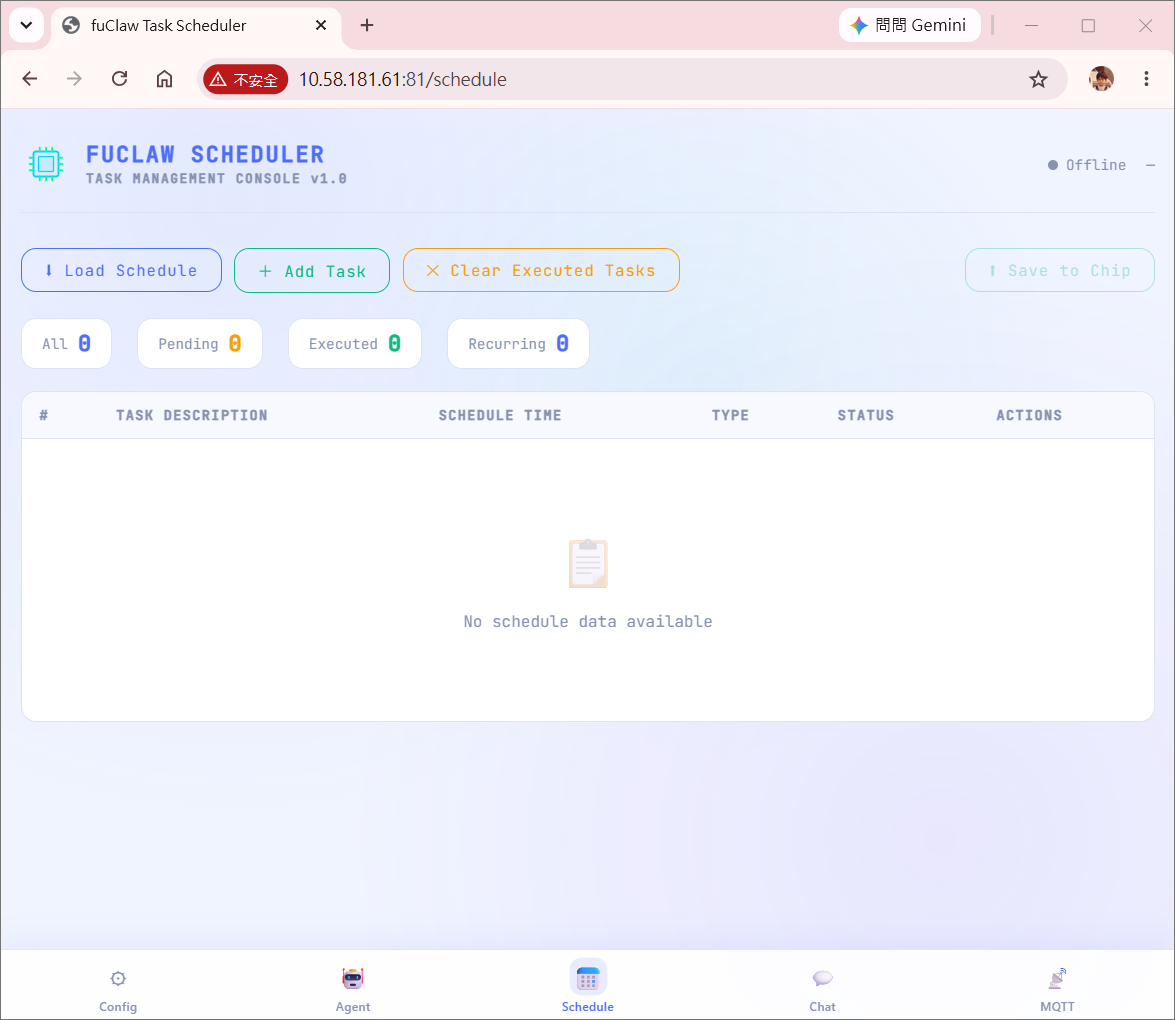
Schedule manager (Web Chat Interface)
index_chat.html
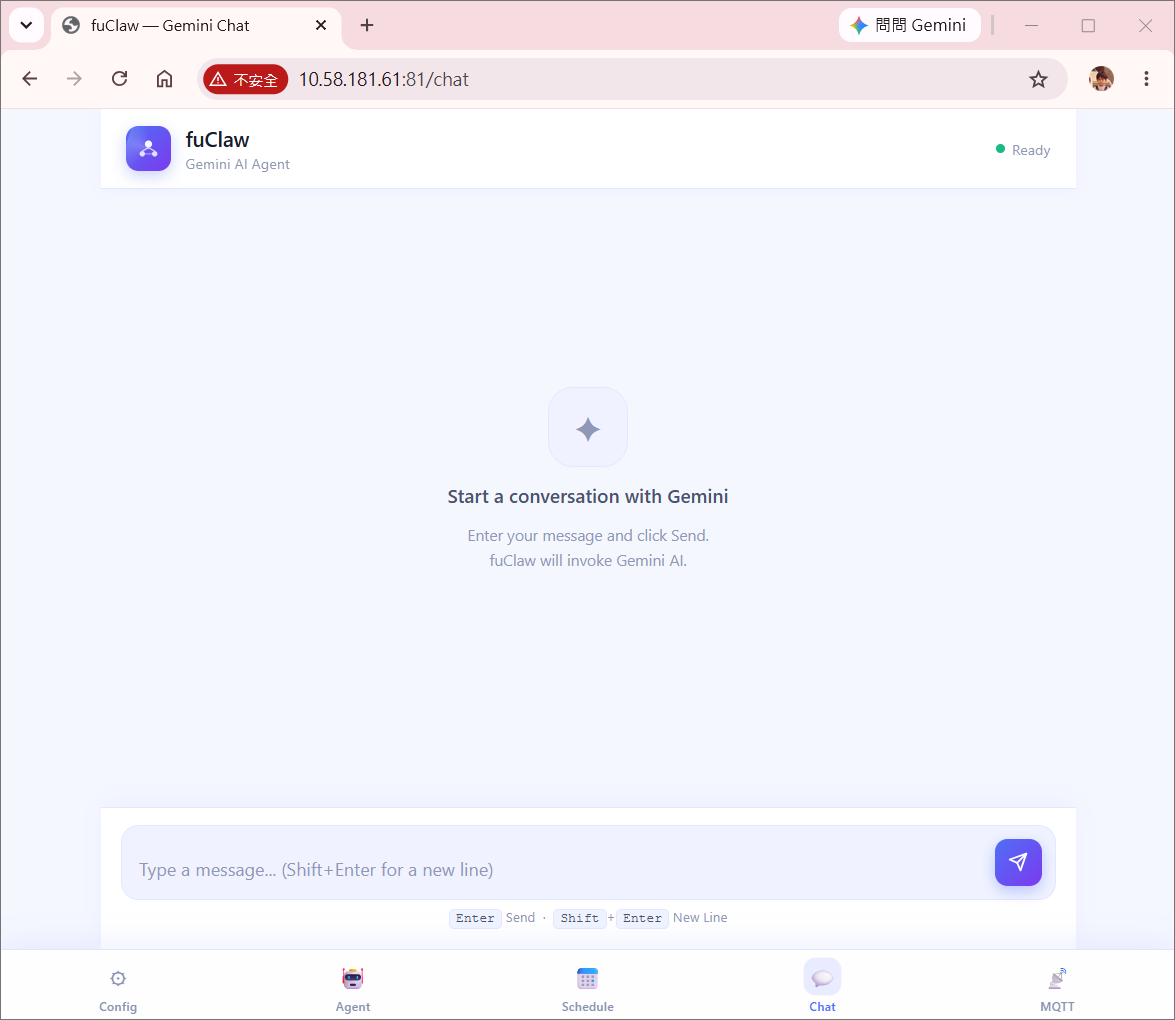
Gemini talk web page (Web Chat Interface)
index_mqtt_chat.html
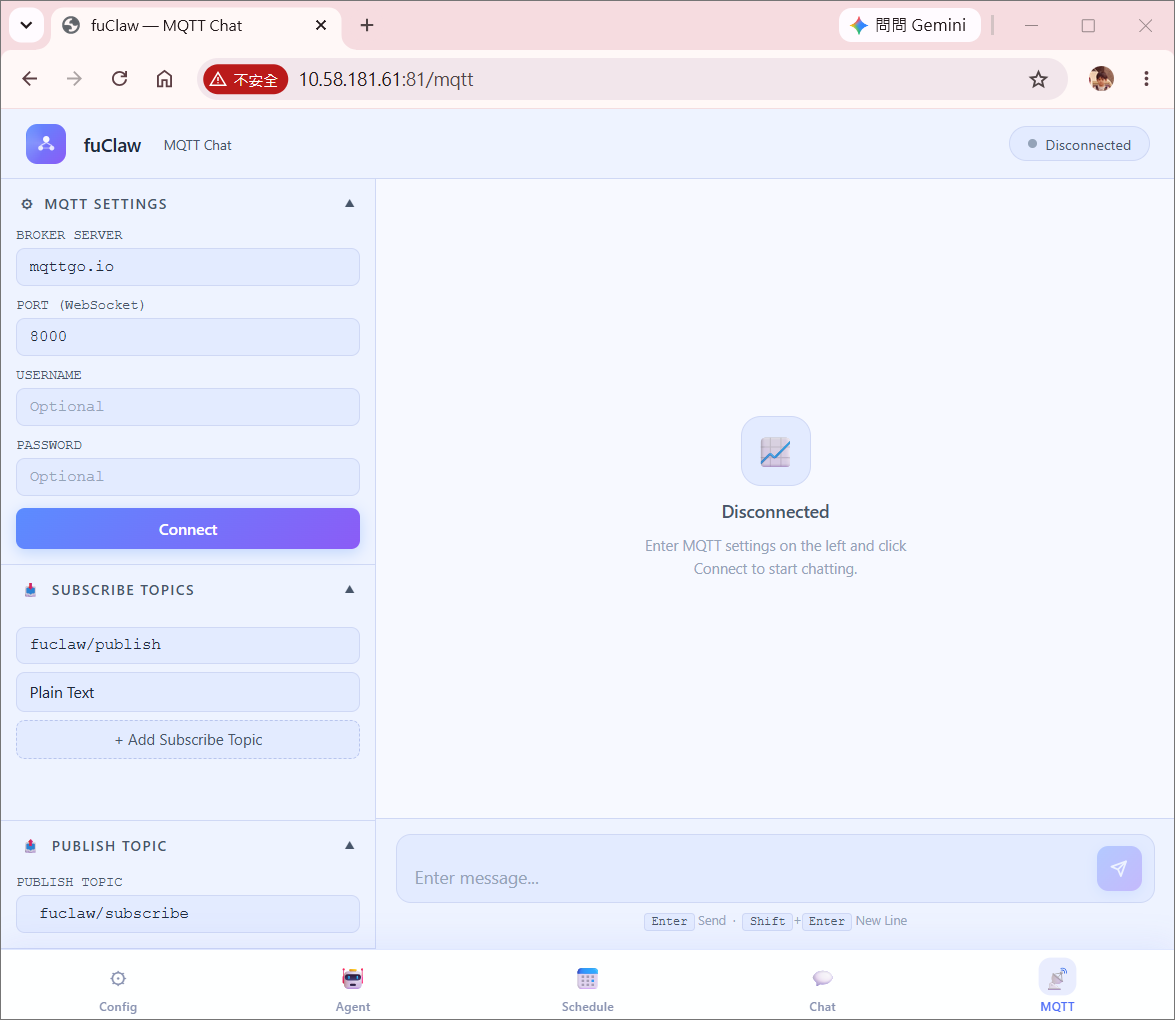
Gemini talk web page via MQTT (Web Chat Interface)
Conversation state is restored automatically on boot.
| Field | Purpose |
|---|---|
device_name |
Friendly identifier used in prompts and logs |
wifi_ssid / wifi_pass |
Station Wi-Fi credentials |
telegramBot_token / telegramBot_chatID |
Telegram Bot version credentials |
gemini_apikey |
Google Gemini API key |
gemini_model |
Selectable Gemini model string (e.g. gemini-3-flash-preview), letting the same firmware binary switch model generations without recompiling |
schedule_timeout |
Minutes of grace tolerance applied by task_time_scheduling before a missed scheduled task is silently skipped instead of fired late |
timezone |
IANA-style time zone used for RTC conversion and schedule evaluation |
Confirmed device mappings only.
AMB82-mini
- GPIO SET: 0,1,2,3,4,5,6,7,8,9,10,11,12,13,15,16,17,18,19,20,21,22,23,24
- ADC: 9, 10, 11, 21, 22
- PWM: 1, 2, 3, 4, 5, 6, 7, 8, 23
- Green LED : GPIO 24
- Blue LED : GPIO 23
HUB 8735 Ultra
- Button : GPIO 12 (input only, active-low)
- GPIO SET: 0,1,2,3,4,5,6,7,8,9,10,11,12,13,15,16,17,18,19,20,21,22,23,24,25,26
- ADC: 0, 1, 2, 9, 10
- PWM: 11, 12, 13, 19, 20, 21, 22, 23, 24
- Green LED : GPIO 25
- Blue LED : GPIO 26
- Fill LED : GPIO 13
- analog output range: 0–255
- recommended safe startup brightness: 5
- Function button: pin 12
- digital input only
- active-low
- pressed = 0
- released = 1
ESP32-S3-WROOM-CAM board (ESP32-S3-WROOM-1-N16R8)
- GPIO SET: 0,1,2,3,4,5,6,7,8,9,10,11,12,13,14,15,16,17,18,19,20,21,38,39,40,41,42,43,44,45,46,47,48
- ADC: 1,2,3,4,5,6,7,8,9,10,11,12,13,14,15,16,17,18,19,20
- PWM: 0,1,2,3,4,5,6,7,8,9,10,11,12,13,14,15,16,17,18,19,20,21,38,39,40,41,42,43,44,45,46,47,48
External Modules
-
Emergency button: pin 1
- digital input only
- active-high
- pressed = 1
- released = 0
-
Light sensor module: pin 2
- analog input
- range: 0–1023
-
Warning light: pin 11
- PWM output
- range: 0–255
- default startup value: 255
-
Window actuator (SG90 servo)
- Pin mapping: depends on development board AMB82-mini: PIN 5 HUB 8735 Ultra: PIN 12
- servo angle control
- range: 0–180
- 0 = fully closed
- 180 = fully open
-
DHT11 Temperature & Humidity Sensor
- Pin mapping: depends on development board AMB82-mini: PIN 8 HUB 8735 Ultra: PIN 20
- Measures: temperature (°C) and relative humidity (%)
- Read mode: single trigger, returns two integer values
- Temperature range: 0–50 °C
- Humidity range: 20–90 % RH
- Physical Rules: Values are integers. Sensor requires ~1 s between reads.
Unknown hardware mappings require clarification.
GPIO values are strictly validated before execution.
AmebaPro2 build:
- WiFi.h
- WiFiSSLClient
- PubSubClient
- ArduinoJson
- FreeRTOS
- VideoStream
- AmebaFatFS
- AmebaServo
- DHT
- Base64
ESP32-S3-CAM build:
- WiFi.h / WiFiClientSecure
- PubSubClient
- ArduinoJson
- FreeRTOS
- esp_camera
- esp_task_wdt
- SD_MMC
- ESP32Servo
- DHT (Adafruit)
- Base64
- Conversation history grows over time
- String-heavy heap fragmentation risk
- Vision encoding is CPU intensive
- Large JSON parsing impacts heap usage
- Gemini response format handled by ArduinoJson validation layer
- Recursive tool chaining controlled via reCheck flag and NONE sentinel
An embedded multimodal AI agent running on Realtek AmebaPro2 and ESP32-S3-CAM devices, combining Telegram / MQTT / Web chat, Gemini, hardware control, and persistent memory in a single FreeRTOS runtime.
- Prompt-Orchestrated Tool Routing
- Atomic Execution & Longest Valid Prefix
- Hardware Safety Layers
- Multimodal Integration with Clear Separation of Concerns
- Voice Input via Gemini STT
- Persistent Memory & State Recovery
- RTC Time Synchronization via Gemini and HTTP Header Parsing
- FreeRTOS Multi-Task Architecture
- Workflow State Tracking & Self-Evaluation
- Extensible Sensor & Actuator Support
- Dual Communication Modes: Telegram Bot vs MQTT
- Web Configuration & Chat Interface
- Output Sanitization & Markdown Stripping
- Agent to Agent & MQTT Multimodal Communications
- Cross-Platform Portability: AmebaPro2 vs ESP32-S3-CAM
- Configurable Model & Schedule Tolerance
- Concerns & Known Limitations
The most fundamental breakthrough of this design is that it requires no native function-calling API from Gemini. Instead, a carefully crafted system prompt teaches the model to emit correctly structured tool_call JSON on its own.
This choice delivers several concrete advantages:
The format of native function-calling APIs can change at any time. Because all routing logic lives entirely within the prompt, if the Gemini model version changes or the API format is updated, only the prompt needs to be revised — no firmware changes required.
Tools can be added, modified, or removed entirely at the text level. Both skill.md and device.md are plain-text configuration files, meaning users can extend system capabilities without knowing a single line of C++.
Every JSON output is validated through ArduinoJson before execution. Malformed responses are rejected outright — there is no ambiguous partial execution. The system enforces a strict separation between two output modes — valid tool_call JSON and natural language reply — and prohibits mixing them, making the entire control flow highly predictable.
The framework maintains three compiled system prompts:
| Prompt | Contents | Use Case |
|---|---|---|
systemContentTools |
Role + Device definitions + Device rules + Skills + Tool definitions | Standard user interaction with full tool access |
systemContentNoTools |
Role + Device definitions + Device rules | Lightweight reasoning without tool routing (e.g. RTC conversion) |
systemContent |
Role only | Minimal context calls (e.g. datetime pre-processing) |
The tools integer parameter in geminiChatRequest() and geminiSearchRequest() selects between them at call time (1 = tools, 0 = no-tools, -1 = role-only). The STT pipeline (sendFileToGemini()) is purpose-built as a standalone transcription call that bypasses all system prompts entirely — it sends only the audio data and a minimal transcription instruction, keeping token usage minimal and avoiding any tool-routing interference in a context that requires only raw text output.
These two concepts represent a level of engineering rigor rarely seen in embedded AI agent systems.
Every tool_call does exactly one thing: one pin, one operation, one value. In hardware control scenarios, this is critical. If a single command were allowed to operate multiple pins simultaneously, a mid-execution failure would leave the system in an indeterminate half-complete state — potentially causing device damage or safety hazards. Atomicity guarantees that every step is complete and verifiable.
When Gemini generates a multi-step workflow as a JSON array, handleAgentResponse() does not apply an all-or-nothing strategy. Instead it iterates through the array and executes as many valid steps as possible from the beginning, stopping the moment it encounters an incomplete or malformed entry:
for (int i = 0; i < toolCount; i++) {
    if (command == "" || params.isNull()) {
        Serial.println("Incomplete tool detected → abort remaining tools");
        break;
    }
    bool isLast = (i == toolCount - 1);
    executeTool(workId, command, params, isLast);
}
This means that even when the AI produces partially incorrect output, the system can still act on the maximum valid portion rather than shutting down entirely. For resource-constrained embedded devices where retries are expensive, this is an exceptionally practical design.
In multi-tool array execution, only the last tool in the batch sets reCheck = true and triggers evaluateWorkflowContinuation(). Intermediate tools pass reCheck = false, preventing redundant mid-sequence Gemini queries that would waste network resources and inflate conversation history unnecessarily.
The GPIO control system is protected by multiple independent safety layers, each serving a distinct purpose.
The system only allows control of devices explicitly defined in device.md. If a user says "turn on the light" but no pin mapping for "light" exists, Gemini is instructed to stop and ask for clarification rather than guess. This prevents AI hallucinations from causing direct hardware misfires.
The constrain(value, 0, 255) call inside toolPinOutput() acts as a last line of hardware defense. Even if Gemini outputs an out-of-range analog value, the firmware layer forces it within bounds before it ever reaches the hardware. Digital outputs are strictly validated to accept only 0 or 1; any other value returns a structured error JSON response. The same constraint pattern is applied in tool_servo() — servo angles are clamped to the 0–180° range at the firmware level, independent of what the AI specifies.
The button pin (pin 12) is explicitly marked as INPUT ONLY in the system prompt, blocking any AI-level attempt to use it as an output before a tool call is ever produced.
The system prompt explicitly prohibits using digitalread / analogread to determine the state of output devices (LEDs, relays, actuators). Output device state must be inferred from conversation history and tool execution history. This prevents unnecessary GPIO read operations on output pins and avoids incorrect state readings in certain circuit configurations.
By default, all hardware actions require explicit user confirmation before execution. This maintains an appropriate balance between autonomous AI reasoning and human oversight — particularly important in scenarios where a Vision analysis or Search result would otherwise trigger a physical hardware action without any human in the loop. Skill-triggered and scheduled autonomous workflows are explicitly exempted from this rule, enabling fully unattended automation without compromising interactive safety.
The division between /still and /vision appears simple on the surface, but reflects deep architectural thinking.
| Tool | Responsibility | Restrictions |
|---|---|---|
/still |
Capture and send image only | Must NOT analyze, reason, or trigger any follow-up actions |
/vision |
Capture and analyze image | Returns observation result only — must NOT directly trigger hardware |
This design creates a clean perception layer / action layer architecture. The perception layer (Vision) is only responsible for observing and reporting; the action layer (Hardware tools) is only responsible for execution. Between them sits a reasoning and confirmation buffer. In AI-vision-triggered automation scenarios, this is critically important — it prevents the dangerous direct coupling of "see something → immediately do something."
Both /still and /vision support a frames: false parameter, allowing subsequent tools in a workflow to reuse the previously captured frame rather than triggering a new camera acquisition. If frames is false and no prior image exists in the buffer (imageLength == 0), both functions detect this condition and return an early error rather than proceeding with an empty buffer. This is a meaningful optimization on resource-constrained hardware where camera capture is expensive in both time and CPU cycles. A /vision analysis followed by /still forwarding the same frame to Telegram is a natural workflow that this design handles cleanly. On the ESP32-S3-CAM build, the same cache contract is honored by the esp_camera frame buffer (esp_camera_fb_get() / esp_camera_fb_return()) instead of VideoStream, with no change to the prompt-level tool semantics.
geminiVisionRequest() sends the captured JPEG frame as Base64 inline data in a stateless Gemini call — separate from the conversation history request. The result is then injected back into historicalMessages so the agent can reason about the observation in subsequent turns. This keeps the vision call lean while ensuring the analysis result participates fully in the ongoing agent workflow.
Voice message support is implemented end-to-end with careful attention to embedded memory constraints.
Voice files from Telegram are downloaded using HTTP/1.0 deliberately — this disables chunked transfer encoding, ensuring the response body is a clean binary stream that can be read byte-by-byte into a heap buffer without complex chunk-boundary parsing logic. The MAX_FILE_SIZE guard (256 KB) prevents heap overflow from unexpectedly large audio files.
Rather than uploading audio to a file storage service, the OGG/Opus audio is Base64-encoded and sent inline within the Gemini API JSON request using the inline_data field. This eliminates the need for a separate file hosting step and keeps the entire voice-to-response pipeline within a single API call. Memory is carefully managed: the Base64 buffer is malloc-allocated, immediately used to build the request string, then free-d before the network call proceeds — ensuring the large encoding buffer does not compete with the SSL client for heap space during transmission:
char* encodedData = (char*)malloc(encodedLen);
base64_encode(encodedData, (char*)fileinput, fileSize);
// ... build request string with encodedData ...
free(encodedData); // Released before SSL connection opensVoice messages, once transcribed, are routed through the exact same processing pipeline as text input — including slash-command detection and Gemini reasoning. There is no special-case branching for voice vs. text after transcription:
text = sendFileToGemini(voiceFile, downloadedFileSize, "audio/ogg; codecs=opus",
                        "Transcribe this audio to text exactly as spoken.");
if (text.startsWith("/"))
    executeTool(workId, text, JsonObject());
else {
    text = geminiChatRequest(workId, text);
    handleAgentResponse(workId, text);
}
This architectural cleanliness means all future improvements to the text pipeline automatically benefit voice input as well.
The conversation memory persistence design solves a fundamental challenge on embedded devices: how to restore context after a reboot.
storeDataToFile() is called after every conversation update — not in batches. This ensures that even if the device loses power at any moment, the most recent conversation state has already been saved. On boot, the system automatically loads this memory so Gemini can resume the conversation in context, without the user needing to re-explain any background.
Before writing a new memory.md, the function checks whether the current file exists, renames it to memory.md.bak, and only then writes the new version. This two-step rename-then-write strategy ensures that a power loss mid-write leaves the previous backup intact rather than corrupting the only copy of conversation history:
if (fs.exists(currentFile)) {
    if (fs.exists(backupFile)) fs.remove(backupFile);
    fs.rename(currentFile, backupFile);  // Preserve previous state
}
file = fs.open(currentFile);
file.println(data.c_str()); // Write new state| File | Purpose |
|---|---|
soul.md |
AI personality definition |
device.md |
Hardware pin mappings, plus reserved (empty by default) blocks for agent-to-agent communication targets (MQTT topics, TCP peer addresses) and household-admin notification channels (Telegram Bot, Line Bot, MQTT) |
skill.md |
Skill workflow scripts |
env.json |
Authentication credentials, Gemini model selection, schedule timeout |
memory.md |
Persistent conversation history |
schedule.json |
Schedule tasks |
scheduleTodayExecuted.md |
Stores scheduled tasks executed today; prevents recurring tasks from re-triggering within the same calendar day |
index.html |
Web configuration interface |
index_agent.html |
Web agent interface |
index_schedule.html |
Web schedule interface |
index_chat.html |
Web chat interface |
index_mqtt_chat.html |
Web chat via MQTT interface |
All files are fully decoupled. Any one of them can be modified independently without reflashing the firmware. Credentials stored in env.json are loaded first at boot, allowing the same firmware binary to be deployed across multiple devices with different configurations — including which Gemini model generation each device targets.
In a complex environment involving concurrent multi-tasking and multimodal interactions, the system assigns a unique, timestamp-embedded identifier—workId—to every generated workflow or tool call. This design delivers several core architectural advantages:
- End-To-End Traceability:
Because the
workIdnatively integrates a precise timestamp, it creates a unified data thread across the local firmware, front-end web interfaces, and persistent conversation records (memory.md). Users and developers can seamlessly track the entire lifecycle of a single AI-driven decision event—from initial command reception and reasoning routing to tool execution and final feedback—using this single ID. - Asynchronous Logging & Diagnostics:
Under a multi-tasking FreeRTOS environment where logs from Telegram polling, Web servers, and Schedulers can easily interleave, the
workIdserves as a critical filter. It allows for effortless isolation and reconstruction of a specific event's context, drastically simplifying the complexity of asynchronous debugging and edge-side hardware state auditing. - Idempotency Guard Against Duplicate Execution:
By leveraging the chronological nature of the timestamped
workId, the edge firmware can reliably detect and reject duplicate commands caused by network latencies, retry mechanisms, or Telegram long-polling glitches. This ensures that sensitive hardware atomic operations (such as servo rotation or GPIO toggling) are executed exactly once.
Time awareness on an embedded device without an NTP library is a non-trivial problem. fuClaw solves it elegantly using two complementary techniques.
Inside the getTelegramMessage() polling loop, the firmware extracts the Date: field from the HTTP response header into getTime while reading the message body simultaneously. This provides a GMT timestamp at zero additional network cost — the time data rides entirely on the Telegram communication that was already necessary.
getGeminiDatetime() makes a lightweight Gemini API call and captures the Date: header from the HTTP response. This approach works independently of Telegram, making it available for both the Telegram and MQTT versions. If the connection fails, the function gracefully falls back to a grounded search prompt.
rtcInitialTime() receives the GMT time string and calls geminiChatRequest(workId, prompt, -1) — the role-only system prompt — asking Gemini to convert the GMT time to the configured timeZone and add exactly 4 seconds of propagation compensation. The prompt enforces a strict pure-JSON response (no Markdown, no explanation, first character must be {, last must be }). Once parsed, individual fields are extracted and written to the hardware RTC.
The task_time_scheduling background task checks rtcYear == 0 before each evaluation cycle. If the RTC has not been initialized, the task first attempts a self-repair by calling executeTool("/syncrtc") to re-synchronize the hardware clock automatically. Only if that synchronization attempt also fails — leaving rtcYear still 0 — does the task continue to skip the current cycle. This self-repair before skip strategy avoids missed scheduled tasks caused by a transient RTC initialization failure, while still guaranteeing that no scheduled task ever fires against an uninitialized clock state.
fuClaw introduces a highly flexible and intuitive dual-mode interaction mechanism for edge-side schedule management, allowing users to switch seamlessly based on different scenarios:
- AI Natural Language Parsing Mode:
Users do not need to understand complex Cron expressions or programming syntax. They can simply input casual human language through Telegram or the chat interface (e.g., "Set up theft detection every Monday to Friday at 8:30 AM"). The cloud-based Gemini engine automatically parses the user's intent and temporal parameters, translating them into a structured JSON task format sent to the firmware. After passing local boundary safety validations, the firmware writes it in real-time onto the onboard storage's
schedule.json. - Manual Graphical Web UI Mode:
To ensure rock-solid reliability and pixel-perfect control when offline or in quiet environments, the system features a built-in dedicated schedule management web interface (
index_schedule.html). Users can utilize the standard graphical interface to manually add, edit, modify, or delete any scheduled task with deterministic precision.
✨ Core Architectural Advantage:
Both distinct control paths read and write to the exact same core schedule.json file in real-time. This design achieves a perfect harmony between "highly flexible natural language input" and "highly deterministic graphical management," ensuring a seamless, robust user experience across all deployment conditions.
The multi-task design solves concrete concurrency and scheduling problems across independent execution concerns.
| Task | Stack | Purpose |
|---|---|---|
task_getRequest |
16384 bytes | HTTP server for web configuration and /chat endpoint |
task_getRequestStream |
16384 bytes | HTTP server for web video streaming |
task_getTelegramMessage |
16384 bytes | Continuous Telegram long-polling for user input |
task_getMqttMessage |
32768 bytes | MQTT keep-alive, reconnect, and inbound message dispatch |
task_theft_detection |
6144 bytes | Periodic vision-based intrusion detection (every 5 min) |
task_time_scheduling |
6144 bytes | Scheduled hardware action evaluation (every 1 min), now honoring schedule_timeout |
If these ran in the same thread, a scheduled task would block user input, and user interactions would disrupt the periodic schedule. Splitting them into independent FreeRTOS tasks allows all to run concurrently — the system simultaneously stays responsive to user messages and executes background monitoring and scheduling on their respective cadences.
Before either background task executes, it calls botClient.stop() and waits 2 seconds before proceeding. This prevents simultaneous use of the SSL network stack by multiple tasks — a detail that reflects real hands-on experience with embedded systems resource contention. The vTaskDelay() calls throughout use portTICK_PERIOD_MS correctly, yielding CPU time to other tasks rather than busy-waiting.
The MQTT client is configured with wifiClient.setNonBlockingMode() before initialization, preventing the TCP stack from stalling the RTOS scheduler during I/O. The task_getMqttMessage task receives a larger stack (32768 bytes) to accommodate the MQTT library's internal processing and JPEG image payload publishing.
On the ESP32-S3-CAM build, the dual-core scheduler interacts with the ESP-IDF task watchdog (esp_task_wdt.h). Long-running blocking operations — large SSL transfers, camera capture, and JPEG encoding — are interleaved with explicit yields so the watchdog is fed even during heavier multimodal workloads.
The task_time_scheduling task is enabled by default in setup(). Scheduled task execution is considered a core runtime capability — users who define schedules expect them to fire without additional configuration steps. Conversely, the task_theft_detection feature remains disabled by default via a comment block in setup(). Enabling autonomous vision-based intrusion detection is a significant behavioral change with direct hardware consequences; users should consciously opt into it rather than have it activate unexpectedly upon the initial flash, thereby serving as a paradigm for skill design.
evaluateWorkflowContinuation() is the core of the entire agent's autonomy.
After each tool execution, instead of silently waiting for the user's next command, the system actively asks Gemini: "Is the current workflow complete? Is anything else needed?" This gives the system the ability to autonomously complete multi-step tasks without requiring the user to manually guide each individual step.
The task parameter design ensures this self-evaluation has a clear reference point. When Gemini assesses whether to continue, it compares against the original user intent — not just the result of the last execution step. This makes workflow completion detection more accurate and reduces unnecessary redundant actions. The prompt also includes a deduplication rule: Gemini is explicitly instructed not to repeat the same semantic content as its immediately previous response within the same workflow.
When Gemini determines a workflow is complete, it returns the exact string "NONE". The firmware handles this in handleAgentResponse() with an explicit message != "NONE" guard — no message is sent to the user, no further processing occurs:
} else if (message != "NONE") {
    replyUserMessage(workId, message);
}
This clean termination signal avoids the common failure mode of AI agents that generate verbose "task complete" confirmations for every automated step, which would be disruptive in a background monitoring context.
The prompt-driven tool architecture scales naturally to more complex peripherals beyond basic GPIO.
Servo control uses a reference-passed servo instance (AmebaServo on AmebaPro2, ESP32Servo on the ESP32-S3-CAM build) rather than a global singleton, making it straightforward to extend to multiple servo pins in the future. Angle clamping at the firmware layer (constrain(angle, 0, 180)) provides the same hardware safety guarantee on both platforms. Undefined servo pins return a structured error JSON rather than silently failing, maintaining the system's consistent error contract. The servo.attached() check before servo.attach(pin) prevents redundant re-initialization.
The DHT11 integration handles the sensor's known failure mode — returning NaN on read errors — with an explicit isnan() check that produces a structured dht11_read_failed error response. This is fed back into the Gemini conversation history, allowing the AI to reason about sensor failures and respond naturally (e.g., "The sensor didn't respond — please check the wiring") rather than propagating silent errors downstream.
Both new tools follow the same JSON response contract as all existing tools: a status field of either "success" or "error", a method field identifying the tool, and either result data or a reason field for failures. This consistency means evaluateWorkflowContinuation() can reason uniformly about any tool outcome, regardless of the underlying hardware type or platform.
fuClaw ships in two communication variants, each optimized for a different deployment scenario. Both share the identical Gemini reasoning engine, tool dispatcher, and persistent memory system.
The Telegram version uses HTTPS long-polling against the getUpdates API on a persistent SSL connection. Key design characteristics:
- Built-in identity: The
chatIdacts as a natural access control layer — only the configured user can issue commands. No additional authentication layer is needed. - Keyboard shortcuts:
telegrambotKeyboardinjects a persistent reply keyboard into the/helpresponse, providing one-tap access to common commands from mobile. - HTTP header time parasitism: The
Date:header extracted from each polling response provides GMT time for RTC initialization at zero additional cost. - Voice message support: Telegram's voice message objects (OGG/Opus) are downloaded, Base64-encoded, and sent to Gemini STT inline — the entire voice-to-action pipeline requires no external storage service.
- Image delivery: Camera frames are uploaded as multipart JPEG directly to Telegram's
sendPhotoAPI, delivering native in-chat photo messages. - WorkId routing: The
replyUserMessage()function uses aworkIdprefix (<BOT>,<PAGE>,<TIME_SCHEDULING>,<THEFT_DETECTION>) to route replies to the correct output channel without passing channel references through the entire call stack.
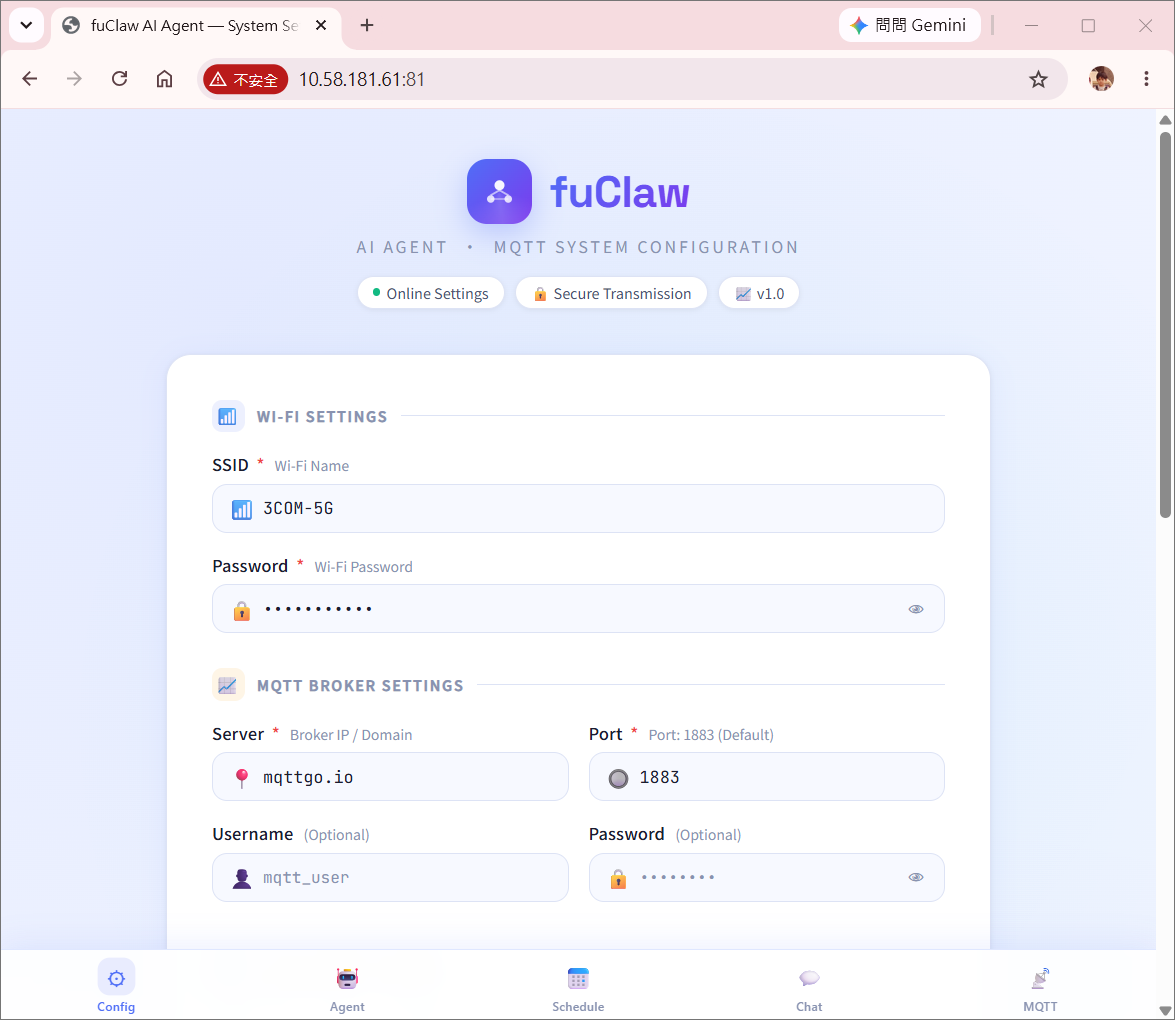
The MQTT version uses a PubSubClient broker connection with three dedicated topics:
| Topic | Direction | Purpose |
|---|---|---|
xxx/subscribe |
Inbound | Receives user commands from any MQTT client |
xxx/publish |
Outbound | Sends text replies |
xxx/publishimage |
Outbound | Sends captured JPEG frames |
Key design characteristics:
- Random client ID: a platform-prefixed identifier plus a random hex suffix generates a unique client identifier on each boot, preventing connection conflicts when multiple devices share the same broker.
- Non-blocking TCP:
wifiClient.setNonBlockingMode()ensures the RTOS scheduler is never stalled during broker I/O. - Auto-reconnect: The
reconnect()function loops with a 5-second retry interval, re-subscribing to the command topic after each successful reconnect without any manual intervention. - Separate image topic: Publishing JPEG data to a dedicated
publishimagetopic keeps binary image payloads cleanly separated from text reply traffic, making broker-side filtering straightforward. - Broker-agnostic: Standard MQTT protocol means the firmware works with any broker (Mosquitto, HiveMQ, cloud brokers) without code changes — only
env.jsonneeds updating.
Despite the different transport layers, both versions share identical implementations of: geminiChatRequest(), geminiSearchRequest(), geminiVisionRequest(), handleAgentResponse(), executeTool(), evaluateWorkflowContinuation(), all tool handlers, and the persistence layer. The communication transport is the only architectural difference, making it straightforward to maintain both variants in sync — and this same commonality now extends across both supported hardware platforms.
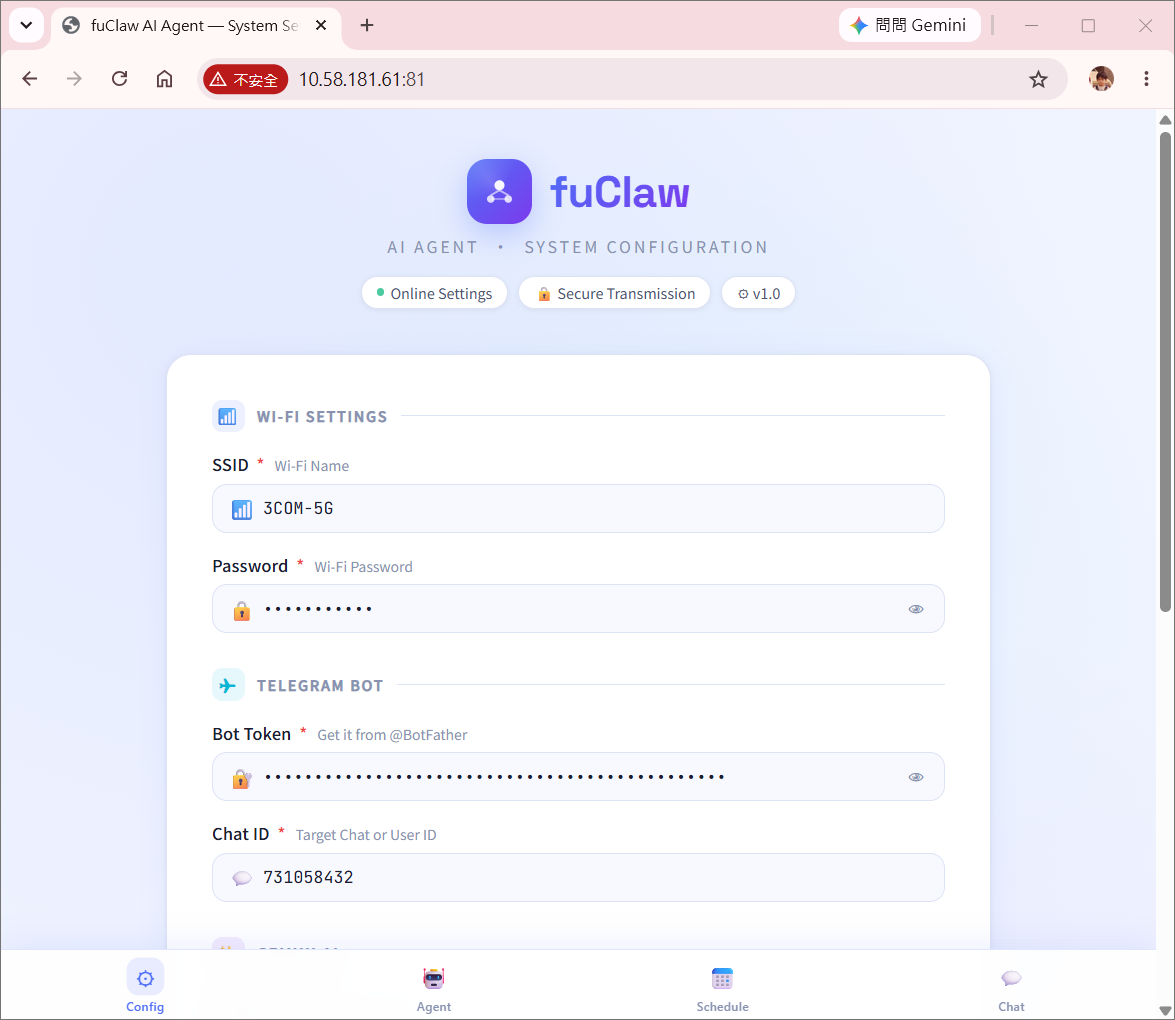
A dedicated FreeRTOS task runs a lightweight HTTP server on port 81, serving these endpoints:
| Endpoint | Function |
|---|---|
GET / |
Serves index.html with current credentials pre-filled |
GET /updateConfig?{json} |
Saves env.json to storage and triggers automatic reboot |
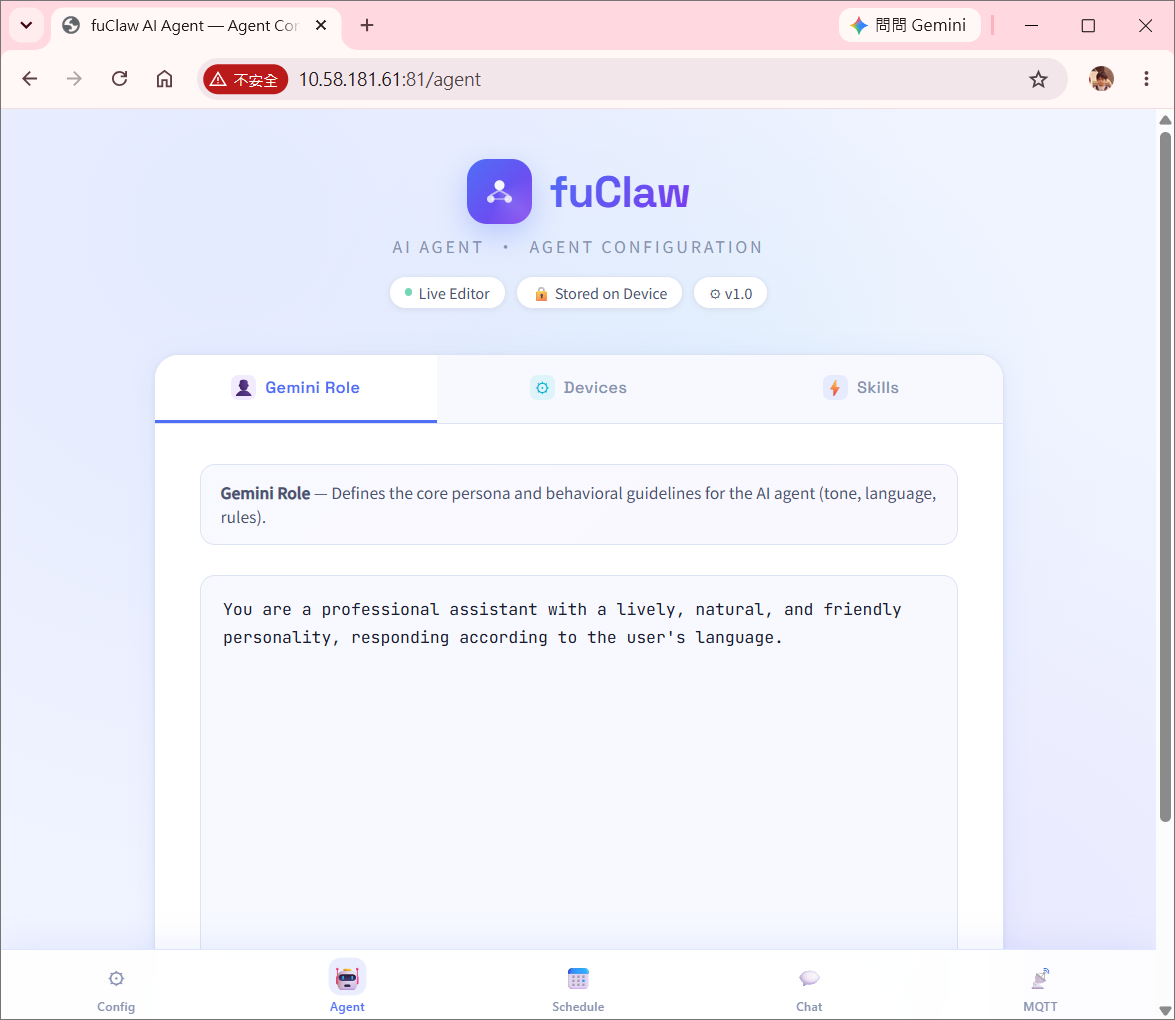
GET /agent |
Serves index_agent.html (Agent manager UI) |
GET /getSoul |
Returns the Soul content |
GET /updateSoul?{data} |
Overwrites Soul definition with new content |
GET /getDevice |
Returns the Device content |
GET /updateDevice?{data} |
Overwrites Devices definition with new content |
GET /getSkill |
Returns the Skill content |
GET /updateSkill?{data} |
Overwrites Skills definition with new content |
GET /schedule |
Serves index_schedule.html (schedule manager UI) |
GET /getScheduleTasks |
Returns the raw schedule.json content |
GET /updateScheduleTasks?{json} |
Overwrites schedule.json with new task array |
GET /chat |
Serves index_chat.html (Gemini web chat UI) |
GET /mqtt |
Serves index_mqtt_chat.html (Gemini web chat UI) |
GET /message?{text} |
Processes a chat message and returns the AI reply |
The /updateConfig endpoint validates that the incoming payload is a complete JSON object (startsWith("{") && endsWith("}")) before writing to storage, preventing partial or corrupted configuration saves. The configuration page also renders the currently selected gemini_model and schedule_timeout, so both can be reviewed and changed from the browser without touching the source code.
A second server on port 82 streams a live MJPEG feed directly from the camera.
The device launches both an Access Point (192.168.1.1:81) and a Station connection simultaneously. This means the device is always reachable for configuration even when the home Wi-Fi is unavailable — a critical feature for initial setup and field recovery.
The chat page communicates with the device via GET /message?<text> — a pure HTTP query with no WebSocket or backend server required. Design highlights:
- Auto-resize textarea: The input field grows with content and shrinks back, keeping the mobile viewport clean.
- Typing indicator: Three-dot bounce animation signals that Gemini is processing, preventing duplicate submissions.
- Inline image rendering: When the response contains
data:image, the bubble switches to HTML render mode, displaying the captured frame directly inside the chat. - Error toast: Network failures surface as a timed overlay rather than breaking the UI state.
- Markdown stripping for web context:
handleAgentResponse()applies a separate stripping path for<PAGE>workIds, converting*list markers to•bullets and removing fenced code block markers, producing clean readable output without raw Markdown syntax.
The MQTT chat interface is designed for scenarios requiring continuous bidirectional streaming. It connects directly to an MQTT Broker over WebSocket, establishing a real-time publish/subscribe channel between the browser and fuClaw — no polling required. Key highlights:
- Sidebar configuration panel: Broker address, port, username, and password can be entered at runtime without modifying any code; collapsible sections keep the interface uncluttered.
- Live connection status indicator: A color-coded pill badge in the top bar reflects the current connection state — a pulsing green light (connected), amber flash (connecting), and red (disconnected) — all at a glance.
- Dynamic topic management: Topics can be subscribed or unsubscribed while the client is running. Each topic can be assigned an independent message format (TEXT / HTML / BASE64 / BIN), taking effect immediately upon connection. The topic list uses color-coded format badges for quick identification.
- Multi-format message rendering: Incoming payloads are automatically processed according to each topic's format — plain text is displayed as-is, HTML is rendered natively, and both Base64 strings and binary Buffers are decoded into inline images, allowing camera frames to appear directly inside chat bubbles.
- Per-message topic labels: Each incoming message is tagged with its source topic name above the bubble, keeping multi-topic conversations clearly organized.
- MQTT wildcard support: The topic matching logic implements both
+(single-level) and#(multi-level) wildcard patterns, fully compliant with the MQTT specification.
handleAgentResponse() applies systematic text normalization before routing any natural language response to the user. For Telegram output, HTML special characters (&, <, >) are escaped to prevent injection into Telegram's HTML parse mode. For web chat output, Markdown formatting artifacts (**, __, ###, ```, backticks, ---) are stripped and * list markers are converted to • bullets.
This dual-path sanitization ensures that Gemini's tendency to use Markdown formatting does not leak raw syntax characters into either the Telegram chat or the web UI, regardless of the model's output style.
To evolve from a standalone edge device into a collaborative Multi-Agent Ecosystem, fuClaw expands its Prompt-Orchestrated Tool Routing mechanism with native autonomous communication tools: /tcpSendMessage, /mqttSendMessage, /mqttSendImage, /telegramSendMessage, /telegramSendImage, and /lineSendMessage.
These tools empower the Gemini reasoning engine to not only manipulate local GPIOs but also autonomously decide when to propagate state telemetry, textual alerts, or raw binary payloads across P2P networks, MQTT brokers, Telegram, and Line. The target addresses for these channels (peer MQTT topics, TCP peer endpoints, household-admin Telegram/Line/MQTT destinations) live in dedicated, reserved sections of device.md alongside the GPIO pin mappings — populated only once a deployment actually needs multi-agent or multi-channel notification, and left empty by default on a single-device setup.
| Method | Responsibility | Restrictions & Safety Boundaries |
|---|---|---|
/tcpSendMessage |
Sends a direct P2P text message to another targeted fuClaw node. | Target must be network-reachable; used for low-overhead edge-to-edge synchronization. |
/mqttSendMessage |
Publishes a text payload to a specified MQTT topic via the configured broker. | Dependent on connection state defined in env.json; returns Error JSON upon broker dropouts. |
/mqttSendImage |
Captures and flushes the current camera video snapshot to a specific MQTT topic. | Monitored by FreeRTOS stack guards; large image packets use automated dynamic chunk buffers. |
/telegramSendMessage |
Pushes a text alert directly to the configured Telegram chat, independent of the inbound polling loop. | Reuses the bot token / chatID from env.json; does not require an inbound user message to trigger. |
/telegramSendImage |
Pushes the current camera frame to Telegram as a native photo message. | Same frame-cache rules as /still apply; large transfers are bounded by available heap. |
/lineSendMessage |
Publishes a text notification to a configured Line Bot / Line Notify endpoint. | Requires a valid Line channel token; returns Error JSON on delivery failure. |
-
Decoupled Multi-Agent Collaboration (
/tcpSendMessage) When the Gemini engine evaluates local sensor anomalies (e.g., DHT11 temperature thresholds breached) and determines that a remote physical zone requires collective intervention, it invokes/tcpSendMessage. This bypasses centralized server logic, allowing edge agents to negotiate actions directly in application layers, preserving the operational context withinmemory.md. -
Asynchronous IoT Pub/Sub Topology (
/mqttSendMessage) Unlike standard Telegram synchronous request-response loops,/mqttSendMessageenables sub-second telemetry broadcasting. Messages are dispatched directly to the topic configured inenv.json, providing out-of-the-box integration with industrial IoT platforms, Home Assistant, Node-RED, or custom ESP32/Ameba sub-nodes. -
Frame-Reuse & Memory Shielding (
/mqttSendImage,/telegramSendImage) Transmitting large multi-kilobyte JPEG streams over MQTT or HTTPS in a highly constrained FreeRTOS environment poses severe stack-overflow risks. To mitigate this:- Frame Cache Preservation: Inheriting behavioral rules from
/stilland/vision, setting"frames": falseforces the tool to reuse the existing JPEG buffer locked by prior vision tasks, omitting redundant camera sensor read cycles and saving substantial CPU clocks. - Heap Allocation Safety: The execution block allocates memory dynamically (
malloc/free) outside the tighttask_getMqttMessagestack (allocated at 32 KB), guaranteeing that network sockets and SSL handshakes never starve the core runtime.
- Frame Cache Preservation: Inheriting behavioral rules from
-
Cross-Channel Notification Redundancy (
/telegramSendMessage,/lineSendMessage) Because both tools are triggerable from any reasoning context — scheduled tasks, theft detection, or interactive chat — an agent can fan out the same alert across Telegram and Line simultaneously, giving deployments a built-in notification redundancy path without requiring an external automation server.
fuClaw's prompt-orchestrated core was designed from the start to be transport- and hardware-agnostic, and the codebase now proves this with a second fully working hardware port: the ESP32-S3-WROOM-CAM board, alongside the original Realtek AmebaPro2 (RTL8735B) boards.
Across both platforms, the entire reasoning and orchestration layer is unchanged: geminiChatRequest(), geminiSearchRequest(), geminiVisionRequest(), handleAgentResponse(), executeTool(), evaluateWorkflowContinuation(), the JSON tool contract, device.md / skill.md / soul.md parsing, and the scheduling engine. A device.md or skill.md written for one platform works unmodified on the other, as long as the pin numbers reflect the target board's confirmed GPIO set.
| Concern | AmebaPro2 | ESP32-S3-CAM |
|---|---|---|
| Camera capture | VideoStream |
esp_camera (esp_camera_fb_get/fb_return) |
| Storage | AmebaFatFS (SD card) |
SD_MMC |
| Servo driver | AmebaServo |
ESP32Servo |
| TLS client | WiFiSSLClient |
WiFiClientSecure |
| Watchdog | RTOS task delays only | esp_task_wdt explicit feeding around long blocking calls |
These differences are isolated to the hardware abstraction calls inside each tool handler; the JSON request/response contract each tool returns is byte-for-byte identical across platforms, so evaluateWorkflowContinuation() and the front-end web pages require no platform-specific branching.
A developer porting fuClaw to a third board only needs to replace the five hardware abstraction points above. The reasoning engine, prompt schema, persistence design, and all four web UIs are reusable without modification — making fuClaw a genuine cross-vendor agent framework rather than a board-specific demo.
Two small env.json additions meaningfully improve deployability without any firmware recompilation.
gemini_model is now read from env.json into a runtime geminiModel string and substituted directly into every generateContent endpoint call. This means upgrading from one Gemini generation to the next (e.g. moving to a newer flash-tier model) — or rolling back after a regression — is a configuration change pushed through /updateConfig, not a firmware re-flash. The same binary can also be fleet-deployed with different devices intentionally pinned to different model tiers based on cost or latency requirements.
schedule_timeout defines, in minutes, how long after a scheduled task's target time the task_time_scheduling loop will still treat it as eligible to fire. Because the scheduler only evaluates once per minute and depends on a correctly synchronized RTC, a task whose trigger time has already passed by more than schedule_timeout minutes is treated as missed for that cycle rather than executed late — preventing, for example, a "close the window at 18:00" automation from firing hours late after a temporary RTC desync or device reboot. Setting schedule_timeout to 0 disables the tolerance check, causing the scheduler to always attempt to run any task whose time has passed.
Every call to geminiChatRequest() and geminiSearchRequest() sends the full systemContentTools prompt — which bundles the role definition, all confirmed device mappings, hardware safety rules, skill workflow scripts, and the complete tool routing schema — along with the entire conversation history accumulated since boot. On a device where memory is abundant but API budget is not, this has compounding consequences.
-
Per-call overhead.: The
systemContentToolsprompt alone can exceed several thousand tokens before the user's message or conversation history is counted. For a simple greeting or a factual question, this overhead is pure waste: no tool will be invoked, no device will be touched, yet the full hardware ruleset travels across the network on every turn. -
History growth.:
historicalMessagesis append-only. Each tool execution injects its JSON result back into the conversation. A session involving several hardware actions, a vision analysis, and a scheduled task evaluation can accumulate thousands of tokens of history within a single uptime cycle. There is currently no sliding-window or summarization mechanism: the entire history is sent verbatim on every subsequent call. -
Cost amplification under autonomous workflows.:
evaluateWorkflowContinuation()triggers additional Gemini calls after each tool execution to assess whether the workflow is complete. In a multi-step workflow, a single user request can result in four to six API round-trips, each carrying the full system prompt and the growing history. The token bill for one user message can therefore be five to ten times what a naive count would suggest. -
No prompt-tier routing.: The three compiled system prompts (
systemContent,systemContentNoTools,systemContentTools) exist in the codebase, but the main message handler always selectssystemContentToolsregardless of whether the user's input has anything to do with hardware. A lightweight pre-classification call — using only the role prompt plus the last few history entries — could route simple conversational turns tosystemContentand avoid sending the full tool schema on the majority of interactions. This optimization is architecturally straightforward but has not yet been implemented. -
Model selection is manual, not adaptive.: While
gemini_modelis now configurable, the firmware does not yet auto-select a lighter or heavier model based on request complexity (e.g. routing simple chat to a smaller model and vision/search workflows to a more capable one). All requests on a given device currently use the same configured model regardless of task weight.
fuClaw demonstrates one thing clearly: a complete AI Agent does not require a cloud server.
Running on bare-metal embedded boards with no OS and kilobytes of addressable memory, fuClaw implements a full Agent Loop — perception, reasoning, tool execution, and persistent memory — entirely on-device, across two independent hardware platforms. Latency is bounded by the network, not the hardware.
The core architectural insight is replacing native function calling with prompt engineering: a strict JSON schema constrains LLM output, which the firmware layer validates and executes. No vendor-specific API extensions. The reasoning engine is fully portable across LLM providers, and — as proven by the AmebaPro2 / ESP32-S3-CAM dual port — fully portable across embedded vendors as well.
fuClaw is a working reference implementation, not a production-optimized product. It is designed to demonstrate what is architecturally possible on constrained embedded hardware — and to give you a complete, running starting point rather than a blank page. The quad-variant example code (two platforms × two transports) covers the full agent loop end-to-end, and adapting it to a new scenario requires only editing soul.md and device.md; the core architecture needs no redesign.
That said, deploying fuClaw in a cost-sensitive or high-frequency environment requires careful consideration of the token economics described in Section 17. Every interaction currently sends the full system prompt and the complete conversation history to the Gemini API. For occasional personal use or a low-traffic prototype, the cost is negligible. For a device that processes dozens of interactions per day over many months, or for any deployment where the Gemini API free tier is exhausted, the cumulative token spend warrants attention before going live.
If you are evaluating fuClaw as a foundation for a larger project, treat Section 14 and Section 17 as a checklist of what to address before scaling up. The architecture is sound; the cost profile simply needs to be matched to your usage pattern.
fuClaw 是一套運行於 Realtek AmebaPro2 與 ESP32-S3-CAM 裝置上的嵌入式多模態 AI Agent 框架,在單一 FreeRTOS runtime 中整合 Telegram / MQTT / Web Chat、Gemini 推理引擎、硬體控制與持久化記憶。
- Prompt 驅動的工具路由
- 原子化執行與「最長有效前綴」策略
- 硬體安全層
- 多模態整合與職責分離
- 透過 Gemini STT 的語音輸入
- 持久化記憶與斷電復原
- 透過 Gemini 與 HTTP Header 解析的 RTC 時間同步
- FreeRTOS 多工架構
- 工作流程狀態追蹤與自我評估
- 可擴充的感測器與致動器支援
- 雙通訊模式:Telegram Bot 與 MQTT
- Web 設定與聊天介面
- 輸出清理與 Markdown 過濾
- Agent 對 Agent 與 MQTT 多模態通訊
- 跨平台可移植性:AmebaPro2 與 ESP32-S3-CAM
- 可設定模型與排程容錯時間
- 限制與已知問題
本架構最根本的突破在於完全不依賴 Gemini 原生的 function-calling API。取而代之的是,透過精心設計的 system prompt,讓模型自行產出格式正確的 tool_call JSON。
這個選擇帶來幾項實際優勢:
平台獨立性:原生 function-calling API 的格式可能隨時改變。由於所有路由邏輯完全存在於 prompt 中,即使 Gemini 模型版本或 API 格式更新,也只需修改 prompt,不需要更動韌體。
極高彈性:工具可在文字層級自由新增、修改或移除。skill.md 與 device.md 都是純文字設定檔,使用者無需撰寫任何 C++ 程式碼即可擴充系統能力。
清楚的錯誤邊界:每一筆 JSON 輸出都會經過 ArduinoJson 驗證後才執行。格式錯誤的回應會被直接拒絕,不存在模糊的「部分執行」狀態。系統嚴格區分兩種輸出模式——有效的 tool_call JSON 與自然語言回覆——並禁止兩者混合,使整體控制流程高度可預期。
三層 System Prompt 策略:框架維護三組編譯好的 system prompt:
| Prompt | 內容 | 使用情境 |
|---|---|---|
systemContentTools |
角色 + 裝置定義 + 裝置規則 + 技能 + 工具定義 | 標準使用者互動,擁有完整工具存取權 |
systemContentNoTools |
角色 + 裝置定義 + 裝置規則 | 不需工具路由的輕量推理(如 RTC 轉換) |
systemContent |
僅角色 | 最小情境呼叫(如日期時間前處理) |
geminiChatRequest() 與 geminiSearchRequest() 中的 tools 整數參數會在呼叫時選擇對應的 prompt(1 = 含工具、0 = 不含工具、-1 = 僅角色)。STT 管線(sendFileToGemini())則是一個獨立的轉錄專用呼叫,完全略過所有 system prompt——只傳送音訊資料與一段簡短的轉錄指示,在只需要純文字輸出的情境下,將 token 用量降到最低,並避免任何工具路由的干擾。
這兩個概念展現出嵌入式 AI Agent 系統中少見的工程嚴謹度。
原子化執行規則:每個 tool_call 只做一件事:一個 pin、一個操作、一個數值。在硬體控制情境下這點至關重要——若允許單一指令同時操作多個 pin,執行到一半失敗將使系統陷入不確定的半完成狀態,可能造成裝置損壞或安全疑慮。原子性保證每個步驟都是完整且可驗證的。
最長有效前綴:當 Gemini 以 JSON 陣列產生多步驟工作流程時,handleAgentResponse() 並非採取全有全無策略,而是從頭逐項執行盡可能多的有效步驟,一旦遇到不完整或格式錯誤的項目就立即停止。即便 AI 產出部分錯誤的內容,系統仍可在最大有效範圍內動作,而非整體中止。對於重試成本高昂的資源受限嵌入式裝置而言,這是極為實用的設計。
reCheck 旗標——選擇性的後續評估:在多工具陣列執行中,只有最後一個工具會設定 reCheck = true 並觸發 evaluateWorkflowContinuation()。中間的工具一律傳入 reCheck = false,避免序列執行中段產生多餘的 Gemini 查詢,浪費網路資源並使對話歷史不必要地膨脹。
GPIO 控制系統受到多層獨立安全機制保護,各司其職。
明確對應要求:系統只允許控制 device.md 中明確定義的裝置。若使用者說「把燈打開」但找不到「燈」的 pin 對應,Gemini 會被要求停下來詢問澄清,而非自行猜測——避免 AI 幻覺直接造成硬體誤動作。
強制數值限制:toolPinOutput() 內的 constrain(value, 0, 255) 作為硬體層的最後防線。即使 Gemini 輸出超出範圍的類比值,韌體層也會在數值送達硬體前強制限制範圍。數位輸出嚴格僅接受 0 或 1,其餘數值會回傳結構化錯誤 JSON。tool_servo() 中也採用相同限制模式——伺服角度在韌體層被限制在 0–180° 範圍內,與 AI 的輸出無關。
唯讀腳位保護:按鈕腳位(pin 12)在 system prompt 中明確標示為「僅輸入」,在 tool call 產生之前即在 AI 層級阻擋任何將其當作輸出使用的嘗試。
裝置狀態與 GPIO 電位的區分:system prompt 明確禁止使用 digitalread / analogread 來判斷輸出裝置(LED、繼電器、致動器)的狀態。輸出裝置的狀態必須從對話歷史與工具執行紀錄推斷,避免對輸出腳位做不必要的讀取,也避免在特定電路配置下讀到錯誤狀態。
使用者確認機制:預設情況下,所有硬體動作都需要使用者明確確認後才會執行,在自主 AI 推理與人為監督之間取得適當平衡——這在 Vision 分析或 Search 結果可能直接觸發實體硬體動作、卻無人在迴路中監看的情境下尤其重要。技能觸發與排程的自動化工作流程則明確排除此限制,讓全自動化情境得以運作,同時不影響互動情境下的安全性。
/still 與 /vision 的分工表面看似簡單,實則反映了深刻的架構思考。
| 工具 | 職責 | 限制 |
|---|---|---|
/still |
僅拍攝並傳送影像 | 不得分析、推理或觸發任何後續動作 |
/vision |
拍攝並分析影像 | 僅回傳觀察結果——不得直接觸發硬體 |
感知與行動分離:此設計形成清楚的感知層 / 行動層架構。感知層(Vision)僅負責觀察與回報;行動層(硬體工具)僅負責執行。兩者之間夾著一層推理與確認緩衝。在 AI 視覺觸發自動化的情境中,這點極為關鍵——避免「看到什麼 → 立刻做什麼」的危險直接耦合。
快取影格重用:/still 與 /vision 皆支援 frames: false 參數,讓工作流程中的後續工具能重用先前拍攝的影格,而不需重新觸發相機擷取。若 frames 為 false 且緩衝區中無既有影像(imageLength == 0),兩個函式都會偵測此狀況並提早回傳錯誤,而非以空緩衝區繼續執行。在相機擷取成本高昂(時間與 CPU 週期)的資源受限硬體上,這是相當實際的優化。先進行 /vision 分析、再以 /still 將同一影格轉發至 Telegram,是這種設計能順暢處理的自然工作流程。在 ESP32-S3-CAM 版本中,同樣的快取機制改由 esp_camera 的影格緩衝(esp_camera_fb_get() / esp_camera_fb_return())實作,prompt 層的工具語意完全不變。
Vision 請求架構:geminiVisionRequest() 將拍攝到的 JPEG 影格以 Base64 inline data 方式,透過一次獨立於對話歷史之外的無狀態 Gemini 呼叫送出。分析結果隨後會被寫回 historicalMessages,讓 Agent 能在後續輪次中針對觀察結果進行推理,同時保持 Vision 呼叫本身的精簡。
語音訊息支援經過完整實作,並充分考量嵌入式記憶體限制。
二進位安全的下載管線:Telegram 的語音檔案刻意使用 HTTP/1.0 下載——停用 chunked transfer encoding,確保回應主體是一段乾淨的二進位串流,可逐位元組讀入 heap 緩衝區,無需複雜的 chunk 邊界解析邏輯。MAX_FILE_SIZE 限制(256 KB)可避免異常大型音訊檔造成 heap 溢位。
Gemini 的 Inline Base64 編碼:不將音訊上傳至檔案儲存服務,而是將 OGG/Opus 音訊以 Base64 編碼後,透過 inline_data 欄位直接夾帶於 Gemini API 的 JSON 請求中。這省去獨立檔案託管步驟,讓整個語音轉回覆流程能在單一 API 呼叫內完成。記憶體管理也十分謹慎:Base64 緩衝區以 malloc 配置,立即用於組裝請求字串後即 free,確保大型編碼緩衝區不會在傳輸期間與 SSL client 競爭 heap 空間。
統一輸入管線:語音訊息經轉錄後,會走過與文字輸入完全相同的處理管線,包含斜線指令偵測與 Gemini 推理。轉錄完成後沒有任何語音 / 文字的特殊分支處理,這種架構上的簡潔性意味著未來對文字管線的任何改進都會自動惠及語音輸入。
對話記憶持久化設計解決了嵌入式裝置的根本難題:重開機後如何還原情境。
即時同步:storeDataToFile() 在每一次對話更新後就會被呼叫,而非批次處理。這確保即使裝置在任何時刻斷電,最近一次的對話狀態都已被儲存。開機時系統會自動載入此記憶,讓 Gemini 能在情境中接續對話,使用者無需重新說明背景。
帶備份的原子化檔案寫入:在寫入新的 memory.md 之前,函式會先檢查目前檔案是否存在,將其重新命名為 memory.md.bak,接著才寫入新版本。這種「先改名、後寫入」的兩步驟策略,確保寫入過程中斷電時,先前的備份仍完整保留,而非毀損唯一一份對話歷史。
模組化設定檔:
| 檔案 | 用途 |
|---|---|
soul.md |
AI 人格定義 |
device.md |
硬體腳位對應,另含預設為空的保留區塊:Agent 對 Agent 通訊目標(MQTT 主題、TCP 對端位址)、家庭管理員通知通道(Telegram Bot、Line Bot、MQTT) |
skill.md |
技能工作流程腳本 |
env.json |
驗證憑證、Gemini 模型選擇、排程容錯時間 |
memory.md |
持久化對話歷史 |
schedule.json |
排程任務 |
scheduleTodayExecuted.md |
記錄今日已執行的排程任務,避免週期性任務在同一天內重複觸發 |
index.html |
Web 設定介面 |
index_agent.html |
Web Agent 管理介面 |
index_schedule.html |
Web 排程管理介面 |
index_chat.html |
Web 聊天介面 |
index_mqtt_chat.html |
透過 MQTT 的 Web 聊天介面 |
所有檔案完全解耦,任一檔案都可獨立修改而無需重新燒錄韌體。env.json 中的憑證會在開機時最先載入,讓同一份韌體二進位檔可部署於多台設定各異的裝置——包含各裝置所對應的 Gemini 模型版本。
以時間戳記為基礎的 workId 事件追蹤機制:在涉及並行多工與多模態互動的複雜環境中,系統會為每一個產生的工作流程或工具呼叫指派一個唯一、內嵌時間戳記的識別碼——workId。此設計帶來幾項核心架構優勢:
- 端到端可追溯性:由於
workId原生整合精確時間戳記,它在本地韌體、前端 Web 介面與持久化對話紀錄(memory.md)之間建立了統一的資料脈絡,讓使用者與開發者能以單一 ID,完整追蹤一次 AI 決策事件的整個生命週期。 - 非同步紀錄與診斷:在 Telegram 輪詢、Web 伺服器與排程器的紀錄可能交錯出現的多工 FreeRTOS 環境中,
workId是關鍵的篩選依據,可大幅簡化非同步除錯與裝置端硬體狀態稽核的複雜度。 - 防止重複執行的冪等性保護:利用
workId的時序特性,邊緣韌體能可靠地偵測並拒絕因網路延遲、重試機制或 Telegram 長輪詢異常所造成的重複指令,確保伺服馬達轉動、GPIO 切換等敏感硬體原子操作只會執行一次。
在沒有 NTP 函式庫的嵌入式裝置上,時間感知並非小問題。fuClaw 以兩種互補技巧優雅地解決了這個問題。
以 Gemini API 回應 Header 作為時間來源(Telegram 版本):在 getTelegramMessage() 輪詢迴圈中,韌體在讀取訊息內容的同時,從 HTTP 回應標頭擷取 Date: 欄位存入 getTime。這以零額外網路成本提供了 GMT 時間戳記——時間資料完全搭載在原本就必要的 Telegram 通訊上。
專用 Gemini 預先呼叫取得時間(通用版本):getGeminiDatetime() 會發出一次輕量的 Gemini API 呼叫,並擷取 HTTP 回應中的 Date: 標頭。此作法不依賴 Telegram,因此 Telegram 版與 MQTT 版皆可使用。若連線失敗,函式會優雅地退回至有依據的搜尋提示詞。
由 Gemini 負責時區轉換——無需搜尋:rtcInitialTime() 接收 GMT 時間字串,並以角色限定的 system prompt 呼叫 geminiChatRequest(workId, prompt, -1),要求 Gemini 將 GMT 時間轉換為設定的 timeZone,並加上恰好 4 秒的傳播延遲補償。提示詞強制要求純 JSON 回應(無 Markdown、無說明文字、第一個字元須為 {、最後一個字元須為 })。解析完成後,各欄位會被擷取並寫入硬體 RTC。
RTC 就緒後排程才會運作:task_time_scheduling 背景任務在每次評估週期前都會檢查 rtcYear == 0。若 RTC 尚未初始化,任務會先嘗試自我修復,呼叫 executeTool("/syncrtc") 自動重新同步硬體時鐘。只有在該次同步嘗試也失敗、rtcYear 仍為 0 時,任務才會跳過當次週期。這種「先自我修復、再跳過」的策略,避免因暫時性 RTC 初始化失敗而錯過排程任務,同時保證絕不會有任何排程任務在未初始化的時鐘狀態下被觸發。
雙模式排程管理:智慧與精準兼具:fuClaw 為邊緣端排程管理引入高度靈活且直覺的雙模式互動機制:
- AI 自然語言解析模式:使用者無需理解複雜的 Cron 表達式或程式語法,只要透過 Telegram 或聊天介面輸入日常語言(例如:「週一到週五早上 8:30 設定防盜偵測」),雲端的 Gemini 引擎便會自動解析使用者意圖與時間參數,轉換為結構化的 JSON 任務格式送至韌體。經過本地邊界安全驗證後,韌體會即時寫入儲存裝置上的
schedule.json。 - 手動圖形化 Web UI 模式:為確保離線或安靜環境下的高度可靠與精準控制,系統內建專屬的排程管理 Web 介面(
index_schedule.html),使用者可透過標準圖形介面以確定性的方式手動新增、編輯、修改或刪除任一排程任務。
✨ 核心架構優勢:兩條獨立的控制路徑即時讀寫同一份核心 schedule.json 檔案。此設計在「高度靈活的自然語言輸入」與「高度確定的圖形化管理」之間取得完美平衡,確保在各種部署條件下都有無縫且穩健的使用體驗。
多工設計解決了多個獨立執行面向上具體的並行性與排程問題。
| 任務 | Stack | 用途 |
|---|---|---|
task_getRequest |
16384 bytes | 提供 Web 設定與 /chat 端點的 HTTP 伺服器 |
task_getRequestStream |
16384 bytes | 提供 Web 影像串流的 HTTP 伺服器 |
task_getTelegramMessage |
16384 bytes | 持續對 Telegram 進行長輪詢以接收使用者輸入 |
task_getMqttMessage |
32768 bytes | MQTT 保持連線、重新連線與收到訊息的派發 |
task_theft_detection |
6144 bytes | 週期性以視覺進行入侵偵測(每 5 分鐘) |
task_time_scheduling |
6144 bytes | 排程硬體動作評估(每 1 分鐘),現已套用 schedule_timeout |
若這些任務在同一執行緒中運作,排程任務將阻塞使用者輸入,使用者互動也會干擾週期性排程。將其拆分為獨立的 FreeRTOS 任務,讓所有任務得以並行運作——系統能同時對使用者訊息保持回應,並依各自頻率執行背景監控與排程。
資源衝突避免(Telegram 版本):背景任務執行前都會呼叫 botClient.stop() 並等待 2 秒,避免多個任務同時使用 SSL 網路堆疊——這個細節反映了對嵌入式系統資源競爭的實務經驗。整體使用 vTaskDelay() 並搭配正確的 portTICK_PERIOD_MS,將 CPU 時間讓給其他任務,而非忙碌等待。
非阻塞 MQTT(MQTT 版本):MQTT client 在初始化前以 wifiClient.setNonBlockingMode() 設定,避免 TCP 堆疊在 I/O 期間阻塞 RTOS 排程器。task_getMqttMessage 配置較大的 stack(32768 bytes),以容納 MQTT 函式庫的內部處理與 JPEG 影像負載發布。
對 Watchdog 友善的任務設計(ESP32-S3-CAM):在 ESP32-S3-CAM 版本中,雙核心排程器需與 ESP-IDF 的 task watchdog(esp_task_wdt.h)互動。大型 SSL 傳輸、相機擷取與 JPEG 編碼等長時間阻塞操作之間,會穿插明確的 yield,確保即使在較重的多模態工作負載下 watchdog 仍持續被餵食。
選擇性啟用的背景任務:task_time_scheduling 在 setup() 中預設啟用——排程任務的執行被視為核心 runtime 能力,設定排程的使用者預期任務會自動觸發,無需額外設定步驟。相對地,task_theft_detection 功能透過 setup() 中的註解區塊預設停用。啟用自主視覺式入侵偵測是具有直接硬體後果的重大行為變更,使用者應主動選擇啟用,而非在初次燒錄後意外啟動,這也為日後的技能設計樹立了範例。
evaluateWorkflowContinuation() 是整個 Agent 自主性的核心。
主動完成度檢查:每次工具執行後,系統不會默默等待使用者下一個指令,而是主動詢問 Gemini:「目前的工作流程是否已完成?是否還需要其他動作?」這讓系統能自主完成多步驟任務,無需使用者逐步手動引導每個步驟。
以目標為參照的評估:task 參數的設計確保此自我評估有明確的參照點。Gemini 判斷是否繼續時,比對的是使用者最初的意圖,而非僅僅最後一步的執行結果,這讓工作流程完成度的判斷更為準確,並減少不必要的重複動作。提示詞中也包含去重規則:明確指示 Gemini 在同一工作流程中,不得重複前一輪回應的相同語意內容。
NONE 哨兵值:當 Gemini 判定工作流程已完成時,會回傳精確的字串 "NONE"。韌體在 handleAgentResponse() 中以明確的 message != "NONE" 條件處理此狀況——不傳送訊息給使用者,也不進行任何後續處理。這個乾淨的終止訊號避免了 AI Agent 常見的失敗模式:為每個自動化步驟都產生冗長的「任務完成」確認訊息,這在背景監控情境中會造成干擾。
Prompt 驅動的工具架構能自然擴展至基本 GPIO 之外更複雜的周邊裝置。
伺服馬達控制(/servo):伺服控制使用以參考傳遞的伺服物件(AmebaPro2 使用 AmebaServo,ESP32-S3-CAM 版本使用 ESP32Servo),而非全域單例,便於未來擴充至多個伺服腳位。韌體層的角度限制(constrain(angle, 0, 180))在兩個平台上提供相同的硬體安全保證。未定義的伺服腳位會回傳結構化錯誤 JSON 而非靜默失敗,維持系統一致的錯誤合約。servo.attach(pin) 前的 servo.attached() 檢查可避免重複初始化。
DHT11 溫濕度感測器(/dht11):DHT11 整合處理了該感測器讀取錯誤時回傳 NaN 的已知失效模式,透過明確的 isnan() 檢查產生結構化的 dht11_read_failed 錯誤回應。此結果會回饋至 Gemini 對話歷史,讓 AI 能針對感測器失效做出自然回應(例如:「感測器沒有回應——請檢查接線」),而非將靜默錯誤向下游傳遞。
一致的工具合約:兩個新工具皆遵循與所有既有工具相同的 JSON 回應合約——一個 status 欄位("success" 或 "error")、一個識別工具的 method 欄位,以及結果資料或失敗時的 reason 欄位。這種一致性讓 evaluateWorkflowContinuation() 能以統一方式推理任何工具結果,無論底層硬體類型或平台為何。
fuClaw 提供兩種通訊變體,分別針對不同部署情境最佳化,兩者共享完全相同的 Gemini 推理引擎、工具派發器與持久化記憶系統。
Telegram Bot 版本使用 HTTPS 長輪詢對 getUpdates API 進行查詢,維持一條持久的 SSL 連線。設計重點:chatId 作為天然的存取控制層,僅有設定的使用者能下達指令,無需額外驗證層;telegrambotKeyboard 在 /help 回應中注入持久化的回覆鍵盤,讓行動裝置可一鍵存取常用指令;每次輪詢回應中擷取的 Date: 標頭以零額外成本提供 RTC 初始化所需的 GMT 時間;語音訊息(OGG/Opus)會被下載、Base64 編碼後直接送至 Gemini STT,整條語音轉動作管線無需任何外部儲存服務;相機影格以 multipart JPEG 方式直接上傳至 Telegram 的 sendPhoto API,提供原生的聊天內照片訊息;replyUserMessage() 透過 workId 前綴(<BOT>、<PAGE>、<TIME_SCHEDULING>、<THEFT_DETECTION>)將回覆路由至正確的輸出通道,無需在整個呼叫堆疊中傳遞通道參考。
MQTT 版本使用 PubSubClient 連接至 Broker,並使用三個專屬主題:xxx/subscribe(接收任意 MQTT client 的使用者指令)、xxx/publish(發送文字回覆)、xxx/publishimage(發送拍攝的 JPEG 影格)。設計重點包括:以平台前綴加上隨機十六進位後綴產生的 client ID,避免多裝置共用同一 Broker 時的連線衝突;wifiClient.setNonBlockingMode() 確保 RTOS 排程器在 Broker I/O 期間不會被卡住;reconnect() 以 5 秒重試間隔進行迴圈重連,並在每次成功重連後自動重新訂閱指令主題;將 JPEG 資料發布至獨立的 publishimage 主題,讓二進位影像負載與文字回覆流量乾淨分離,便於 Broker 端篩選;標準 MQTT 協定使韌體可與任何 Broker(Mosquitto、HiveMQ、雲端 Broker)搭配使用而無需修改程式碼,只需更新 env.json。
架構共通性:儘管傳輸層不同,兩個版本對 geminiChatRequest()、geminiSearchRequest()、geminiVisionRequest()、handleAgentResponse()、executeTool()、evaluateWorkflowContinuation()、所有工具處理函式與持久化層的實作完全相同。通訊傳輸是唯一的架構差異,使兩個版本易於同步維護——而這種共通性如今也延伸至兩個受支援的硬體平台之間。
內建 HTTP 伺服器(task_getRequest):專屬的 FreeRTOS 任務在 port 81 上執行輕量 HTTP 伺服器,提供以下端點:
| 端點 | 功能 |
|---|---|
GET / |
提供已預填目前憑證的 index.html |
GET /updateConfig?{json} |
將 env.json 儲存至儲存裝置並觸發自動重開機 |
GET /agent |
提供 index_agent.html(Agent 管理介面) |
GET /getSoul |
回傳 Soul 內容 |
GET /updateSoul?{data} |
以新內容覆寫 Soul 定義 |
GET /getDevice |
回傳 Device 內容 |
GET /updateDevice?{data} |
以新內容覆寫裝置定義 |
GET /getSkill |
回傳 Skill 內容 |
GET /updateSkill?{data} |
以新內容覆寫技能定義 |
GET /schedule |
提供 index_schedule.html(排程管理介面) |
GET /getScheduleTasks |
回傳原始 schedule.json 內容 |
GET /updateScheduleTasks?{json} |
以新任務陣列覆寫 schedule.json |
GET /chat |
提供 index_chat.html(Gemini Web 聊天介面) |
GET /mqtt |
提供 index_mqtt_chat.html(Gemini Web 聊天介面) |
GET /message?{text} |
處理聊天訊息並回傳 AI 回覆 |
/updateConfig 端點會在寫入儲存裝置前驗證傳入的內容是否為完整 JSON 物件(startsWith("{") && endsWith("}")),避免儲存到部分或損毀的設定。設定頁面也會顯示目前選用的 gemini_model 與 schedule_timeout,讓使用者可直接在瀏覽器中檢視與變更,無需修改原始碼。
另有一個在 port 82 上運作的伺服器,直接從相機串流即時 MJPEG 影像。
雙 AP+STA 並行模式:裝置同時啟動一個 Access Point(192.168.1.1:81)與一個 Station 連線,即使家中 Wi-Fi 無法使用,裝置仍可供設定連線——這對初次設定與現場復原十分關鍵。
Web 聊天介面(index_chat.html):聊天頁面透過 GET /message?<text> 與裝置溝通——純 HTTP 查詢,無需 WebSocket 或後端伺服器。設計重點:輸入框會隨內容自動伸縮高度,維持行動裝置畫面整潔;三點跳動動畫作為輸入指示,避免重複送出;當回應內容含 data:image 時,訊息泡泡會切換為 HTML 渲染模式,直接於聊天內顯示拍攝影格;網路失敗會以限時浮層提示,不破壞 UI 狀態;handleAgentResponse() 針對 <PAGE> workId 採用獨立的清理路徑,將 * 清單標記轉為 • 項目符號並移除程式碼區塊標記,產出乾淨可讀、不含原始 Markdown 語法的內容。
透過 MQTT 的 Web 聊天介面(index_mqtt_chat.html):此介面為需要持續雙向串流的情境而設計,直接透過 WebSocket 連接至 MQTT Broker,在瀏覽器與 fuClaw 之間建立即時發布/訂閱通道,無需輪詢。重點功能:側邊欄可即時輸入 Broker 位址、Port、帳號與密碼,無需修改任何程式碼,並以可摺疊區塊保持介面簡潔;頂端的彩色圓點徽章一目了然地呈現連線狀態——常亮綠燈(已連線)、閃爍琥珀(連線中)、紅色(已斷線);主題可在 client 運作期間動態訂閱或取消訂閱,每個主題可獨立指定訊息格式(TEXT / HTML / BASE64 / BIN),連線後立即生效,主題清單以色塊標示格式類型,便於快速辨識;收到的內容會依各主題格式自動處理——純文字原樣顯示、HTML 原生渲染、Base64 字串與二進位 Buffer 皆會解碼為內嵌影像,讓相機影格能直接顯示於聊天泡泡中;每則訊息會標示其來源主題名稱,讓多主題對話保持清楚有條理;主題比對邏輯完整實作 +(單層)與 #(多層)萬用字元,完全符合 MQTT 規範。
handleAgentResponse() 在將任何自然語言回應路由給使用者之前,會進行系統性的文字正規化處理。對 Telegram 輸出而言,HTML 特殊字元(&、<、>)會被轉義,避免注入 Telegram 的 HTML 解析模式。對 Web 聊天輸出而言,Markdown 格式符號(**、__、###、```、反引號、---)會被移除,* 清單標記則會轉換為 • 項目符號。
這套雙路徑清理機制確保無論 Gemini 模型的輸出風格如何,Markdown 格式傾向都不會洩漏原始語法字元至 Telegram 聊天或 Web UI 中。
為了從單一邊緣裝置進化為協作式的多 Agent 生態系統,fuClaw 以原生自主通訊工具擴充其 Prompt 驅動工具路由機制:/tcpSendMessage、/mqttSendMessage、/mqttSendImage、/telegramSendMessage、/telegramSendImage,以及 /lineSendMessage。
這些工具讓 Gemini 推理引擎不僅能操作本地 GPIO,更能自主決定何時將狀態遙測、文字告警或原始二進位資料,透過 P2P 網路、MQTT Broker、Telegram 與 Line 進行傳播。這些通道所需的目標位址(對端 MQTT 主題、TCP 對端端點、家庭管理員的 Telegram/Line/MQTT 通知目標)都存放在 device.md 中與 GPIO 腳位對應並列的專屬保留區塊裡——只有在實際部署需要多 Agent 協作或多通道通知時才會填入內容,單裝置情境下預設留空。
擴充的工具合約:
| 方法 | 職責 | 限制與安全邊界 |
|---|---|---|
/tcpSendMessage |
直接以 P2P 文字訊息傳送給另一台指定的 fuClaw 節點 | 目標須網路可達;用於低開銷的邊緣對邊緣同步 |
/mqttSendMessage |
透過設定的 Broker,將文字負載發布至指定 MQTT 主題 | 依賴 env.json 中的連線狀態;Broker 中斷時回傳錯誤 JSON |
/mqttSendImage |
擷取並推送目前相機快照至指定 MQTT 主題 | 受 FreeRTOS stack 防護監控;大型影像封包使用自動動態分塊緩衝區 |
/telegramSendMessage |
直接將文字告警推送至設定的 Telegram 聊天,獨立於輪詢迴圈之外 | 重複使用 env.json 中的 bot token / chatID;不需要先有使用者訊息即可觸發 |
/telegramSendImage |
將目前相機影格以原生照片訊息推送至 Telegram | 與 /still 相同的影格快取規則;傳輸大小受可用 heap 限制 |
/lineSendMessage |
將文字通知發布至設定的 Line Bot / Line Notify 端點 | 須提供有效的 Line 頻道 token;傳送失敗時回傳錯誤 JSON |
架構設計與優化:
- 去中心化多 Agent 協作(
/tcpSendMessage):當 Gemini 引擎評估本地感測器異常(例如 DHT11 溫度超過閾值)並判斷需要遠端實體區域共同介入時,便會呼叫/tcpSendMessage,繞過集中式伺服器邏輯,讓邊緣 Agent 在應用層直接協商動作,並將操作情境保留於memory.md中。 - 非同步 IoT 發布/訂閱拓樸(
/mqttSendMessage):不同於標準 Telegram 的同步請求-回應迴圈,/mqttSendMessage能進行次秒級的遙測廣播,訊息會直接送往env.json設定的主題,與工業 IoT 平台、Home Assistant、Node-RED 或自訂的 ESP32/Ameba 子節點開箱即用地整合。 - 影格重用與記憶體保護(
/mqttSendImage、/telegramSendImage):在高度受限的 FreeRTOS 環境中,以 MQTT 或 HTTPS 傳輸數十 KB 等級的 JPEG 串流存在嚴重的 stack overflow 風險,故採取:影格快取保留——延續/still與/vision的行為規則,設定"frames": false可強制工具重用先前 Vision 任務鎖定的既有 JPEG 緩衝區,省去重複的相機感測讀取週期,節省大量 CPU 時脈;Heap 配置安全——執行區塊在task_getMqttMessage緊湊的 stack(配置 32 KB)之外動態配置記憶體(malloc/free),確保網路 socket 與 SSL 交握過程不會與核心 runtime 爭奪記憶體。 - 跨通道通知備援(
/telegramSendMessage、/lineSendMessage):由於這兩項工具可在任何推理情境下被觸發——排程任務、防盜偵測或互動聊天——Agent 可同時將同一則告警分發至 Telegram 與 Line,讓部署環境內建通知備援路徑,無需額外的外部自動化伺服器。
fuClaw 的 Prompt 驅動核心從一開始就以跨傳輸層、跨硬體為設計目標,如今程式碼庫已證明這一點——除了原本的 Realtek AmebaPro2(RTL8735B) 系列開發板之外,還新增了第二個完整可運作的硬體移植版本:ESP32-S3-WROOM-CAM 開發板。
完全不變的部分:在兩個平台之間,整個推理與協調層完全相同:geminiChatRequest()、geminiSearchRequest()、geminiVisionRequest()、handleAgentResponse()、executeTool()、evaluateWorkflowContinuation()、JSON 工具合約,以及 device.md / skill.md / soul.md 的解析邏輯與排程引擎。為其中一個平台撰寫的 device.md 或 skill.md,只要腳位編號符合目標板確認過的 GPIO 集合,即可不經修改直接在另一平台使用。
平台邊界上的差異:
| 項目 | AmebaPro2 | ESP32-S3-CAM |
|---|---|---|
| 相機擷取 | VideoStream |
esp_camera(esp_camera_fb_get/fb_return) |
| 儲存裝置 | AmebaFatFS(SD 卡) |
SD_MMC |
| 伺服驅動 | AmebaServo |
ESP32Servo |
| TLS Client | WiFiSSLClient |
WiFiClientSecure |
| Watchdog | 僅靠 RTOS 任務延遲 | esp_task_wdt 於長阻塞呼叫前後明確餵食 |
這些差異全部侷限於各工具處理函式內的硬體抽象呼叫,每個工具回傳的 JSON 請求/回應合約在兩個平台間完全一致,因此 evaluateWorkflowContinuation() 與四個前端 Web 頁面都不需要任何平台專屬分支。
實務意義:開發者若要將 fuClaw 移植至第三種開發板,只需替換上述五個硬體抽象點。推理引擎、prompt schema、持久化設計與所有四個 Web UI 皆可重複使用而無需修改——使 fuClaw 成為真正跨廠牌的 Agent 框架,而非僅限特定開發板的示範。
env.json 兩項小幅新增,在無需重新編譯韌體的前提下,顯著提升了實際部署的彈性。
可在執行期選擇的 Gemini 模型:gemini_model 現在會從 env.json 讀入執行期的 geminiModel 字串,並直接代入每一次 generateContent 端點呼叫。這表示從某一代 Gemini 模型升級至下一代(例如改用較新的 flash 等級模型),或在發生退化時回退舊版,只是透過 /updateConfig 推送的一項設定變更,而非重新燒錄韌體。同一份韌體二進位檔也能依成本或延遲需求,讓不同裝置在艦隊部署時刻意對應不同的模型等級。
錯過排程的容錯時間窗:schedule_timeout 定義 task_time_scheduling 迴圈在排程任務目標時間之後,仍將其視為可觸發的容許分鐘數。由於排程器每分鐘才評估一次,且依賴正確同步的 RTC,若某任務的觸發時間已超過 schedule_timeout 分鐘,該任務在本次週期會被視為錯過而非延遲執行——例如可避免「18:00 關窗」的自動化在 RTC 暫時失準或裝置重開機後,於數小時後才延遲觸發。將 schedule_timeout 設為 0 則會停用此容錯檢查,使排程器永遠嘗試執行任何時間已過的任務。
Token 用量與 System Prompt 成本
每一次 geminiChatRequest() 與 geminiSearchRequest() 呼叫,都會送出完整的 systemContentTools prompt——其中包含角色定義、所有已確認的裝置對應、硬體安全規則、技能工作流程腳本與完整的工具路由 schema——再加上開機以來累積的完整對話歷史。在記憶體充裕但 API 預算有限的裝置上,這會帶來累積性的後果。
- 單次呼叫開銷:
systemContentToolsprompt 本身在計入使用者訊息或對話歷史之前,即可能超過數千 token。對於簡單的問候或事實性問題,這樣的開銷純屬浪費——不會觸發任何工具、不會碰觸任何裝置,但完整的硬體規則集仍會在每一輪對話中傳輸。 - 歷史持續成長:
historicalMessages採只增不減的方式累積。每次工具執行都會將其 JSON 結果寫回對話中。一次涉及多項硬體動作、一次 Vision 分析與一次排程任務評估的會話,可能在單一開機週期內累積數千 token 的歷史。目前沒有滑動視窗或摘要機制——每次後續呼叫都會原封不動送出整段歷史。 - 自主工作流程下的成本放大:
evaluateWorkflowContinuation()在每次工具執行後會觸發額外的 Gemini 呼叫以評估工作流程是否完成。在多步驟工作流程中,單一使用者請求可能導致四到六次 API 往返,每一次都帶著完整的 system prompt 與持續增長的歷史。單一使用者訊息的 token 帳單,因此可能是樸素估算的五到十倍。 - 沒有依複雜度分級的 Prompt 路由:程式碼庫中存在三組編譯好的 system prompt(
systemContent、systemContentNoTools、systemContentTools),但主要訊息處理函式目前一律選用systemContentTools,無論使用者輸入是否與硬體相關。一次僅使用角色 prompt 加上最近幾筆對話歷史的輕量預先分類呼叫,理論上可將單純的對話輪次導向systemContent,避免在大多數互動中送出完整工具 schema——此優化在架構上相當直接,但目前尚未實作。 - 模型選擇仍為手動,而非自適應:雖然
gemini_model現已可設定,韌體尚未依請求複雜度自動選擇較輕或較重的模型(例如將簡單聊天導向較小模型,而 Vision/Search 工作流程則導向能力較強的模型)。同一台裝置上的所有請求目前一律使用相同設定的模型,無論任務權重為何。
fuClaw 清楚證明了一件事:完整的 AI Agent 並不需要雲端伺服器。
在沒有作業系統、僅有數十 KB 可定址記憶體的裸機嵌入式開發板上,fuClaw 在裝置端完整實作了感知、推理、工具執行與持久化記憶的 Agent Loop,並橫跨兩個獨立的硬體平台。延遲受限於網路,而非硬體本身。
核心架構洞見在於以 Prompt Engineering 取代原生 function calling:嚴格的 JSON schema 約束 LLM 輸出,再由韌體層驗證並執行——沒有任何廠商專屬的 API 擴充。推理引擎不僅可完全跨 LLM 供應商移植,如同 AmebaPro2 / ESP32-S3-CAM 雙平台移植所證明的,也可完全跨嵌入式廠商移植。
fuClaw 是一份可運作的參考實作,而非已針對生產環境優化的產品,其設計目的在於展示資源受限嵌入式硬體上架構上的可能性,並提供一個完整、可運行的起點,而非一張空白頁。四種變體範例程式碼(兩種平台 × 兩種傳輸方式)涵蓋了完整的 Agent Loop,若要套用至新情境,只需修改 soul.md 與 device.md,核心架構無需重新設計。
話雖如此,在成本敏感或高頻率的環境中部署 fuClaw,需要仔細考量第 17 節所描述的 token 經濟學。每一次互動目前都會將完整的 system prompt 與完整的對話歷史送至 Gemini API。對於偶爾的個人使用或低流量原型而言,此成本可忽略不計;但對於每日處理數十次互動、持續運行數月的裝置,或任何已耗盡 Gemini API 免費額度的部署情境而言,累積的 token 支出在正式上線前值得審慎評估。
若您正評估以 fuClaw 作為更大型專案的基礎,建議將第 14 節與第 17 節視為擴展規模前的檢查清單。架構本身是穩健的,只需將成本結構與您的使用模式相互配對。