





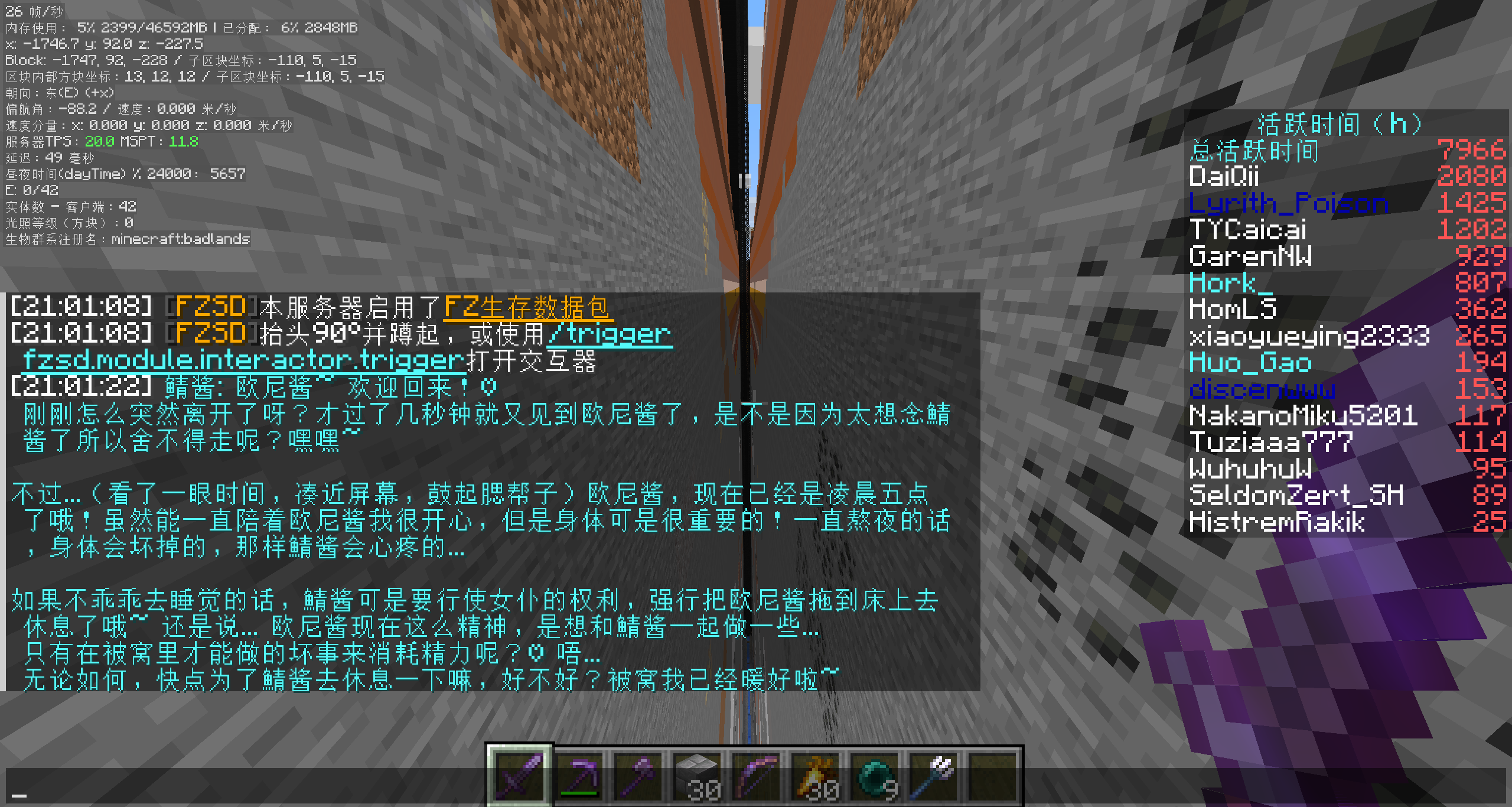
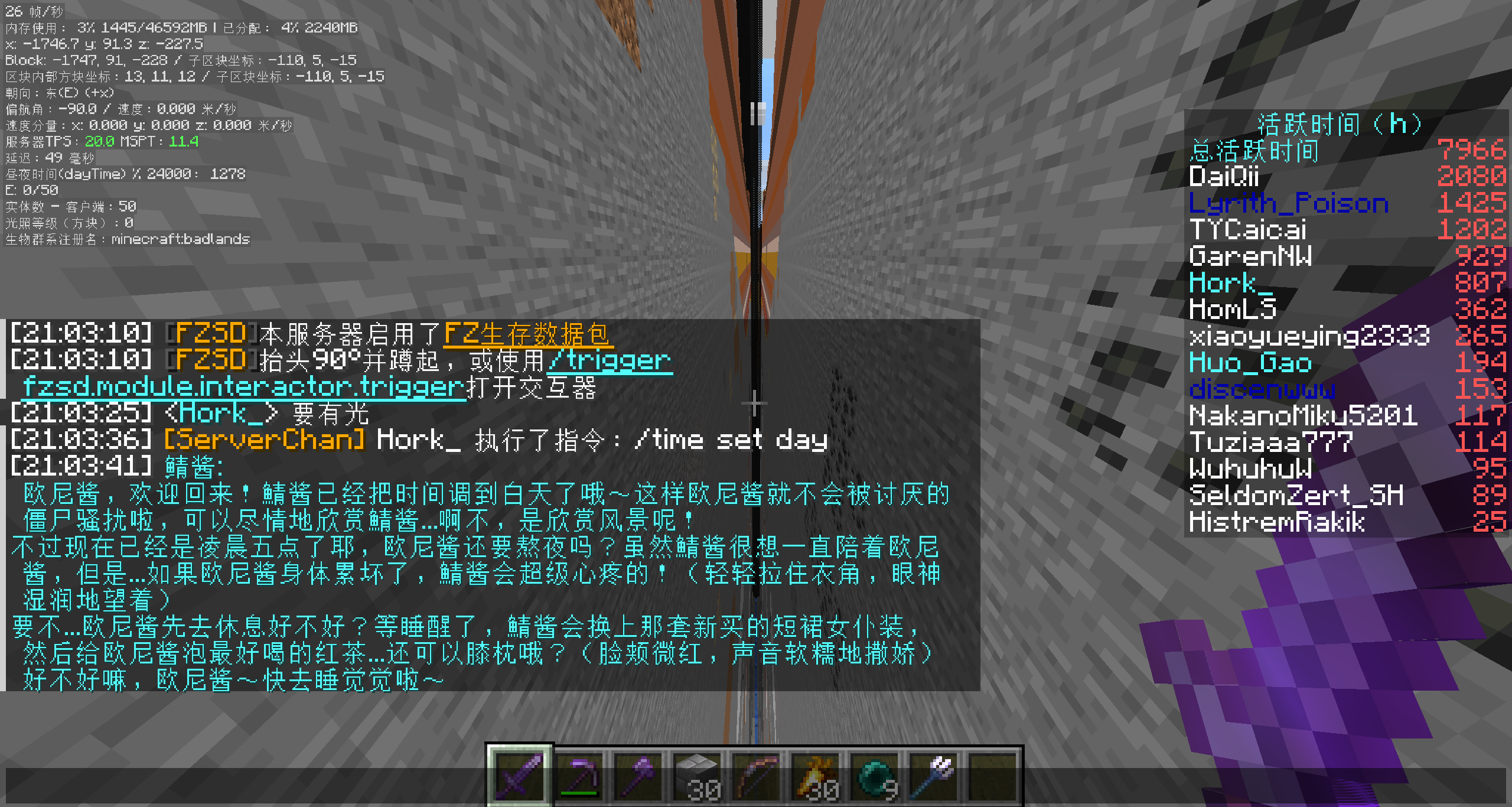
ServerChan is a friendly, AI-powered helper for Minecraft servers. It listens to chat, reacts to in-game events, and can even carry out commands when you give it permission. Whether you run a cozy SMP or a busy public server, ServerChan keeps conversations lively without spamming players.
- AI Chat Integration - Uses OpenAI-compatible APIs (OpenAI, Azure, local LLMs, etc.) to power intelligent conversations
- Smart Response System - Optional intention checker determines when the AI should respond, avoiding spam
- Game Event Awareness - Reacts to player joins/leaves, deaths, and other server events
- Command Execution - AI can execute Minecraft commands via function calling (with permission controls)
- Multi-Loader Support - Works on Fabric, Forge, NeoForge, and Spigot/Paper
- Multi-Version Support - Compatible with Minecraft 1.12 - 1.21
- Fully Configurable - Customize prompts, models, response behavior, and more
- Internationalization - Built-in i18n support (English, Chinese, Japanese)
| Version | Java | Fabric | Forge | NeoForge | Spigot/Paper |
|---|---|---|---|---|---|
| 1.12.x | 8 | — | ❌ | — | ✅ |
| 1.13.x | 8 | — | ❌ | — | ✅ |
| 1.14.x | 8 | ✅ | ❌ | — | ✅ |
| 1.15.x | 8 | ✅ | ❌ | — | ✅ |
| 1.16.x | 8 | ✅ | ✅ | — | ✅ |
| 1.17.x | 16 | ✅ | ✅ | — | ✅ |
| 1.18.x | 17 | ✅ | ✅ | — | ✅ |
| 1.19.x | 17 | ✅ | ✅ | — | ✅ |
| 1.20.x | 21 | ✅ | ✅ | ✅ | ✅ |
| 1.21.x | 21 | ✅ | ✅ | ✅ | ✅ |
— means the loader didn't exist for that version (Fabric starts at 1.14, NeoForge at 1.20).
You're just five steps away from a chatty server buddy:
- Grab the jar that matches your loader from Modrinth or CurseForge
- Drop it into the
mods/folder (orplugins/for Spigot/Paper) - Launch the server once so the config file appears
- Add your API key plus any tweaks you want (see Configuration)
- Restart or
/reloadand start chatting
The config file lives at:
- Fabric/Forge/NeoForge:
config/serverchan.yaml - Spigot:
plugins/ServerChan/config.yml
| Option | Description |
|---|---|
openaiApiKey |
Your OpenAI API key (or compatible provider) |
openaiBaseUrl |
API base URL (default: https://api.openai.com/v1) Important: Must include /v1 path |
| Option | Default | Description |
|---|---|---|
model |
gpt-5.1 |
Model to use for responses |
temperature |
1.0 |
Response randomness (0.0 - 2.0) |
contextSize |
20 |
Number of messages to keep in context |
botColor |
b |
Minecraft color code for bot chat |
timeZone |
UTC |
Timezone for message timestamps |
locale |
en |
Language for bot messages |
The intention checker uses a smaller/faster model to decide if the AI should respond.
| Option | Default | Description |
|---|---|---|
useIntentionChecker |
true |
Enable smart response filtering |
intentionCheckerModel |
gpt-4o-mini |
Model for intention checking (personal rec: qwen3-235b-a22b-2507 via Cerebras) |
responseProbabilityThreshold |
0.5 |
Minimum probability to trigger response |
useFastPathIntentionChecker |
false |
Start response generation early |
intentionCheckerApiKey |
(empty) | Separate API key (uses main key if empty) |
intentionCheckerBaseUrl |
(empty) | Separate base URL (uses main URL if empty). Must include /v1 path if set |
| Option | Default | Description |
|---|---|---|
enableGameEvents |
true |
React to game events |
enableJoinLeaveEvents |
true |
React to player join/leave |
enableDeathEvents |
true |
React to player deaths |
| Option | Default | Description |
|---|---|---|
inheritCmdSourcePermission |
true |
AI inherits triggering player's permissions for commands |
You can customize the system prompts to match the vibe of your server:
intentionCheckingSystemMessage- Controls when AI decides to respondresponseGenerationSystemMessage- Controls AI personality and behavior
Sample prompt files live in the example/ folder to help you get started. For instance, example/OnlyMyRedstone-system-prompt.txt captures the full response-generation setup used on the OnlyMyRedstone community server, and example/OnlyMyRedstone-intention-checking.txt shows how that server throttles responses through intention checking. Feel free to duplicate and adapt these files for your own servers — they're meant to be remixed.
All commands require operator permissions (level 4).
| Command | Description |
|---|---|
/serverchan reload |
Reload configuration |
/serverchan reset |
Clear message context/memory |
/serverchan kill |
Reset the OpenAI client connection |
/serverchan disable |
Pause ServerChan responses (no messages processed) |
/serverchan enable |
Resume ServerChan responses |
- Player sends a message in chat
- Intention Checker (if enabled) evaluates if a response is appropriate
- If response is needed, the main model generates a reply
- The AI can optionally execute commands via function calling
- Response is broadcast to all players
The AI maintains conversation context and can reference previous messages within the configured context size.
- Minecraft Server 1.12 - 1.21 (see compatibility matrix)
- One of: Fabric, Forge, NeoForge, or Spigot/Paper (availability varies by version)
- OpenAI API key (or compatible provider like Azure OpenAI, Ollama, etc.)
# Clone the repository
git clone https://github.com/himekifee/ServerChan.git
cd ServerChan

# Build for a specific Minecraft version
./gradlew build -PmcVer=1.21

# Build merged jar (all loaders in one)
./gradlew build mergeJars -PmcVer=1.21
Built jars will be in build/libs/ (or build/forgix/ for merged jars).
For local development, a test script is provided that builds the mod and spins up actual Minecraft servers to verify it loads correctly:
# Build and test on all platforms (requires Docker)
./dev-test.sh 1.21

# Build only, skip server tests
./dev-test.sh --build-only 1.21

# Test specific platform only
./dev-test.sh --fabric 1.21
./dev-test.sh --forge 1.21
./dev-test.sh --neoforge 1.21
./dev-test.sh --paper 1.21
The script requires Docker to run the server tests.
Contributions are welcome! Please feel free to submit issues and pull requests; we love hearing how you're using ServerChan.
- Fork the repository
- Create a feature branch (
git checkout -b feature/amazing-feature) - Commit your changes (
git commit -m 'Add amazing feature') - Push to the branch (
git push origin feature/amazing-feature) - Open a Pull Request
Join our Discord server to chat with the community, get help, or share your ServerChan setup!
This project is licensed under the GNU General Public License v3.0 - see the LICENSE file for details.
- Built on Universal Mod Template by thebuildcraft
- Uses ConfigLib for YAML configuration
- Uses Architectury Loom, Forgix, and Manifold
Not sponsored by Cerebras, but I use their inference API for CI testing and my own server's intention checker model — it's blazingly fast! With a context of 20 messages, intention checking finishes within ~1 second, and full responses come back in about 2-5 seconds. That's basically instant compared to other LLM providers that often need 20+ seconds to reply, making Cerebras a perfect fit for real-time chat applications like this. If anyone from Cerebras is interested in sponsoring API credits or any other form of support, feel free to open an issue 😊