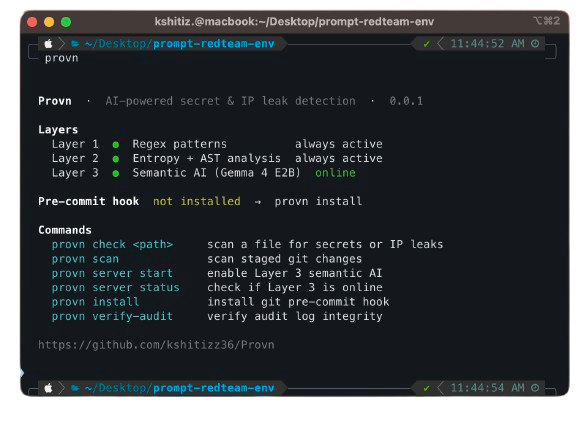
AI powered secret and IP leak detection that runs before code leaves your machine.
npm install -g provn-cli
brew install kshitizz36/tap/provn
Provn is a local first pre commit scanner that blocks secrets, API keys, tokens, private keys, and proprietary snippets before they land in git. Layer 1 and Layer 2 work immediately. Layer 3 AI is optional and installs separately.
npm install -g provn-clibrew install kshitizz36/tap/provncurl -fsSL https://raw.githubusercontent.com/kshitizz36/Provn/main/install.sh | bashcd your-repo
provn install
git add .
git commit -m "first protected commit"You do not need to clone the Provn repo to use Layer 3. Install the CLI first, then download the model separately from Hugging Face.
Model page: https://huggingface.co/kshitizz36/provn-gemma4-e2b-q4km
macOS / Linux
brew install hf
hf auth login
mkdir -p ~/.provn/models
hf download kshitizz36/provn-gemma4-e2b-q4km provn-gemma4-e2b-q4km.gguf --local-dir ~/.provn/models
llama-server -m ~/.provn/models/provn-gemma4-e2b-q4km.gguf --host 127.0.0.1 --port 8080
provn server status
Windows PowerShell
pip install "huggingface_hub[cli]"
hf auth login
New-Item -ItemType Directory -Force "$HOME\.provn\models"
hf download kshitizz36/provn-gemma4-e2b-q4km provn-gemma4-e2b-q4km.gguf --local-dir "$HOME\.provn\models"
llama-server -m "$HOME\.provn\models\provn-gemma4-e2b-q4km.gguf" --host 127.0.0.1 --port 8080
provn server status1. Install the pre commit hook in your repo
cd your-repo
provn install
2. Commit as normal. Provn runs automatically.
git add .
git commit -m "add feature"
#   ✓  clean  12ms
3. Watch it catch a real secret
echo 'api_key = "<paste-real-api-key-here>"' >> config.py
git add config.py && git commit -m "oops"
#
# Example output when the staged file contains a live key:
#   ✗  blocked  [T1]
#   Matched pattern: generic_api_key  via regex
#   config.py:1
#
#   - api_key = "<paste-real-api-key-here>"
#   + PROVN_REDACTED_API_KEY_1
#
# Accept redaction? [y/N]provn Status dashboard with layers, hook, and server state
provn check <path> Scan a file for secrets or IP leaks
provn check --json <path> Machine readable output for CI
provn scan Scan staged git changes (hook mode)
provn server start Start the Layer 3 AI model server
provn server stop Stop the Layer 3 AI model server
provn server status Check if Layer 3 is online
provn install Install the git pre commit hook
provn verify-audit Verify the HMAC audit log chain
Provn runs three detection layers in sequence:
| Layer | Method | Latency | Catches |
|---|---|---|---|
| 1a | Regex patterns, 30+ Gitleaks rules + NFKC normalization | <5ms | AWS keys, OpenAI keys, private keys, tokens |
| 1b | Shannon entropy analysis | <5ms | High-entropy strings in assignments |
| 2 | Tree-sitter AST taint tracking | <50ms | system_prompt = "..." in Python / TS / JS |
| 3 | Gemma 4 E2B (on-device, optional) | <800ms | Ambiguous IP leaks in the 0.4–0.8 confidence band |
Layer 3 only activates for ambiguous cases. Confident detections from L1 and L2 skip it entirely.
Risk tiers:
| Tier | Action | Examples |
|---|---|---|
| T0 | Hard block | Private keys, DB passwords, cloud credentials |
| T1 | Block + optional redaction | API keys, system prompts, model configs |
| T2 | Warn, allow commit | High-entropy tokens |
| T3 | Log only | Low-signal patterns |
Use the workflow in .github/workflows/provn-ci.yml as the current source of truth.
If you want a simple manual CI step today, build from source inside the workflow:
- uses: actions/checkout@v4
- uses: actions-rust-lang/setup-rust-toolchain@v1
  with:
    toolchain: stable
- name: Build Provn
  run: cd provn-cli && cargo build --release
- name: Scan changed file
  run: ./provn-cli/target/release/provn check --json path/to/file
The built-in workflow can publish the npm package on release when npm publishing is configured.
Layer 3 runs a fine-tuned Gemma 4 E2B model locally. No data leaves your machine.
# 1. Download the model
mkdir -p ~/.provn/models
# Place provn-gemma4-e2b-q4km.gguf in ~/.provn/models/

# 2. Start the server (auto-restarts at login)
provn server start

# 3. Confirm it's online
provn server status
#   ●  Layer 3 online  ·  127.0.0.1:8080
Enable in provn.yml:
layers:
  semantic:
    enabled: true
    model: provn-gemma4-e2b-q4km.gguf
    endpoint: http://localhost:8080
timeout_ms: 2000provn.yml in your repo root. All fields are optional and have sensible defaults:
mode: enforce          # enforce | warn | shadow

exclude_dirs:
  - node_modules
  - .git
  - dist

layers:
  regex:   { enabled: true }
  entropy: { enabled: true, threshold: 4.5, min_length: 20 }
  ast:
    enabled: true
    sensitive_vars: [system_prompt, api_key, secret, password, token, private_key]
  semantic:
    enabled: false
    model: provn-gemma4-e2b-q4km.gguf
    endpoint: http://localhost:8080
    timeout_ms: 2000
    fallback: layer1          # layer1 | clean
    ambiguous_low: 0.4
    ambiguous_high: 0.8

audit:
  enabled: true
  path: .provn/audit.jsonl   # HMAC-chained append-only log
Inline overrides:
secret = os.getenv("SECRET")  # provn:allow
# provn:skip-file ← at top of file to skip entirely| Metric | Target | Status |
|---|---|---|
| Recall | ≥ 97% | ✓ 97.0% |
| FPR | ≤ 1.2% | ✓ 1.2% |
| p50 latency | ≤ 30ms | ✓ |
| p95 latency | ≤ 50ms | ✓ |
# Unit tests
cd provn-cli && cargo test

# Lint
cargo clippy -- -D warnings

# Fine-tune Layer 3 on Modal A10G (requires Modal account)
cd aegis-model && modal run modal_finetune.py

# Export fine-tuned GGUF
modal run modal_finetune.py::main_gguf- Regex patterns inspired by Gitleaks (MIT)
- Layer 3 model: Gemma 4 E2B fine-tuned on LeakBench dataset
MIT License